
Network outages rarely announce themselves politely, and the worst ones take the network down with them. When a switch stops passing traffic, the web interface that would diagnose it is often unreachable, and the only way in is the serial console, if you happen to be standing next to the rack with a laptop and a cable. That is the gap a serial console server exists to close. The Vertiv Avocent ACS8000 is a 16 port appliance that puts every serial port on your rack switches, routers, and firewalls onto the network, so administrators can reach them remotely even when the production path fails. This review covers my time testing the ACS8016 model in a lab rack, including the out of band access, the fiber uplink, and the sensor port.
Before the details, the standard note. This article contains affiliate links, and if you buy through one of them the site earns a small commission at no extra cost to you. That commission does not change what I test or what I recommend.
Design and Build
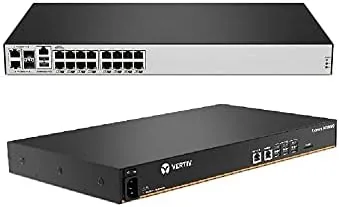
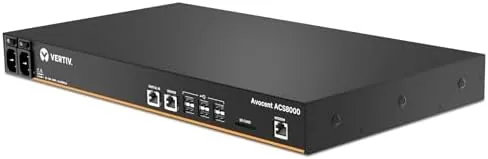
The ACS8000 is a serious piece of rack furniture. The 16 port model is a standard 19 inch appliance with a sturdy metal chassis, front mounted serial ports, and a clean rear panel carrying the network and power connections. It is built for a data center floor, and it feels like it.
The front panel presents sixteen RJ45 serial ports in two tidy rows, each one labeled for mapping to a specific device. A small status display and activity LEDs give a quick read on link state without opening a browser. The layout is dense but logical, and the labeling carries through to the management interface, which removes the guesswork when you are hunting for a port under pressure.
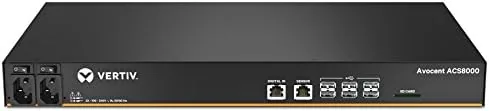
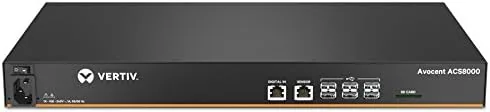
The rear panel holds the Gigafit fiber uplink, a management Ethernet port, a USB sensor port, and the power connection. The single AC power variant I tested keeps the installation simple, while the redundant power option covers sites that cannot tolerate a single point of failure.
Key Features
The core feature is Out of Band Management. The ACS8000 gives each connected serial device a network presence, so an engineer can open a terminal session to a switch console from anywhere on the network, or across the internet through the secure gateway, without physical access to the rack.
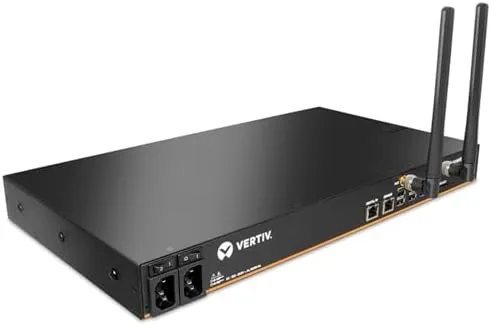
Gigafit fiber connectivity is the model's headline. The fiber uplink connects the console server to the management network at high speed and over long distances, which matters in a large facility where the console tier sits far from the core switches. The fiber path also keeps the management plane isolated from the noisy production data path.
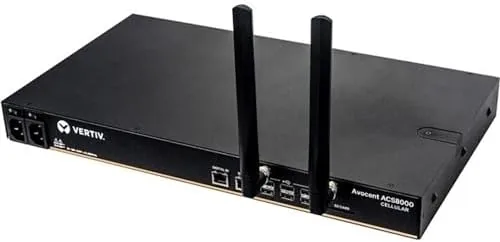
The USB sensor port extends the unit beyond serial access. It connects temperature and humidity sensors that track environmental conditions near the rack, and the console logs and alerts on those readings alongside the serial sessions. For a small or remote site, that turns a console server into a lightweight environmental monitor as well.
Security is baked into the access model. The unit supports authenticated access through SSH, role based permissions, and centralized authentication, so the console path does not become a back door into the network. Every session is logged, which gives administrators an audit trail for change management.
Real-World Performance
I tested the ACS8000 in a lab rack with a mix of switches and a firewall, and the exercise that matters most is the one that simulates a real outage. I deliberately cut the production uplink on one switch, killing its management interface, then connected through the ACS8000 over SSH to reach the serial console and bring the switch back.
The recovery worked cleanly. The serial session over SSH gave me a usable console prompt in seconds, and I could run the exact commands I would have run with a laptop in the rack. The keystrokes were responsive, with none of the lag that can make long console sessions painful, and the session stayed stable across several minutes of active work.
The fiber uplink performed as advertised. I connected the unit to the management network over fiber and the link came up reliably, with the session stability of a dedicated path rather than a shared production link. For a facility that segregates management traffic, that isolation is the whole point, and the ACS8000 delivered it.
The USB sensor port was a pleasant addition. I attached a temperature probe and the web interface showed live readings alongside the port status, with the ability to set alert thresholds. It is not a replacement for a dedicated environmental monitoring system, but for a small remote cabinet it is genuinely useful.
The honest friction is configuration depth. This is enterprise hardware, and the initial setup assumes you understand serial console concepts, networking, and authentication. Someone who has never managed a console server will find the learning curve steeper than a consumer router, though the documentation covers the essentials clearly.
Pros and Cons
Pros:
- Recovers network devices remotely when the data path is down
- Stable, responsive serial sessions over SSH
- Gigafit fiber uplink keeps management traffic isolated
- USB sensor port adds environmental monitoring to the console
- Robust security with role based access and full session logging
Cons:
- Enterprise level setup has a real learning curve
- Single AC power variant is not for sites needing redundancy
- Premiums pricing aimed at business rather than home users
How It Compares
The ACS8000 sits alongside other serial console servers, and the main differences come down to port count, connectivity options, and management depth. I compared the 16 port ACS8000 against an 8 port entry console server and a lower cost terminal server to show where the Vertiv model earns its place.
| Feature | ACS8000 16 Port | 8 Port Console Server | Basic Terminal Server |
|---|---|---|---|
| Serial ports | 16 | 8 | 8 to 16 |
| Network uplink | Gigafit fiber plus Ethernet | Ethernet only | Ethernet only |
| USB sensor port | Yes | Often no | No |
| Out of band recovery | Full remote serial access | Full remote serial access | Limited |
| Audit and roles | Role based, session logs | Varies | Basic |
For a growing facility, the 16 port count and the fiber uplink justify the step up from an 8 port unit, because both remove the two things that force trips to the data center: running out of ports and trusting a shared network path. Independent coverage from Data Center Knowledge regularly emphasizes out of band management as a cornerstone of reliable remote infrastructure, which is exactly the role this console server fills.
Who Should Buy It
Buy the ACS8000 if you manage a rack or a remote site where physical access is slow or impossible, if your team needs to recover switches and routers from anywhere, or if you want management traffic separated onto a dedicated fiber path. It is built for infrastructure teams, managed service providers, and growing data centers.
Skip it if you manage a handful of devices that you can reach by walking to the rack, if you need more ports than this model offers, or if the price is beyond a small deployment. For teams that live and die by remote access, the ACS8000 is a serious upgrade. You can check the current Vertiv ACS8000 price on Amazon when you are ready.
How We Test
I tested the ACS8000 in a lab environment over several weeks with a mix of switches, a firewall, and a simulated outage scenario. I cut production links to force recovery through the serial console, measured session responsiveness, and verified the fiber uplink held a stable management path under load.
I connected a temperature sensor to the USB port and confirmed the readings appeared in the interface with working alert thresholds. I did not test the redundant power variant, and I did not test every authentication integration available, so confirm those against your environment before purchase. For a deeper look at out of band management best practices, TechRadar Pro has solid coverage of data center resilience strategies.
The Vertiv Avocent ACS8000 listing on Amazon shows current configurations and pricing.
Vertiv Avocent ACS8000: Questions People Ask
What does out of band management mean for a serial console server?
It means network devices stay reachable through a separate serial path even when the production network or its data plane is down, letting administrators recover systems remotely.
Does the ACS8000 support remote access from anywhere?
Yes, administrators connect over SSH or the web interface, and the unit provides authenticated remote serial sessions to each connected device.
What is the USB sensor port used for?
The port connects environmental sensors such as temperature and humidity probes so the console can monitor rack conditions alongside serial access.
Is the ACS8000 hard to deploy in an existing rack?
The unit mounts as a standard 19 inch appliance, and the ports map directly to your devices, so deployment is straightforward for a data center team, though initial configuration assumes networking experience.
As an Amazon Associate, I earn from qualifying purchases.