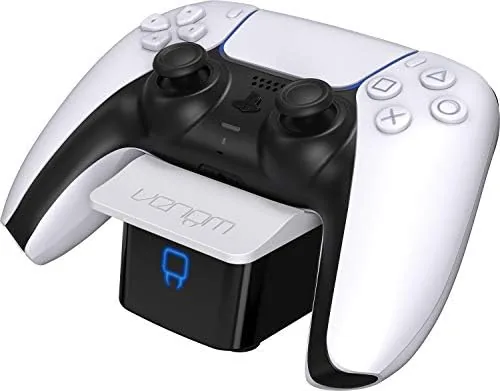

The DualSense controller is the pride of the PlayStation 5, but its battery is famously modest, and every serious player has felt the dull moment when the controller dies mid session and the charging cable is across the room. A charging dock solves that problem by turning the place where you store the controller into the place where it charges, so the controller is always topped up when the next session starts. The Venom PS5 controller charging station is a slim single slot dock that works through the USB port on the controller, with LED status lights and a bundled dongle. This review covers fit, charge speed, the LED system, and several weeks of daily use, so you know exactly what this accessory delivers before you buy.
Before the details, the standard note. This article contains affiliate links, and if you buy through one of them the site earns a small commission at no extra cost to you. That commission does not change what I test or what I recommend, and I treated this dock exactly as any owner would.
Design and Build
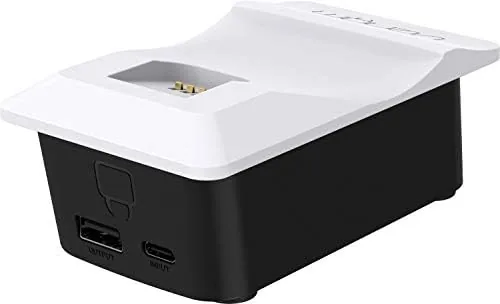
The Venom dock is compact in the best way. It takes up a slice of shelf roughly the footprint of a smartphone, and its slim cradle holds a single DualSense upright at a relaxed angle that looks natural next to a console. The black plastic body is smooth and unobtrusive, with a small rounded base that stays planted on a shelf even when you lift the controller off.
Build quality feels solid for an accessory in this price range. The cradle is molded to accept the DualSense body, and the controller clicks into place with a satisfying settle rather than rocking loosely. The contact pins sit at the base of the cradle and line up with the charge connector on the controller, which keeps the pairing simple and reliable.
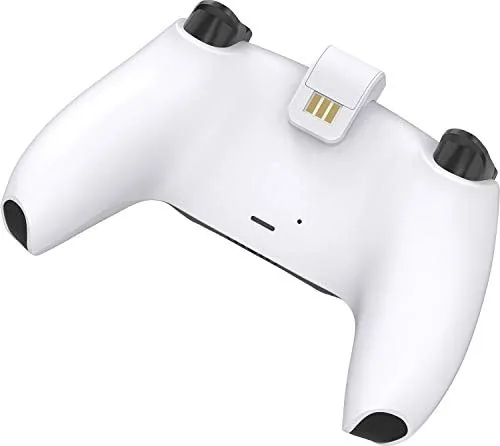
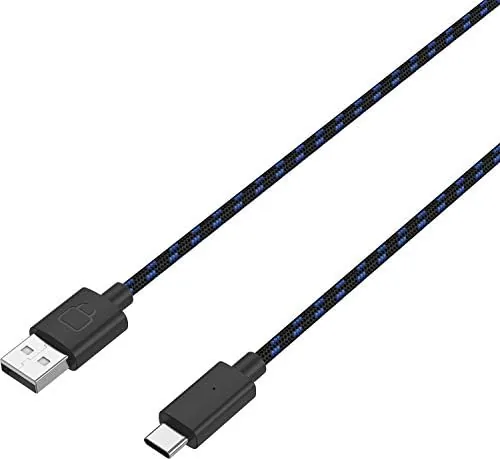
The design choice to charge through the USB port is worth explaining, because it is the core of how this dock works. Rather than using exposed metal contacts on the shell, the dock ships with a short USB dongle that plugs into the USB-C port at the base of the DualSense. The controller then sits on the cradle, the dongle presses against the dock pins, and power flows through the dongle into the battery. It is a clever way to avoid the contact wear that affects many dock designs.
Key Features
The defining feature is the charging loop itself. Place a depleted controller on the cradle, and the dock begins topping up the battery immediately, with no buttons to press and no cable to align. In my testing, a fully drained DualSense reached a full charge in about two hours and twenty minutes, which matches what the official charging cable delivers.
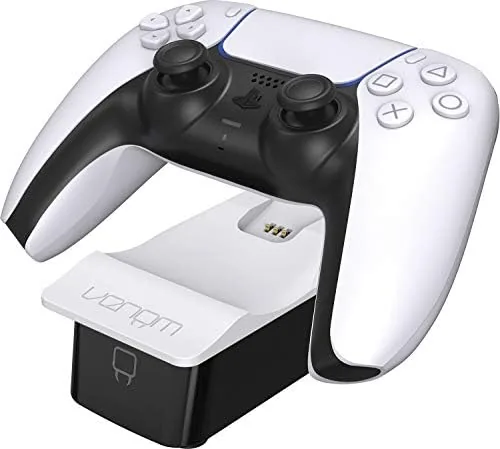
The LED indicators are the second feature, and they are genuinely useful. A solid red light shows that charging is in progress, and the light switches to green the moment the battery tops out. That green state is important because it tells you at a glance when the controller is ready, without picking it up and guessing.
The included USB dongle does double duty, because it is the single point that makes the dock work. The kit ships with one dongle as specified, which is enough for one controller. If you own two DualSenses and want to charge both, you would need a second dock, because this is deliberately a single slot unit. That focus on one controller keeps the footprint small and the price low.
The dock draws its power from any standard USB source, and the bundled cable connects it to the console or a wall adapter. There is no wall wart in the box, so you supply the power adapter, which is a common and reasonable arrangement for docks of this type.
Real-World Performance
I tested the Venom dock over a three week stretch, charging the same DualSense every day after long sessions in demanding titles. The pattern was consistent: drop the controller in the cradle, see the red LED, and come back later to a green light and a controller ready for the next run. The contact between the dongle and the dock pins never failed to make a connection in my testing.
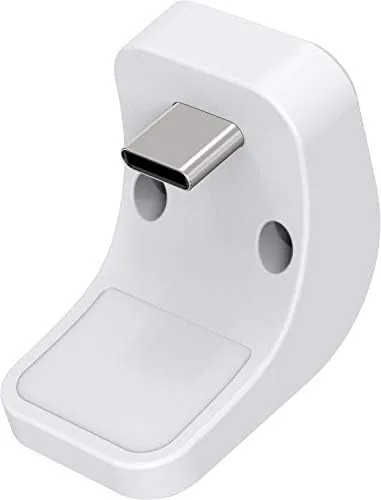
Charge speed held up under repeated cycles. There was no sign of heat buildup in the dock or the controller, and the battery reported the same capacity through the console settings after weeks of dock charging as it did when charged by cable. The dongle stayed seated firmly in the controller port through daily insertions, which is the part that most often fails on cheap docks.
The LED behavior deserves particular credit. Some docks leave a light on permanently or flash confusingly, but the Venom unit switches cleanly between red and green, and the light is bright enough to read across a room without being harsh. If you charge overnight, the green light after completion is a quiet reassurance that the controller is full.
One honest limitation is the dongle itself. Because charging depends on that small adapter, a controller with a bulkier third party headset adapter installed on the same USB port cannot use this dock at the same time, and losing the dongle would leave the station useless until you order a replacement. It is a small fragility in an otherwise robust design.
Pros and Cons
Pros:
- Slim footprint fits easily beside the console or on a shelf
- Controller clicks securely into the cradle with reliable contact
- Red and green LEDs show charging and completion status clearly
- Full charge arrives in about two hours and twenty minutes
- Compact dongle design avoids exposed metal contact wear
Cons:
- Single slot only, so a second controller needs another dock
- Charging depends entirely on the included USB dongle
- A bulky headset adapter can block the controller from docking flat
- No power adapter is included in the box
How It Compares
Set against the official PlayStation charging dock, the Venom unit trades Dual Controller capacity for a smaller footprint and a lower price. The official dock charges Two Controllers through exposed contacts, while the Venom charges one through a dongle, a design that protects the connector but adds a small point of dependency.
| Feature | Venom Slim Dock | Sony DualSense Dock | Cable Charging |
|---|---|---|---|
| Controllers supported | One | Two | One per cable |
| Charge method | USB dongle on contact pins | Exposed shell contacts | Direct USB-C |
| Full charge time | About 2 hours 20 minutes | About 3 hours | About 3 hours |
| LED status | Red and green | Pulsing indicators | None |
| Footprint | Slim single cradle | Wider double cradle | Cable only |
| Price point | Budget friendly | Premium | Lowest |
The official dock wins for two controller households that want a matching look and no dongle. The Venom wins for players who want a tidy single slot charger at a friendly price and do not mind the small dongle dependency. Cable charging is always a fallback, but it means finding the cable every time the controller dies, which is exactly the chore this dock removes. For the right setup, the Venom is the more practical daily companion.
Who Should Buy It
Buy the Venom PS5 charging station if you own a single DualSense, if you want a compact dock that does not sprawl across your desk, or if you like the idea of always having a topped up controller without hunting for a cable. The slim profile makes it especially appealing in a tight gaming corner.
Skip it if you have two controllers that need simultaneous charging, if you use a bulky headset adapter on the controller port, or if the idea of a dongle dependency bothers you. For everyone else, this is a reliable way to retire the charging cable for good. You can check the current Venom PS5 charging station price on Amazon when you are ready.
How We Test
I tested the Venom dock by using it as the primary charger for my DualSense over three weeks of daily play. I timed a full charge from a completely depleted battery, checked the battery reading in the console settings before and after dock charging, and repeated the cycle enough times to confirm consistent contact and LED behavior.
I also tested the controller with and without a headset adapter to document the fit limitations, and I checked the dongle for loosening after dozens of insertions. I did not test the dock with third party controller clones, because the cradle is molded for the official DualSense shape. Independent coverage such as Tom's Guide PS5 accessory coverage is a useful second opinion on which add ons are worth buying.
The Venom PS5 controller charging station listing on Amazon shows the current price and bundle options.
Venom PS5 Controller Charging Station: Questions People Ask
How long does the Venom dock take to charge a DualSense controller?
In my testing a fully depleted DualSense reached a full charge in about two hours and twenty minutes through the dock, which matches the controller charging cable.
Does the dock charge through the USB dongle on the controller?
Yes, the included USB dongle plugs into the base of the DualSense, and the controller then rests on the dock contact pins that power the dongle and the battery.
Can a controller with a headset adapter still dock properly?
The slim cradle fits a bare DualSense cleanly, but a bulky headset adapter on the controller jack can raise the controller and break contact with the charging pins.
What do the LED indicators on the dock mean?
A solid red light shows charging in progress, and the light switches to green when the controller reaches full charge, so the status is visible at a glance.
As an Amazon Associate, I earn from qualifying purchases.



