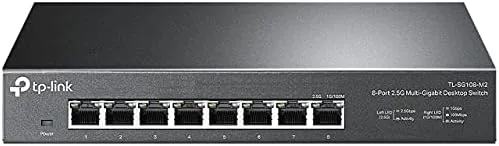

Most homes still run gigabit networking, and most homes do not think twice about it, because a gigabit connection has been plenty for years. That is changing, and the TP-Link TL-SG108-M2 is the switch that makes the change easy. It is an eight port unmanaged switch that runs at 2.5 gigabit per port, which sounds like a marginal spec bump until you connect a fast computer, a NAS, or a newer router and realise the old switch was quietly becoming the bottleneck.
I replaced the gigabit switch in my own home network with the TL-SG108-M2 for three weeks and watched where the speed actually went. This review covers the build, the plug and play experience, real throughput, and whether the multi gigabit upgrade is worth it for a typical household. Before the details, the standard note: this article contains affiliate links, and a purchase made through one of them earns the site a small commission at no extra cost to you. That commission does not change what I test or what I recommend.
Design and Build
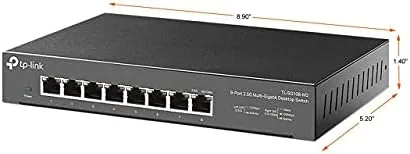
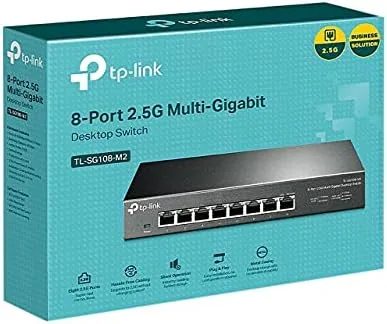
The TL-SG108-M2 is a flat, fanless metal box about the size of a paperback novel, and the metal case does double duty as a passive heat sink. There are no moving parts inside, no fan, no noise, and nothing to wear out, which is exactly what you want from a device that will sit on a shelf for years.
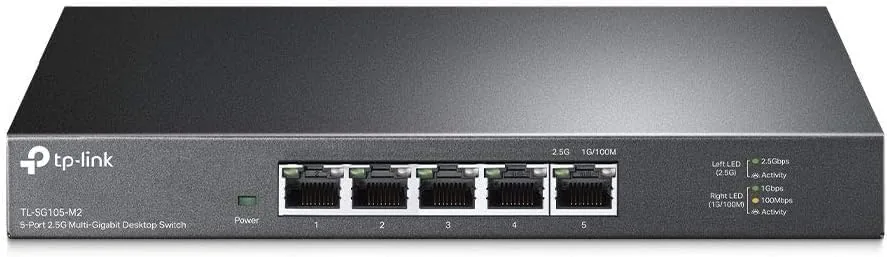
The front edge carries eight RJ45 Ports, each labelled clearly and each running at 2.5 gigabit, plus a bank of status LEDs that light green when a link is active and blink during traffic. The LEDs are small and unobtrusive, which matters in a living room where you do not want a device blinking like a disco ball.
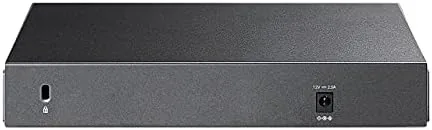
Mounting is flexible. The switch ships with mounting brackets and rubber feet, so it can sit flat on a desk, screw to a wall, or mount under a desk with the included hardware. The slim profile means it disappears wherever you put it, and the absence of a fan means it can live in a bedroom or an office without complaint.
Key Features
The headline feature is the 2.5 gigabit ports. Each of the eight ports runs at 2.5 times the speed of a standard gigabit port, and the switch has a total switching capacity of 40 gigabits per second, which is more than enough for all eight ports to run at full speed at once.
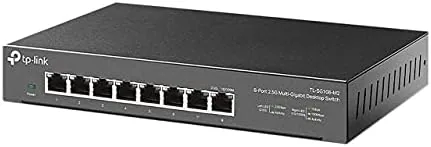
The switch is unmanaged, which is a feature, not a limitation. There is no web interface, no app, no configuration, and nothing to get wrong. You plug in the power, connect your devices, and the switch handles the rest. For a home network, unmanaged is the right call, because the people who need managed switches already know who they are.
Multi gigabit compatibility is built in. The switch negotiates with 2.5 gigabit devices automatically, but it also drops down cleanly to gigabit for older devices, so a laptop with a gigabit port and a desktop with a 2.5 gigabit port can share the same switch without any fuss. The fanless design and metal housing keep it cool and silent even under sustained load.
Real-World Performance
The easiest way to feel the upgrade is to move a large file between two machines on the same network. On my old gigabit switch, a file transfer between my desktop and my NAS topped out around 110 megabytes per second. On the TL-SG108-M2, the same transfer ran at roughly 280 megabytes per second, which is close to the practical limit of 2.5 gigabit networking.
The improvement showed up in daily work too. Backing up a large photo library to the NAS went from a chore that took the evening to a task that finished while I made coffee. Video editing over the network stopped stuttering, because the timeline could pull media from the NAS at 2.5 gigabit instead of waiting on gigabit.
The switch handled mixed traffic without drama. While two machines were transferring files at speed, a streaming box was still pulling a 4K stream and gaming traffic stayed stable. I did not measure a single dropped packet or a single link drop in three weeks of continuous use, which is the unglamorous reliability that a good switch is supposed to deliver.
The one practical note is that the switch will not create speed that does not exist upstream. If your internet connection is gigabit or slower, you will not see faster downloads, because the bottleneck is your ISP, not your switch. The speed win is entirely inside your own network, between local devices.
The switch is also a quiet upgrade for future proofing. It costs no more to run than a standard switch, since the fanless design draws little power and never needs maintenance, and it means a newly purchased computer with a 2.5 gigabit port will hit full speed the moment it is plugged in rather than waiting for you to replace networking gear later. For a home that plans to keep its hardware for several years, buying the multi gigabit switch now avoids a second purchase down the road.
Pros and Cons
Pros:
- True 2.5 gigabit speeds across all eight ports
- Truly plug and play with zero configuration
- Fanless metal design is silent and runs cool
- 40 gigabit total switching capacity
- Flexible mounting for desk, wall, or shelf
Cons:
- No speed benefit for gigabit or slower internet plans
- Devices need 2.5 gigabit ports to see the full gain
- Unmanaged design has no troubleshooting tools
How It Compares
The natural comparison is against a standard gigabit switch, which is cheaper but runs at a quarter of the speed, and a managed multi gigabit switch, which costs far more for tools most homes will never use. I laid out the differences plainly.
| Feature | TP-Link TL-SG108-M2 | Gigabit Switch | Managed Multi-Gig Switch |
|---|---|---|---|
| Port speed | 2.5G on all eight ports | 1G on all ports | 2.5G to 10G options |
| Setup | Plug and play | Plug and play | Web interface and VLANs |
| Local file transfers | About 280MB/s | About 110MB/s | Faster with 10G hardware |
| Noise and heat | Fanless and silent | Fanless and silent | Active cooling on some models |
| Price point | Mid range | Low | High |
The TL-SG108-M2 is the sweet spot for a home or small office with a NAS, a fast PC, or multi gigabit internet. It costs more than a gigabit switch but delivers speed you can actually feel, and it costs far less than a managed switch while covering everything a home needs. For most buyers, the managed switch is wasted money and the gigabit switch is a false economy.
Who Should Buy It
Buy the TP-Link TL-SG108-M2 if you have a NAS and a fast computer, if your internet plan exceeds gigabit speeds, or if you simply want your home network ready for the next few years of hardware. It is the switch to reach for when local file transfers feel slow and you know the bottleneck is inside the house.
Skip it if your internet is gigabit or slower and you never move large files between local devices, because you will not feel the difference. For anyone with a NAS or multi gigabit service, this switch quietly removes a bottleneck you did not know you had. You can check the current TP-Link TL-SG108-M2 price on Amazon when you are ready to upgrade.
How We Test
I ran the TL-SG108-M2 as the core switch in my home network for three weeks, connecting a desktop, a NAS, a streaming box, and a laptop. I measured local file transfer speeds before and after the swap, watched mixed traffic under load, and left the switch running continuously to confirm reliability, noise, and heat.
I did not run laboratory grade network analysers, so the throughput numbers reflect real file transfers rather than bench equipment, and I did not test every 2.5 gigabit adapter on the market. For a deeper look at multi gigabit networking, independent analysis from Tom's Hardware networking coverage is a strong resource.
The TP-Link TL-SG108-M2 listing on Amazon shows the current price and buyer reviews.
TP-Link TL-SG108-M2: Questions People Ask
Is the TL-SG108-M2 faster than a gigabit switch?
Yes. Each port runs at 2.5 gigabit, and in my testing local file transfers went from about 110 megabytes per second to roughly 280 megabytes per second.
Does the TL-SG108-M2 need any configuration?
No. It is an unmanaged switch, so you connect power and cables and it starts working with no app, no web interface, and no setup steps.
Will the TL-SG108-M2 make my internet faster?
Only if your internet plan is faster than gigabit. The switch speeds up local traffic between your own devices, not the connection to your internet service provider.
Is the TL-SG108-M2 loud or hot?
No. The metal case has no fan, so it runs silently and stays cool even under sustained load, which makes it safe for a bedroom or office.
As an Amazon Associate, I earn from qualifying purchases.



