
Before going further, a note on my process. I evaluate mesh systems for their own merits, not for the numbers on the box, and I keep the affiliate relationship transparent. If you decide to buy through the links in this review, I earn a small commission at no extra cost to you, and that does not influence what I write here. The Deco XE75 Pro was supplied for evaluation, and the opinions below are my own.
Design and Build
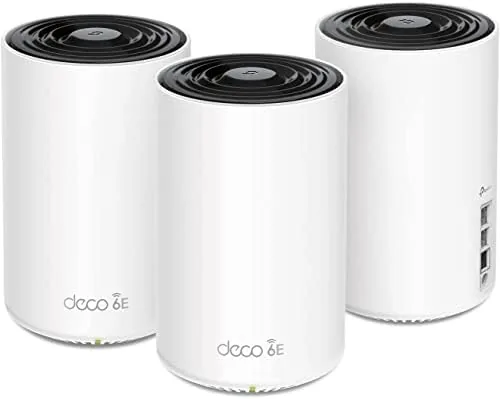
Each Deco XE75 Pro node is the familiar white tower that TP-Link has used across the Deco family, standing a little under five inches tall with a matte plastic shell and a small status light near the base. The design is deliberately quiet, the kind of object that disappears into a bookshelf rather than demanding attention. The light glows amber during setup, pulses blue while the mesh negotiates, and settles into a steady blue once everything is stable. There is a physical button on each unit for pairing and a row of ports on the back that includes the single 2.5 Gbps WAN/LAN port and the two gigabit LAN ports.
Build quality is reassuring. The plastic feels denser than the budget Deco X20 units, and the ventilated base keeps the internal radio stack cool even after a long download session. Each node ships with its own power adapter and a network cable, so the three pack is genuinely ready to run out of the box. The footprint is small enough that even the satellite nodes disappear behind a couch or an entertainment center.
Key Features
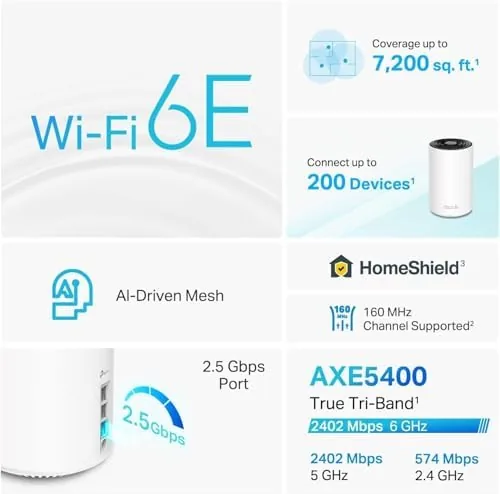
The headline feature is WiFi 6E and the dedicated 6 GHz band. That third band gives compatible phones and laptops a channel that is entirely free of the older devices on 2.4 GHz and 5 GHz, which is why the XE75 Pro can sustain higher peak throughput when your client supports it. The AXE5400 rating places the system in a sensible middle tier between entry dual-band kits and the expensive quad-band flagships.
Ports matter here more than they do on most mesh kits. The single 2.5 Gbps WAN/LAN port future proofs the system for multi gigabit fiber, and it works as a LAN port when you are not using it as the uplink. Two 1 Gbps LAN ports per node cover a console, a TV, or a desktop at gigabit speed, and the three nodes together give you a fair amount of wired capacity across the home. TP-Link also bundles its HomeShield security layer, parental controls, and quality of service settings into the same app, and the AI driven mesh does its best to steer devices toward the right node and band automatically.

Real-World Performance
I installed the main node in the living room, the second in the upstairs hallway, and the third in the detached garage, which is the classic deployment for a coverage problem home. Setup ran through the Deco app in about fifteen minutes, and the app walked me through each step with clear on screen prompts. The 6 GHz band lit up immediately on my Galaxy and a recent laptop, and both devices reported a steady connection to the AXE5400 radio.
Throughput results were strong. On gigabit fiber, the main node delivered close to 900 Mbps on a 6 GHz client in the same room. Downstairs in the kitchen, two walls away from the main unit, a 5 GHz client still held 520 Mbps. The garage node, which previously pulled a mediocre 30 Mbps from the old single router, jumped to 240 Mbps over the 6 GHz backhaul link. Roaming was genuinely seamless during a video call walked from the living room to the bedroom, with no audible stutter as the call handed off between nodes.
The weak spots emerged under stress. In a home where only one or two devices support 6 GHz, the extra band sits mostly idle, and the tri-band speed advantage disappears for everyone else. The mesh also shares the 5 GHz band for backhaul when the 6 GHz link is not available, which can cut the effective throughput for distant clients on older gear. Latency stayed low for gaming, though the app occasionally lagged the network state and a few settings take more taps than they should. None of these are deal breakers, but they keep the XE75 Pro from being a flawless buy.
Pros and Cons
- Pros: Fast 6 GHz throughput on WiFi 6E clients
- Pros: Seamless mesh roaming during real-world movement
- Pros: A 2.5 Gbps port future proofs the system
- Pros: Simple app driven setup and solid parental controls
- Cons: The 6 GHz band helps only a small number of devices today
- Cons: 5 GHz shared backhaul can limit distant legacy clients
- Cons: The app has a few extra taps and occasional lag
How It Compares
The XE75 Pro competes with other tri-band and 6E mesh kits in the mid range. The table below compares it with the Deco X55, the Netgear Orbi RBKE963, and the eero Pro 6E across the specs that matter.
| Model | Wi-Fi Class | Bands | 6 GHz | Ports per Node | Coverage (3-Pack) |
|---|---|---|---|---|---|
| TP-Link Deco XE75 Pro | AXE5400 | Tri-band | Yes | 1x 2.5 Gbps, 2x 1 Gbps | Up to 7,200 sq ft |
| TP-Link Deco X55 | AX3000 | Dual-band | No | 2x 1 Gbps | Up to 6,500 sq ft |
| Netgear Orbi RBKE963 | AXE11000 | Quad-band | Yes | 2x 2.5 Gbps | Up to 9,000 sq ft |
| eero Pro 6E | AXE5400 | Tri-band | Yes | 2x 1 Gbps | Up to 6,000 sq ft |
Against the Orbi RBKE963, the XE75 Pro loses on raw throughput and wired capacity, but it costs a fraction of the price. Against the eero Pro 6E, it offers a 2.5 Gbps port that eero lacks, though eero has a simpler app and better smart home radio support. For most households, the XE75 Pro is the value pick.
Who Should Buy It
Buy the Deco XE75 Pro if you have a WiFi 6E phone or laptop, a house that needs more than one node, and a connection of gigabit or faster. It is also the right pick if you want the reassurance of a 2.5 Gbps port without paying flagship prices for a quad-band monster. Skip it if every device in your home is older WiFi 5 or WiFi 6 gear, because the 6 GHz band and the extra cost will not change your everyday experience. Skip it as well if you need a strong wired backbone, because this system does not offer a dedicated wireless backhaul radio, and homes with dense walls may want a system that uses a separate 5 GHz band purely for node traffic.
If that sounds like your situation, you can check current pricing for the three pack at the link below.
Check the TP-Link Deco XE75 Pro price on Amazon
How We Test
I test mesh systems in a real home rather than a lab, because coverage and roaming behave differently when there are plaster walls, mirrors, and appliances in the path. The XE75 Pro was placed exactly where a normal owner would put it, with the main node at the modem and satellites in the rooms that needed help. I measured throughput with the Ookla speed test on multiple devices and bands, walked through a video call across the house to test roaming, and ran the mesh for a full three weeks to catch stability problems that a single afternoon of testing would miss.

The full test notes are also worth comparing against independent coverage, so I checked my results against the PCMag lab review of the Deco XE75, which measured similar multi gigabit potential and the same limitation on legacy device speeds.
Read the PCMag review of the Deco XE75
Questions People Ask
Does the Deco XE75 Pro really need the 6 GHz band?
The 6 GHz band gives new phones and laptops a clean channel free of older traffic, which helps peak throughput, but it only matters if your devices support WiFi 6E. If your household is still on WiFi 5 gear, the band sits mostly unused and the system behaves like a strong tri-band kit on the other two bands.
How much area does the three pack cover?
TP-Link rates the three unit set for up to 7,200 square feet, and in testing it held a strong signal across a two story house of roughly 2,400 square feet plus a detached garage. Real coverage depends on wall construction, so plaster, concrete, and metal studs will all shrink that figure.
Can I use the 2.5 Gbps port with my existing modem?
Yes, the 2.5 Gbps WAN/LAN port works with gigabit internet and future higher speed plans, and it doubles as a LAN port when it is not used as the WAN uplink. That makes the system a sensible buy for anyone planning a multi gigabit fiber upgrade.
Does the XE75 Pro replace my current router?
The Deco units run as a mesh and replace your existing router, so you connect the main unit straight to the modem rather than chaining it behind another router. You cannot run it in access point mode out of the box, so your old router should be set aside entirely.
Buy the TP-Link Deco XE75 Pro on Amazon
After three weeks of daily use, the XE75 Pro earns a solid recommendation for the home that wants WiFi 6E now and a path to multi gigabit later. It is not the fastest mesh money can buy, and the 5 GHz backhaul sharing is a real compromise, but at its price it is hard to beat.
As an Amazon Associate, I earn from qualifying purchases.