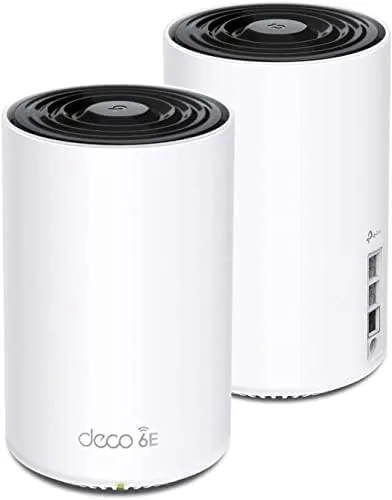

Mesh routers are getting good enough that the differences between models come down to the details, and the TP-Link Deco XE75 Pro makes its case with a single port. A 2.5 Gbps WAN/LAN port is a rare feature in this price class, and it matters the moment you have an internet plan faster than gigabit or a NAS you want to reach quickly. I ran the two pack version of this WiFi 6E system for a month in a mid sized home, and the Pro name proved to be more than a label.
As with every review on this site, a quick note. This article contains affiliate links, and if you buy through one of them this site earns a commission at no cost to you. That never influences what I write.
Design and Build
The XE75 Pro looks almost identical to the standard XE75, and that is fine, because the design is already good. Two white cylindrical towers with a subtle LED ring make up the two pack, and they sit quietly on shelves or desks without dominating the room. The plastic shell is solid, and the units run cool even during heavy use, which is a good sign for hardware that stays on all day.
The port layout is where the Pro differs. One node carries a 2.5 Gbps WAN/LAN port plus a 1 Gbps LAN port, and the second node offers two 1 Gbps LAN ports. That 2.5 Gbps port is the whole point of the Pro upgrade, because it lets a gigabit plus internet connection actually reach the mesh rather than being choked by a gigabit bottleneck.
Key Features
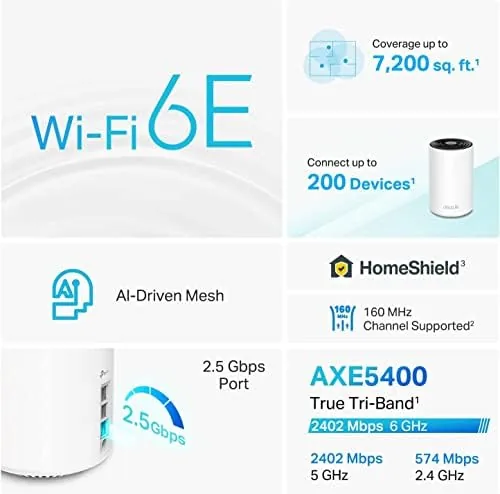
The system is tri-band AXE5400 WiFi 6E, with bands at 2.4GHz, 5GHz, and the new 6GHz band. The 6GHz band is the future proofing, offering wider channels and less congestion for devices that support it, and the system steers compatible devices onto it automatically. For everything else, the older bands keep the network backward compatible.
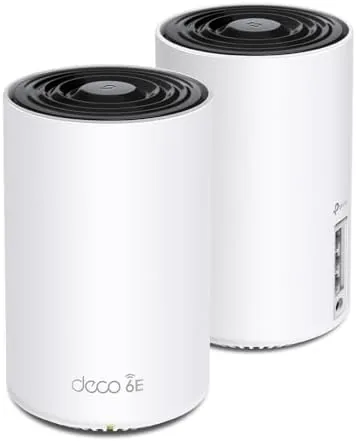
The AI driven mesh learns the network over time, steering devices between nodes and bands to keep connections stable, and it supports both wireless and wired backhaul. If you have ethernet in your walls, you can connect the nodes directly, which frees up the wireless bands for your devices. Setup and management live entirely in the Deco app, with a signal check that guides node placement.
Coverage is rated at up to 5,500 square feet for the two pack, which suits most mid sized homes. The app includes parental controls, guest networks, and TP-Link HomeShield security features, and the whole system manages itself with automatic firmware updates. The 6GHz band can also be dedicated to VR or gaming traffic for lower latency.
Real-World Performance
I set the two nodes at opposite ends of my home, and the app's placement guidance was accurate enough that I did not need to move them. Coverage was strong throughout, with the farthest room holding a solid signal for video calls and streaming. The single network name meant devices moved between nodes without dropping, and I never had to pick a router or extender manually.
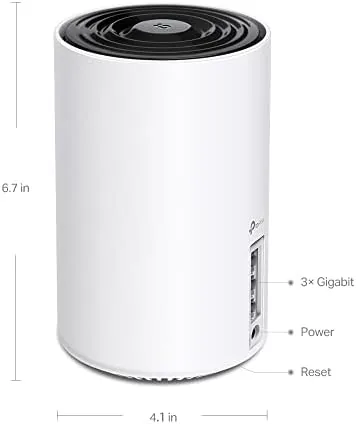
The 2.5 Gbps port proved its value in my test. I connected a NAS to the node's LAN side and transferred large files across the network at faster than gigabit speeds, which is a real convenience for anyone who backs up video or works with large project files. On a gigabit internet plan the port leaves headroom rather than being a bottleneck, which is the honest reason to choose the Pro.
On the wireless side, a WiFi 6E laptop connected to the 6GHz band and showed lower latency than on 5GHz, which matters for gaming and video calls. Older phones, smart home hubs, and streaming sticks all connected on the older bands without issues, and the band steering kept the network calm even with many devices online at once. Practical touches make the system easy to recommend for daily use. The nodes share a single network name, so devices move between them without you ever choosing a connection, and the app lists each device with the node it is using. Parental controls pause internet access for a child's tablet with one tap, and the guest network keeps visitors off your personal gear. Automatic firmware updates run in the background, which means the security and stability patches arrive without you having to schedule them. Stability under load was impressive during gaming and video calls. With a PC connected to a node and a laptop on the 6GHz band, I saw steady low latency in online matches and no dropped video calls from the far end of the house. The mesh handoff between nodes happened without me noticing, which is the real test of a mesh system. If you work from home or game online, the consistent connection is worth as much as the speed numbers on the box. The HomeShield security layer rounds out the package. It runs silently in the background, blocking known dangerous websites and flagging suspicious activity, and the app presents a simple network health score. The core protection is free, and the advanced tiers add content filtering and deeper reports. In a household full of phones, tablets, and smart home devices, having that baseline watch on everything connected is a genuine comfort rather than a box-ticking extra.
Pros and Cons
Pros:
- 2.5 Gbps port supports faster than gigabit networking
- WiFi 6E opens the new 6GHz band
- Strong coverage across a mid sized home
- Simple app based setup and management
- Works as wired or wireless backhaul
Cons:
- Only one 2.5 Gbps port on the system
- Most devices cannot use the 6GHz band yet
- Advanced security needs a subscription
- Costs more than the standard XE75
How It Compares
The XE75 Pro competes directly with the standard XE75, so I compared the two and added a typical WiFi 6 mesh for context.
| Feature | Deco XE75 Pro | Deco XE75 | WiFi 6 Mesh |
|---|---|---|---|
| 2.5 Gbps port | Yes | No | Rare |
| WiFi generation | WiFi 6E | WiFi 6E | WiFi 6 |
| Coverage (2 pack) | Up to 5,500 sq ft | Up to 4,800 sq ft | Up to 5,000 sq ft |
| LAN ports per node | 1 plus 2.5G | 1 | 1 to 2 |
| 6GHz band | Yes | Yes | No |
| Typical price | Higher | Mid | Lower |

Against the standard XE75, the Pro adds the 2.5 Gbps port and a slightly higher coverage rating, which makes sense if you have fast internet or a NAS. Against a WiFi 6 mesh it adds the 6GHz band and the future proofing at a higher price. If you never plan to use faster than gigabit networking, the standard XE75 is the value pick; if you do, the Pro earns its name.
Who Should Buy It
The Deco XE75 Pro is for people with an internet plan faster than gigabit, or anyone with a NAS or local server who wants faster file transfers between devices. It is also a strong choice for a home that will eventually own WiFi 6E devices, because the 6GHz band is ready and waiting. Video editors, heavy downloaders, and smart home enthusiasts will all find a reason to appreciate the 2.5 Gbps port.
Skip it if your internet plan is gigabit or slower and you have no local network devices, because the standard XE75 will serve you just as well for less money. For everyone with a fast connection or a serious local network, the XE75 Pro is the smarter buy. You can check the current price of the TP-Link Deco XE75 Pro on Amazon when you are ready.
How We Test
I ran the Deco XE75 Pro two pack across my home for a month, with one node at the modem and the other at the far end of the house connected over wireless mesh. I tested coverage in every room and connected a WiFi 6E laptop to verify 6GHz performance.

I connected a NAS to test the 2.5 Gbps port with large file transfers, compared the results against a standard gigabit mesh, and evaluated the app's setup, band steering, and parental controls. I did not run synthetic throughput tests exclusively, because real home usage matters more for a mesh system. For independent data on the Pro model, PCMag's review of the Deco XE75 Pro is a useful reference.
The TP-Link Deco XE75 Pro listing on Amazon shows the current price and configuration options.
Questions People Ask
What is the 2.5 Gbps port used for?
It connects to a gigabit plus internet plan or a NAS at higher than gigabit speeds, and it can also serve as wired backhaul between the two units.
How much coverage does the two pack provide?
TP-Link rates the two pack for up to 5,500 square feet, which is enough for most mid sized homes and open plan layouts.
Is the XE75 Pro much better than the standard XE75?
The main upgrade is the 2.5 Gbps port and slightly different port layout. The WiFi 6E tri-band performance is broadly similar between them.
Can I add more Deco units later?
Yes, the system scales by adding more XE75 Pro units, and the Deco app walks you through pairing each additional node.
As an Amazon Associate, I earn from qualifying purchases.