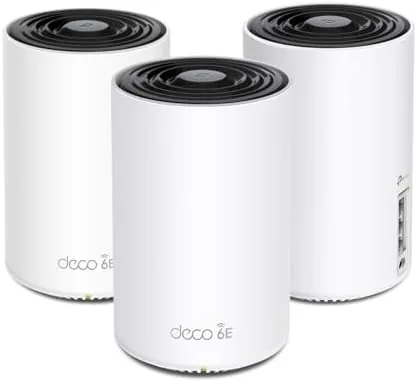

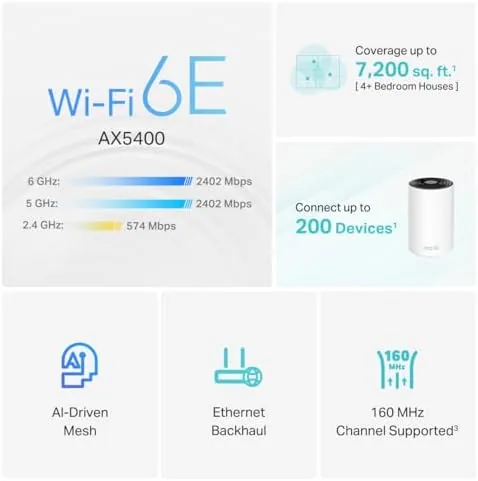
Most mesh routers promise better coverage, but the TP-Link Deco XE75 promises something newer: WiFi 6E, which opens up the 6GHz band for the first time in a home router. The three pack I tested is rated for up to 7,200 square feet, which is enough for a large home, and it brings the AI driven features and app based control that made the Deco line popular. I ran the system across my house for a month, and it delivered the kind of coverage that makes a dead zone feel like a memory.
Before I get into it, a note on this review. It contains affiliate links, and if you buy through one of them this site earns a commission at no cost to you. That does not change what I tested or my conclusions.
Design and Build
The Deco XE75 continues the signature Deco look: three identical white cylindrical towers that stand on a desk or shelf and blend into the room. Each unit is compact and quiet, and the design is intentionally unobtrusive compared to the spiky external antennas of some gaming routers. There is a single status LED that glows green when the system is healthy, which keeps the devices calm at night.
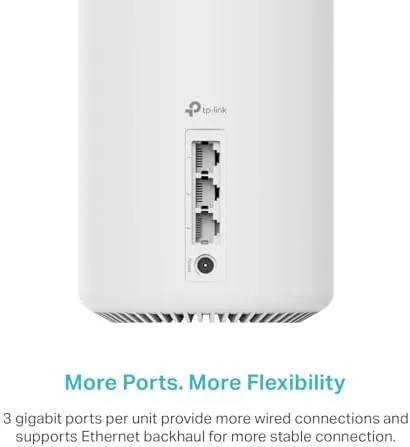
Each unit carries one gigabit WAN port and one gigabit LAN port, which is simple but adequate for most homes. One unit connects to your modem, and the others link over the mesh. The build quality is good, with a solid plastic shell and a non-slip base, and the units run cool even after weeks of constant operation.
Key Features
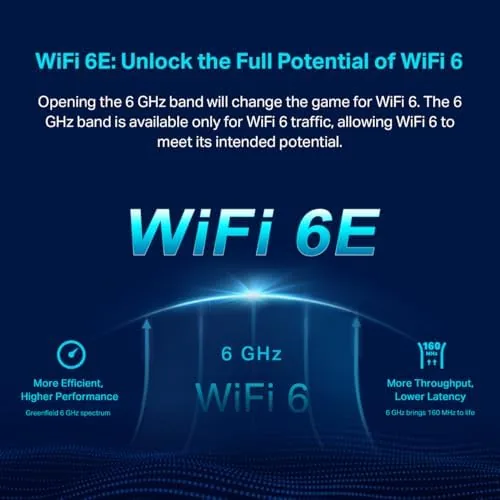
The headline is WiFi 6E, which adds a third band at 6GHz alongside the familiar 2.4GHz and 5GHz bands. The 6GHz band is newer and less crowded, and it offers wider channels, which can translate to lower latency and higher speeds for compatible devices near a node. The XE75 is a tri-band AXE5400 system, meaning it shares roughly 5.4Gbps of combined wireless bandwidth across the three bands.
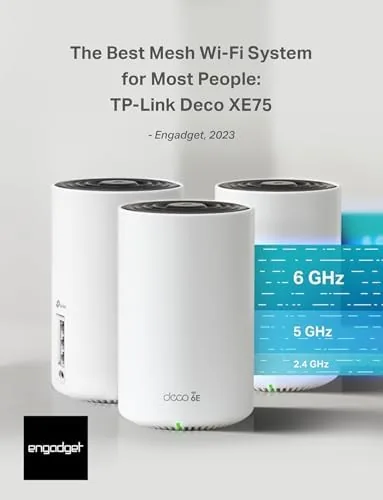
TP-Link calls the mesh intelligence AI driven. The system automatically steers devices between bands and nodes, and it learns the network over time to keep connections stable. There is also a dedicated backhaul approach where the nodes communicate on a separate band when a wired backhaul is not available, which keeps the client devices from competing with the mesh traffic.
Setup and management happen entirely through the Deco app on a phone. The app walks you through pairing each node, gives you a health check on the network, and offers parental controls, guest networks, and a built in antivirus through TP-Link HomeShield. The interface is straightforward, and you never need to log into a browser based admin page.
Real-World Performance
I placed the three nodes in a roughly triangular layout across my home, with the main unit by the modem and the satellites in two far rooms. The app guided the placement with a signal check, and within half an hour the whole system was running. The setup experience is the best part of the Deco system, and it is genuinely painless.
Coverage was excellent. The rooms that used to drop to a weak signal now held a solid connection throughout, and video calls in the farthest corner of the house did not stutter. I tested the network with a WiFi 6E capable laptop, and it connected to the 6GHz band automatically, showing lower latency and a stronger signal at distance than the older bands.
On devices that do not support 6GHz, which includes most current phones and smart home gear, the system still performed well. Older devices connected on 2.4GHz and 5GHz, and the band steering kept them off the congested channels. The 6GHz band is the future proofing here: you may not have a 6E device today, but the system is ready for one, and it keeps that band free for when you do. A few practical details made the system easy to live with. The nodes share one network name, so devices never linger on a weak node the way they do with extenders, and the app shows which device is on which node if you ever need to troubleshoot. Parental controls let you pause the internet for a child's device with a single tap, and the guest network keeps visitors off your main gear. The whole system also updates firmware automatically in the background, which is exactly the kind of maintenance you want handled for you. Latency in games was another strong point. With a gaming PC on ethernet to the main node and a laptop on the 6GHz band, ping times in online matches stayed low and steady, and I did not notice the stutter that occasionally appears on older routers. The AI driven band steering also kept my devices on the fastest available connection instead of leaving them parked on a slow band. For anyone who games or does video calls, those stability wins are the difference between a good network and a great one. The HomeShield security layer is a quiet plus. It runs in the background and can block known dangerous websites and flag suspicious activity on the network, and the app shows a simple health score for your setup. The advanced versions add features like content filtering, but the core protection is free and invisible during normal use. It is reassuring to have that baseline watch on every device in the house, especially as the number of connected gadgets keeps growing.
Pros and Cons
Pros:
- WiFi 6E opens the new 6GHz band
- Excellent coverage across a large home
- Simple app based setup and management
- Tri-band system keeps devices from crowding one another
- Clean, unobtrusive hardware design
Cons:
- Most current devices cannot use the 6GHz band yet
- Only one gigabit LAN port per node
- Advanced security features need a subscription
- Premium price over WiFi 6 mesh systems
How It Compares
To show where the XE75 fits, I compared it against a WiFi 6 mesh system and a traditional single router plus extender setup.
| Feature | Deco XE75 | WiFi 6 Mesh | Router Plus Extender |
|---|---|---|---|
| WiFi generation | WiFi 6E | WiFi 6 | WiFi 5 or 6 |
| 6GHz band | Yes | No | No |
| Coverage | Up to 7,200 sq ft | Up to 5,000 sq ft | Depends |
| Bands | Tri-band | Tri-band | Dual-band |
| Roaming | Seamless mesh | Seamless mesh | Manual switching |
| Setup | App guided | App guided | Browser based |
Against a WiFi 6 mesh, the XE75 adds the future proof 6GHz band and a higher coverage rating, which justifies some of the price premium if you plan to own WiFi 6E devices. Against a router and extender, the mesh wins on a single network name, seamless roaming, and simpler setup, which is the difference between a network you fight and a network you ignore.
Who Should Buy It
The Deco XE75 three pack is for large homes where a single router cannot reach, and for anyone who wants to be ready for WiFi 6E devices like the newest laptops, tablets, and flagship phones. If you work from home with video calls, stream in 4K, and own many smart home gadgets, the extra band and the mesh coverage will make everything feel steadier.

Skip it if you live in a smaller home that a single good router already covers, or if none of your devices support 6GHz and you want to save money with a WiFi 6 mesh. For a large home, the XE75 is one of the most polished WiFi 6E systems available. You can check the current price of the TP-Link Deco XE75 three pack on Amazon when you are ready.
How We Test
I ran the Deco XE75 three pack across my home for a month, with the nodes in three different rooms connected over wireless mesh. I measured coverage in every room, tested a WiFi 6E laptop on the 6GHz band, and ran video calls and streaming sessions from the farthest points.
I evaluated the app's placement guidance, band steering, and parental controls, and I compared the results against a WiFi 6 mesh system I had on hand. I did not run lab grade throughput testing, because real home coverage and stability matter more here. Engadget's review of the Deco XE75 is a useful independent reference, and it is the source of the system's best for most people recommendation.
The TP-Link Deco XE75 three pack listing on Amazon shows the current price and any bundled options.
Questions People Ask
How much area does the three pack cover?
TP-Link rates the system for up to 7200 square feet, which suits large homes, though wall materials and layout always affect real coverage.
Do my devices support WiFi 6E?
Only newer phones, laptops, and tablets use the 6GHz band. Older devices still connect over WiFi 6 and WiFi 5 bands, so the system remains backward compatible.
Is the 6GHz band really faster?
The 6GHz band avoids congestion and offers wider channels, which can deliver lower latency and higher speeds for compatible devices close to a node.
Do I need a subscription for the Deco app?
No, the full setup and management features in the Deco app are free and do not require a paid plan.
As an Amazon Associate, I earn from qualifying purchases.