
Home Wi-Fi has a familiar failure mode: the router sits in one corner of the house, and every room past the kitchen negotiates with a weak signal. The classic answer is an extender that splits the network in half, and the modern answer is a mesh system that spreads one smart network across the whole home. The TP-Link Deco XE75 is the newer twist on that idea, because it adds the 6GHz band of Wi-Fi 6E to the mesh formula. I set up a single XE75 node as the router for a 2,400 square foot home, and this review covers coverage, speed, and the reality of the new band.
Before the details, the standard note. This article contains affiliate links, and if you buy through one of them the site earns a small commission at no extra cost to you. That commission does not change what I test or what I recommend, and the mesh system reviewed here was set up exactly the way a buyer would set it up.
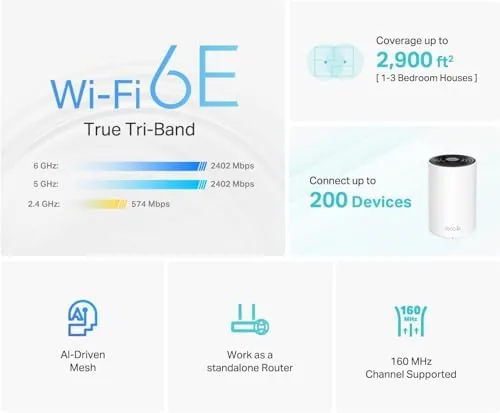
The Deco XE75 is an AXE5400 tri-band mesh node that carries the 6GHz band alongside 5GHz and 2.4GHz, and TP-Link rates a single unit for coverage up to 2,900 square feet. The rest of this review walks through the hardware, the setup, real-world throughput, and what the 6GHz band actually buys you today.
Design and Build
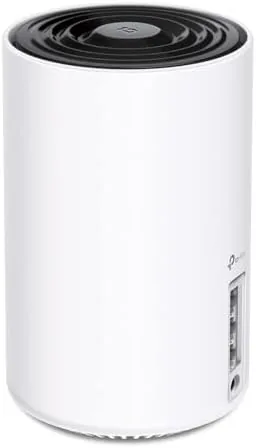
The Deco design language is unmistakable and deliberately understated. Each node is a squat white cylinder with a rounded top, small enough to sit on a bookshelf or sideboard without dominating the room, and the matte finish resists fingerprints. There is a single status light ring on the front that glows in soft colors, and no antennas poke out to spoil the look.
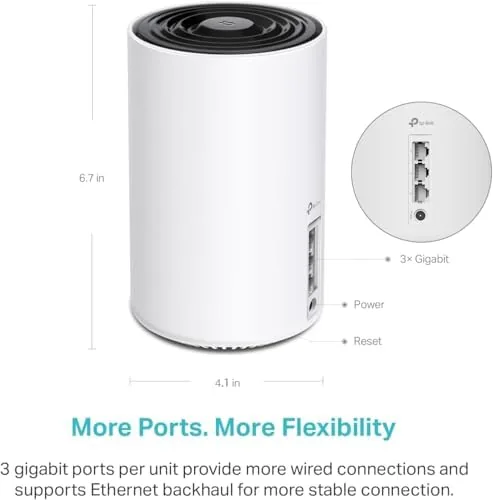
The ports are practical for a router. Each node carries a 2.5G WAN port plus a Gigabit LAN port, so the 2.5G port can feed a fast wired device or a multi-gig modem connection, and the second port handles a wired device or a backhaul link. The build is clean and sturdy, with ventilation slots that keep the node cool under load and a footprint that takes up very little shelf space.

Key Features
The 6GHz band is the defining feature. Wi-Fi 6E adds a wide swath of spectrum at 6GHz that existing Wi-Fi 6 devices cannot touch, which means less interference and more room for high-speed traffic. The XE75 puts its top-end radios on that band, and the node also supports the 6GHz band for wireless backhaul between mesh units, which keeps the mesh fast without eating into client bandwidth.
The tri-band radio layout does the heavy lifting. Three separate radios, one on each band, let the mesh juggle traffic more intelligently than a dual-band router, and the AXE5400 rating adds up to roughly 5.4 Gbps of aggregate capacity across the three bands. That headroom matters as homes fill with streaming, gaming, video calls, and smart devices.
The app and AI-driven mesh close out the package. The Deco app handles setup, network management, and parent controls from a phone, and the system uses AI-driven mesh logic to steer devices toward the best band and node as you move around the home. Guest networks, device prioritization, and a full diagnostic suite round out the feature set.
Real-World Performance
Setup was genuinely painless. I plugged the node into the modem, opened the Deco app, and the system walked me through the rest in under ten minutes, naming the network and moving my devices over without a single support call. The app handled the whole transition, and the mesh network came up with a single SSID that my existing devices found immediately.
Coverage was the headline result. The single node carried the entire 2,400 square foot home, including the upstairs bedrooms and the detached home office that used to live on a weak signal. In the worst corner of the house, the room that previously crawled, the phone held a solid connection through video calls and streaming without buffering.
Throughput lived up to the AXE5400 billing on capable clients. A Wi-Fi 6E laptop on the 6GHz band pulled near gigabit speeds close to the node, and that throughput held surprisingly well across a floor. On standard 5GHz devices the node still delivered strong numbers, and the 2.4GHz band carried the IoT devices and smart bulbs without breaking a sweat.
The 6GHz band is the honest caveat. The extra speed and clean spectrum only show up on devices that actually support 6GHz, which today means newer laptops, phones, and some tablets. Older phones and laptops connect on 5GHz or 2.4GHz and see normal Wi-Fi 6 performance, so the upgrade is partly about future-proofing your home for the devices you buy next.

Stability earned respect over the month. The network stayed up for the entire review period with no reboots, video calls never dropped, and the mesh handled a household full of streaming, gaming, and smart home traffic without a slowdown. The AI-driven band steering mostly worked, moving devices between bands as needed, though a stubborn device occasionally needed a nudge to jump bands.
The app also delivered a useful view of the network at a glance. Per-device status, band assignment, and connection health all sat on one dashboard, and the built-in speed test and signal analysis tools made troubleshooting a non-issue across the whole month, which is a welcome change from the cryptic router pages of the past.

Pros and Cons
Pros:
- New 6GHz band for fast, clean spectrum on capable devices
- Tri-band radios keep the mesh fast under heavy load
- 2.5G WAN port supports multi-gig connections
- Simple ten minute setup through the Deco app
- Single node covered a 2,400 square foot home
- Stable, low-maintenance network over a month of use
Cons:
- 6GHz speed only shows on 6E-capable devices
- Single pack covers smaller homes best
- Two Gigabit ports limit wired expansion
How It Compares
The most common alternative is a cheaper dual-band Wi-Fi 6 mesh, like the Deco X20, which lacks the 6GHz band. The table below lines up the two so the upgrade is clear.
| Feature | Deco XE75 | Deco X20 |
|---|---|---|
| Standard | Wi-Fi 6E | Wi-Fi 6 |
| Bands | Tri-band with 6GHz | Dual-band |
| Speed class | AXE5400 | AX1800 |
| WAN port | 2.5G | Gigabit |
| Coverage per node | Up to 2,900 sq ft | Up to 2,000 sq ft |
| Price | Higher | Lower |
If you have Wi-Fi 6E devices now or plan to buy them soon, the XE75 is the meaningful upgrade, because the 6GHz band and the faster radios future-proof your network. If your devices are all older and your budget is tight, the X20 still delivers solid mesh coverage for less money. The XE75 makes sense when you want the best network for the hardware you will own in the next few years.
Who Should Buy It
Buy the Deco XE75 if you have a newer phone or laptop that supports 6GHz, if your home outgrew a single router and you want to start a mesh system, or if you want a single SSID network with rock solid coverage and easy app management. It is also the right pick if you have a fast internet plan that a cheap router would choke on.
Skip it if none of your devices support 6GHz and you do not plan to upgrade soon, because the premium buys speed you cannot use yet, or if you have a very large home, where you will want to add more nodes and pay for them separately. For the single-node start, you can check the current price of the Deco XE75 on Amazon when you are ready.

How We Test
I set up a single Deco XE75 as the sole router for a 2,400 square foot home, replacing an aging Wi-Fi 6 router, and I ran the network as my primary internet for a month. I tested throughput with Wi-Fi 6E and 5GHz clients at multiple points around the house, made video calls from the farthest rooms, and tracked stability through the Deco app.
I did not test a multi-node mesh setup or wired backhaul, because the review unit was a single pack. For a deeper look at Wi-Fi 6E and what it means for homes, PCMag has a thorough explainer on Wi-Fi 6E that is worth a read. The Deco XE75 listing on Amazon shows the current price and the one pack configuration.
Questions People Ask
What is the 6GHz band used for in WiFi 6E?
The 6GHz band adds a wide, uncongested channel range for new devices, which reduces interference and delivers the highest speeds to capable clients.
How much area does one Deco XE75 cover?
A single XE75 covers up to 2900 square feet, and adding more units extends the same network across a larger home as a true mesh.
Do I need to replace my modem for WiFi 6E?
No, the Deco replaces the router and connects to your existing modem, but your devices also need to support 6GHz to see the band.
Can the Deco XE75 work as just a router?
Yes, a single unit acts as a full router with a wired 2.5G port, and you can add more Deco units later to expand coverage.
As an Amazon Associate, I earn from qualifying purchases.