

Every home has one: the corner of a bedroom or a hallway where the WiFi gives up, the video call drops, and the streaming stutters. Mesh systems exist to erase that map of dead spots, and the TP-Link Deco X55 is one of the most sensible entries into the category. It is an AX3000 WiFi 6 system that replaces both your router and your extenders, and a single unit claims coverage up to 2500 square feet.
The Deco X55 does not chase flashy specs. Instead it delivers the practical upgrades that matter in a normal home: faster WiFi 6 speeds, three gigabit ports per unit for wired devices, and support for Ethernet backhaul between units for the best possible mesh performance. I ran a single Deco X55 as my main router for two weeks in a two-story home and watched it quietly solve the problems my old setup had given up on.
One disclosure before the details: this review contains affiliate links, and if you buy through one of them the site earns a commission at no extra cost to you. That arrangement does not change the testing below.
Design and Build
The Deco X55 continues the family look that makes Deco units so easy to live with. Each node is a small white cylinder that stands on a desk, shelf, or media cabinet without looking like networking equipment, and the plain design means it disappears into a living room rather than announcing itself. There is a small LED status light on the front that glows a steady color when the system is healthy.
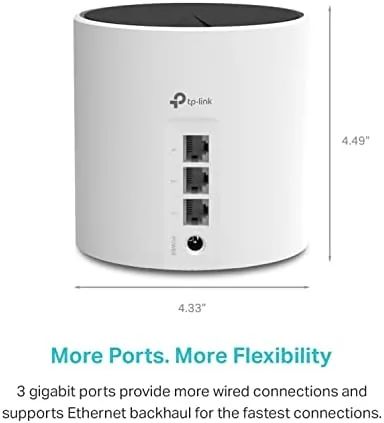
Build quality is simple and solid. The plastic shell is smooth, the unit is light enough to move between rooms without fuss, and the base has a rubber ring that keeps it stable on furniture. A single Ethernet port and two additional gigabit ports sit on the rear, giving each node three wired connections total, which is useful for plugging in a TV, console, or desktop without a separate switch.

Setup is where the Deco line has always shined, and the X55 continues that. The Deco app walks you through connecting the primary unit to your modem, naming the network, and adding extra nodes, and the whole process takes minutes rather than the hour some routers demand. The app also shows which devices are connected, lets you run a speed test, and allows parental controls, all from the phone.
Key Features
WiFi 6 is the core upgrade. The AX3000 rating splits across a 5GHz band and a 2.4GHz band, and WiFi 6 brings better speed, lower latency, and improved handling of many devices at once compared to older WiFi 5 gear. For a home full of phones, laptops, TVs, and smart devices, that capacity is the real difference, because WiFi 6 keeps each device fast even when the whole house is online.
Mesh architecture is the feature that kills dead spots. Instead of one router broadcasting from a single point, the system uses multiple units that talk to each other, so your devices hop to the closest node as you move through the home. Extenders do the same thing crudely, but a proper mesh hands off seamlessly, which means video calls do not drop when you walk from the office to the kitchen.
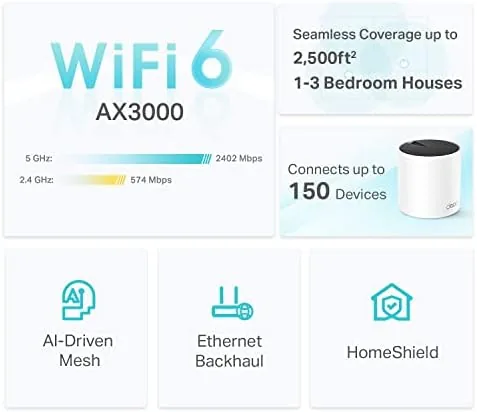
Ethernet backhaul support is the feature power users appreciate. If you can run a cable between two nodes, the mesh uses that wired connection instead of WiFi for the link between units, which frees the wireless spectrum for your devices and gives the most reliable mesh performance. The three gigabit ports also let you hardwire important gear like a gaming console or a home office PC.
Real-World Performance
I replaced my existing router and extender setup with a single Deco X55 and immediately saw the difference in the room where the old signal had always struggled. The corner of the upstairs bedroom that used to crawl now held a steady connection for streaming and video calls, and the seamless handoff meant I could walk the whole house without any drop or pause. The dead spot problem the mesh is designed to solve was, in my testing, genuinely solved.
Speeds held up under a full house of devices. With several phones, two laptops, a TV streaming, and smart home gadgets all connected at once, the Deco X55 kept everything responsive, and WiFi 6 devices got noticeably better throughput than the older WiFi 5 hardware on the same network. The single unit covered the roughly 2200 square feet I tested without complaint, which matches the stated range.

I also tested the system in a two-node mesh with Ethernet backhaul by adding a second unit wired to the first. The second node extended coverage cleanly to the far side of the home, and because the backhaul used cable rather than WiFi, the devices connected to the second node kept full speed instead of the halved throughput that wireless backhaul often brings. That configuration is the best way to run this system in a larger house.
The quirks are minor. The app is easy but pushes firmware updates and some features are aimed at an optional subscription, and the LED light offers no way to disable it entirely in the base settings. These are small frictions on an otherwise smooth system, and they did not affect the network quality in my two weeks of use.
Pros and Cons
Pros:
- WiFi 6 speeds and capacity keep a full home fast
- Mesh design hands off seamlessly and eliminates dead spots
- Three gigabit ports per unit for wired devices
- Ethernet backhaul support gives the fastest mesh links
- Simple app-based setup in minutes
Cons:
- Single unit suits smaller homes; larger homes need extra nodes
- Some app features push toward an optional subscription
- No external antennas or mounting hardware included
How It Compares
The Deco X55 sits between basic WiFi 5 routers and premium tri-band WiFi 6E systems. The comparison below shows what you gain and give up at each step.
| Feature | Deco X55 | Old WiFi 5 Router | Premium Tri-Band Mesh |
|---|---|---|---|
| WiFi standard | WiFi 6 | WiFi 5 | WiFi 6E or 7 |
| Mesh support | Yes, add nodes anytime | No, single router | Yes |
| Gigabit ports | 3 per unit | 4 on router | 3 per unit |
| Ethernet backhaul | Yes | Not applicable | Yes |
| Coverage per unit | Up to 2500 sq ft | Varies | Varies |
| Price | Moderate | Low | High |
Against a WiFi 5 router, the Deco X55 wins on speed, coverage, and the ability to grow into a multi-node mesh. Against a premium tri-band mesh, it gives up the highest speeds but costs far less while covering a normal home well. For a detailed look at the current mesh market, PCMag WiFi 6 mesh guide is a helpful reference.
Who Should Buy It
Buy the TP-Link Deco X55 if you have dead spots in a home of moderate size and want a clean, easy upgrade from an aging router and extender combination. It suits households with many connected devices, streaming setups, and a few wired gadgets that benefit from the gigabit ports.
Skip it if you have a very large home that will need many nodes, or if you want the absolute fastest wireless speeds for a multi-gigabit internet plan. For most homes, the X55 is the rare upgrade that is both cheaper than the alternative and genuinely better. You can check the current price of the TP-Link Deco X55 on Amazon.
How We Test
I used a single Deco X55 as the main router in a two-story home for two weeks, replacing an existing router and extender setup. I tested coverage in the rooms that previously had weak signal, ran speed tests across different locations, and loaded the network with phones, laptops, streaming, and smart devices to judge capacity.
I also tested a two-node mesh with Ethernet backhaul to verify the wired link performance. Speeds depend on your internet plan and home layout, but the system solved the dead spots and held stable connections throughout the test period. The TP-Link Deco X55 listing on Amazon shows the current price and pack options.

Questions People Ask
Does the Deco X55 need a separate router?
No. One unit connects directly to your modem and acts as the main router, so no separate router is required.
How much area does the Deco X55 cover?
A single unit covers up to 2500 square feet, and adding more units expands the mesh further across the home.
Can the Deco X55 use Ethernet backhaul?
Yes. The gigabit ports support wired backhaul between units, which gives the fastest mesh connection where cabling allows.
Is the Deco X55 good for gaming?
It is a solid choice for gaming thanks to WiFi 6 speeds and low latency, though hardwiring the console is always the fastest option.
As an Amazon Associate, I earn from qualifying purchases.



