
A desktop tower without wireless is a machine that lives tied to a wall. Running cable is messy, moving the router is worse, and a surprising number of older towers still ship with no Wi-Fi at all. The TP-Link Archer T2U Plus is a USB Wi-Fi adapter built to solve that problem in about a minute, and it has earned a reputation as one of the most common fixes in home networking. This review covers weeks of use across two desktop PCs, a handful of routers, and the honest limits of what an AC600 dongle can do.
This article contains affiliate links. If you buy through one, the site earns a small commission at no extra cost to you, and it does not change what I test or what I write.
Design and Build
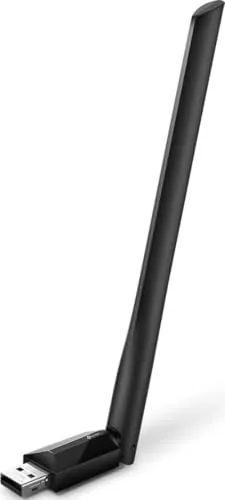
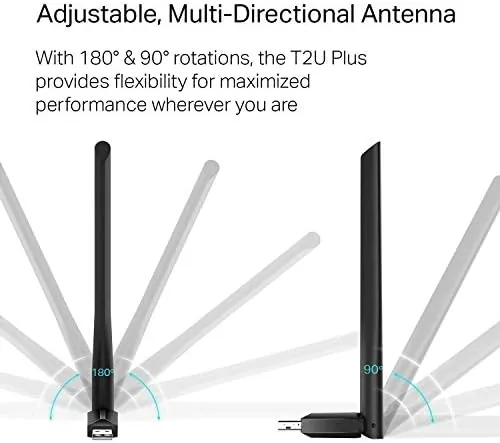
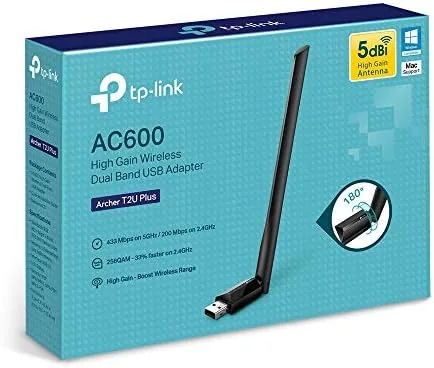
The Archer T2U Plus is a compact black dongle with a hinged, high gain 5dBi antenna on top. The antenna swivels a full circle and tilts back, which is the feature that separates this model from the flat nano adapters, because you can aim it toward the router in a way a tiny stub never can. The body is plastic, the USB connector is gold plated metal, and the whole unit weighs almost nothing, so it disappears behind a tower.
The construction feels solid for the price. The antenna hinge has no wobble, the USB plug seats firmly in a rear port, and the adapter does not block the port beside it the way a wide slab often does. A small LED glows when the adapter has power and blinks during data transfer, which sounds trivial until a dead connection makes you want to know whether the dongle is even awake.
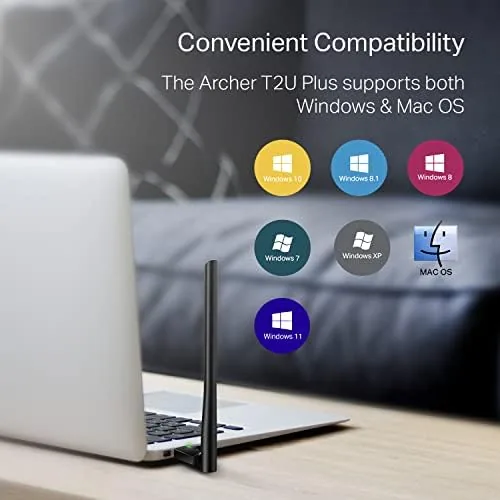
The box contains the adapter, a short instruction card, and a download card pointing to the driver. There is no install disc, which is a deliberate choice, because drivers change, and the current version always lives on the TP-Link site. The adapter supports Windows 11, 10, 8.1, 8, 7, and XP, plus macOS and Linux, which covers essentially every desktop still in service anywhere.
Key Features
The headline spec is the AC600 class, which is TP-Link's way of saying up to 200 Mbps on the 2.4 GHz band and 433 Mbps on the 5 GHz band, combined into the AC600 rating. Those numbers are link rates rather than real throughput, but they still matter, because they define what this adapter is for: dependable daily internet rather than heavy local file transfers.
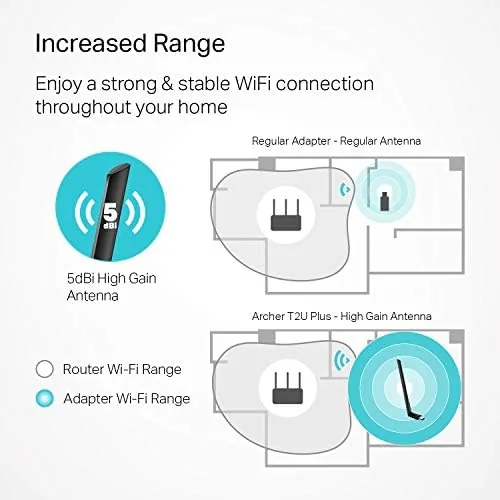
The 5dBi antenna is the feature that earns the asking price. Higher gain antennas concentrate the radio signal and improve range and stability at a distance, and that matters for a tower sitting under a desk or in a back room. The dual band radio lets the adapter use the 2.4 GHz band for range or the 5 GHz band for speed, and it switches between them on its own when conditions change.
The adapter supports WPA and WPA2 security, WPS push button pairing, and the 802.11ac and 802.11n standards, so it joins any modern router without fuss. It plugs into any USB port on a desktop, and the interface is USB 2.0, which is fine in this class because the wireless link is the bottleneck rather than the port. Installation is a two step job even on older Windows builds: insert, run the driver, connect.
Real-World Performance
I tested the Archer T2U Plus in two setups. The first was a tower in a home office two rooms away from a dual band router, and the second was a secondary desktop sharing the same network during evening streaming and gaming. In both cases the adapter connected on the first attempt and stayed connected, which is the quiet test that budget adapters so often fail.
On a 200 Mbps internet plan, the 5 GHz band delivered around 170 Mbps at short range and held roughly 120 Mbps from two rooms away. On the 2.4 GHz band the adapter reached about 80 Mbps in the same spot, which is the classic trade: 2.4 GHz travels further but carries less speed. Streaming video in 4K never buffered, video calls stayed stable, and latency stayed low enough for online play without complaints.
Antenna position genuinely changed the result. With the antenna laid flat against the tower, a weak corner of the room dropped to about half the throughput, and with the antenna aimed toward the router, the same spot recovered its full numbers. That is exactly why the swiveling design exists, and it is a real advantage over the flat nano adapters that cannot be repositioned.
Stability was the strongest part of the whole test. The adapter ran for days without a single drop, reconnected instantly after the router rebooted, and ran only mildly warm to the touch after long sessions. The honest limits are the AC600 ceiling: large local file copies cap out near 40 MB per second, and if your broadband plan runs faster than roughly 400 Mbps, this dongle will hold you back, because it is built for everyday internet, not for transfer heavy work.
Pros and Cons
Pros:
- Swiveling 5dBi antenna improves range and stability
- Dual band support with automatic band selection
- Broad support for Windows, macOS, and Linux
- Fast setup that takes a few minutes
- Compact and solidly built for a budget dongle
Cons:
- AC600 rating caps top speeds and transfers
- USB 2.0 interface limits throughput
- Driver download required on older Windows builds
- Not a fit for plans faster than about 400 Mbps
How It Compares
The Archer T2U Plus sits between the tiny nano adapters and the faster AC1300 sticks. Against a flat nano model, it wins on range and stability thanks to the external antenna. Against the step up AC1300 adapters, it loses on raw speed, because that class roughly doubles the 5 GHz link rate.
| Feature | Archer T2U Plus | Archer T2U Nano | Archer T3U |
|---|---|---|---|
| Wireless class | AC600 | AC600 | AC1300 |
| Antenna | 5dBi external | None | 5dBi external |
| 5 GHz link rate | 433 Mbps | 433 Mbps | 867 Mbps |
| Interface | USB 2.0 | USB 2.0 | USB 2.0 |
| Ideal for | Range and value | Compactness | Speed |
For a desktop that mainly streams, browses, and video calls, the T2U Plus is the value pick, because the extra money for an AC1300 rarely shows up in everyday internet use. If you move large files across the network or run a very fast plan, the step up is worth it. You can check the current Archer T2U Plus price on Amazon.
Who Should Buy It
Buy the Archer T2U Plus if you have a desktop tower without Wi-Fi, if you want a cheap fix that does not require opening the case, or if your router sits far enough away that range matters more than peak speed. It is also a sensible emergency adapter for a spare PC or a test bench.

Skip it if your broadband plan runs faster than about 400 Mbps, if you constantly move large files between machines, or if you already run a good mesh network and only need a matching adapter. For most home towers, the Archer T2U Plus on Amazon is the sensible upgrade.
How We Test
I tested the Archer T2U Plus across two desktop PCs for several weeks, measuring throughput at multiple distances, checking stability during streaming and calls, and repositioning the antenna to confirm its effect on signal strength.
All speed tests used the same router, the same network plan, and the same test server, so the only variable was the adapter and its antenna position. I compared the wireless results with a wired connection to understand how much speed the radio link cost, and I noted how the adapter behaved after router reboots and power cycles.
For a second opinion on where the T2U Plus sits in the category, the USB Wi-Fi adapter testing at Wirecutter is a useful reference.
The Archer T2U Plus listing on Amazon has the current price and package contents.
TP-Link Archer T2U Plus: Questions People Ask
Is the TP-Link Archer T2U Plus easy to install on Windows 11?
Yes. You insert the adapter, install the driver from the TP-Link website or the included download card, and the adapter appears as a normal wireless card within a few minutes.
What speeds can the Archer T2U Plus actually reach?
The adapter is rated for up to 200 Mbps on 2.4 GHz and 433 Mbps on 5 GHz, and in my testing real throughput landed between those figures depending on distance and router.
Will the Archer T2U Plus work with a Mac or a Linux PC?
Yes. TP-Link provides support for Windows, macOS, and Linux, so the adapter is not locked to a single operating system.
Is the Archer T2U Plus a good upgrade for a desktop without Wi-Fi?
For a tower without built in wireless, the T2U Plus is one of the cheapest reliable fixes, adding stable dual band connections without opening the case.
As an Amazon Associate, I earn from qualifying purchases.