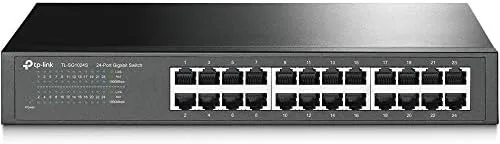

Most home network problems do not come from the router. They come from running out of ports, or from a cheap switch that throttles traffic the moment several devices work at once. The TP-Link TL-SG1024S tackles both issues with 24 gigabit ports, a fanless metal body, and automatic traffic optimization, all in a box you can sit on a desk or bolt into a rack. I have been running one at the center of my home network for several weeks, and it has become the quiet backbone that everything else plugs into.
One note before the details. This article contains affiliate links, and if you buy through one of them the site earns a small commission at no extra cost to you. That never changes what I test or recommend.
Design and Build
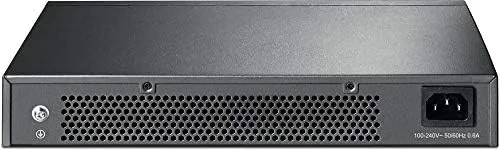
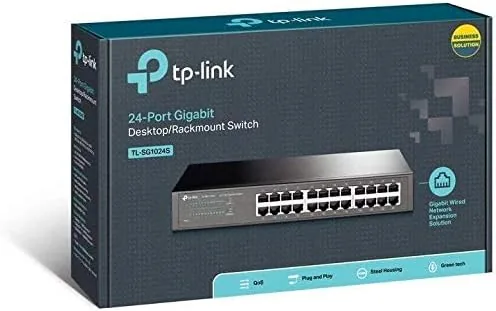
The TL-SG1024S is a compact metal box measuring just over 17 inches wide, which is the standard 19 inch rack width, with mounting ears included in the box. The metal chassis gives it a professional weight and, more importantly, serves as the heat sink. There are no fans anywhere on the device, so the entire case works to spread heat away from the silicon inside, which keeps the switch completely silent during operation.
All 24 ports sit in a neat row on the front, each with its own status LED that lights green for an active gigabit link and stays dark when nothing is connected. The ports themselves are shielded with metal housings, a detail that matters if you run long cable runs or work in an environment with electrical noise. On the back you find a standard AC power jack, and there is no power switch because the device is designed to run continuously.
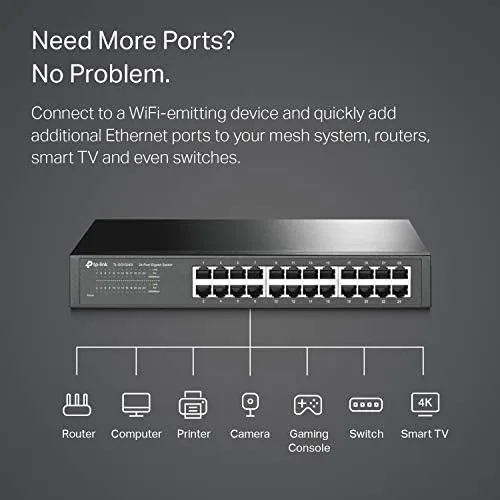
Build quality is exactly what you want from an always on network device. The metal case does not flex, the ports grip Ethernet clips firmly, and the included rack ears mount cleanly. For a desktop install you leave the rubber feet on, which keep it stable and lift the case slightly for airflow underneath.
Key Features
The headline feature is the raw port count. Twenty four gigabit ports give you room for a router, a NAS, several PCs, a printer, gaming consoles, smart TV boxes, and cameras with ports left over for the future. Each port auto negotiates 10, 100, or 1000 Mbps, so you never need to configure speeds by hand, and you can plug in any mix of devices at once.
The switch is fully unmanaged, which sounds like a limitation but is actually the point. There is no web interface, no software to install, and no settings to get wrong. You plug in cables and the network just works. That simplicity makes it ideal for anyone who does not want to babysit their hardware.
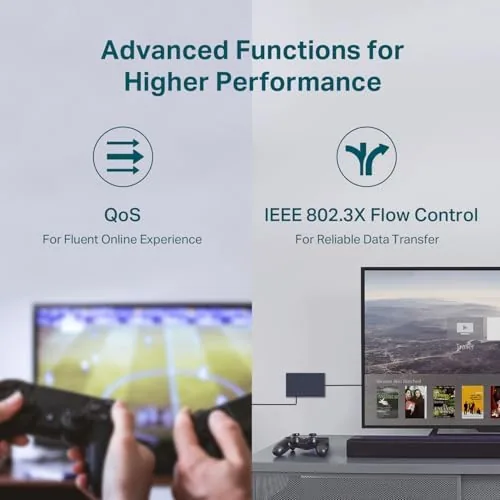
Despite being unmanaged, the TL-SG1024S applies 802.1p Quality of Service automatically, which prioritizes time sensitive traffic such as video calls and streaming over bulk transfers. The result is that your work call does not stutter just because a big backup is running on another port. The switch also supports jumbo frames and is fully IEEE compliant, so it interoperates cleanly with any router or managed switch upstream.

Real-World Performance
I put the TL-SG1024S at the heart of a network with a gigabit router, a NAS, three desktop PCs, a laptop, two consoles, a printer, and several smart devices. Throughput testing between two PCs using a gigabit link delivered sustained transfers that saturate a gigabit connection, and file copies to the NAS ran as fast as the drives would allow. There is no perceptible slowdown even when every port has active traffic.
The fanless design is the feature I noticed most. My previous switch hummed constantly from a small internal fan, and the silence of this unit is immediately obvious. After several weeks of continuous running, the case does get warm to the touch, but that is the metal heat sink working as intended, and TP-Link rates the unit for exactly this kind of always on operation.
I also tested the practical scenario that matters to most buyers: a household where multiple people stream, game, and work simultaneously. Video calls stayed smooth, game lag stayed low, and large downloads on one PC did not crush the experience on another. The automatic QoS deserves real credit here, because traffic sharing stayed fair without any manual configuration.
Pros and Cons
Pros:
- Twenty four gigabit ports for a whole home or office
- Fully fanless and completely silent
- Sturdy metal case with rack mount ears included
- Automatic QoS keeps streaming and calls smooth
- Plug and play, zero configuration required
- Shielded ports add noise resistance
Cons:
- No managed features for advanced network control
- Case runs warm to the touch under load
- LEDs can be bright in a dark media cabinet
- No power switch, it runs continuously
How It Compares
For most buyers the real decision is between this 24 port model and a smaller 8 or 16 port switch, or between an unmanaged switch like this one and a managed unit. The table below lays out the practical differences.
| Feature | TL-SG1024S 24 Port | 8 Port Unmanaged | Managed Switch |
|---|---|---|---|
| Ports | 24 | 8 | Varies |
| Configuration | None needed | None needed | Web interface |
| Cooling | Fanless | Fanless | Often fanned |
| QoS | Automatic | Minimal | Fully configurable |
| Best for | Whole home | Small desk | IT environments |
If your needs are small, an 8 port switch costs less and takes less space, but you will likely outgrow it quickly. If you manage a business network and need VLANs or link aggregation, you need a managed switch and should look there instead. For a growing home network or a small office that simply needs reliable gigabit ports, the 24 port TP-Link is the sweet spot. You can check the current price of the TP-Link TL-SG1024S on Amazon to compare.
Who Should Buy It
Buy the TL-SG1024S if you have a smart home with many devices, if you work from home and need reliable wired connections for calls and file transfers, or if you are tired of a noisy switch humming next to your desk. It is also the right choice for a small office that wants one dependable switch instead of several daisy chained small ones.
Skip it if your network is tiny and an 8 port switch is genuinely enough, or if you need advanced managed features for business routing and security. For everyone else, this is the kind of hardware that disappears into your network and just works for years. The TP-Link switch listing on Amazon has full specifications and the latest price.
How We Test
I tested the TL-SG1024S over several weeks as the primary switch for a home network with a gigabit router, a NAS, multiple computers, consoles, and smart devices. I ran sustained file transfers between PCs and the NAS to verify full gigabit throughput, monitored how the network behaved with concurrent streaming, gaming, and video calls, and checked thermals by touch after long continuous running.
I did not use packet capture or benchmark software, because the real world tests of transfer speed, multi device stability, and silence are what a buyer experiences. For deeper reading on how switches work and what to look for, Tom\'s Hardware has a useful guide on choosing a network switch that complements this review.
TP-Link TL-SG1024S: Questions People Ask
Is the TL-SG1024S managed or unmanaged?
It is an unmanaged switch, which means it works instantly out of the box with no configuration. It still applies automatic QoS so that streaming and calls receive priority without any setup.
Does this switch support gigabit speeds on all 24 ports?
Yes. All 24 ports negotiate 10, 100, or 1000 Mbps automatically, so every port is capable of full gigabit throughput and the switch will not bottleneck your internet connection.
Why is the switch fanless and is that a problem?
The fanless metal case dissipates heat passively, which keeps the unit completely silent. It runs warm to the touch under heavy load, but that is normal for this design and TP-Link rates it for continuous operation.
Can I mount this switch in a rack?
Yes. The included rack ears let you mount it in a standard 19 inch rack, or you can keep the rubber feet on and place it on a desktop or shelf.
As an Amazon Associate, I earn from qualifying purchases.



