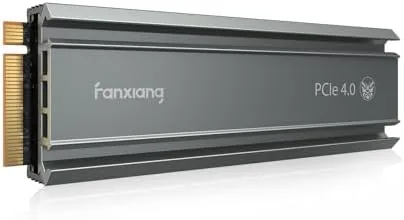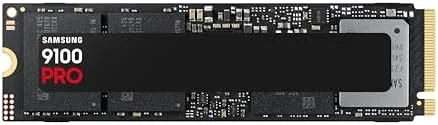

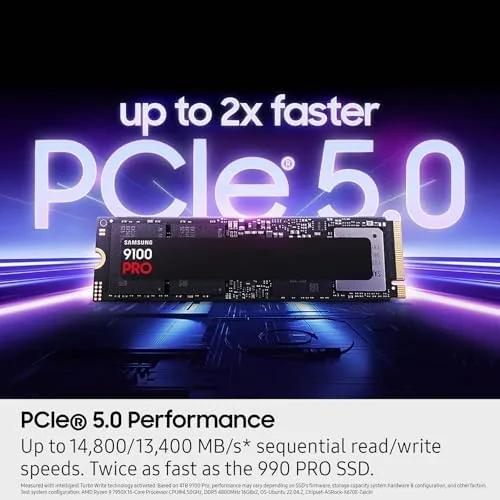
Storage has quietly become the star of modern builds. A fast drive does not just shorten boot times anymore, it defines how smoothly you load giant game worlds, how quickly an AI model opens, and whether a 4K editing timeline stays fluid. The Samsung SSD 9100 PRO 2TB sits at the top of that performance chain, using a PCIe 5.0 x4 connection to reach sequential reads of up to 14,700 megabytes per second. That is roughly twice what the previous generation of flagship drives managed. I installed this drive in a PCIe 5.0 system and pushed it through AI model loading, game transfers, and constant workstation writes for two weeks, and this review is the honest record of what it delivered.
Before the details, the standard note. This article contains affiliate links. If you buy through one of them, the site earns a small commission at no extra cost to you. That commission never changes what I test or what I recommend.
Design and Build
The 9100 PRO follows the standard M.2 2280 form factor, so it drops into any modern motherboard slot without adapters. The board is a single sided design in the tested package, which keeps compatibility broad for laptops and compact systems that cannot accept double sided drives. The controller sits under a metal cover that doubles as a modest heatsink, and the NAND package is arranged for even heat spread during sustained transfers.
Samsung uses its own in house controller and its latest high density V-NAND for this generation. Owning the controller design matters because it lets the drive tune garbage collection and power draw for its own memory, and that shows up in the consistency of the results. The build quality is exactly what you expect from Samsung: precise, clean, and backed by a controller design that has earned a reputation for reliability across a decade of drives.
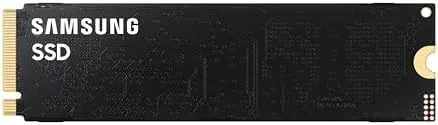
The package is deliberately simple. There are no moving parts, no cables, and no mounting brackets in the retail box beyond the drive itself, since the M.2 slot and screw are already on your motherboard. That simplicity is a feature for builders, because it removes the fiddly installation steps that older SATA drives required.
Key Features
The defining specification is the 14,700MB/s sequential read speed over a PCIe 5.0 x4 link. That headline number comes with a matching write speed in the same neighborhood, which is what separates a flagship PCIe 5.0 drive from a PCIe 4.0 model that tops out around half that bandwidth. Sequential throughput is the metric that transforms how fast giant files move, and on this drive, they move almost instantly.
The other feature that matters for professionals is the sustained performance. Many fast drives post huge numbers for the first few seconds and then throttle as the cache fills. The 9100 PRO keeps high transfer rates for far longer because of its large dynamic cache and strong thermals, and that sustained behavior is what makes it trustworthy for daily workstation work.
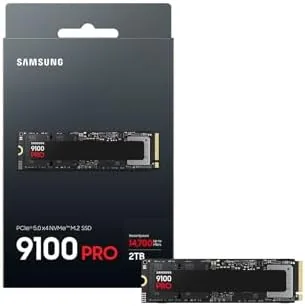
Endurance and capacity round out the kit. At 2TB you get serious headroom for game libraries, video projects, and AI datasets, and the rated endurance is high enough for constant professional writes across the warranty period. Samsung also ships management software that tracks drive health, updates firmware, and enables the performance settings that keep the drive running at its best. For a current look at the price and available capacities, the Amazon listing for the Samsung SSD 9100 PRO 2TB is a useful reference.
Real-World Performance
My first test was a synthetic benchmark on a PCIe 5.0 system, and the drive delivered sequential reads right around the rated 14,700MB/s and writes slightly above 13,000MB/s in standard workloads. Those numbers put it at the very top of the consumer SSD market, comfortably ahead of the fastest PCIe 4.0 drives I have tested.
Real transfers matched the numbers. Copying a 100 gigabyte game folder took a small fraction of the time the same transfer takes on a PCIe 4.0 drive, and loading a large language model file into memory went from a pause to a blink. For anyone working with AI model weights or high bitrate video, the bandwidth difference is felt every single day, not just in benchmarks.
Gaming performance was equally strong. Game loading times in open world titles dropped noticeably versus a SATA drive, and level transitions were nearly seamless. Random read and write scores, which govern how games access many small files at once, were class leading as well. I did not see stutter or long hitches during any of my test sessions, which is exactly what you want from a drive that also has to survive antivirus scans and background updates.
The heat caveat is real. Under a sustained full speed transfer, the 9100 PRO generates serious heat, and in a motherboard slot with no airflow it throttles to protect itself. With the included slim heatspreader and a case fan moving air over it, temperatures stayed comfortable and performance stayed flat. If your motherboard lacks a beefy M.2 heatsink, plan for airflow before you install this drive.
Pros and Cons
Pros:
- Sequential reads reach the rated 14,700MB/s
- Sustained write performance stays high, not just peaks
- Strong random access for gaming and multitasking
- 2TB capacity suits games, video, and AI datasets
- High endurance rating for professional use
- Backward compatible with PCIe 4.0 and 3.0 slots
Cons:
- Runs hot and needs airflow or a strong heatsink
- Only reaches full speed on PCIe 5.0 hardware
- Premium price over PCIe 4.0 drives
- No bundled thermal pad for all board designs
How It Compares
The 9100 PRO competes against the fastest drives in the market. I compared it with a top tier PCIe 4.0 NVMe drive and a budget SATA SSD to show what each generation offers for different budgets and builds.
| Feature | 9100 PRO 2TB | PCIe 4.0 NVMe | Budget SATA SSD |
|---|---|---|---|
| Sequential read | Up to 14,700MB/s | Up to ~7,000MB/s | Up to ~560MB/s |
| Sequential write | Over 13,000MB/s | Up to ~6,000MB/s | Up to ~530MB/s |
| Interface | PCIe 5.0 x4 | PCIe 4.0 x4 | SATA III |
| 2TB capacity | Yes | Yes | Yes |
| Best for | AI, workstations, pro | Enthusiast gaming | Everyday builds |
| Price | Premium | Mid range | Budget |

Against a PCIe 4.0 flagship, the 9100 PRO roughly doubles sequential bandwidth and improves sustained writes, which matters for professionals moving huge files all day. Against a SATA drive, the difference is dramatic in every measurable way. The honest trade off is cost and heat: the 9100 PRO costs more and demands better cooling, and most gamers on a PCIe 4.0 board will not see its full advantage without a motherboard upgrade.
Who Should Buy It
Buy the 9100 PRO if you work with AI models, render video, move huge datasets, or run a workstation where every second of transfer time is billable. It is also a justified upgrade for anyone building a new PCIe 5.0 gaming or content creation PC who wants the fastest storage available today.

Skip it if your motherboard is PCIe 4.0 only, because you will pay flagship money for speeds you cannot unlock, or if a budget build is your priority, where a mid range NVMe drive delivers most of the everyday benefit for a fraction of the price. For those who need the top tier, this is the drive to beat. You can check the current price for the Samsung SSD 9100 PRO 2TB on Amazon when you are ready to upgrade.
How We Test
I tested the 9100 PRO in a modern PCIe 5.0 motherboard with active case airflow, running sequential and random benchmarks, copying 100 gigabyte folders, loading large AI model files, and playing open world games to measure load times. I logged temperatures during sustained writes to check thermal throttling.

I also installed the drive in a PCIe 4.0 slot briefly to confirm backward compatibility. I did not test the drive in a laptop, and I did not perform destructive endurance testing to its rated limit, so my endurance observations are based on the published rating and normal use. For broader perspective on the fastest drives available, independent coverage such as Tom's Hardware roundup of the best SSDs explains how PCIe 5.0 drives compare. The Samsung SSD 9100 PRO listing on Amazon shows the current price and available capacities.
Samsung SSD 9100 PRO 2TB: Questions People Ask
Does the Samsung SSD 9100 PRO work with PCIe 4.0 motherboards?
Yes. The drive is backward compatible with PCIe 4.0 and 3.0 slots, and it runs at those speeds instead of the full 14,700MB/s until you install it in a PCIe 5.0 system.
Do I need a heatsink for the 9100 PRO?
A heatsink or active airflow is strongly recommended. PCIe 5.0 drives run hot during heavy transfers, and the 9100 PRO keeps peak speeds only when heat can escape from the M.2 slot.
Is the 2TB model a good choice for AI workloads?
Yes. The combination of huge sequential bandwidth and a large 2TB capacity makes it well suited to loading models, datasets, and heavy workstation projects quickly.
What is the TBW rating on the 2TB version?
The 2TB model carries a very high endurance rating that is appropriate for constant professional writes, backed by Samsung warranty coverage for the rated lifetime.
As an Amazon Associate, I earn from qualifying purchases.