
The shift to hybrid work and always on streaming has made the webcam one of the most important pieces of gear on a desk, and the Razer Kiyo V2 arrives with a specification sheet aimed squarely at that audience. It offers 4K capture at 30 frames per second, AI powered auto framing that follows you as you move, a built in microphone, and an ultrawide angle lens, all wrapped in a design that fits either a gaming battlestation or a professional home office. I used the Kiyo V2 for two weeks across Zoom calls, Discord hangouts, OBS streams, and a handful of recorded videos to find out whether the headline features actually translate into better video.
Before going further, the standard disclosure. This article contains affiliate links, and if you buy through one of them the site earns a small commission at no extra cost to you. That commission never changes what I test or what I recommend, and the camera reviewed here was mounted and used exactly as an owner would use it.
This review covers the design and build, the key features including AI auto framing and the built in microphone, real world performance across the apps that matter, how the Kiyo V2 compares with other premium webcams, and who should buy it. If you want to check the current price and listing first, the Razer Kiyo V2 on Amazon has the details.
Design and Build
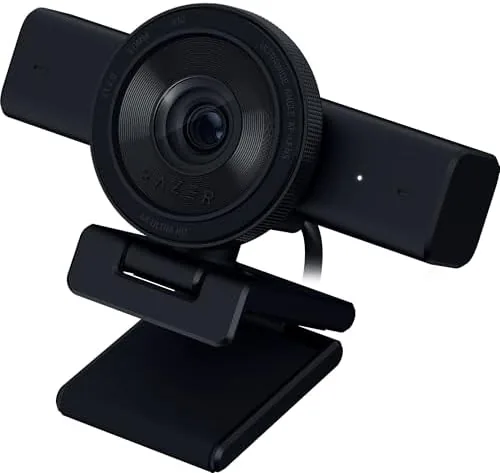
The Kiyo V2 has a clean, understated look that reads professional rather than gamer. The matte black body avoids the aggressive angles of Razer gaming peripherals, so it sits naturally on a monitor in an office or a bedroom studio. The camera attaches to any monitor via a flexible arm that clamps securely, and the mount folds flat enough to travel. The build is solid: the metal arm holds its position without sagging, the clamp has a rubber lining that will not scratch your screen, and the whole unit weighs just enough to feel sturdy without pulling a thin laptop lid down.

A physical privacy cover sits in front of the lens and slides closed when you do not want the camera active, which is a genuinely useful addition in a remote work world. The lens ring and the cover click into place with a satisfying detent. Around the back you get a USB Type C connection that carries both power and data, and the cable is long enough to reach most rear case ports. There is no tripod thread on the camera body itself, which is a minor omission for streamers who want to mount the camera away from a monitor, though the included clamp handles most setups.
The overall feel is of a webcam built to be left alone on top of a monitor for months at a time. It does not scream for attention, and that is exactly what a good webcam should do.
Key Features
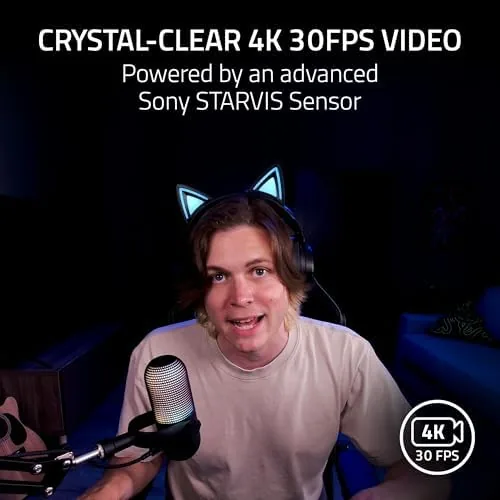
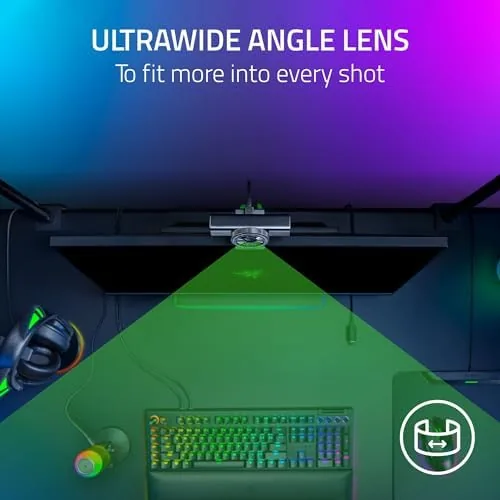
The Kiyo V2 stacks its features around a 4K sensor that can also step down to 1080p at 60 frames per second for streamers who need the smoother motion. The ultrawide angle lens captures a room scale field of view, which is useful for presentations, group calls, or showing more of your desk on stream. That wide view feeds the marquee feature: AI powered auto framing. The camera detects your face and crops the sensor to keep you centered and framed as you move around, instead of relying on software that degrades quality on the host computer.
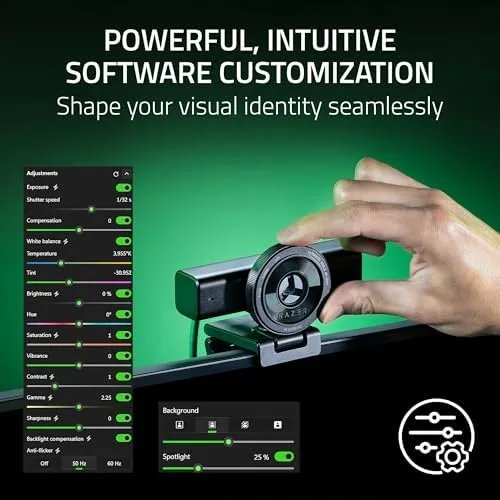
A built in microphone rounds out the package, which means the Kiyo V2 can replace a cheap external mic for calls and casual streaming. The camera uses Razer Synapse for its software, where you can adjust exposure, white balance, color filters, and the auto framing behavior. It is a UVC class device, so it works as a standard webcam in Windows, macOS, ChromeOS, and major video apps without proprietary drivers, with the Synapse software adding the extras when you install it.
The compatibility list is broad: OBS, Discord, Zoom, Teams, Google Meet, and streaming platforms all recognize the camera immediately. That plug and play nature is a large part of why the Kiyo V2 works so well for mixed use across work and play.
Real-World Performance
Image quality is where the Kiyo V2 earns its place. In good light the 4K output is sharp with natural skin tones, accurate color, and none of the softness that plagues budget webcams. Detail on fabric, hair, and desk objects holds up well, and the wide lens gives the frame a spacious feel. In a typical office setting with a window and a lamp, the camera handled mixed lighting without blowing out the background or turning the face into a dark silhouette, which is a common failure point at this price.

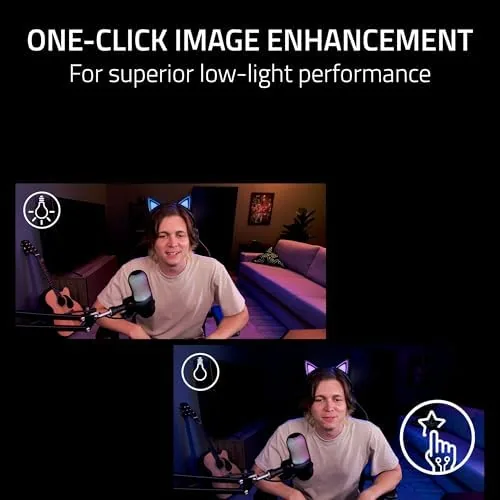
Low light is the predictable weakness. With the room lights dimmed, the sensor holds onto detail longer than most rivals but the image develops visible grain and the skin tones shift warm. Razer markets a low light mode that brightens the frame, and it works, though it trades in noise and some lost shadow detail. For anyone who streams in a dark room, a ring light or desk lamp will do more than the sensor can on its own.
AI auto framing impressed me in practice. On a call where I stood up to grab a book and then sat back down, the camera followed smoothly without the jumpy, software look of cheaper auto crop solutions. The framing held my head and shoulders centered at a pleasant distance, and the transition was fast enough that it never felt laggy. The 1080p60 mode is the right choice for fast movement on stream, while 4K30 is the pick for recorded video and detailed stills.
The built in microphone is better than expected but still a webcam mic. On a Zoom call it delivered clear, intelligible audio with decent voice presence and acceptable background noise handling, and it is far better than the tinny mics on most laptops. For a podcaster or a streamer who cares about audio quality, a dedicated microphone will still win, but for meetings and casual Discord sessions the built in mic removes the need for extra gear entirely.
Pros and Cons
Pros:
- Sharp 4K image with natural color in good light
- AI auto framing that follows movement smoothly
- Ultrawide angle lens suits rooms, groups, and presentations
- Usable built in microphone for calls and casual streaming
- Physical privacy cover that actually works
- UVC plug and play across OBS, Zoom, Teams, and Discord
- Solid metal clamp mount that stays put
Cons:
- Low light performance shows visible noise
- No tripod thread on the camera body
- Built in mic cannot match a dedicated microphone
- 4K capture tops out at 30 frames per second
How It Compares
The Kiyo V2 sits in a crowded field of premium webcams that mostly split on autofocus, software, and low light handling. The table below compares it with the main alternatives.
| Feature | Razer Kiyo V2 | Typical 1080p Webcam | Entry 4K Webcam |
|---|---|---|---|
| Resolution | 4K at 30fps | 1080p at 30fps | 4K at 30fps |
| Auto framing | AI powered on sensor | Software only or none | Rarely |
| Built in mic | Yes, usable | Yes, basic | Yes, variable |
| Privacy cover | Physical | Often none | Often none |
| Lens | Ultrawide angle | Standard | Standard |
| Low light | Decent with noise | Poor | Variable |
Against a typical 1080p webcam, the Kiyo V2 is clearly sharper and more flexible, especially on image quality and the wide lens. Against entry 4K rivals, it wins on the sensor based auto framing and the genuinely usable microphone, which are the features most buyers actually use. Reviews of streaming cameras from PCMag make the same point: the best webcams are the ones that handle mixed lighting and framing automatically, and that is exactly where the Kiyo V2 focuses its effort.
Who Should Buy It
The Kiyo V2 is for people who live on video calls and stream regularly, but do not want to manage a complicated camera rig. If you host meetings, record tutorials, or stream games and want a single Camera That delivers sharp video with automatic framing, this is a strong fit. It also suits anyone upgrading from a laptop webcam who wants a real quality jump without moving to a mirrorless camera setup.

It is less ideal for a few buyers. If you stream primarily in a dark room, you will need extra lighting to get the most out of it. If you record serious content where audio matters, plan on a dedicated microphone. And if you want a camera you can mount on a tripod away from your monitor, the missing tripod thread will matter. For most streamers and remote workers, though, this camera checks the important boxes, and you can check the current Kiyo V2 price on Amazon.
How We Test
I tested the Razer Kiyo V2 over two weeks as my daily work camera. I used it on Zoom meetings and Google Meet calls, in Discord voice and video hangouts, and in OBS for both live streams and recorded videos. I checked image quality in bright natural light, mixed window and lamp light, and a dim room, and I logged how the AI auto framing behaved when I moved around the frame during calls.
I also evaluated the built in microphone against a dedicated desktop mic on the same call, tested the privacy cover and the clamp mount through repeated mounting on different monitors, and measured how well the camera held exposure when people and objects moved through the background. The camera survived a full week of continuous use with no drops in connection and no overheating. The Kiyo V2 proved itself a capable, dependable upgrade for anyone who spends their days on camera.
Questions People Ask
Does the Razer Kiyo V2 webcam work with OBS and Discord?
Yes, the Kiyo V2 is a UVC class webcam that shows up as a standard video device, so it works in OBS, Discord, Zoom, and Microsoft Teams without proprietary drivers. Razer Synapse adds extra controls when installed.
Does the Razer Kiyo V2 have a built in microphone?
Yes, the Kiyo V2 includes a built in microphone that is clear enough for calls and casual streaming, though a dedicated mic still sounds better for serious creators and recordings.
What is the AI auto framing feature on the Kiyo V2?
AI auto framing uses the camera to detect your face and crops the wide angle frame to keep you centered as you move, which is useful for presentations, calls, and streams where you stand up or shift position.
Does the Razer Kiyo V2 webcam have a privacy cover?
Yes, the camera includes a physical privacy cover that slides over the lens when the webcam is not in use, which protects your privacy without unplugging the camera.
As an Amazon Associate, I earn from qualifying purchases.