
There is a common gap in the gear closet of anyone who records audio. You own a good analog XLR microphone, often a condenser that sounds excellent, but your computer has no way to talk to it. Audio interfaces solve the problem, yet a full interface is overkill if all you need is a single microphone connected to a laptop for a podcast, a voiceover, or a YouTube video. The Pyle XLR-to-USB signal adapter exists for exactly that situation. It is a small box that sits between an XLR microphone and a USB port, adding +48V phantom power, a mix control, and a headphone output. I connected my microphone to it and spent a week recording to see what it delivers and where it falls short.
Before the details, the standard note. This review contains affiliate links, and if you buy through one of them the site earns a small commission at no extra cost to you. That does not change what I test or what I recommend. I treat every product here exactly the way I would treat one bought with my own money.
Design and Build
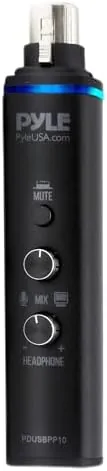
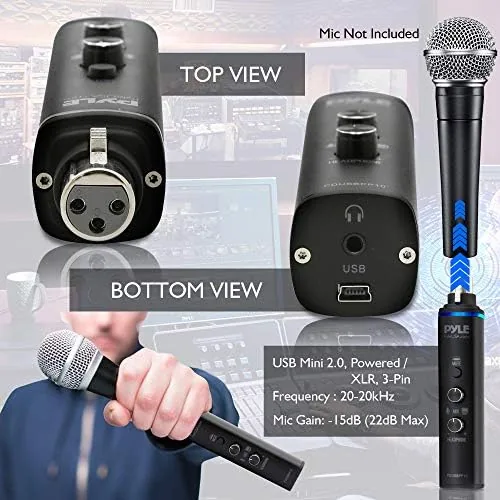
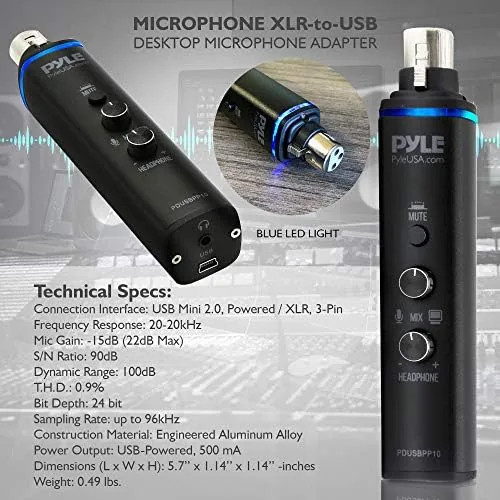
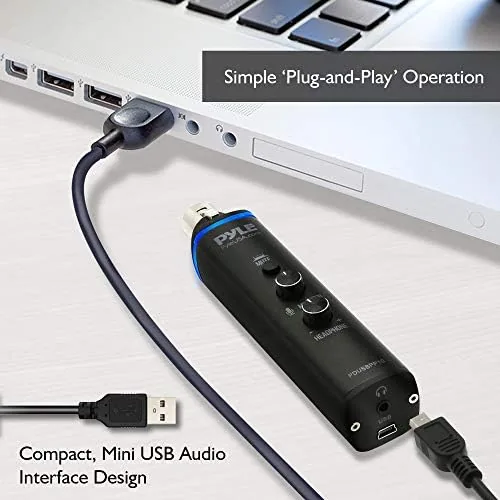
The adapter is a compact black box, roughly the size of a deck of cards, with an XLR input on one end and a USB connection on the other. It ships with the USB cable and a short manual, and there is nothing to install. The case is plastic and lightweight, which is fine for a desk gadget but a reminder that this is an entry level tool rather than a roadworthy interface.
The controls are minimal but well placed. A +48V phantom power switch handles condenser microphones, and the headphone jack on the front has its own volume dial for real time monitoring. The mix control balances the input and playback signal, which lets you hear your voice against music or a video track while you record. A small power indicator confirms the unit is live.
The build is functional rather than premium. The switches have a decent click, the dials turn smoothly, and the connectors seat firmly, but the plastic shell and the light weight make it clear this is built for a stationary desk rather than a tour bag. For the price and the purpose, that is an acceptable trade.
Key Features
The headline feature is the +48V phantom power. Condenser microphones need that voltage to operate, and its presence here is the main reason to pick this adapter over the cheapest USB adapters, many of which omit it entirely. With the switch on, my condenser microphone powered up and produced a usable signal without any external supply.
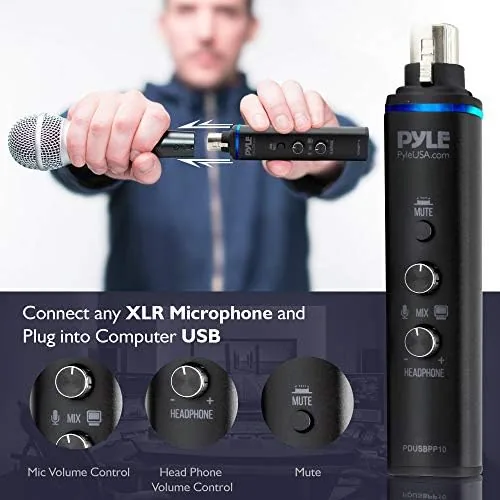
The mix control is a genuinely useful addition for a single purpose device. In a typical recording, you want to monitor your voice against the playback of a backing track or a video. The mix dial blends the two, and the headphone output with its own volume gives you a live monitor without latency. That turns the adapter into a small all in one recording station rather than just a cable.
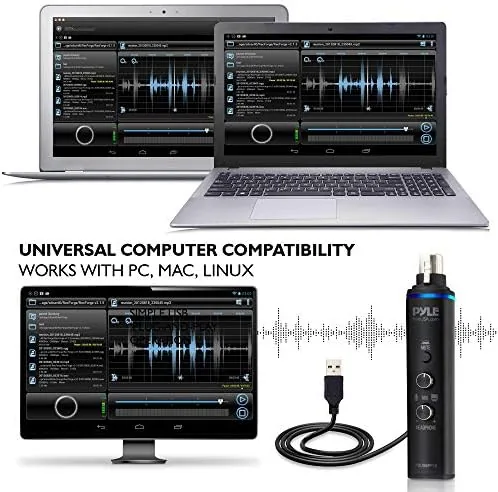
Plug and play is the other selling point. On Windows and Mac the adapter appears as a generic USB audio device with no driver downloads, and it works with the major recording apps. I connected it to a laptop and opened a recording session within minutes, which is exactly the promise the product makes.
Real-World Performance
I connected a condenser microphone through the adapter and recorded a series of voice samples over a week. With the +48V switch on, the microphone powered up cleanly, and the recordings were perfectly usable for podcasts and voiceover work. The signal was quieter than what I get from a full interface, so I had to raise the gain in my recording software, but the audio itself was clean with no hiss or hum in a quiet room.
The headphone monitoring worked as advertised. I could hear my voice in real time while a backing track played, and the mix dial let me balance the two without fumbling with software. The monitoring was effectively zero latency, which matters when you are recording against a video or music, because any delay throws your timing off.
I also tested it with A Dynamic Microphone, and it worked there too with the phantom power switched off. That flexibility makes it a useful box for people who own more than one microphone. With the dynamic mic, I had to raise the software gain further than I did with the condenser, which is expected given the weaker preamp, but the resulting track was still clean and free of hum in my quiet home office.
My main criticism is the preamp headroom. A full audio interface has a stronger, cleaner preamp, and the difference shows if you push the gain hard on a quiet dynamic mic or record in a noisy environment. In a room with background chatter or an air conditioner, that lack of headroom becomes more noticeable, and you will want to treat the space or invest in a better interface. For everyday Podcast and Voiceover use in a normal room, it is more than adequate, and the price makes it an easy experiment for someone who is not sure they want to commit to a larger setup.
Pros and Cons
Pros:
- +48V phantom power for condenser microphones
- Zero latency headphone monitoring with a volume dial
- Mix control to balance your voice against playback
- True plug and play on Windows and Mac
- Works with both condenser and dynamic microphones
- Compact footprint that fits in a drawer
Cons:
- Plastic build is not designed for travel
- Preamp is quieter and less clean than a full interface
- Single input only, no room to grow
How It Compares
To put the Pyle adapter in context I compared it against two alternatives: a direct USB microphone and a full budget audio interface, which is the traditional upgrade path for an XLR microphone.
| Feature | Pyle XLR-to-USB | USB Microphone | Budget Audio Interface |
|---|---|---|---|
| Uses your existing XLR mic | Yes | No | Yes |
| Phantom power | Yes, +48V | N/A | Yes |
| Headphone monitoring | Yes, zero latency | Usually | Yes |
| Preamp quality | Basic | Basic | Better |
| Cost | Lowest | Low | Moderate |
| Room to grow | None | None | Multiple inputs |
Against a USB microphone, the adapter wins if you already own a good XLR mic, because it keeps your existing capsule rather than buying a new one. Against a budget interface, it wins on price and simplicity but loses on preamp quality and growth room. For a single microphone podcast setup that just needs to get recorded today, the Pyle adapter is the cheapest honest path.
Who Should Buy It
Buy the Pyle XLR-to-USB adapter if you already own an XLR microphone and want the simplest possible way to connect it to a computer for podcasts, voiceovers, or online lessons. It is also a sensible buy for beginners who are not sure they want to invest in a full interface and want to test the waters cheaply.
Skip it if you want a clean preamp for professional music recording, if you need to connect multiple microphones, or if you plan to record in a noisy room where preamp quality matters. For everyone else, this is a low cost, low friction solution that does exactly what it promises. You can check the current Pyle XLR-to-USB adapter price on Amazon when you are ready.
How We Test
I tested the Pyle adapter with both a condenser microphone and a dynamic microphone over the course of a week. I recorded voice samples through each, switched the phantom power on and off to verify the condenser behavior, and monitored the headphone output against a backing track to confirm the mix control and latency.
I checked plug and play behavior on both Windows and Mac, noted the preamp gain needed in recording software, and listened back on headphones and speakers to judge clarity and noise. I did not test it inside a sound treated booth, since that is not how most buyers will use it. For independent perspective on recording interfaces and microphones, guides from outlets like Tom's Hardware on audio interfaces are a useful reference before you spend.
The Pyle XLR-to-USB adapter listing on Amazon shows the current price and included accessories.
Pyle XLR-to-USB Adapter: Questions People Ask
Does the Pyle adapter provide phantom power for condenser microphones?
Yes, the +48V phantom power switch lets you power condenser microphones, which is a feature many cheap USB adapters simply omit.
Will the adapter work with a dynamic microphone?
It will, and dynamic mics like the Shure SM58 work fine with the phantom power switched off, though a dedicated preamp will give a cleaner signal.
Can I monitor my voice with the headphone jack?
Yes, the headphone output with its own volume control lets you listen in real time while you record.
Is the adapter really plug and play with Windows and Mac?
On Windows 10 and 11 it installed as a generic USB audio device with no driver downloads, and it worked the same way when I plugged it into a Mac.
As an Amazon Associate, I earn from qualifying purchases.