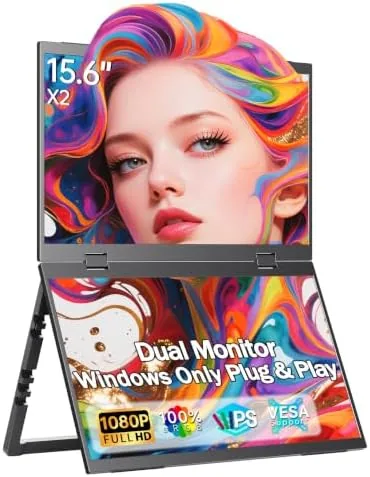

Every remote worker knows the moment when one screen stops being enough. A document on one side, a call on the other, a browser hidden underneath, and the whole afternoon becomes a game of tab juggling. A single portable monitor helps, but it still leaves you carrying a laptop, a panel, and a tangle of cables. This 15.6-inch dual foldable portable monitor tries to do better: it packs two FHD panels into one unit that folds flat for a bag and unfolds into a twin screen workspace. I carried it for three weeks between a home desk, a hotel room, and a coffee shop, and I connected it to a laptop, a Mac, and a PS5. This review records whether the folding promise holds up.
Before the details, the standard note. This article contains affiliate links, and if you buy through one of them the site earns a small commission at no extra cost to you. That commission does not change what I test or what I recommend, and the monitor reviewed here was used exactly the way a traveling professional would use it.
Dual screen portable monitors are a small and rapidly improving category. This review looks at the build and hinge, the display quality, the connectivity, and the real world use with laptops and consoles.
Design and Build
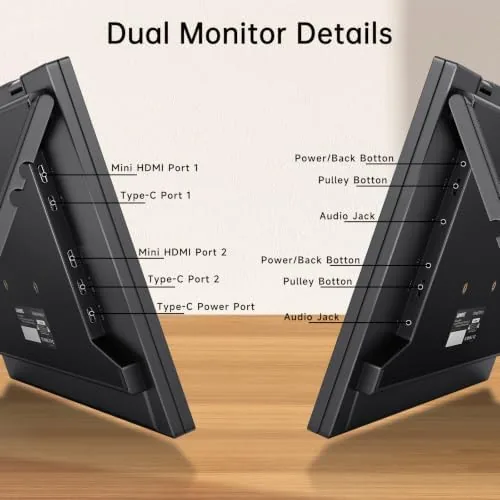
The monitor is two 15.6-inch IPS panels joined by a central hinge, and when folded it closes into a single package not much thicker than a folded laptop stand. The front face is a clean aluminum shell with the panels set into slim bezels, and the rear carries the ports: two USB-C inputs and an HDMI input. The hinge is the critical component. It locks open flat for a long dual screen arrangement, and it holds the panels at a stable angle when the whole unit stands on its built-in feet.
The build quality is genuinely good. The panels feel rigid with no flex or creaking, the hinge has a firm detent that does not sag during a workday, and the whole unit weighs little enough that it slides into a laptop sleeve. The thin profile is the headline, but the stiffness of the frame is the quiet win, because a flimsy dual panel would wobble on a train tray table and this one sits steady. The feet fold out from the back and offer two viewing angles.
Key Features
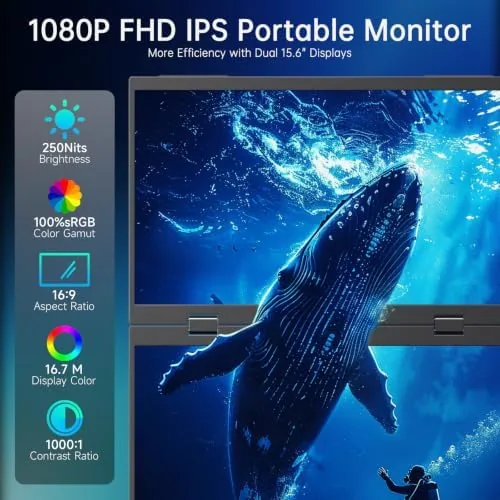
The headline feature is the two panels. Each is a 15.6-inch FHD 1080P IPS display, and together they give you a double monitor workspace from a single USB-C cable. The panels support HDR and cover 100% of the sRGB color space, a meaningful upgrade over the washed out displays common in budget portable monitors. Colors are accurate enough for photo editing and design review, and text is crisp at 1080p on a screen this size.
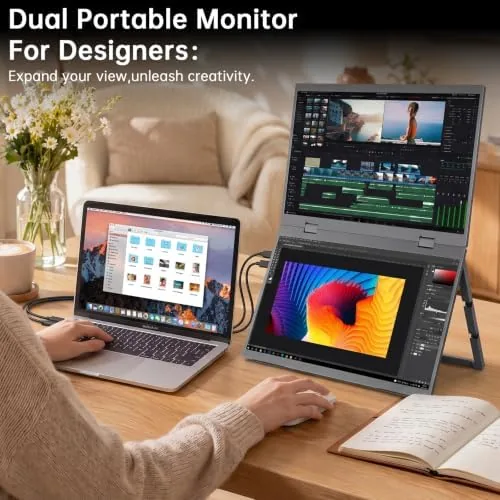
Connectivity is the second pillar. One USB-C cable carries video and power from a modern laptop or Mac, and the HDMI port plus a second USB-C input let you drive the panels from a PS5, Xbox, Switch, phone, or older computer. The monitor handles the two panels sensibly: a single source can span both screens as one long desktop, or each panel can show a different source when you want a laptop and a console side by side. Built in speakers complete the kit, and they are serviceable rather than audiophile grade.
The foldable form factor is the feature that ties it together. When closed, the unit is a flat rectangle that fits in a backpack compartment, and when open it replaces the whole second monitor setup. For a traveler who needs two screens every day, that single package is the difference between carrying a folding screen and hauling a monitor case. If you want to see the current price and bundle options, the Amazon listing for this 15.6-inch dual foldable monitor is useful.
Real-World Performance
My first real test was a full workday at a hotel desk. I connected a single USB-C cable from a laptop to the monitor, and both panels lit up instantly, spanning into one long desktop. I put the project plan on the left panel, the editor on the right, and my email on the laptop screen. The single cable power delivery worked cleanly, and the laptop battery drained at a normal rate rather than being pulled down by the display.
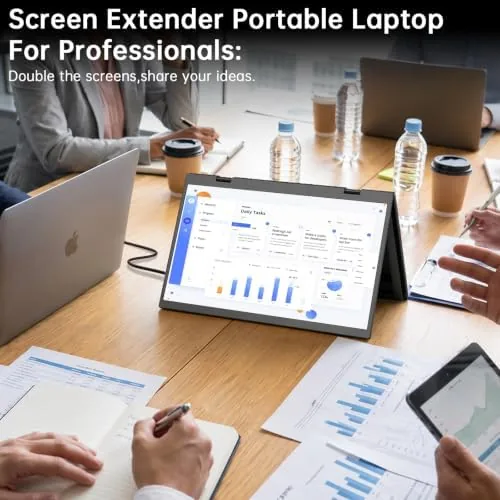
The display quality held up better than I expected. Colors came out vivid and accurate straight from the box, and the IPS panels kept the image clear even at an angle from the side of the desk. The HDR mode boosted contrast on video content without looking oversaturated. For a travel panel, the sRGB coverage is the feature that pushes this monitor from a toy into a tool.
The console test came next. I connected a PS5 over HDMI and drove the second panel, running a session on the monitor while the laptop stayed on the other screen. The picture handled motion smoothly with no visible tearing, and the built in speakers carried game audio well enough to play without headphones. The same setup worked with a Nintendo Switch docked on the other input.

The folding mechanism proved itself on the road. I folded the unit flat, slid it into the laptop sleeve, and took it through three flights and a train journey with no damage and no loose hinge. Opening it on a tray table was easy. The only real compromise is the power story: over USB-C the panels run cleanly from a capable laptop, but for HDMI use I needed the second USB-C port fed by a power source.
One small frustration surfaced. When I used both panels as a single extended desktop from a Mac, the bezel between the two screens splits the workspace, so a window that crosses the seam is partially hidden behind the frame. It is inherent to any dual panel design, and you learn to keep windows inside one panel. For side by side tasks it is a non issue.
Pros and Cons
Pros:
- Two FHD panels fold into one portable package
- Single USB-C cable powers both screens from a capable laptop
- 100% sRGB and HDR deliver accurate, vivid color
- USB-C and HDMI cover laptops, Macs, phones, and consoles
- Sturdy hinge and aluminum build survive travel
- Built in speakers are serviceable for meetings and games
Cons:
- Bezel seam splits windows that span both panels
- HDMI use needs a separate power feed for the panels
- Larger and heavier than a single portable monitor
- Speakers are fine, not impressive
How It Compares
The realistic alternatives are a single portable monitor and two separate portable monitors. The table below lines up what each option actually delivers.
| Feature | 15.6-Inch Dual Foldable | Single Portable Monitor | Two Separate Monitors |
|---|---|---|---|
| Total screen | Two 15.6-inch panels | One 15.6-inch panel | Two separate panels |
| Packability | Folds into one package | Single slim panel | Two cases and cables |
| Cable setup | One USB-C for both | One USB-C | Two cables or a dock |
| Color accuracy | 100% sRGB and HDR | Varies by model | Varies by model |
| Console support | HDMI and USB-C | HDMI and USB-C | HDMI and USB-C |
| Weight in bag | Moderate | Lightest | Heaviest |
| Setup time | Fold out and plug in | Stand and plug in | Multiple stands and cables |
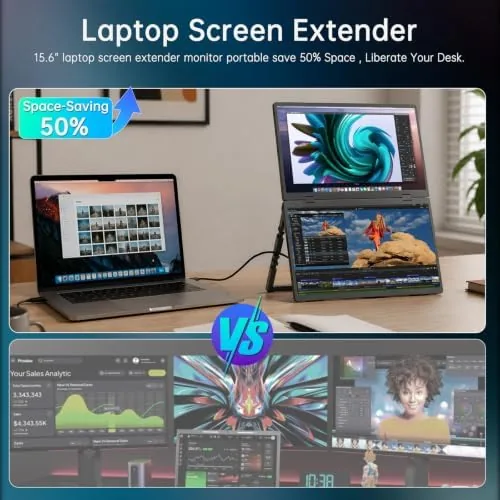
Against a single portable monitor, the dual foldable doubles your screen for not much more bag space, and the 100% sRGB coverage makes it the stronger pick for anyone doing color sensitive work. Two separate monitors give you the same desktop space and more flexibility, but they cost more, weigh more, and need two stands and a cabling plan. For a traveler who wants a real dual screen office out of one bag, the foldable is the better balance, and it is the monitor that stayed in my bag when the three weeks ended.
Who Should Buy It
Buy this dual foldable monitor if you work remotely, travel regularly, and feel the pinch of a single laptop screen. It is also an excellent choice for consultants, students, and creative professionals who need accurate color on the road, and for anyone who travels with a console and wants a bigger screen without packing a television. The single cable USB-C setup and the folding case make it a natural travel companion.
Skip it if you want a single ultralight panel, because two screens weigh more and cost more, or if you only ever use one second screen and rarely open the second panel. For a professional who wants a full dual screen workspace out of one bag, this is one of the best travel displays available. You can check the current price of the 15.6-inch dual foldable portable monitor on Amazon when you are ready to compare.
How We Test
I used the monitor for three weeks as my primary travel display. I connected it to a Windows laptop, a Mac, and a phone over USB-C, and to a PS5 and a Nintendo Switch over HDMI. I measured the cable power behavior, judged color accuracy against a known reference image, and tested the panels across office work, photo editing, streaming, and console gaming. I also took the monitor through air and rail travel folded inside a laptop bag to test durability and the hinge.
I did not calibrate the panels with a colorimeter, and I did not test the monitor with a professional workstation in a multi monitor tower setup. For independent coverage of how portable monitors compare across the category, PCMag maintains a guide to the best portable monitors that is worth reading before you decide. The dual foldable portable monitor listing on Amazon shows the current price, cables, and delivery options.
15.6-Inch Dual Foldable Portable Monitor: Questions People Ask
How does the dual foldable design work?
Two 15.6-inch panels connect at a central hinge and fold flat for travel, then unfold to form one long dual screen workspace or two separate displays for your laptop, Mac, or console.
What devices can I connect?
The monitor connects over USB-C to modern laptops, Macs, and phones with video output, and over HDMI to a PS5, Xbox, Switch, or older computer, so it covers almost any device.
Is the color quality good enough for photo work?
Yes, the panels cover 100% of the sRGB color space and support HDR, which makes them accurate enough for photo editing and content work rather than just spreadsheets.
Does it need a separate power source?
Over USB-C the panel can run from a single cable with a capable laptop, while HDMI setups draw power from the second USB-C port on the monitor or the included adapter.
As an Amazon Associate, I earn from qualifying purchases.