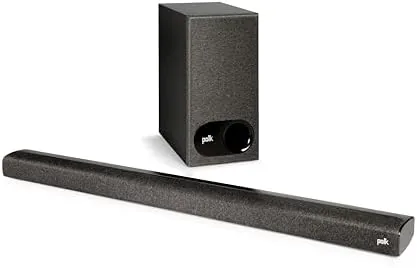

Every home theater story begins the same way. The new television arrives, the picture is stunning, and then the first movie plays with audio that sounds like it is coming through a tin can. The Polk Audio Signa S2D is the answer to that specific complaint: a Compact sound bar and a wireless subwoofer that bolt onto an existing TV with one cable and instantly make dialogue clear and explosions heavy. This review covers two weeks of living with the Signa S2D in a normal living room.
The disclosure comes first, as always. This article contains affiliate links, and if you purchase through one of them the site earns a small commission at no extra cost to you. That commission does not affect what I test or what I recommend.
Design and Build
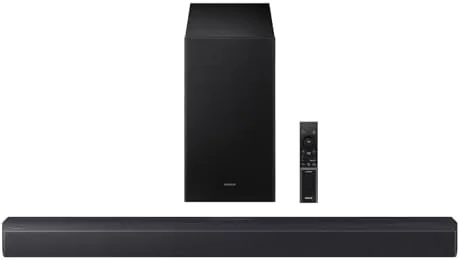
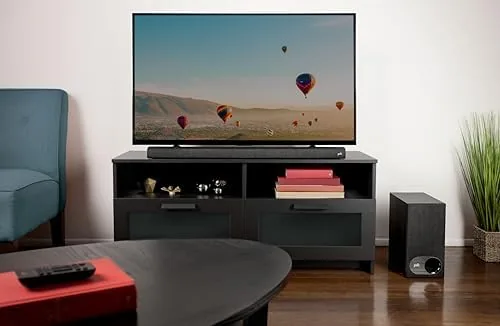
The Signa S2D is built to be seen, which is unusual for a budget sound bar. The bar itself is a low, wide slab finished in a dark fabric that blends with most media consoles, and it sits in front of a TV without blocking the remote sensor. The wireless subwoofer is a tall, slim box that stands in a corner out of sight, and the whole package takes up far less room than a pair of tower speakers.
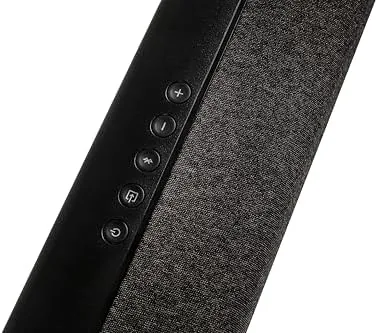
Setup is genuinely five minutes of work. The sound bar connects to the TV with a single cable, either HDMI or optical, and the subwoofer pairs with the bar wirelessly on its own, so there is no cable running across the floor. The bar has a small display on the front that shows the current input and volume level, and the included remote covers power, volume, input selection, and the VoiceAdjust controls.
The build quality is reassuring. The fabric grille is taut with no loose seams, the subwoofer has a solid weight that stops it sliding, and the power brick is internal to the bar, so there is no wall wart to hide. The online exclusive finish is a subtle matte grey that does not show dust as badly as glossy black bars do.
Key Features
The Signa S2D decodes Dolby Digital and uses DTS Virtual Surround to widen the soundstage, and both formats are handled automatically when the TV passes the audio through. There is no Atmos support and no upward-firing drivers, so this is not a ceiling-filling experience, but the virtual surround adds real width to movies without the need for rear speakers.
The signature feature is VoiceAdjust. This is Polk dialogue enhancement that raises or lowers the volume of voices relative to the rest of the mix, and it solves the most common sound bar complaint of all: dialogue that gets lost in the action. With one press you can lift voices out of the mix for late-night viewing or push them back when you want the soundstage to breathe.
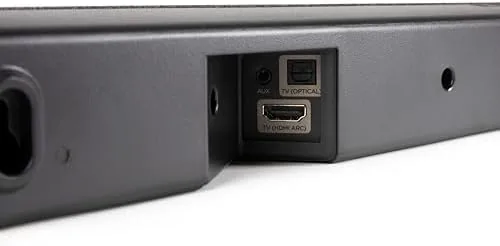
Connections cover the basics well. There is an HDMI input with Audio Return Channel so the TV remote controls the volume, an optical input for older TVs, and an auxiliary jack for a music player. Bluetooth handles phone streaming for music, and the bar switches inputs automatically when it detects a signal. The wireless subwoofer adds real low end, which is the difference between a sound bar and an upgrade.
Real-World Performance
I set the Signa S2D up in a living room with a mid-size TV and lived with it for two weeks. The first movie night made the case instantly: dialogue that had been muddy on the TV speakers was suddenly crisp, and the subwoofer gave car chases and storm scenes a physical weight the old setup never had. At moderate volume the bar is clean and articulate, and it fills a medium room without effort.
VoiceAdjust was the feature I used most. On a show with a quiet lead actor, two presses of the remote lifted the voices clearly above the music and effects, and I did not have to ride the volume the way I do with most bars. Late at night, dropping the dialogue back while lowering the overall level kept the sound intelligible without waking the house.
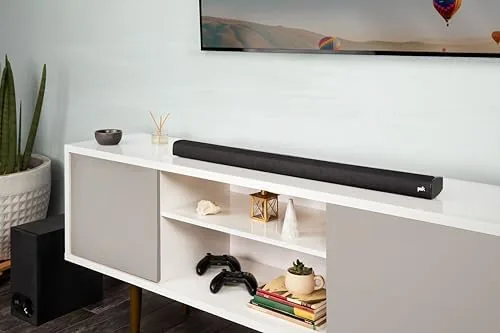
Music over Bluetooth was a pleasant surprise. The bar produced a warm, room-filling sound for a two-piece system, with the wireless subwoofer anchoring the low end without booming. The limit is the size of the soundstage: this is a bar, not a surround system, so you will not hear precise effects moving behind you. For the price, that is an honest trade-off, and it is one most living rooms accept happily.
One evening I used the S2D for a sports broadcast and found the VoiceAdjust setting useful in a different way. The crowd and commentary mix can bury the announcer, and a quick press lifted the commentary cleanly above the noise. The bar also handled the transition between inputs well: switching from the TV to Bluetooth and back happened automatically, and the subwoofer never dropped its connection once during the two weeks, even with the media console sitting a few feet from a router. For a system this simple, reliability is the feature that matters most, and the S2D delivered it every day.
Pros and Cons
Pros:
- VoiceAdjust makes dialogue clear without touching the volume
- Wireless subwoofer adds real bass with no floor cable
- Five-minute setup with HDMI and automatic input switching
- Dolby Digital and DTS Virtual Surround supported
- Compact design that fits small living rooms
- Bluetooth streaming for music from a phone
Cons:
- No Dolby Atmos support for height effects
- Soundstage is limited by the compact bar design
- Limited inputs with only one HDMI
How It Compares
The Signa S2D competes at the value end of the sound bar market, where the two bars it meets most often are the Polk Signa Solo and the Sonos Beam. The table below lines up the important differences.
| Feature | Polk Signa S2D | Polk Signa Solo | Sonos Beam |
|---|---|---|---|
| Subwoofer | Wireless, included | None | Optional, separate |
| Dialogue enhancement | VoiceAdjust | VoiceAdjust | Speech enhancement |
| Surround | DTS Virtual Surround | None | Virtual surround |
| Bluetooth | Yes | Yes | No, AirPlay only |
| Setup | One cable | One cable | One cable |
| Typical price | Budget | Low | Premium |
The Signa Solo is a single bar with the same VoiceAdjust magic but no subwoofer, so the bass is thin in comparison. The Sonos Beam is a genuinely better speaker with a cleaner soundstage, but it costs several times more and needs a separate sub for real low end. The S2D wins on value: it delivers the two things most buyers actually want, clear dialogue and real bass, at a fraction of the premium price.
Who Should Buy It
Buy the Signa S2D if you are tired of straining to hear dialogue, if your TV speakers have no bass, or if you want a living room upgrade that takes five minutes to install. It is the right bar for apartments, small rooms, and anyone who wants a big improvement without a big box. You can check the current price of the Polk Signa S2D on Amazon when you are ready to order.
Skip it if you want a full surround setup with rear speakers, if Atmos height effects matter to you, or if you have a large open-plan space that needs a much bigger bar. For the average living room, this is one of the best value upgrades in TV audio.
How We Test
I used the Signa S2D in a real living room for two weeks, connected first over HDMI and then over optical, and I judged dialogue clarity across shows with quiet actors and heavy soundtracks. I tested VoiceAdjust at both ends of its range, listened to music over Bluetooth, and checked the wireless subwoofer pairing and range through a typical room layout.
I did not run any acoustic measurement equipment for this review, so the sound notes are my listening impressions over time. For an independent view of the sound bar market, Wirecutter guide to the best sound bars is a respected reference. The Polk Signa S2D listing on Amazon shows the current price and finish options.
Polk Signa S2D: Questions People Ask
Does the Polk Signa S2D support Dolby Atmos?
No, the Signa S2D decodes Dolby Digital and uses DTS Virtual Surround to simulate width and height, but it does not process Atmos object audio the way premium bars do.
How do I connect the sound bar to my TV?
You can use the HDMI input, the optical input, or the auxiliary jack, and most TVs will output sound over any of these paths, with HDMI giving the cleanest single-cable setup.
What is VoiceAdjust technology?
VoiceAdjust is Polk dialogue enhancement that lets you raise or lower the volume of voices relative to the rest of the mix without touching the master volume, which fixes the classic dialogue problem.
Does the subwoofer need a cable?
No, the subwoofer connects to the sound bar wirelessly, so you only place it near a wall outlet and it pairs automatically with no cable running across the room.
As an Amazon Associate, I earn from qualifying purchases.