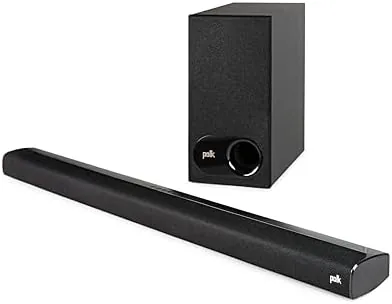

Modern televisions are astonishingly thin and, because of that, astonishingly bad at sound. There is simply no room inside a half-inch panel for a speaker that produces real bass or clear dialogue, so the audio quality of a flagship TV often lags its picture quality by a decade. The standard fix is a sound bar, and the Polk Audio Signa S2 is one of the most popular of the affordable class, a slim bar with a wireless subwoofer that promises a dramatic improvement without the complexity of a full surround system.
I connected the Signa S2 to a smart TV and lived with it for several weeks, watching movies, Streaming shows, and playing music. This review is the record of that time. Before the details, the standard note: this article contains affiliate links, and if you buy through one of them the site earns A Small commission at no extra cost to you. That commission does not change what I test or what I recommend.
Design and Build
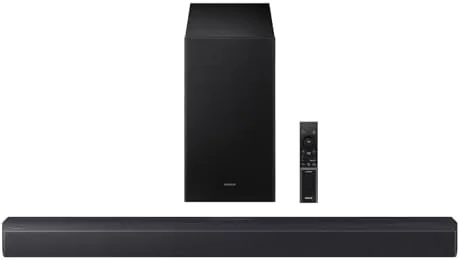
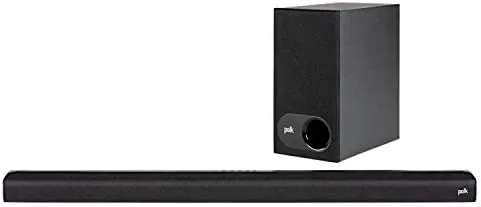
The Signa S2 is built around a design goal of staying out of the way. The bar itself is ultra-slim, barely taller than a fingertip, and it is finished in a dark fabric wrap that blends with any TV stand or wall. It sits low enough that it will not block the bottom of your screen on a typical stand, and it is light enough to mount on the wall without drama if your TV is wall-hung.
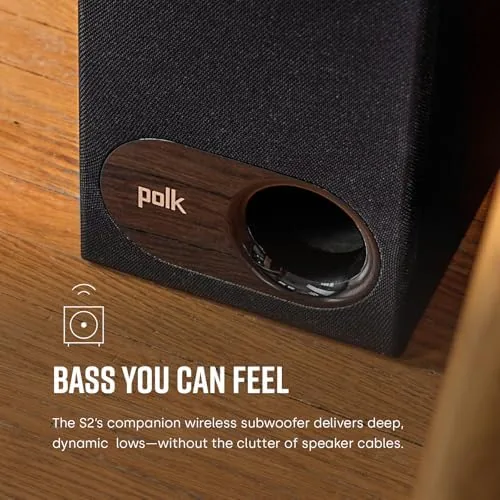
The wireless subwoofer is a compact sealed box that pairs with the bar automatically the first time you power it on. The beauty of a wireless sub is placement freedom: you can set it on either side of the TV, behind a sofa, or in a corner, and the deep bass reaches your ears without a visible cable connecting the two units. The build quality on both pieces is reassuring, with dense cabinets that do not rattle at high volume.
Key Features
The headline feature is the combination of a two-channel sound bar with a wireless subwoofer, a configuration often called 2.1. The bar handles the mids and highs, which is where voices and dialogue live, and the sub handles the low end, which is where explosions and music gain their weight. Splitting the work this way means neither driver is pushed past its comfort zone, and that division is the reason a small bar can fill a room.

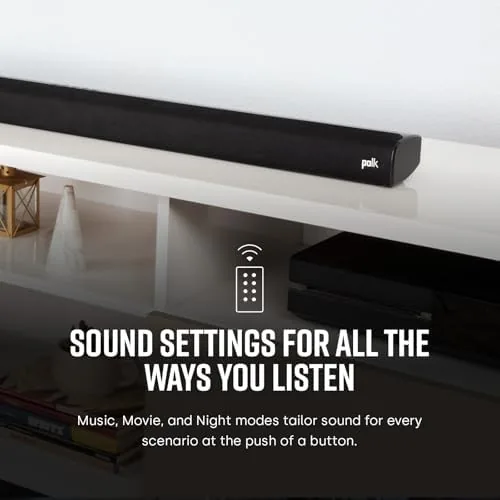
Polk's Voice Adjust technology is the feature that matters most for everyday TV. It boosts the mid-range frequencies where dialogue sits, so voices stay clear and audible even when the mix is full of explosions and score. A single button on the remote or the bar cycles through three levels of voice boost, which is a genuinely useful tool for shows with muddy audio, and it is the reason this bar is popular with people who watch a lot of dialogue-heavy television.
Setup is about as simple as home audio gets. The bar connects to the TV over HDMI ARC or an optical cable, the sub pairs itself, and a Bluetooth connection handles phone and tablet audio for music. With HDMI ARC the TV remote controls the bar volume directly, so there is no second remote to juggle, and no app to install or account to create. That simplicity matters more than it sounds, because most sound bars fail in the first week not through poor sound but through setup friction, and the Signa S2 removes that friction entirely.
Real-World Performance
The first thing I noticed after hooking up the Signa S2 was how much of the sound suddenly had physical presence. Action sequences that sounded flat through the TV speakers gained weight, with the sub producing real, room-filling bass on explosions, car chases, and scores. The bar added width and separation, so effects and voices came from distinct places instead of one flat source behind the screen.

Dialogue is where the bar earns its keep. On a standard drama with a normal mix, voices were clear with the voice boost off, and on poorly mixed shows, one press of Voice Adjust lifted the dialogue out of the noise without making the sound boxy or unnatural. That single feature is worth the price of admission for anyone who has ever complained they cannot hear what characters are saying.
I also spent time with music and Gaming. Over Bluetooth, the bar played streaming music with a warm, full-bodied sound that is genuinely enjoyable for casual listening, though it is not a substitute for a proper stereo system at high volume. Connected to a console over the TV, the bar handled game audio with the same presence as movies, and I did not notice any problematic audio lag in the games I played. At the higher end of its volume range the bar stays composed rather than harsh, which is a common weakness in affordable sound bars, and the subwoofer never bottomed out on bass-heavy tracks during my listening.
Pros and Cons
Pros:
- Ultra-slim bar that blends into any TV setup
- Wireless subwoofer adds real, adjustable bass
- Voice Adjust mode makes dialogue clear and easy to tune
- Simple HDMI ARC setup with TV remote control
- Bluetooth music streaming included
Cons:
- Not a true surround system, no rear channels
- Bar lacks the refinement of far more expensive models
- No built-in voice assistant or smart speaker features
How It Compares
The Signa S2 competes in the crowded 2.1 sound bar market, and the closest comparisons are the Vizio V-series and the Samsung HW-A450, both of which pair a slim bar with a wireless sub at a similar price. The differences come down to tuning and features.
| Feature | Polk Signa S2 | Vizio V-Series | Samsung HW-A450 |
|---|---|---|---|
| Configuration | 2.1 with wireless sub | 2.1 with wireless sub | 2.1 with wireless sub |
| Dialogue feature | Voice Adjust, 3 levels | Dialogue mode | Standard |
| HDMI ARC | Yes | Yes | Yes |
| Bluetooth | Yes | Yes | Yes |
| Surround support | No | Virtual surround | No |
Against the Vizio, the Polk brings a more focused voice-tuning feature and a slightly more polished mid-range, while the Vizio counters with virtual surround processing. Against the Samsung, the Polk has the edge on dialogue clarity and a warmer default tuning. None of these bars produces surround sound, and anyone expecting rear channels will be disappointed, but within the 2.1 class the Signa S2 is one of the most balanced performers.
Who Should Buy It
Buy the Polk Audio Signa S2 if you have a smart TV with weak speakers, if you watch a lot of movies or dialogue-heavy shows, or if you want a serious audio upgrade without running speakers around the room. It is the ideal first sound bar: inexpensive, simple to set up, and immediately better than the television it replaces.
Skip it if you want true surround sound with rear channels, if you need a smart speaker with voice control built in, or if you demand the last word in audiophile detail. For the vast majority of TV owners, the Signa S2 delivers exactly the upgrade they need at a price that makes sense. You can check the current Polk Audio Signa S2 price on Amazon when you are ready.
How We Test
I tested the Signa S2 over several weeks connected to a smart TV over HDMI ARC, with the subwoofer placed first beside the bar and then across the room to confirm the wireless range and placement flexibility. I cycled through all three Voice Adjust levels on dialogue-heavy shows, compared the sound against the TV's built-in speakers, and played music over Bluetooth and console audio through the TV to check overall balance.
I did not measure frequency response in a laboratory, and my room is typical rather than acoustically treated, so results will vary with your space and your TV. Independent coverage such as Wirecutter's guide to the best sound bars is a useful place to see how the Signa S2 compares with the rest of the category.
The Polk Audio Signa S2 listing on Amazon shows the current price and what is included in the box.
Questions People Ask
How easy is the Polk Audio Signa S2 to set up?
Very easy. The sound bar connects to a TV over HDMI ARC or optical, and the subwoofer pairs wirelessly within seconds, with no app required.
Does the Signa S2 improve dialogue on TV shows?
Yes. The Voice Adjust setting lifts mid-range frequencies, so dialogue stays clear even during loud action scenes and effects-heavy sequences.
Does the sound bar work with any TV?
It works with any TV that has an optical port or HDMI ARC. With HDMI ARC you can also control the volume with the TV remote.
Can the Signa S2 stream music from a phone?
Yes. It supports Bluetooth, so you can pair a phone or tablet and stream music, podcasts, and other audio without touching the TV.
As an Amazon Associate, I earn from qualifying purchases.