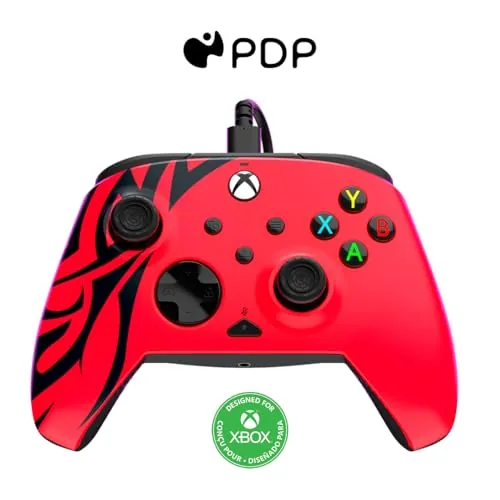

There was a time when the gap between a budget controller and a premium pad was obvious the moment you picked them up. The cheap one felt hollow, the triggers felt loose, and the extra paddles that competitive players love simply did not exist until you paid a premium. The PDP Rematch Enhanced wired Controller for Xbox quietly erases most of that gap. It brings two mappable back buttons, adjustable trigger travel, and built in audio controls to a price that lands well below the flagship wireless pad, and it is licensed for both Xbox and PC.
I spent a month gaming with the Spirit Red model across shooters, racing games, platformers, and a long stretch of a story driven adventure, and the Rematch performed like a pad that costs twice as much. The back buttons work, the trigger stops shave real time off racing shifts, and the wired connection means zero input lag and zero battery anxiety. There are honest trade offs, chief among them the permanent cable, but within its price class this controller makes a very strong case.
The usual disclosure first. This article contains affiliate links, and if you buy through one of them the site earns a small commission at no extra cost to you. That commission does not change what I test or what I recommend, and the controller was used exactly as an owner would use it.
The rest of this review covers the build, the headline features, how the pad performs across a month of games, and who should reach for it.
Design and Build
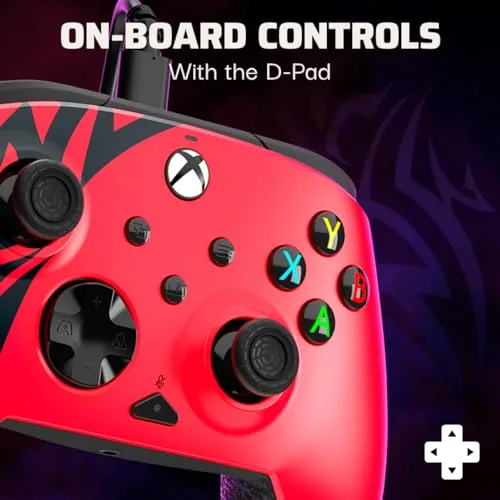
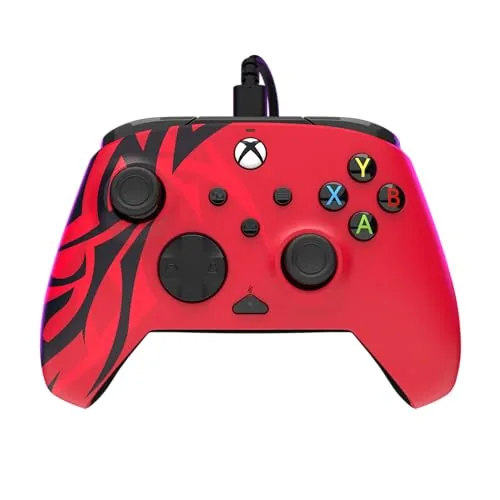
The Rematch makes a good first impression. The shell is a deep spirit red With a textured grip across the back that keeps the pad planted in sweaty palms, and the whole body has a reassuring heft to it. PDP added weight to this model specifically to keep it from feeling cheap, and it shows, because the controller sits in the hand with the solidity of a much more expensive gamepad rather than the hollow feel of a generic wired alternative.
Button feel is the place where budget pads usually fall apart, and the Rematch does not. The face buttons are crisp and responsive, the d pad is accurate enough for fighting game specials, and the analog sticks have a smooth, well damped motion with a decent range. The triggers have a firm pull, and the bumpers click with confidence. After a month of aggressive play nothing creaks, nothing sticks, and the shell has no scratches beyond what any controller would pick up.
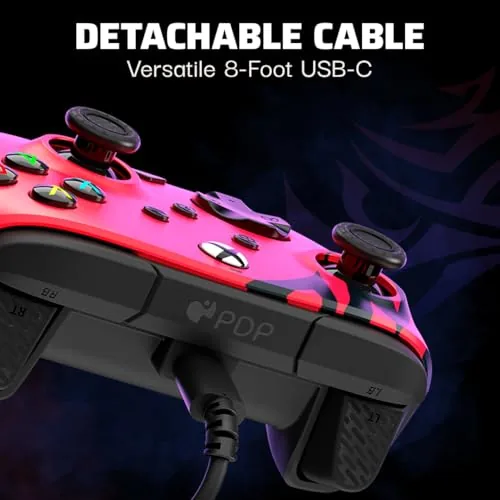
The layout mirrors the standard Xbox pad, so anyone who has held an official controller will feel at home immediately. The cable is roughly nine feet long, which is generous for a couch setup, and it is detachable at the controller end, so a snagged wire does not spell the death of the pad. The 3.5mm headphone jack sits at the bottom for your headset, with audio controls mapped onto the face of the controller itself.
Key Features
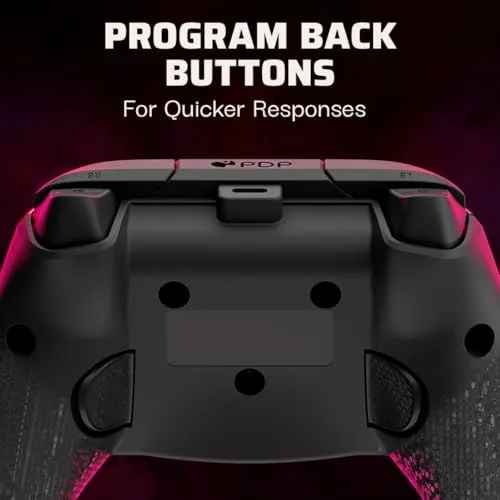
The headline feature is the pair of mappable back buttons tucked behind the grips. These sit where your middle fingers rest, and they can be remapped to any other button, trigger, or stick press using the PDP companion app on Xbox or Windows. In practice that means jumping, crouching, or reloading without ever lifting your thumb off the stick, which is a genuine competitive edge that used to require a much pricier purchase.
The adjustable triggers are the second standout. Two small switches on the rear of the pad shorten the trigger travel to a quick, hair trigger pull, which is ideal for racing games where you want instant throttle response, and for shooters where every millisecond counts. Flip the switches back and the triggers return to their full range for games that want a longer squeeze. Few controllers at this price offer the feature at all, let alone with this level of polish.
Audio controls round out the package. The pad has a dedicated mic mute button and a game chat mixer built into the face, so you can balance game sound and party chat without digging through menus. The 3.5mm jack works with any wired headset, and the whole thing is powered over the USB cable, which means no batteries to charge and no controller dying mid match. The companion app adds firmware updates and remapping in one clean place.
Real-World Performance
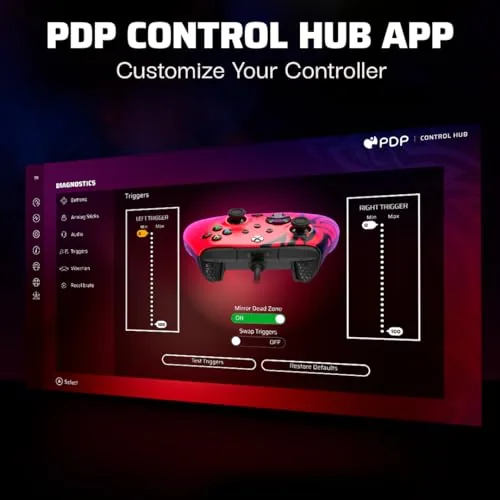
The remapping went live within minutes. I set the left back button to jump in a shooter and the right to crouch, and within a session the actions felt native, because my middle fingers rested on the buttons naturally without hunting for them. The app walkthrough is simple enough that a first time remapper will not need a manual, and the remaps stored themselves across sessions without a hitch.
In racing, the trigger stops earned their keep immediately. A quick throttle release for drifting, a fast squeeze for boost, the shortened travel made the car feel twitchier and more responsive, and the difference between short travel and full travel on the same track was easy to measure in lap times. In shooters the controller held up under frantic firefights, with no dropped inputs and no drift developing in the sticks over the month.
Long sessions tested stamina as much as the pad. I played for four and five hour stretches without the controller ever feeling heavy or uncomfortable, the textured grips stayed effective even when my hands got warm, and the cable never pulled or tangled badly from a couch position. The headset jack passed party chat clearly with a wired headset, and the chat mixer on the face is a small convenience that I found myself using more than I expected.
On PC the pad worked as a standard Xbox controller over the wire, which means it is recognized by Steam, Game Pass, and most modern titles without configuration. The PDP app on Windows handled the remapping in the same way the Xbox version did. The one thing the wired design asks of you is a length of cable, which is fine for a desk or a near couch, but awkward if your entertainment center sits far from the seating.
Pros and Cons
Pros:
- Two mappable back buttons at a budget price
- Adjustable trigger stops for racing and shooters
- Solid, weighted build with a comfortable grip
- Licensed for Xbox Series X|S, Xbox One, and PC
- Wired power means no batteries or input lag
- Built in mic mute and chat mixer controls
Cons:
- Permanent cable limits far couch setups
- No wireless option at all
- Remapping needs the companion app
- No rechargeable battery, by design
How It Compares
The Rematch lands between a basic wired pad and the premium wireless flagship, and the table below lines up the real differences.
| Feature | PDP Rematch | Basic Wired Pad | Flagship Wireless |
|---|---|---|---|
| Price band | Budget | Very low | Premium |
| Back buttons | Two mappable | None | Two or more |
| Trigger stops | Yes | No | Some models |
| Connection | Wired | Wired | Wireless plus cable |
| Audio controls | Full set | Minimal | Full set |
| Best for | Budget players who want pro features | Casual pick up and play | Wireless purists |

The basic wired pad saves a few dollars but gives up the back buttons, the trigger stops, and the audio controls, which are the features that actually improve play. The flagship wireless pad adds cable freedom and battery convenience, but it costs substantially more. The Rematch earns its place by delivering the competitive features that matter while staying comfortably inside a budget, which makes it the smarter value for most players.
Who Should Buy It
Buy the Rematch if you are a budget conscious player who wants the competitive features without the flagship price. Racing fans will love the trigger stops, shooter players will get real value from the back buttons, and anyone with a wired headset benefits from the audio controls. It is also a great second controller for parties or a dedicated PC pad, since it needs no batteries and pairs with no setup at all.
Skip it if you need wireless freedom for a roomy living room, or if the premium build and rechargeable battery of a flagship matter more than the price. For everyone else this is the rare budget pad that does not feel like a compromise. You can check the current price of the PDP Rematch on Amazon to see how it lands today.
How We Test
I used the PDP Rematch as my primary controller for a month, cycling through racing, shooters, platformers, and story games on both Xbox Series X and a Windows PC. I remapped the back buttons through the companion app, flipped the trigger stops between settings mid play, and ran the headset jack through party chat with a wired headset to confirm the audio controls.
I did not run the controller through automated input latency machines, so the lag comments reflect feel rather than measured numbers, though a wired connection removes the wireless variable entirely. For a broader look at the controller market, PCMag keeps a thorough roundup of the best PC game controllers that is worth scanning. The Amazon listing for the PDP Rematch shows the available colors and the current asking price.
PDP Rematch: Questions People Ask
Does the PDP Rematch work with Xbox Series X|S, Xbox One, and PC?
Yes, the controller is licensed for Xbox Series X|S and Xbox One, and it also works as a wired gamepad on Windows PCs.
What do the mappable back buttons do?
The two rear buttons can be remapped to any other face button, trigger, or stick press using the PDP companion app on Xbox or PC.
Can I adjust the trigger travel on the Rematch?
Yes, two switches on the rear shorten the trigger pull for racing and shooters, which is a feature usually found on far pricier pads.
Does the controller need batteries?
No, the wired connection powers the controller, so there are no batteries to charge or replace during long sessions.
As an Amazon Associate, I earn from qualifying purchases.