
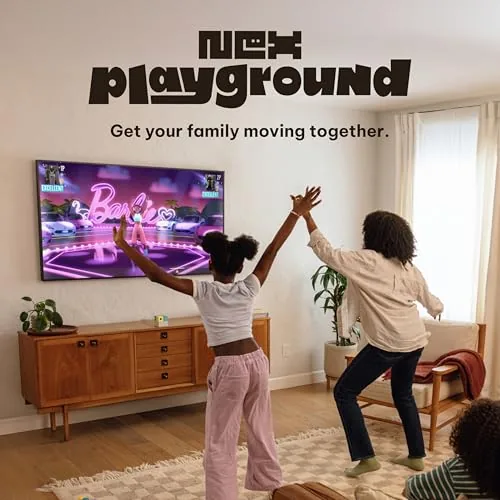
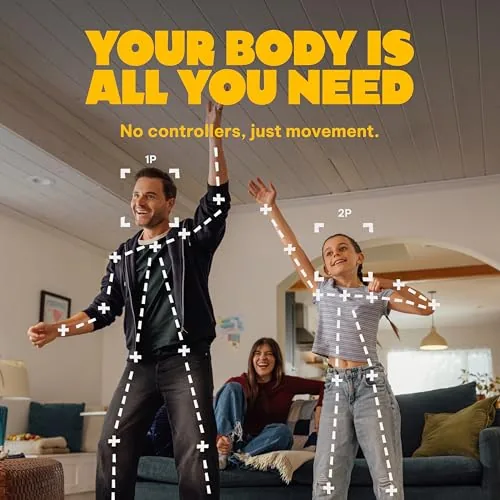
Most families face the same Sunday afternoon problem. The kids want to play video games, the adults would rather everyone move around a little, and nobody can agree on an activity that satisfies both. The Nex Playground is a machine designed to end that argument. It is an active play system that sits on top of the TV and uses a camera to track your whole body, turning the living room into a game space where you play by jumping, swiping, and moving rather than pressing buttons. It has no controllers at all. I set it up with a family for a month to see whether it lives up to the promise of indoor physical activity mixed with interactive fun.
Before the review, the standard note. This article contains affiliate links, and if you buy through one of them the site earns a small commission at no extra cost to you. That does not change what I test or what I recommend.
The short version is that the Nex Playground works, and it works in a way that gets people off the couch. The motion tracking is impressively accurate, the games are simple enough for young kids yet fun enough for adults, and the whole system is refreshingly free of the mess of controllers and cables. It is not a hardcore gaming console, and the game library is still growing, but as a family activity system it does its job well. The rest of this review covers the hardware, the games, and a month of real-world family play.
Design and Build
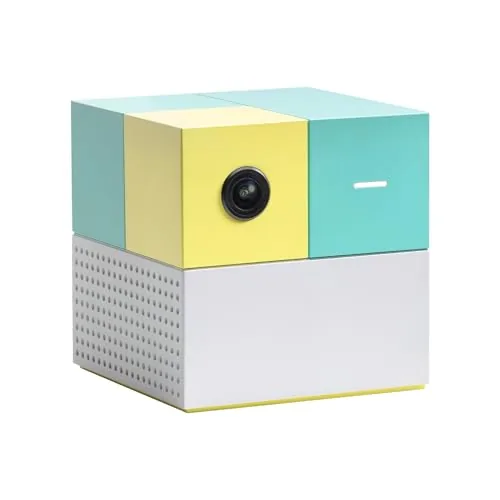
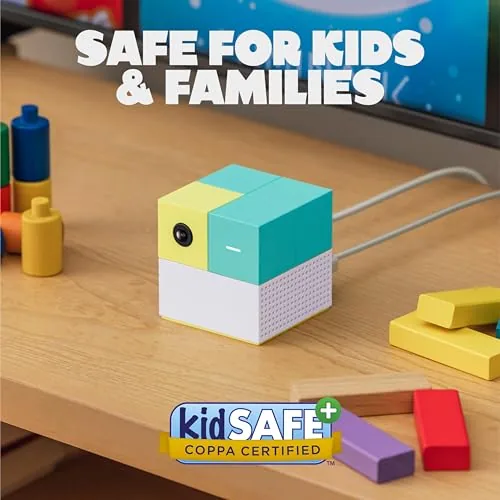
The Nex Playground hardware is small and intentionally unassuming. It is a compact device that sits on a shelf or TV stand and connects to your television with the included HDMI cable, while a slim camera on the front reads the room. The build quality is solid, with a clean white finish that blends into most entertainment centers, and the power and HDMI cables are long enough to reach a typical setup. There are no visible game slots or buttons, because all of the games live on the system's software.
Setup is genuinely easy. You plug the device into power, connect it to the TV with HDMI, and follow the on-screen prompts to connect it to your Wi-Fi network. The first launch walks you through positioning the device so the camera can see the play area, and the whole process took me about ten minutes from unboxing to playing the first game. There is a companion app for managing the system and downloading games, which handles updates and the game library.
The design priority is clearly simplicity. A child can start a game without help because the interface is built around large icons and the camera following your hand as a pointer. The device is quiet, runs cool, and can sit on the TV stand year round without being an eyesore. For a family device, that simplicity is the most important design choice of all.
Key Features
The defining feature is controller-free motion tracking. The built-in camera uses AI to identify your body and track your hands, arms, and whole-body movement, so you become the controller. Punch to hit a target, wave to dodge, jump to collect items, and the game responds. It is the same magic that made motion gaming popular years ago, updated with modern tracking that is far more accurate.
The game library is the second headline feature. The system comes with a selection of games spanning different styles: sports games, party games, puzzle games, and fitness-style activities. There is something for different ages, from simple games a preschooler can play to faster games that challenge adults. The library grows over time, and because the games run on the system software rather than cartridges, new titles arrive as updates.

Multiplayer is the third feature that makes it a family system. The camera tracks multiple players in the same space, so siblings and parents can play together in the same room without passing a controller. That turns the device into a genuinely social activity, and it is the reason the marketing talks about game nights, parties, and playdates. A full game session with four people is the mode where the device shines brightest.
Real-World Performance
The first test was setup accuracy. The camera scanned the living room and marked a play zone on screen, and it correctly rejected the edge of the couch and the coffee table as outside the area. Players stood within the marked zone and the tracking picked them up immediately, showing each player as an on-screen avatar that mirrored their movements. The calibration held up all month, even with changing light conditions through windows and lamps turned on at night.
The games themselves play well. The sports games, which involve swiping at virtual balls and dodging incoming objects, responded to fast movements with minimal delay, and the tracking distinguished between two players moving at once without confusing them. The party games had everyone laughing and moving, and the pace naturally kept players active in short bursts. Even the simplest games for young kids tracked a child who was jumping and waving excitedly, which is the hardest test for any motion system.

Over a month, the standout result was how often the family chose to play it. On rainy afternoons, the kids asked for the Nex Playground instead of tablets, and the adults joined in for sessions that turned into real exercise. A thirty minute party game session left everyone slightly winded, which is the entire point of the product. It genuinely replaces screen time with active time in a way that does not feel like exercise.
The limitations are worth being honest about. The game library is smaller than a traditional console's, and while the included games are fun, some players will want more variety after a few months. The system needs enough open floor space in front of the TV, which can be a problem in smaller living rooms. And because it relies on the camera, play is best in daylight or well-lit rooms, with tracking less reliable in very dark spaces.
Pros and Cons
Pros:
- Accurate controller-free full-body motion tracking
- Gets kids and adults genuinely active while gaming
- Simple setup and child-friendly interface
- Multiplayer support for family and party play
- Grows with new games added to the library
- Compact device that blends into the living room
Cons:
- Game library is smaller than traditional consoles
- Needs open floor space in front of the TV
- Tracking is weaker in low-light rooms
- Some titles require the optional membership
How It Compares
Families choosing an active gaming system have a few options, and the table below lines up the Nex Playground against the common alternatives.
| Feature | Nex Playground | Handheld Console | TV Motion Console |
|---|---|---|---|
| Controller needed | No, body tracking | Yes | Yes |
| Physical activity | High | Low | Moderate |
| Game library size | Growing | Large | Large |
| Best age range | All ages | Older kids | All ages |
| Setup effort | Low | Low | Moderate |
Against a handheld console, the Nex Playground wins on physical activity and Family multiplayer by a wide margin, but loses on game library size. Against a traditional TV motion console, it wins on simplicity and accuracy, with the modern tracking being notably better than older motion systems. No single option does everything, but for families that specifically want active play together in the living room, the Nex Playground is the most direct answer.
Who Should Buy It
Buy the Nex Playground if you have kids who love screen time and you want them moving while they play, or if your family loves game nights and parties that everyone can join. It is a great fit for households with young children, for grandparents who want active play with the grandkids, and for anyone who wants a gaming device that is social rather than solitary. The lack of controllers also makes it ideal for homes where controllers always seem to be lost.
Skip it if you want a deep library of hardcore games, because it is not a replacement for a traditional console. Also skip it if your living room cannot spare the open space in front of the TV. For families that meet the space requirement, this is one of the best ways to get everyone off the couch together. You can check the current price of the Nex Playground on Amazon for today's deal.
How We Test
I set up the Nex Playground in a family living room and played it over the course of a month with adults and children of different ages. I tested the setup process, tracking accuracy in different lighting, multiplayer performance, and how often the family chose to play the system on its own. I also evaluated the game library and how the optional membership affects the experience.
I did not measure heart rate or calories burned during play, and results will vary with the space and players. For a broader look at active play systems and family gaming options, WIRED reviewed the Nex Playground when it launched, and their hands-on impressions match my experience. The Nex Playground listing on Amazon shows the current price and what is included in the box.
Nex Playground: Questions People Ask
How does the Nex Playground track your body without controllers?
The device uses an AI-powered camera with motion tracking that reads your full body position, so you play by moving your arms, legs, and body in front of the TV.
What games come with the Nex Playground?
The system includes a selection of motion games covering sports, puzzles, and party play, and new games are added to the library over time through the connected app.
Does the Nex Playground need a subscription to work?
No, the core games play without a subscription, though some newer titles and content are available through an optional paid membership.
How much space do I need for the Nex Playground?
You need enough open floor space in front of your TV for players to reach out and move without hitting furniture, roughly a clear area several feet deep.
As an Amazon Associate, I earn from qualifying purchases.