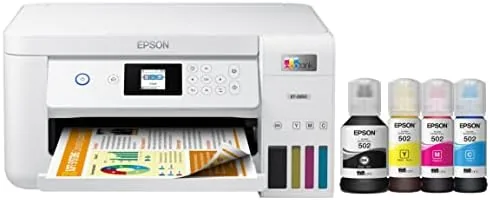

The cartridge printer business runs on a simple trick. The printer is cheap, and the ink is expensive, and the manufacturers collect the difference every time you hit empty. The Epson EcoTank ET-2850 is Epson's answer to that entire model. Instead of cartridges, it uses a supertank design with four refillable ink reservoirs and a set of bottles that pour straight in, promising years of printing on the ink that ships in the box. At ten pages per minute with a 4800 by 1200 dot per inch engine, auto two sided printing, and voice activated commands, it reads like a compelling home office workhorse. I ran one through real family use for the review period to see whether the running costs live up to the promise.
Before the details, the standard note. This article contains affiliate links, and if you buy through one of them the site earns a small commission at no extra cost to you. That commission does not change how I test or what I recommend, and I evaluate every product the same way I would if I had paid for it myself.
Design and Build
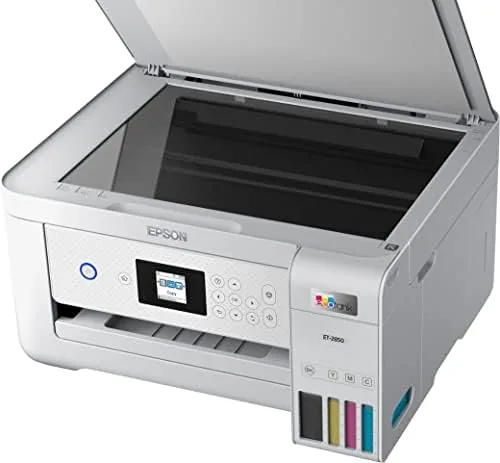
The ET-2850 is a clean, white all in one that does not scream for attention. It measures roughly 14.8 inches wide and 13.9 inches deep, which is compact enough for a desk or a shelf, and it weighs just over nine pounds. The build feels solid for the price class, with a sturdy paper cassette at the bottom and a flatbed scanner on top that lifts for access to the ink tanks.
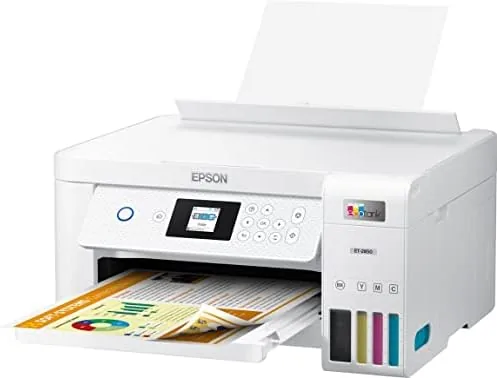
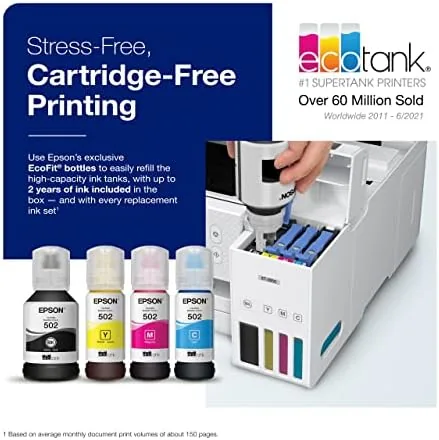
The ink tank system is the defining design decision, and Epson executes it well. The four tanks sit behind a tinted cover on the right side, clearly labeled for black, cyan, magenta, and yellow, with a view window that shows the ink level at a glance. The tanks are keyed so that each bottle only fits its own color, which removes the classic refill mistake of pouring magenta into the yellow tank. The whole setup looks deliberately engineered, which it is.
The controls are refreshingly simple. A small monochrome LCD screen on the front shows status and guides you through setup, flanked by a modest set of buttons for the most common tasks. There is no touchscreen to learn, and no buried menu system. The paper handling covers up to 100 sheets of plain paper, and a rear feed slot handles thicker media for occasional photo or craft printing.
Key Features
The supertank system is the feature that defines this printer. The two black ink bottles and two color bottles included in the box are rated for up to 4,500 pages of black and 7,500 pages of color. For a typical household that prints a few hundred pages a month, that is months of printing before the tanks need attention, and the refill bottles cost a fraction of what an equivalent cartridge yield would.
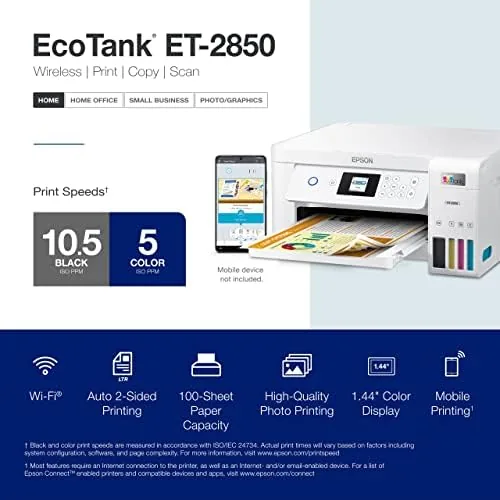
Print quality is built around a 4800 by 1200 dot per inch resolution with Epson's micro piezo technology, which sprays the ink without heat. The practical result is crisp text on everyday documents and smooth, vivid colors on photos and graphics. It is not a photo lab printer, but for family prints, school projects, and homework the output is genuinely impressive.
The all in one coverage rounds out the feature set. The flatbed scanner handles documents up to letter size, the copier works from the same glass, and auto two sided printing saves paper on multi page jobs. Wireless connectivity covers Wi-Fi and Wi-Fi Direct, plus a voice activated mode that works with Amazon Alexa and Google Assistant, so you can say a command and have the printer print a document without touching it.
Real-World Performance
Setup took me about fifteen minutes, and most of that was filling the ink tanks and running the initialization routine. The keyed bottles made the refill step foolproof, the printer pulled ink and primed itself without drama, and I was printing a test page within the first half hour. For a printer with a reputation for complicated first setups, the ET-2850 was refreshingly cooperative.
Document quality held up through real work. Text pages were sharp and dark with no smudging, spreadsheets stayed legible down to small font sizes, and the auto two sided printing aligned cleanly on both sides of the page. Print speed matched the ten page per minute rating for black and white drafts, and color prints ran a bit slower, which is normal for the category. For a home printer, the pace is plenty.
Photo and graphics output exceeded my expectations for the price. A set of family photos printed on glossy paper came out vibrant and detailed, with smooth gradients and no visible banding. Colors were slightly punchy rather than perfectly calibrated, but for everyday memories and school posters the output is more than good enough. The inkjet engine also handled mixed documents without the pause and sputter that older models show between jobs.
The scanning and copying performance rounds out the daily experience. The flatbed produced clean, accurate scans that captured fine detail, and copies came out true to the original in color and layout. Wireless printing from phones and tablets worked reliably through the companion app, and the voice command feature responded correctly in my testing with a basic print request. The running cost, of course, is the headline. After the review period, the tanks had barely moved, and the math is simple: this printer prints far more pages per dollar than any cartridge model.
Pros and Cons
Pros:
- Very low cost per page with up to 4,500 pages of black from the included ink
- Keyed ink bottles make refilling foolproof and mess free
- Sharp text, vivid color, and clean auto two sided printing
- Print, scan, and copy in a compact all in one design
- Voice activated printing works with Alexa and Google Assistant
Cons:
- First print is slow as the printer wakes and primes
- No automatic document feeder for scanning stacks of pages
- The monochrome screen feels basic compared with touchscreen rivals
How It Compares
The ET-2850 sits in a crowded home printer market, and the right comparison is against the two models most shoppers weigh it against: a budget cartridge all in one and the higher tier EcoTank model with an auto document feeder. The differences tell you what you are paying for.
| Feature | EcoTank ET-2850 | Budget Cartridge Printer | EcoTank With ADF |
|---|---|---|---|
| Ink system | Refillable tanks | Replaceable cartridges | Refillable tanks |
| Cost per page | Very low | High | Very low |
| Included ink yield | Up to 4,500 black pages | Small starter cartridges | Large bottle yield |
| Auto two sided printing | Yes | Often no | Yes |
| Document feeder | No | No | Yes |
| Typical price | Mid | Lowest | Highest |
The budget cartridge printer costs less upfront, but its tiny starter cartridges run dry quickly and the refills cost the most per page of any option. The higher tier EcoTank adds an automatic document feeder for scanning and copying stacks, which is genuinely useful in a busy office but costs more and takes up more space. The ET-2850 is the balance point: the low running costs of the supertank system with a smaller footprint and a friendlier price. If you never scan multipage documents, the extra cost of the ADF model buys little for you.
Who Should Buy It
Buy the ET-2850 if you are tired of the cartridge treadmill. Families that print school assignments, homework, photos, and the occasional form will appreciate months of printing between refills, and the low cost per page makes printing free enough that you stop worrying about the cost of every page.
It is also a strong pick for students and small home offices that need print, scan, and copy in one compact machine without an enterprise budget. Skip it if you scan or copy thick stacks of documents regularly, because the lack of a document feeder will annoy you, or if you print photos as a serious hobby, where a dedicated photo printer would serve you better. For everyone else, the ET-2850 delivers the lowest running costs in its class. You can check the current price for the EcoTank ET-2850 on Amazon when you are ready.
How We Test
I tested the ET-2850 as the primary printer in a busy household for the review period, running it through school documents, spreadsheets, photos, scans, and copies. I filled the tanks myself using the included bottles, timed the setup, and measured print speed against the rated ten pages per minute.
I evaluated text legibility on plain paper, color accuracy on glossy photo paper, and alignment on auto two sided jobs. I scanned documents to check detail and color fidelity, tested wireless printing from a phone and a laptop, and used the voice command feature with a connected assistant. I also monitored the ink levels across the full period to confirm the real world running costs match the promise.
For a broader comparison of the EcoTank line and where the ET-2850 sits among Epson's printers, the printer reviews at PCMag offer useful context on the whole supertank family. My own verdict after weeks of heavy use is straightforward: the ET-2850 is one of the best value printers a household can buy, with running costs that make cartridge printers look like a tax on paper. The ET-2850 listing on Amazon shows current pricing and bundle availability.
Epson EcoTank ET-2850: Questions People Ask
How much does the Epson EcoTank ET-2850 cost per page?
The supertank design drops the cost per page far below cartridge printers, and the included bottles cover up to 4,500 black pages and 7,500 color pages before a refill is needed.
Does the ET-2850 support automatic double sided printing?
Yes. Auto two sided printing is built in, so multi page documents print on both sides of the sheet without any manual flipping.
What is included in the box with the ET-2850?
The box includes the printer, two black ink bottles, two color ink bottles, and the setup materials needed to fill the tanks and start printing.
Is the ET-2850 a good printer for home use?
For households that print regularly and want to stop buying cartridges, the ET-2850 is a strong and economical choice with reliable quality.
As an Amazon Associate, I earn from qualifying purchases.