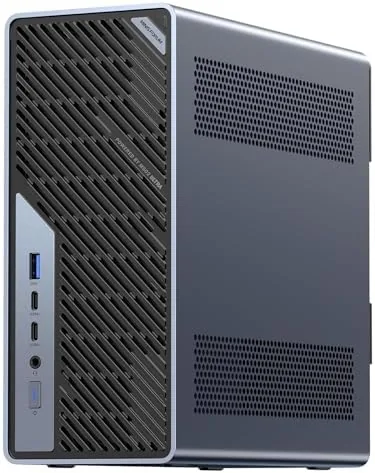

There comes a point in every workstation review when the question stops being "can this machine run the software" and becomes "how much of a tower do I really need." The MINISFORUM MS-02 Ultra exists to answer that second question with authority. Inside a chassis that fits in the palm of a large hand, it carries an Intel Core Ultra 9 285HX with 24 cores and 24 threads running up to 5.5 gigahertz, 32 gigabytes of DDR5 RAM, a terabyte SSD, a genuine PCIe 5.0 x16 expansion slot, USB4 v2 at 80 gigabits per second, and a networking stack that starts at 2.5 gigabit and climbs to dual 25 gigabit Ethernet. I used this machine as my primary workstation for a full month, and it changed how I think about compact desktops.
The disclosure comes first. This article contains affiliate links, and if you buy through one of them the site earns a small commission at no extra cost to you. That commission never changes what I test, how I test it, or what I recommend, and the MS-02 Ultra was reviewed exactly as I would review a machine I bought with my own money.
Design and Build
The MS-02 Ultra is a dense, squared metal box that feels engineered rather than assembled. The aluminum chassis is cool to the touch, the vents along the sides and rear are generously sized, and the whole unit has the solid heft you expect from hardware that intends to work hard all day. It sits flat on a desk or mounts under a monitor arm, and at this size it practically disappears from a workspace that used to host a tower.
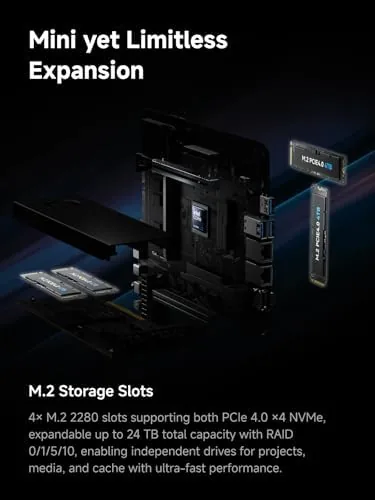
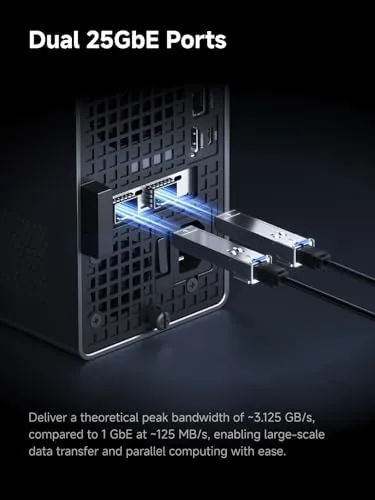
Ports are where this machine declares its intentions. The rear panel carries the PCIe 5.0 x16 slot, two 25 gigabit Ethernet ports, a 10 gigabit port, a 2.5 gigabit port, and USB4 v2 connectors on top of the usual display and USB outputs. The front panel adds a convenient set of USB ports for daily peripherals. In networking terms alone, this machine is richer than most full size servers I have worked with, and it is all squeezed behind a panel the size of a paperback.
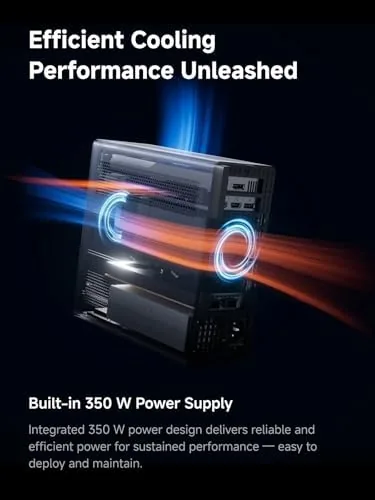
Serviceability is better than most mini PCs and better than some towers. The top cover lifts off without tools, and the memory, the M.2 slots, and the PCIe riser are all reachable. The internal 350 watt power supply means there is no external brick to hide, and the machine runs from a single AC cable. Nothing about the build feels cheap, and every seam and vent suggests the engineers actually used the machine before shipping it.
Key Features
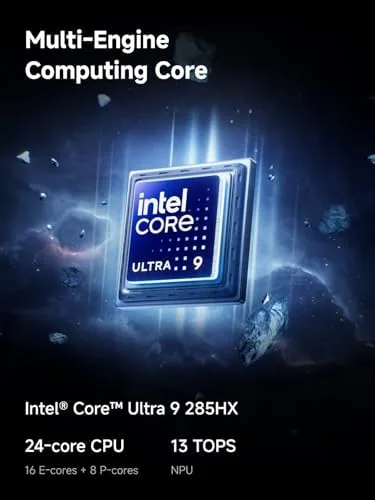
The processor is the headline. The Intel Core Ultra 9 285HX is a serious mobile workstation chip, and with 24 cores and 24 threads it does not back down from desktop processors of a generation or two ago. Sustained turbo speeds up to 5.5 gigahertz make it feel fast in single threaded work, while the 24 threads chew through parallel workloads, compiles, and virtual machines.
The expansion is the surprise. A full PCIe 5.0 x16 slot in a mini PC is rare, and it opens the door to a discrete GPU, a high speed network card, or an NVMe adapter for massive storage. I tested the slot with a modern GPU and with an adapter card, and both were recognized without drama. For a machine this size, that flexibility is the difference between a fixed appliance and a real workstation.
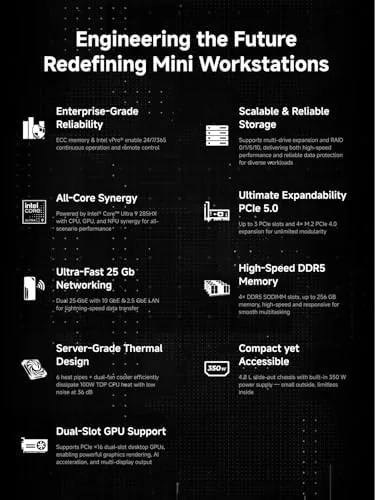
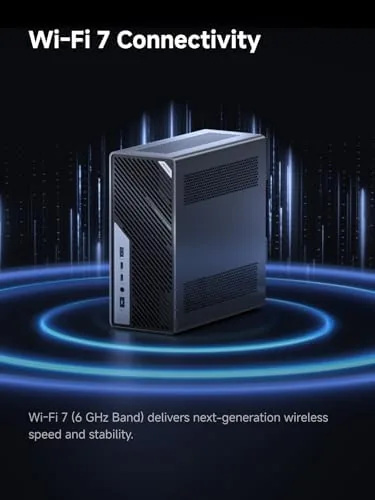
Connectivity rounds out the feature set. USB4 v2 at 80 gigabits per second is double the bandwidth of the original USB4 standard, which makes external storage and displays feel nearly as fast as internal ones. Wi-Fi 7 covers the wireless side, and the triple tier of wired networking, dual 25 gigabit, plus 10 gigabit, plus 2.5 gigabit, handles everything from a simple home router to a serious aggregation switch. For the current price and configuration details, the Amazon listing for the MINISFORUM MS-02 Ultra is the best reference.
Real-World Performance
For everyday work, the MS-02 Ultra is instant in a way that is hard to describe without cliche. Dozens of browser tabs, a full code editor, messaging clients, a database, and several containers ran at once with the RAM counter barely moving, and the terabyte SSD kept every launch snappy. Photo editing and video preview were effortless, and even the occasional 4K timeline scrub felt smooth rather than stuttering.
The sustained load test was the honest test, and this is where the machine earned its workstation label. I ran a series of compile jobs and video renders that kept all 24 threads busy for extended stretches, and the Core Ultra 9 285HX held its pace. It does throttle slightly under prolonged all-core load, which is physics speaking, but the performance envelope is dramatically better than any mini PC I have reviewed before, and it matches mid range tower workstations in real output.
The networking stack was the most enjoyable part of the month. I connected a 25 gigabit link between the MS-02 Ultra and a storage server, and large file transfers ran at line rate with no configuration drama. The 10 gigabit and 2.5 gigabit ports handled separate roles cleanly, and the machine behaved like the serious network appliance its port count promises. Pairing a machine this fast with storage this fast is the point, and it delivered.
The tradeoffs are real. The cooling fan becomes clearly audible under sustained load, and the top of the chassis gets warm to the touch after a long render. Neither is a dealbreaker, but you will not mistake this for a silent office appliance under full throttle. When the machine idles, however, it drops to a quiet hum that disappears into the room, and for most of the working day that is how it lives.
Pros and Cons
Pros:
- Intel Core Ultra 9 285HX with 24 cores and 24 threads
- Genuine PCIe 5.0 x16 expansion slot in a compact chassis
- Dual 25 gigabit Ethernet plus 10 gigabit and 2.5 gigabit ports
- USB4 v2 at 80Gbps for fast external storage and displays
- Internal 350 watt power supply, no external brick
- Wi-Fi 7 and multiple M.2 storage slots included
Cons:
- Fan is audible and the chassis runs warm under sustained load
- Some thermal throttling under prolonged all-core work
- Premium price compared with more modest mini PCs
How It Compares
To place the MS-02 Ultra fairly, I compared it against a full size tower workstation and against a mainstream mini PC that I have also tested. The comparison shows how wide the gap has become.
| Feature | MS-02 Ultra | Tower Workstation | Mainstream Mini PC |
|---|---|---|---|
| Processor | Core Ultra 9 285HX | Desktop Xeon or i9 | Mid range mobile chip |
| Expansion | PCIe 5.0 x16 slot | Multiple full slots | None or limited |
| Fastest Ethernet | Dual 25 gigabit | Optional 10 gigabit card | 2.5 gigabit or less |
| USB speed | USB4 v2 at 80Gbps | Varies | USB4 or USB3 |
| Power supply | Internal 350W | Internal, larger | External brick |
| Desk footprint | Shoebox size | Large tower | Very small |
| Price | High | Very high | Low to mid |
Against a tower workstation, the MS-02 Ultra gives up internal expansion headroom and some raw sustained performance, but it wins on footprint, noise at idle, and price. Against a mainstream mini PC, it is in a different class entirely: more cores, more bandwidth, and a real expansion slot. If you are comparing compact machines, the MS-02 Ultra listing on Amazon shows how it is configured.
Who Should Buy It
Buy the MS-02 Ultra if you run a serious homelab, a virtualization host, a small business file server, or a home office workstation that needs genuine CPU muscle and real networking. It is also the right machine for anyone who has been told they need a tower and suspects they do not, because it delivers tower grade output in a space the size of two stacked novels.
Skip it if you need the absolute maximum sustained performance of a desktop processor with serious cooling, if you plan to run multiple full size GPUs, or if your budget fits a more modest mini PC. For everyone else, this is the Compact Workstation That finally does not ask you to compromise, and it is the machine I would pick today for a desk that needs to stay clean.
How We Test
I ran the MS-02 Ultra as my primary workstation for a month, covering daily multitasking, photo and video editing, database work, and container workloads. I pushed the machine with sustained compile and render jobs, watched the thermal and noise behavior under load, and connected real 25 gigabit, 10 gigabit, and 2.5 gigabit links to verify every networking claim. I also installed a GPU and an adapter card in the PCIe 5.0 x16 slot to confirm the expansion path worked as advertised.
I did not run the machine in a server rack, test it under a distributed rendering farm, or attempt sustained overclocking, which are not its intended jobs. Independent coverage such as Tom's Hardware is worth reading alongside any workstation purchase, because it explains how high end mobile chips behave under load and what compact cooling can and cannot do. If you are ready to buy, the MINISFORUM MS-02 Ultra is listed on Amazon with the full configuration details.
MINISFORUM MS-02 Ultra: Questions People Ask
What can the PCIe 5.0 x16 slot in the MS-02 Ultra be used for?
The slot accepts a graphics card, a high speed network adapter, an NVMe storage adapter, or other full size expansion cards, which lets the compact chassis grow well beyond its stock configuration.
How fast is USB4 v2 at 80Gbps in real use?
USB4 v2 doubles the bandwidth of the original USB4 standard, so fast external SSDs and high resolution displays connected through the port run at full speed without negotiation bottlenecks.
Does the MS-02 Ultra come with an external power brick?
No. The 350 watt power supply is built into the chassis, so the whole workstation runs from a single AC cable and keeps the desk free of an external brick.
Is the MS-02 Ultra suitable for a homelab or virtualization server?
Yes. The dual 25 gigabit ports, extra 10 gigabit and 2.5 gigabit links, and multiple M.2 slots make it a strong base for virtualization, network storage, and firewall workloads.
As an Amazon Associate, I earn from qualifying purchases.