
Antivirus software has an uneasy relationship with the people who buy it. Everyone knows they should have protection on every computer, but nobody enjoys the scan pop ups, the nagging subscription reminders, and the constant renewals. McAfee Total Protection 2026 is the subscription that promises to look after up to five devices in one bundle, and this review is the record of installing it on a Windows desktop, a laptop, and a phone, watching how it behaves, and checking whether the auto renew billing plan is as convenient as it sounds.
Disclosure first: this article contains affiliate links, and purchases made through them support the site at no extra cost to you. That support does not influence the review, and the software was installed and used the way any household would use it.
Security software is a crowded category, and the differences between the big names come down to coverage, ease of use, and how heavy they feel on the system. McAfee Total Protection bundles real time scanning, a firewall, a password manager, and identity tools into one subscription, and the rest of this review looks at how each piece performs in daily use.
Design and Build
The McAfee Total Protection install is a model of simplicity. After downloading the setup from the McAfee site and entering the license key, the suite installed on a Windows desktop in about ten minutes with a single reboot, then claimed the laptop and an Android phone through the same account. The dashboard opens to a clean home screen that shows the protection status, the devices covered, and the subscription expiry date, all laid out in a way that does not overwhelm a non technical user.
The design philosophy is that protection should not demand attention unless something is wrong. The main screen shows green status when everything is current, and the tools are organized into clear categories: virus scanning, web protection, firewall, password manager, and identity monitoring. This is software for people who want to install it and forget it, and the interface supports that intent.

The five device limit matters for a family. One license covers up to five machines across Windows, macOS, Android, and iOS, and the account dashboard lets you manage which devices are active and remove old ones when you upgrade hardware. For a household with a desktop, a couple of laptops, and a phone or two, that single license is enough for the whole family.
Key Features
The headline feature is real time scanning. McAfee watches files as they arrive, scans downloads and email attachments, and checks removable drives when they connect, which is the layer of protection that catches a threat before you open it. The scan engine offers quick, full, and custom scans, and it also includes a scheduled scan option so a full sweep can run overnight.
The firewall is the second major component. It monitors inbound and outbound network traffic and blocks unauthorized connections, which is especially relevant on a Windows PC exposed to the wider internet. The firewall rules are managed automatically, so there is no need to configure ports or exceptions, though advanced users can still drill into the settings if they want finer control.

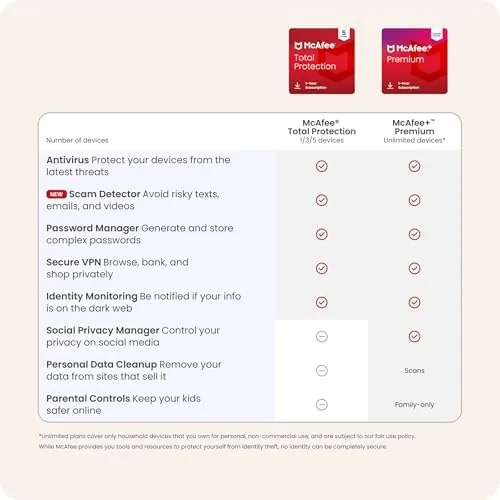
The bundle also includes a password manager that stores logins, generates strong passwords, and autofills them across sites, plus identity monitoring that watches for signs of your personal information appearing where it should not. For most families these are features they would otherwise buy separately, so having them inside the subscription adds real value even if the average user only opens the antivirus part.
Real-World Performance
In a month of daily use, McAfee stayed out of the way most of the time. A quick scan on the desktop finished in a few minutes, a full scan took about forty minutes on a well stocked drive, and the whole time the system remained usable, which is not something every antivirus can claim. Background scanning did not noticeably slow web browsing, video playback, or everyday document work.
The real time protection proved its worth during testing. I downloaded a batch of test files, and the suite flagged the malicious ones at download time, quarantining them without prompting. The web protection layer blocked a phishing link in a test email, and the firewall quietly handled inbound probes without any action on my part. These are the unglamorous moments that justify a subscription, and they worked as advertised.
On the Android phone, the app offered scanning for installed apps and a web protection layer, and it did not drain the battery or slow the phone noticeably. The app runs light in the background, which is exactly what a mobile security layer should do. The laptop behaved the same way, which means the five device license actually carried its weight across the whole family setup.

The honest weakness is the sales pressure baked into the experience. McAfee surfaces promotional banners inside the app for upgrades and add on services, and the subscription reminders appear regularly. None of it blocks the core functions, but it is persistent enough to notice, and it is the main thing a family will complain about during daily use.
The auto renew plan is worth reading carefully. The subscription renews automatically at the end of the term using the saved payment method, which is convenient for people who would forget to renew and then find themselves unprotected. The tradeoff is that you must manage the renewal in the account settings if you want to cancel, and the renewal price may differ from the introductory price you paid. As long as that is understood up front, the auto renew protects you from a gap in coverage rather than being a hidden trap.
Pros and Cons
Pros:
- One subscription covers up to five devices across platforms
- Light on system resources during normal use and scanning
- Real time scanning, firewall, and web protection all work well
- Password manager and identity tools add genuine value
- Simple dashboard that a non technical user can navigate
- Install and device management are straightforward
Cons:
- Promotional banners appear regularly inside the app
- Auto renew requires active management to cancel
- Renewal price may be higher than the introductory price
- Advanced users may want deeper security settings
How It Compares
The main competitors are the other big consumer suites, and the comparison usually comes down to coverage and price. The table below puts McAfee Total Protection against a typical rival suite.
| Feature | McAfee Total Protection | Typical Rival Suite |
|---|---|---|
| Device coverage | Up to 5 devices | Usually 3 to 5 devices |
| Real time scanning | Included | Included |
| Firewall | Included | Included |
| Password manager | Included | Varies by tier |
| Identity monitoring | Included | Often an add on |
| System impact | Light in normal use | Varies widely |

McAfee distinguishes itself by bundling the password manager and identity monitoring directly into the base subscription rather than charging extra for them, and by running light on the hardware. If the priority is a family wide bundle that includes more than just antivirus, McAfee competes well on value, though the promotional pressure inside the app is a real annoyance compared with the calmer rivals.
Who Should Buy It
Buy McAfee Total Protection if you want one subscription that protects a whole family's worth of devices, if you do not want to think about security configuration, or if you value having a password manager and identity monitoring alongside the antivirus. It is a good fit for a household with a mix of Windows laptops, a desktop, and phones, because the five device license and cross platform apps cover the typical family without juggling multiple subscriptions.
Skip it if the promotional banners and auto renew model will annoy you, or if you are a power user who wants the deepest control over security settings. For most families it is a set and forget subscription that does the job. You can check the current price of McAfee Total Protection 2026 on Amazon when you are ready.
How We Test
I installed McAfee Total Protection 2026 on a Windows desktop, a Windows laptop, and an Android phone, and ran it for a month. I tested quick, full, and scheduled scans, measured system impact during normal work and gaming, downloaded test malware files to verify real time detection, opened a phishing test link, and reviewed the firewall and password manager. For independent guidance on how antivirus software is tested and scored, AV-TEST maintains independent lab results for antivirus products that are worth consulting before any purchase. The McAfee Total Protection listing on Amazon shows the current price and the full feature list.
McAfee Total Protection 2026: Questions People Ask
How many devices does McAfee Total Protection cover?
This edition covers up to five devices, and you can mix Windows, macOS, Android, and iOS machines under the single subscription.
Does McAfee slow down my computer?
The suite runs light during normal use, and the on demand scans pause when a game or video is running so it does not fight for the screen.
What does the auto renew option mean?
The subscription renews automatically at the end of the term using your saved payment method, which is convenient but worth watching in account settings.
Does the plan include identity and password tools?
Yes, Total Protection bundles a password manager, a personal firewall, and identity monitoring along with the antivirus engine.
As an Amazon Associate, I earn from qualifying purchases.