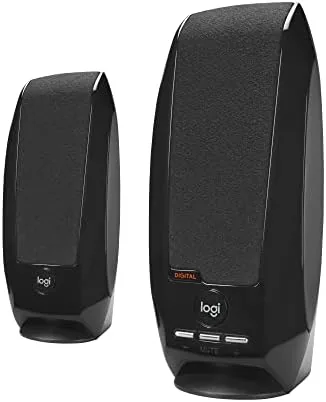

There is a particular moment that every laptop owner knows. You are in a video call or trying to watch something, and the Built In speakers give up the moment anyone raises their voice. The usual remedy is a set of USB speakers, and the Logitech S150 is one of the oldest, cheapest, and most persistent of that breed. It is a pair of tiny plastic speakers with 1.2W RMS of total power, digital sound, and volume and mute controls built into the right speaker, and it does the one thing laptops still cannot: make audio louder and clearer than the machine itself. I used a pair for a month across calls, video, and light music to decide whether a twenty dollar set still makes sense in 2026.
The standard disclosure comes first. This article contains affiliate links, and if you buy through one of them the site earns a small commission at no extra cost to you. That commission does not influence what I test or recommend.
Design and Build
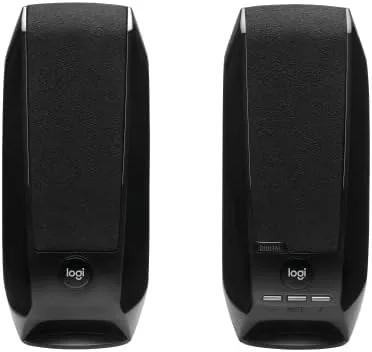
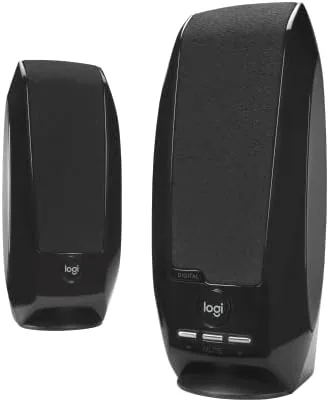
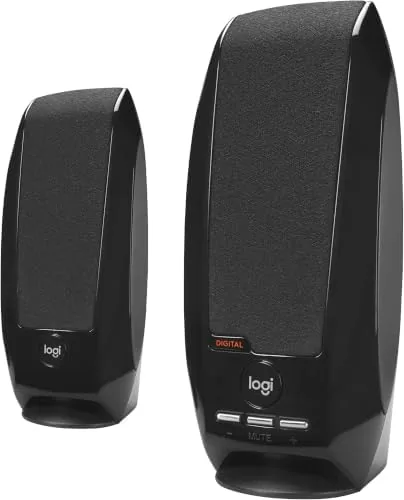
The S150 looks exactly like what it is: an entry level accessory that has been selling for nearly two decades. The satellites are small rounded plastic pods, the left speaker connects to the right with a short cable, and the whole set is light enough to pack into a bag without noticing it. The build is pure utilitarian plastic, and it does not pretend otherwise, but the quality is honest. Nothing rattles, the grilles are clean, and for a product this inexpensive the construction is reassuringly solid.
The smartest part of the design is the control placement. The right speaker carries a small knob for volume and a separate mute button, so you never have to reach into the operating system to adjust audio. That may sound trivial, but it is the feature that makes the S150 feel like a real audio device rather than a pair of novelty speakers. The USB connection carries both power and the digital audio signal, which means there is no separate power brick and no audio cable to lose, and it works on any computer with a USB port.
Key Features
The entire pitch of the S150 is that it runs on USB. A single cable plugs into any USB port, the computer recognizes it as an audio device, and sound comes out. No drivers to install on modern operating systems, no wall adapter, no audio jack, and no batteries. For travelers, students, and people with cramped desks, that simplicity is the feature that matters most.
Inside the small cabinets, Logitech uses its digital sound processing to keep the audio clean at the modest 1.2W RMS output level. That figure sounds tiny next to a 50 watt speaker system, but the S150 is not trying to fill a room; it is trying to beat a laptop, and at that job it succeeds. The controls add real utility: the rotary volume knob adjusts smoothly, and the mute button kills the audio instantly for those moments when a call goes sideways.
The set is designed for computers first. It plugs into a laptop, desktop, or desktop dock, and the digital connection means the host controls volume consistently across apps. There is no Bluetooth, no built in battery, and no wired audio jack, so this is a strictly desktop product, and that is fine because that is exactly the niche it serves. The absence of a separate audio cable deserves emphasis: with two-in-one designs you are forever hunting for a 3.5 millimeter jack that newer laptops no longer even include, and the S150 sidesteps that entire problem by using the USB connection for both power and signal. It is the sort of small decision that quietly removes the two most common reasons a cheap speaker set ends up unused in a drawer.
Real-World Performance
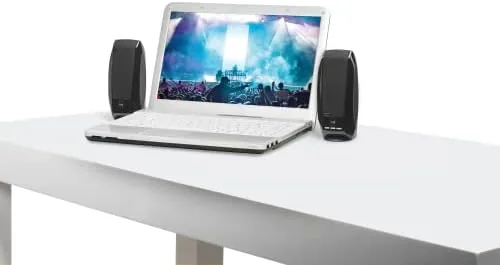
I ran the S150 through the daily routine that defines its purpose. Video calls came through clearly, with voices much easier to understand than the laptop speakers, and the mute button proved itself during a noisy call when I needed to cut audio instantly. The volume knob gives smooth, predictable control, and the speakers will go louder than you want them to for a pair this size, which is a surprise that every budget speaker review ends up repeating.
Video playback sounded good for dialogue and general content. The audio is clean, with no distortion at moderate levels, and the digital processing keeps it from getting muddy when voices and music mix. Music is the honest limitation. The tiny drivers cannot produce meaningful bass, so anything with a kick drum sounds thin, and at higher volumes the small cabinets begin to strain. For podcasts, calls, and video, the S150 is more than adequate; for music, it is a compromise.
The USB simplicity held up across machines. The speakers worked instantly on a Windows laptop and a macOS desktop with no driver installation, and they were recognized correctly by video conferencing software. The absence of a power cable is genuinely nice on a crowded desk, and the whole set is light enough to travel with. Over the month of testing, the S150 never once gave me a reason to look at the operating system volume controls.
Pros and Cons
Pros:
- Single USB cable carries both power and audio
- No drivers needed on modern computers
- Built in volume knob and mute button work instantly
- Much louder and clearer than laptop speakers
- Light and compact enough to travel
- Inexpensive, honest entry level pricing
Cons:
- No real bass, music sounds thin
- Small plastic drivers strain at high volume
- No Bluetooth, strictly a wired computer accessory
- Audio quality is far below any larger speaker set
How It Compares
Budget desktop audio usually comes in one of two forms: tiny USB speakers like the S150 or slightly larger USB powered sets with a subwoofer. The table below lays out the practical difference.
| Feature | Logitech S150 | USB Set with Subwoofer |
|---|---|---|
| Connection | Single USB cable | USB power plus audio |
| Power | 1.2W RMS | 6W to 10W RMS |
| Bass | None | Modest subwoofer |
| Footprint | Very small | Larger, with subwoofer |
| Best for | Calls, video, desk | Music, gaming |
| Price class | Entry level | Mid budget |
If your needs are video calls, lectures, and everyday video, the S150 is the practical choice: it is cheaper, smaller, and easier to travel with, and it does that job perfectly well. If music or gaming matters and you have the Desk space, the extra money for a set with a subwoofer buys real low end. The S150 is not a substitute for those speakers; it is the sensible minimum for everyone else.
Who Should Buy It
Buy the Logitech S150 if you are tired of laptop speakers on calls and video, if you want something that works on any computer without drivers, or if you need a tiny speaker set that packs into a bag. Students, remote workers, and anyone with a cramped desk will find the S150 does everything asked of it at a price that is hard to argue with. It is also a reliable spare to keep in a drawer for when the main speakers fail.
Skip it if music is the main use case or if you want any real bass, because the tiny drivers are not built for that. You can check the current price of the Logitech S150 USB speakers on Amazon if you want to see today's pricing.
How We Test
I used the Logitech S150 for a month as my daily computer audio, running video calls, streaming video, podcasts, and some music. I tested the speakers on both Windows and macOS, evaluated the volume knob and mute button, and pushed them to higher volumes to find the limits of the small drivers.
This is a hands-on field test rather than a laboratory measurement, and I judged the S150 strictly against its price class and intended use. For a broader view of budget computer audio, TechRadar has a guide to the best computer speakers that is useful for comparing options at every price. The Logitech S150 listing on Amazon shows the current specifications and pricing.
Logitech S150 Speakers: Questions People Ask
Do the Logitech S150 speakers need an audio cable too?
No, they draw both power and audio over a single USB connection, which is the entire appeal of the design for laptops and desktops.
Are the S150 speakers any good for music?
They are fine for podcasts, calls, and video, but the small drivers and modest 1.2W output mean they are not a serious music speaker.
Do the volume controls work on any computer?
The inline volume and mute controls work with the standard USB audio class driver found on Windows, macOS, and most Linux desktops.
Can these speakers be used with a gaming console?
They are designed for computers. Consoles generally do not accept USB speakers for game audio, so they are best treated as PC speakers.
As an Amazon Associate, I earn from qualifying purchases.