 Wireless Mouse on a desk from an angle" width="1200" height="800" loading="lazy" style="height:auto">
Some products accumulate so much reputation that you suspect the praise is cultural rather than earned. The Logitech MX Master 3S is one of them. For years, the MX Master line has been the default recommendation for anyone who works in front of a computer all day, and the 3S version refines the formula with an 8K DPI sensor, quieter clicks, and a specification sheet that reads like a wish list. I used the MX Master 3S as my only mouse for a full month, through spreadsheets, design work, long documents, and the occasional game, to test whether the legend holds up when it is the only mouse on your desk.
Before the details, the standard note. This article contains affiliate links, and if you buy through one of them the site earns a small commission at no extra cost to you. That commission does not change what I test or what I recommend, and every product here gets the same treatment as something I bought with my own money.
Design and Build
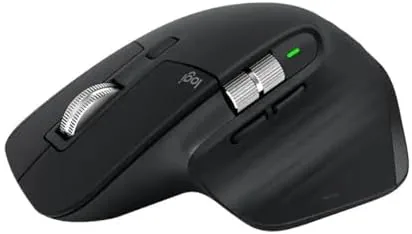
The MX Master 3S looks like what it is: the most considered productivity mouse money can buy. The sculpted silhouette is unmistakable, with a thumb rest that sweeps out on the left side, a deep back that fills the palm, and a finish that balances matte texture with subtle grip. It is a right-handed design, and it sits in the hand with the settled weight of a tool that was shaped around human anatomy.
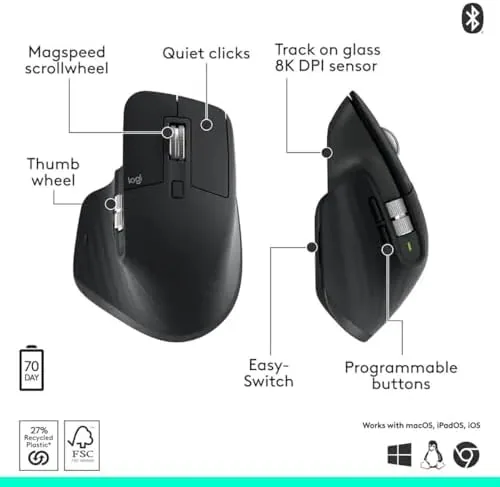
Logitech has kept the famous thumb wheel, the horizontal scroll wheel that sits under the thumb and lets you pan across wide documents and timelines. It is joined by a vertical scroll wheel that switches between ratcheted scrolling and free-spinning momentum, plus two programmable buttons and a gesture area on the top surface. Everything is where a long session tells you it should be, and that sense of deliberate placement is the core of the design.
Build quality is excellent. The shell feels dense, the buttons have a solid, satisfying action, and the MX Master 3S introduces quieter clicks than the previous generation, which matters if you share an office or a bedroom with a keyboard. The quiet clicks trade a little of the older model's clicky feedback, but the reduced noise is a genuine quality of life improvement.
Key Features
The feature that sells the MX Master 3S is the Darkfield sensor, now rated at 8K DPI, and its most famous trick is tracking on glass. The sensor can track on clear glass surfaces and glossy tabletops where standard optical mice skate helplessly. If your desk is glass or marble, this single feature can justify the mouse by itself.

The scroll wheel is the other legend. With the press of a button it switches between a notched scroll for precise, line by line work and a free-spin mode that lets the wheel coast for pages of content in a single flick. Scrolling through a long spreadsheet or a 200 page PDF stops being a chore and becomes something you look forward to, which is a sentence few mice will ever earn.
Connectivity is genuinely multi device. The mouse pairs over Bluetooth with up to three devices, and you can switch between a desktop, a laptop, and a tablet with the press of a button, or use the included USB receiver for a single machine. The MX Master 3S works across Windows, Linux, and Chrome devices, and Logitech Options software lets you assign per application button behavior, which turns the mouse into a different tool for every program you run.
Real-World Performance
For a month, the MX Master 3S was the only mouse on my desk, and it absorbed every job without complaint. The sensor tracked flawlessly across my desk mat, across bare wood, and, in the moment that matters most, across the glass surface of my desk lamp's base, which is a trick no other mouse on the shelf could perform. The 8K DPI is overkill for everyday use, but the pixel level control it offers is there when you need to make precise selections in design software.
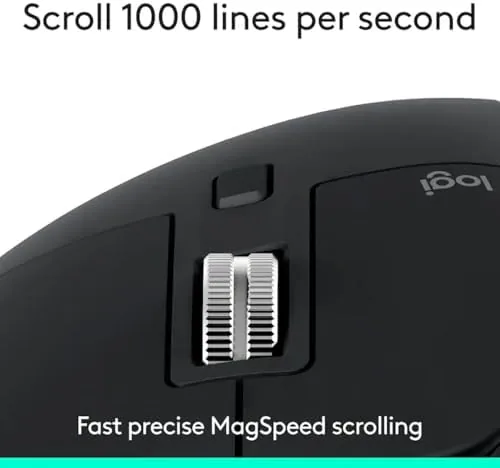
The free-spin scroll wheel became my favorite thing in the room. Scanning a long legal document or a dense dataset felt like a superpower, and the quiet clicks made late night work sessions noticeably less annoying for everyone within earshot. The gesture area, where you press and hold the top button and move the mouse to trigger actions, took a few days to become instinct, and once it did, I stopped using the keyboard shortcuts I had lived with for years.
Battery life matched the marketing. A full charge carried me past two months of eight hour days, and when the charge finally ran low, a one minute top up delivered several hours of work. I paired it with a Windows desktop, a Mac laptop, and a tablet, and switching between them by tapping the button under the wheel never dropped a connection. For everything short of competitive gaming, this mouse simply does not get in your way.
I also tuned the button layout in Logitech Options, mapping the thumb button to a system level action that followed me across every application, and the assignment held through software updates and reboots. That per machine configuration is the difference between a clever mouse and a genuinely personal one, and it is part of why the 3S retains its value long after the novelty of a new gadget wears off.
Pros and Cons
Pros:
- Darkfield sensor tracks reliably on glass surfaces
- Free-spin scroll wheel makes long documents effortless
- Quiet clicks reduce noise in shared spaces
- Pairs with three devices over Bluetooth
- Multi week battery life with fast USB C charging
Cons:
- Right-handed design excludes left-handed users
- Premium price compared with basic wireless mice
- Gesture controls need practice before they feel natural
How It Compares
Set against the standard office mouse, the MX Master 3S is in a different category entirely, and the comparison is about capabilities rather than price. Set against the previous MX Master generation, the 3S earns its upgrade with the sharper 8K sensor, the quieter clicks, and the USB C charging port.
| Feature | MX Master 3S | Basic Wireless Mouse |
|---|---|---|
| Glass tracking | Yes, Darkfield sensor | No |
| DPI | Up to 8000 | 800 to 1600 typical |
| Scroll wheel | Free-spin and ratchet | Ratcheted only |
| Multi device | Three devices via Bluetooth | One device |
| Click noise | Quiet | Varies |
| Charging | USB C fast charge | AA batteries typical |

For the office worker, the MX Master 3S is the better mouse in nearly every meaningful way, and the only reason to buy a basic mouse is a strict budget. Reviews at Wirecutter have called the MX Master line their top pick for years, and the 3S refinement only strengthens that verdict. If you want a gaming mouse, buy a gaming mouse instead, but for everything else, this is the class leader.
Who Should Buy It
Buy the MX Master 3S if you spend eight hours a day moving a cursor, if your desk is glass or glossy, if you switch between a desktop and a laptop constantly, or if you simply want the last mouse you ever think about buying. It is a tool that pays for its price in saved time and reduced frustration.

Skip it if you are left-handed, if you need a mouse purely for competitive gaming, or if a basic mouse genuinely covers your needs without the price. For the rest of the working world, the MX Master 3S is worth every cent, and you can check the current MX Master 3S price on Amazon when you are ready to upgrade.
How We Test
I used the MX Master 3S as my only mouse for a month, which meant living with it rather than demoing it. I tracked it across glass, wood, and fabric, scrolled through documents of every length, paired it with three different devices, and pushed the battery through real working weeks.
I measured the setup time for each device, noted the behavior of the quiet clicks during long typing sessions, and tested the gesture area against the shortcut workflows I normally rely on. The verdict comes from daily use, because a mouse is judged by the ten thousand small moments of a working day, not by a benchmark.
The Amazon listing for the Logitech MX Master 3S shows the full feature set and current pricing if you are ready to end your own search.
Logitech MX Master 3S: Questions People Ask
Does the MX Master 3S really work on glass?
Yes, the Darkfield high precision sensor is designed to track on glass surfaces, which is its signature feature, and it tracks reliably on most glass desks and tabletops.
How long does the MX Master 3S battery last?
The mouse runs for up to 70 days on a full charge, and a one minute quick charge provides about three hours of use when you are in a hurry.
Is the MX Master 3S good for gaming?
The MX Master 3S is built for productivity, not gaming, so competitive gamers should look at a dedicated gaming mouse, while the sensor is more than capable for casual use.
As an Amazon Associate, I earn from qualifying purchases.



