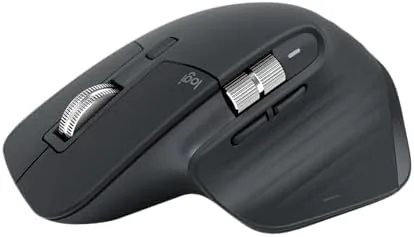

Some mice are bought because they are cheap, some because they look fast, and a very few are bought because they quietly change how a full workday feels. The Logitech MX Master 3S has spent years in that last camp, and this particular version removes the USB receiver entirely, relying on Bluetooth alone. It keeps the 8K DPI sensor that tracks on glass, the ultra fast scrolling wheel, the quiet clicks, and the battery that claims to last seventy days. I used this Graphite edition across a Mac and a Windows PC for a month to find out whether the MX Master 3S still earns its reputation or has been overtaken by a wave of cheaper competitors.
Before the details, the standard note. This article contains affiliate links, and if you buy through one of them the site earns a small commission at no extra cost to you. That commission does not change what I test or what I recommend, and the mouse was used exactly as an office worker would use it.
Design and Build
The MX Master 3S keeps the shape that made the MX line famous. A sculpted, right handed body rises to a tall thumb rest on the left, with a curved palm support that fills the hand and a finish that resists fingerprints. It is a large mouse, and it is not aimed at small hands or a travel bag; it is built for a desk, where its size becomes comfort rather than inconvenience.
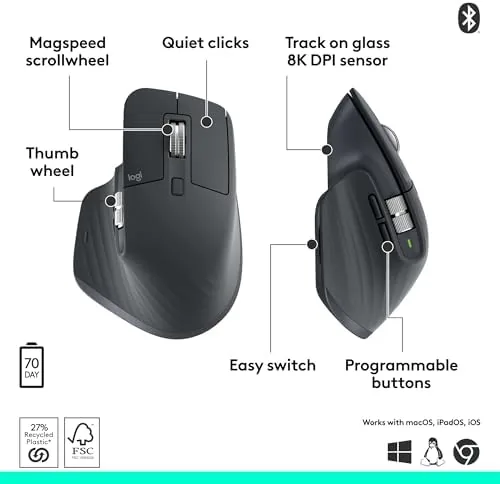
Build quality is exactly what the price implies. The shell has no flex, the scroll wheel spins with a weighted, machined feel, and the buttons sit under quiet switches that produce a soft click rather than the sharp clack of cheaper mice. The wheel toggles between a smooth free spin and a detented notch scroll with the press of a button, and both modes feel precise rather than loose.
The Graphite finish is understated and professional, and the dual connectivity story is the real point of this edition. Because there is no receiver, the mouse pairs over Bluetooth to three devices, and the buttons on the bottom let you switch between them instantly. For anyone who juggles a work laptop and a personal machine, that flexibility saves the day.

Key Features
The headline is the 8K DPI optical sensor, which matters less for its speed than for what it enables: tracking on glass. Most optical sensors fail on transparent and glossy surfaces, but the MX Master 3S was built to track on glass, and in practice it worked on a bare glass desk, a glossy table, and a mirror finish without a single skip. For anyone who has wrestled with a mouse mat on a glass table, this alone justifies a serious look.
The ultra fast scroll wheel is the other signature feature. Flicked into free spin mode, the wheel glides through hundreds of lines with a single gesture, which makes long documents, spreadsheets, and code fly by. Clicked into detented mode, it gives you precise, tactile scrolling line by line. The ability to flip between the two without lifting a finger is the kind of feature that sounds minor and turns out to be transformative.
Logitech pairs the hardware with the Logi Options+ software, which adds per application button assignments, horizontal scrolling on the side wheel, and Logitech Flow, which lets the mouse move seamlessly between a Mac and a Windows PC on the same desk, carrying the cursor across screens and copying files between them. That cross platform flow turns a very good mouse into a genuinely special one.
Real-World Performance
Daily work felt immediately better than my previous mouse. The tall shape supported my hand in a relaxed position, the thumb rest gave the hand a natural place to sit, and after a full day of pointing, clicking, and scrolling, there was none of the wrist fatigue that cheaper mice deliver without fail. The quiet clicks mattered in shared spaces, where the soft thump of each press was nearly silent.
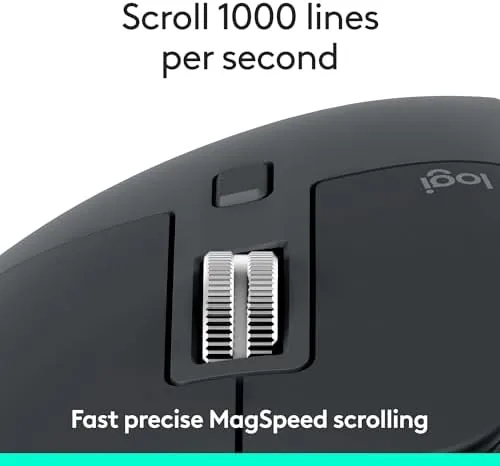
The scroll wheel earned its keep almost immediately. I live in long documents and dense spreadsheets, and the free spin mode let me fly from the top of a report to the bottom in one gesture, then click back into detented mode for precise line by line reading. It is the kind of feature you miss the moment you switch back to a normal wheel.
Bluetooth reliability was excellent over the month. The mouse paired cleanly to a Mac and a Windows PC, the connection never dropped or stuttered, and switching between the two devices with the bottom button was instant. The claimed battery life held up in practice; after a month of eight hour days, the charge indicator had barely moved, and a quick USB-C top up added hours in minutes.

The glass tracking was tested to its limit and held up. I placed the mouse on a bare glass desk, a glossy white table, and even a reflective countertop, and the cursor stayed glued to the input in every case. That is a genuinely useful capability, because it removes the need for a mouse mat entirely in most setups.
The honest weaknesses are the shape and the price. The MX Master 3S is unapologetically right handed and large, so left handed users are out of luck and smaller hands may find it a stretch. The price also sits well above the budget wireless mice that flood the market, and for someone who only does light browsing, the premium buys features they will never touch.
One more note on the no receiver choice. Removing the dongle is a genuine simplification for those who own laptops with limited ports, and it means the mouse works cleanly with Chromebooks and iPads. The trade off is that you give up the 2.4GHz connection near zero latency and the receiver based security of a dedicated link. Over a month of daily use, Bluetooth felt every bit as responsive, and the convenience of the pure Bluetooth connection won the day.
Pros and Cons
Pros:
- 8K DPI sensor tracks reliably on glass and glossy surfaces
- Ultra fast scroll wheel flips between free spin and precise detented mode
- Quiet clicks make it pleasant in shared offices and late night sessions
- Pairs with three devices over Bluetooth and switches instantly
- Logitech Flow moves the cursor between a Mac and a PC seamlessly
- Battery lasts for weeks of daily use and tops up quickly over USB-C
Cons:
- Large, right handed shape does not suit every hand or left handed users
- Premium price well above budget wireless mice
- No receiver means giving up the 2.4GHz connection
- Software features need Logi Options+ installed to unlock
How It Compares
To frame where the MX Master 3S sits, I compared it with a standard office mouse and a budget Wireless Mouse of the kind that fills retail shelves. The table below reflects how each behaved over the same month of work.
| Feature | MX Master 3S | Standard Office Mouse | Budget Wireless Mouse |
|---|---|---|---|
| Sensor | 8K DPI, glass tracking | Basic optical | Basic optical |
| Scroll wheel | Ultra fast, dual mode | Standard notched | Standard notched |
| Clicks | Quiet | Loud clack | Loud clack |
| Devices paired | Three, instant switch | One | One |
| Cross device flow | Mac and Windows | No | No |
| Relative price | Premium | Low | Very low |

Against a standard office mouse, the MX Master 3S wins on every measure that matters to a heavy user: comfort, scrolling, glass tracking, multi device support, and battery. Against a budget wireless mouse, the MX Master 3S is several times the price and offers a dozen times the capability; the budget mouse is fine for an hour of light use, but it cannot survive a month of heavy work without becoming a source of irritation.
Who Should Buy It
Buy the MX Master 3S if you spend your working day at a computer and want a mouse that disappears into your workflow instead of fighting it. It suits developers, writers, analysts, designers, and anyone who lives in long documents, dense spreadsheets, or multiple apps at once. If you work across a Mac and a Windows PC, the Flow feature alone makes this the natural choice, and if your desk surface is glass, the tracking capability is close to a requirement.
Skip it if you have smaller hands or prefer an ambidextrous mouse, because the shape is large and fixed to the right hand. Skip it if you only browse lightly, because the premium price will not pay for itself with light use. For anyone who works hard at a desk all day, the MX Master 3S is one of the few purchases that pays for itself in comfort within a week. You can check the current price of the MX Master 3S on Amazon when you are ready.
How We Test
I used the MX Master 3S as my only mouse for a month, moving between a Mac and a Windows PC and covering documents, spreadsheets, coding, and long browsing sessions. I tested the glass tracking on three reflective surfaces, compared the scrolling against a standard wheel, and monitored the battery over a full month of eight hour days.

I confirmed the three device Bluetooth pairing and the Logitech Flow behavior across the two machines, and I checked the click noise against a standard office mouse to verify the quiet switch claim. For broader perspective on where this mouse sits, PCMag guidance on the best wireless mice is a useful reference point. The verdict here is based on that full month of daily work, not on a spec sheet.
The MX Master 3S listing on Amazon shows the current price, the available colors, and the configuration with or without the receiver.
Questions People Ask
Does the MX Master 3S need a USB receiver?
No, this version connects over Bluetooth without a receiver, so it pairs directly with Mac, Windows, Linux, and ChromeOS devices and switches between three of them instantly.
Can the MX Master 3S really track on glass?
The 8K DPI optical sensor is designed to track on glossy and glass surfaces where older mice fail, and it worked flawlessly on a bare glass desk in my testing.
How long does the battery last?
The built in battery lasts up to 70 days on a full charge, and a quick USB-C top up adds hours of use in minutes, which makes the Bluetooth connection a non issue.
Is the MX Master 3S quiet to use?
Yes, the clicks are engineered to be quiet, which makes it pleasant in shared offices and late night sessions, and the scroll wheel adds no extra noise.
As an Amazon Associate, I earn from qualifying purchases.



