
There is a quiet truth about computer headsets: the ones that fail are rarely the most expensive, they are the ones that make you fight the software. This Logitech H390 review is the record of a month using the wired USB headset for daily work calls, afternoon gaming, and a little voice recording, and the honest verdict is that the H390 earns its reputation by being boring in exactly the right ways. Plug it in, it works, and it keeps working.
Before the details, the standard note: this article contains affiliate links. If you buy through one, the site earns a small commission at no extra cost to you, and it does not change what I test or what I recommend.
Design and Build
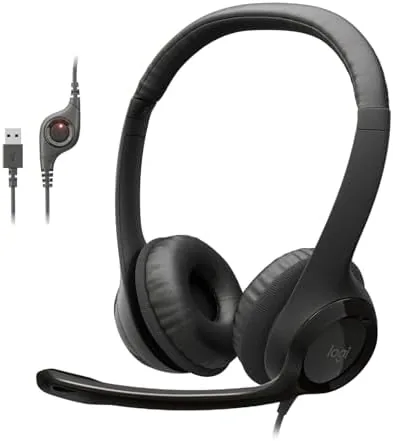
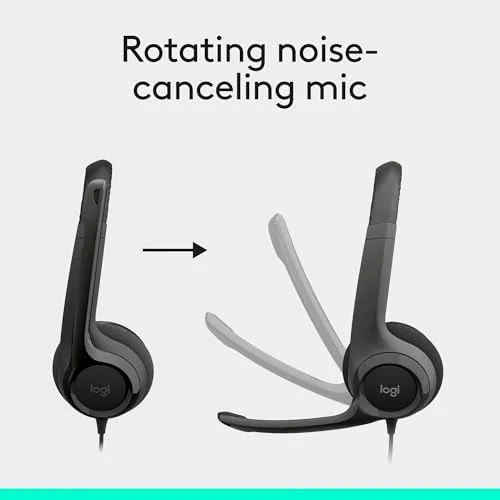
The H390 is a light, black, over the ear headset with a chunky single boom Microphone that rotates to point at your mouth. The headband is padded and adjustable, and the ear pads are cushioned cloth covered foam that wrap around the ear rather than pressing on it. It is a classic office shape, plain and functional, and there is nothing about it that calls attention to itself.
The build feels honest for the price. Most of the shell is a tough matte plastic that resists fingerprints, the headband flexes without creaking, and the microphone arm hinges firmly in place. The ear pads and headband are where Logitech spends the comfort budget, and after a month of daily use neither has softened into a mess or cracked at the seams.
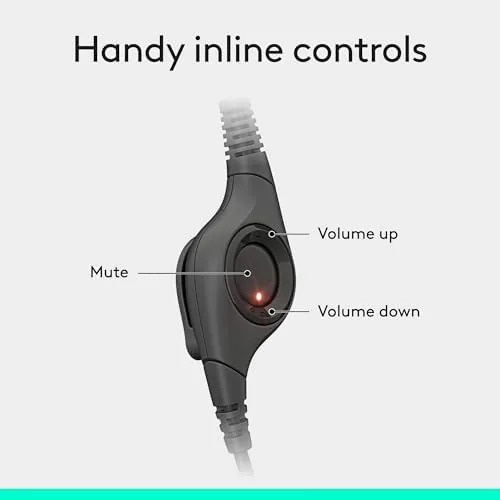
Simplicity extends to the cable. A single USB cord runs from the left cup, long enough to reach the back of a tower or a laptop on a dock, and the control pod sits about a foot down the wire. On the pod are volume up, volume down, and a mute button, which covers the daily needs without any software.
Key Features
The headline feature is the noise cancelling microphone. That phrase means the mic reduces background noise for the listener, not that it silences the room for you, and in practice the person on the other end hears less keyboard clatter and room hum. For calls from a home office that is the difference between being heard and being understood.
The mic boom is the clever part. It rotates from the left cup and stays exactly where you set it, so you aim it once and it holds. The bendable arm lets you pull it close when the room is loud or push it away when you are not on a call, and the mic mutes with a flick of the pod button.

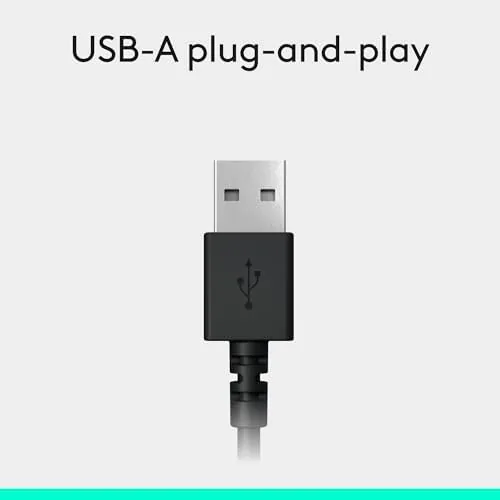
Compatibility is where the H390 is quietly excellent. Because it is a standard USB headset with no drivers, it works with Windows, macOS, and Chromebook out of the box. There is no app to open, no firmware to update, and no per platform setup, which is the feature you only notice once a headset without it arrives.
The drivers are 40mm units tuned for speech and general media, with a stereo sound that handles music, calls, and games without complaint. It is not a bass cannon and not an audiophile toy, but it is a balanced headset that never gets in the way of the content.
Real-World Performance
In daily use the H390 did the job without a single hiccup. The first plug in was recognized instantly by a Windows laptop, and within seconds the mic and speakers appeared as the default device. Across a month of meetings, nobody on the other end asked me to repeat myself, which is the mic verdict that matters most.
The controls earn their keep in meetings. Mute is a tap away when a delivery arrives or a dog barks, and the volume rocker is easy to find by touch because the pod sits a fixed distance down the cord. Those three buttons removed most of the reaching for the keyboard during calls.
Comfort held through long stretches. Over a day that mixed a two hour call with an afternoon of casual gaming, the headset stayed light and the padded band did not create a hot spot on top of the head. The ear cups are around ear style, which suits people who find on ear pads crushing, and the cloth covering breathes better than fake leather.
The honest limits are wired convenience and sound depth. The cable means you stay near the machine, and the drivers, while clear, do not have the low end a gamer with a shooter library would want for immersion. For calls, lectures, podcasts, and light gaming the balance is right, for heavy bass music it is not the tool.
Pros and Cons
Pros:
- Plug and play USB works with no drivers on any OS
- Noise cancelling mic keeps calls clear on your end
- Simple in line volume and mute controls
- Light, padded build stays comfortable for hours
- Cheap, durable, and honest for the money
Cons:
- Wired only, so the cable ties you to the machine
- Sound is clear rather than deep or exciting
- Microphone boom is on one side only
- Lacks a physical switch to turn the mic off
 Gaming Headset for comparison" width="1200" height="800" loading="lazy" style="height:auto">
How It Compares
The H390 sits between the cheaper H110 and the bigger H570 in Logitech own line. The H110 is a lighter budget set with a thinner band and a weaker mic; the H570 adds a wider, heavier cup and better noise isolation at a higher price. The H390 is the balanced middle, and for most callers it is the right one.
| Feature | Logitech H390 | Logitech H110 |
|---|---|---|
| Connection | USB wired | 3.5mm wired |
| Microphone | Noise cancelling boom | Basic boom |
| Controls | In line volume and mute | None |
| Ear style | Around ear, padded | On ear, lighter |
| Price | Mid | Low |
Against a gaming headset the H390 loses on bass and a detachable mic, but it wins on call clarity and on the simple software free life. If your priority is clear meetings and a dependable daily set, the H390 is the sensible pick, as reviews like the TechRadar take on the H390 also note.
Who Should Buy It
Buy the Logitech H390 if you spend your days in video calls, classes, or meetings and you want a headset that never makes you troubleshoot audio. It is also a fair pick for casual gaming, light music, and any Chromebook or school laptop user who needs a mic and speakers in one plug.
Skip it if you want deep gaming bass, wireless freedom, or a truly neutral studio sound. For the reliable wired daily driver, the Logitech H390 price and options are on Amazon for you to review.
How We Test
I used the H390 for a month as my main calling headset, mixing video meetings, voice chats, podcasts, and a few evenings of casual gaming. I judged connection ease on Windows and Chromebook, mic clarity through recorded samples and live calls, comfort across long sessions, and how the controls behaved under daily pressure.
Mic results depend on the room, the voice, and the particular laptop, and comfort is personal, so treat my notes as a guide rather than a promise. Across the month the headset never needed a settings adjustment, which is the highest praise I can give a plug and play part of the desk. Independent coverage, such as the PCMag headset buying guidance, is a useful second read on what to look for in a wired PC headset, and the Logitech H390 listing on Amazon shows the current price and the color options before you decide.
Logitech H390: Questions People Ask
Is the Logitech H390 compatible with Chromebook?
Yes. It is a standard USB headset with no drivers, so it works with Windows, macOS, and Chromebook the moment you plug it in. There is nothing to install and nothing to configure.
Does the microphone do noise cancellation?
Yes. The boom mic reduces background noise for the listener, so the other side of the call hears less keyboard and room sound, and the rotating arm keeps the mic pointed at your mouth.
How does the H390 connect?
Through a single USB plug that carries audio in, audio out, and the microphone. The in line pod handles volume and mute without touching any software.
Is it comfortable for long sessions?
Yes. The adjustable padded band and cushioned around ear pads spread the weight, and the cloth covering stays cool, so a full workday of calls or a few hours of gaming remain comfortable.
As an Amazon Associate, I earn from qualifying purchases.