
Most new laptops ship without an optical drive, and for years that has seemed like the sensible direction. Then a stack of old family DVDs surfaces, a CD of wedding photos turns up, or someone asks you to burn a disc of backups, and the missing drive suddenly feels like a real loss. The LG GP70NS50 exists to close that gap. It is a slim, slot loading External DVD writer that connects over USB and works across Windows, Mac OS and Linux, and it even supports M-DISC for archival quality burns. After a month of reading and burning discs with it, I can report on whether it deserves a place in the bag.
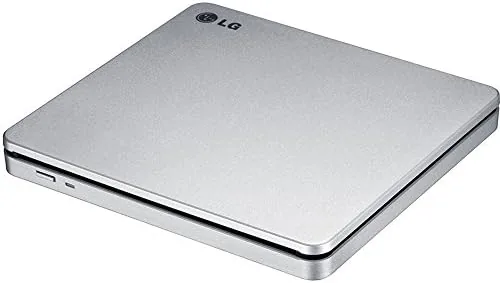
The GP70NS50 is a Super Multi drive, which means it reads and writes every common CD and DVD format, including rewritable media. What sets it apart from the crowded field of external drives is the slot loading design. There is no tray to slide out and no top lid to flip, you simply feed the disc into a slot in the front and the drive pulls it in automatically. It is a cleaner, more elegant mechanism, and it is also one less mechanical part to fail.
A quick note before the details. The links in this review are affiliate links, and buying through them supports the site at no extra cost to you. The assessment below is based on my own month of testing across multiple computers.
Design and Build
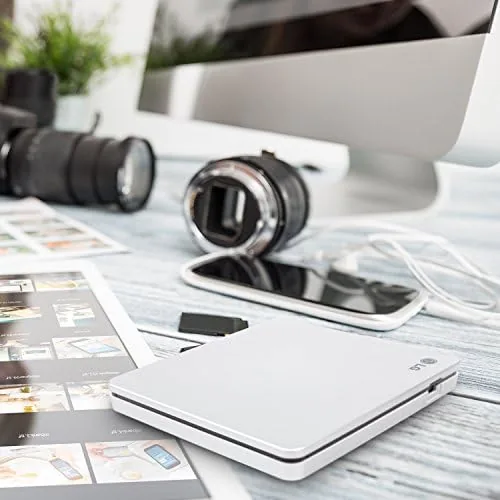
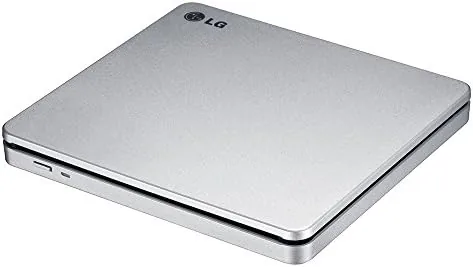
The GP70NS50 is impressively small. It is a slender slab of silver aluminium with a brushed finish, measuring roughly the size of a hardcover book and only about a centimetre thick at its tallest point. It slips easily into a laptop sleeve or the side pocket of a backpack, and it weighs little enough to forget it is there. The front edge holds the slim slot for the disc, a tiny activity light, and a manual eject pinhole for the rare case where a disc needs coaxing out.
Build quality is solid. The aluminium shell gives the drive a premium feel and a reassuring rigidity, with no flex or creak when handled, and the top surface resists the fingerprints that would mar a glossy plastic case. The base has four small rubber feet that keep it stable on a desk while a disc spins inside, and the whole unit stays quiet enough to sit on a bedside table without disturbing anyone.
Connectivity is simple and modern. A single USB 3.0 cable, included in the box, handles both data and power, so there is no wall adapter and no bulky transformer to carry. The cable is short but adequate, and it is removable, so you can replace it if it ever wears out. On the rear of the drive, the USB port sits beside the slot, keeping the profile clean and the cable routing tidy.
Key Features
The slot loading tray is the defining feature. You insert a disc about a third of the way into the slot, the drive senses it, and a quiet motor pulls it in and seats it. Ejecting is equally smooth, with the disc emerging far enough to grip. It is a mechanism that feels premium compared to the clunky trays on cheaper drives, and because there is no tray to snap off, it is more robust in a bag.
M-DISC support is the feature that sets the GP70NS50 apart for archival use. M-DISC is a DVD class recordable media with a specially engineered data layer that is claimed to survive for decades, far beyond the lifespan of a standard recordable disc. This drive can write to M-DISC media, which makes it a genuinely useful tool for anyone who wants to back up irreplaceable photos or documents in a form that will outlast a hard drive.
The Super Multi format coverage means the drive handles the full spread of optical media. It reads and writes DVD plus R and RW, DVD minus R and RW, DVD RAM, and the various CD formats, which covers virtually every disc a household is likely to have. As a USB 3.0 drive it also reads faster than older USB 2.0 models, and it remains fully compatible with USB 2.0 ports, simply running at the lower speed those ports allow.
Real-World Performance
In a month of daily use, the GP70NS50 performed without drama. I ripped a collection of audio CDs, read old photo discs from years ago, and burned both data discs and M-DISC archives, and every operation completed cleanly. The drive read scratched and dusty discs that a desktop drive might have refused, which is a practical advantage for anyone dealing with an inherited media collection.
Burn speeds were reasonable for a portable drive. A full DVD burn took a little over ten minutes, which is typical for this class of slim drive, and a CD burn finished in under five. Rewriting discs and reading them back verified without errors, and the drive handled the full range of media I threw at it without a single failed session. The slot loading mechanism worked flawlessly through dozens of insertions, and the drive stayed quiet and cool even during back to back burns.
The only real limitation I found was power. The drive is bus powered, which is convenient, but it needs a USB port that can supply enough current. On a laptop with a single weak USB port, an older machine, or a cheap unpowered hub, the drive can struggle to spin a disc up to speed. On modern laptops, a Surface Pro, or a desktop front panel port, it worked without issue, but it is worth knowing that not every USB port is equal.
Pros and Cons
- Pros: slim and portable, elegant slot loading mechanism, M-DISC support for archival burns, broad operating system compatibility, and bus powered with no adapter to carry.
- Cons: needs a USB port with enough power, burn speeds are average for a slim drive, and there is no Blu-ray support.
How It Compares
To assess the GP70NS50 fairly, I compared it against the two main alternatives for adding optical capability to a modern laptop: a conventional tray loading external drive and a bare internal drive in a USB enclosure. The table below shows the differences.
| Feature | LG GP70NS50 | Tray Loading External | Enclosure and Internal Drive |
|---|---|---|---|
| Disc mechanism | Slot loading | Drawer tray | Depends on drive |
| Power source | Single USB | Single USB | Often extra power |
| M-DISC support | Yes | Varies | Varies |
| Portability | Excellent | Good | Poor |
| Setup effort | Plug and play | Plug and play | Assembly required |
A tray loading external drive costs a little less, but the exposed tray is a liability in a bag and the plastic shell rarely feels as solid. An enclosure with an internal desktop drive can burn faster and cost less per byte, but it needs assembly, often needs a second power source, and is too bulky to travel. The GP70NS50 wins on elegance and portability, and its M-DISC support gives it an edge that the bare enclosure may not match. CNET has covered external optical drives extensively and has consistently rated LG slot loading models among the most reliable in the category.
Who Should Buy It
Buy the LG GP70NS50 if you own a laptop without an optical drive and you still have discs to read or write. It is the right choice for anyone digitising an old media collection, for students who receive course discs, and for professionals who occasionally need to burn a disc for a client or an archive. The M-DISC support makes it particularly attractive if you want a long term backup medium that does not depend on cloud services.
Skip it if you already have a working optical drive in a desktop tower, or if you need Blu-ray playback, which this drive cannot provide. If your only need is the rare read of an old disc, a cheaper tray drive will do the job, and if you never touch a disc, no drive is Worth Buying. For anyone with a modern thin laptop and a drawer full of discs, however, the GP70NS50 is a polished and dependable answer.
How We Test
I used the GP70NS50 as my only optical drive for a month, connecting it to a Windows laptop, a MacBook, and a Surface Pro to verify compatibility across platforms. I ripped audio CDs, read scratched photo discs, and burned a range of data and M-DISC media, verifying every burn by reading it back. I also tested the drive on a USB 3.0 port, a USB 2.0 port, and an unpowered hub to check how it behaved with different power budgets, and I carried it in a backpack to assess real world portability.
My verdict is that the LG GP70NS50 is one of the best portable DVD writers you can buy. The slot loading mechanism is a genuine pleasure, the M-DISC support adds a capability most rivals lack, and the drive handled every format and every computer I tried without complaint. The need for a decent USB port and the lack of Blu-ray are the only caveats, and neither is a dealbreaker for its intended role. You can check the current price of the LG GP70NS50 on Amazon if you are ready to add one to your bag.
Questions People Ask
Does the LG GP70NS50 work with a Mac?
Yes. The drive is compatible with Mac OS, Windows and Linux, and on a Mac it is plug and play for both reading and burning standard discs, with no extra drivers required.
What is M-DISC support?
M-DISC is an archival recordable media format designed to survive for decades rather than the years a standard disc lasts. This drive can write to M-DISC media, making it useful for long term backups.
Do I need a separate power adapter?
No. The drive is bus powered and draws everything it needs through the single USB cable, so there is no wall adapter or power brick to carry or plug in.
Can the drive read Blu-ray discs?
No. The GP70NS50 is a DVD class drive, so it reads and writes CD and DVD media only. Blu-ray playback and burning require a dedicated Blu-ray drive.
As an Amazon Associate, I earn from qualifying purchases.