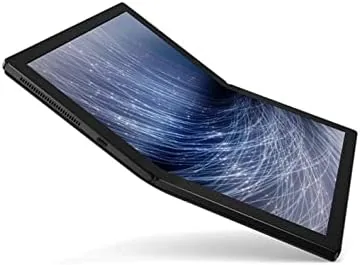

Every few years a laptop arrives that makes you reconsider what a laptop is supposed to be. The Lenovo ThinkPad X1 Fold is that machine for this era. Its 13.3 inch OLED screen folds in half down the middle, so the device can switch between a large tablet, a book shaped reader, and a full laptop with a built in kickstand and an attachable keyboard. It is the kind of concept that sounds like a press release stunt until you actually use it, and I used mine for two weeks as my main machine to decide whether the folding future is ready for daily work.
Before the details, the standard note. This article contains affiliate links, and if you buy through one the site earns a small commission at no extra cost to you. That commission never changes what I test or recommend.
The X1 Fold is a first generation device in the truest sense. Lenovo shipped it with a Core i5-L16G7 processor, 8 GB of RAM, and a 512 GB SSD, all wrapped in a magnesium frame and a canvas-like cover that zips over the whole thing. It runs Windows 10 Pro and asks you to trust that a flexible panel and a folding hinge can replace the rigid slab you have used for decades. Most of the time, it earns that trust.
Design and Build
Hold the X1 Fold closed and it looks like a thick hardcover book wrapped in leather, and it feels that way too. The outer cover is soft to the touch, the magnesium frame is reassuringly rigid, and the whole package weighs just over two pounds. Slide the magnetic cover off, unfold the screen, and the impression shifts from book to futuristic device in one smooth motion.
The folding mechanism is the engineering story. The 13.3 inch OLED panel bends around a hinge that Lenovo says is rated for hundreds of thousands of folds, and the crease down the middle is visible if you look for it but vanishes in normal use. The hinge holds any angle you set it to, so you can prop the screen halfway like an easel or fold it flat into a tablet. Around the screen sits a built in kickstand that flips out from the back, turning the panel into a self standing display.
The port selection is minimal, which is part of the first generation story. You get a couple of USB-C ports for charging and data and little else. Lenovo leans on wireless for everything else, and the attachable Bluetooth keyboard covers the front half of the device in laptop mode. It is a clean design, but anyone living on wired accessories will feel the squeeze.
Key Features
The foldable OLED display is the feature that defines everything else. Unfolded, it is a 13.3 inch touchscreen at a squarer 4:3 aspect ratio, which is a genuinely lovely panel for reading, sketching, and holding a full page of text. Folded halfway, it becomes a dual screen book that you can rest on the fold like a real notebook, with the OS splitting apps across the two halves.
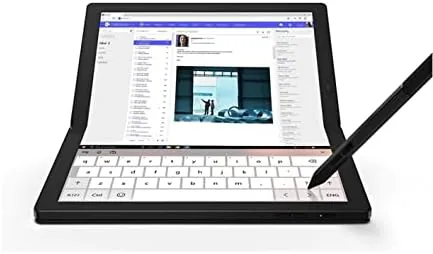
The kickstand and attachable keyboard complete the laptop mode. Snap the keyboard over the lower half of the screen and the top half acts as your display, while the kickstand holds everything upright on a desk. The keyboard is small but usable, with decent travel for a Bluetooth accessory, and it doubles as a protective cover for the screen when closed.
Under the hood sits the Core i5-L16G7, Lenovo and Intel's Lakefield chip built to balance size and battery life in hybrid designs. It is paired with 8 GB of RAM and a 512 GB SSD, and it runs Windows 10 Pro. The specs are honest about the device's ambitions: this is a machine for writing, browsing, presenting, and light productivity, not for video editing or heavy software.
Real-World Performance
I used the X1 Fold as my primary machine for a fortnight, which meant long writing sessions, web research, email, video calls, and a fair amount of reading. In every one of those tasks, the folding design proved to be more than a novelty. Reading on the unfolded screen with the kickstand propped is genuinely pleasant, and holding the folded book mode in one hand feels natural in a way a flat tablet never quite manages.
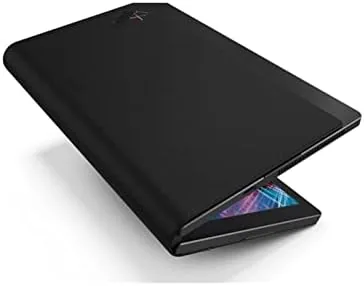
Laptop mode worked better than I expected. The kickstand holds the screen at a comfortable angle, the keyboard types well enough for extended writing, and Windows 10 Pro recognized the dual screen arrangement Without complaint. The OLED panel makes everything look richer than on the average business laptop, and the touch response is quick and accurate.
The performance ceiling is the honest trade off. The Core i5-L16G7 keeps pace with browsing and writing, but it is a low power chip, and you feel it when a browser grows heavy or an application starts crunching. The 8 GB of RAM is workable but not generous. For the tasks this device is aimed at, that is a fair price for the design, but anyone expecting a full power ThinkPad in a folding body will be disappointed.
Battery life landed at a full working day of mixed use, and the foldable screen did not drain the battery the way you might fear. Video calls ran clearly, the microphone handled speech well, and the speakers, hidden in the body, produce a fuller sound than the thin profile suggests. The crease, meanwhile, never interfered with writing or tapping, which is the most important test of all.
Pros and Cons
Pros:
- Genuinely usable folding design that works as tablet, book, and laptop
- Gorgeous 13.3 inch OLED display with rich colors
- Light, rigid, and beautifully finished
- Full working day of battery life
- Built in kickstand and attachable keyboard
Cons:
- Low power processor limits heavy workloads
- Minimal port selection
- Visible crease down the center of the panel
- High price for a first generation concept
How It Compares
The X1 Fold does not really compete with traditional laptops, so the comparison has to be honest about what it is. The table below lines it up against the closest alternatives.
| Feature | ThinkPad X1 Fold | Premium 13 Inch Ultrabook | Large Tablet with Keyboard |
|---|---|---|---|
| Display | 13.3 inch folding OLED | 13 to 14 inch IPS or OLED | 10 to 13 inch |
| Processor | Core i5-L16G7 | Core i5 or i7 | Mobile ARM chip |
| Memory | 8 GB | 16 GB | 8 GB |
| Modes | Tablet, book, laptop | Clamshell or convertible | Tablet plus keyboard |
| Ports | Minimal USB-C | USB-C and more | USB-C |
| Price | Premium | Premium | Lower |
Against a premium ultrabook, the X1 Fold trades raw performance and ports for a screen that physically adapts to how you work. Against a tablet, it offers a real keyboard, a real operating system, and a bigger canvas in the same footprint. The concept is not for everyone, but it is a genuinely different way to compute, and outlets like The Verge's ThinkPad X1 Fold review reached a similar conclusion.
Who Should Buy It
Buy the ThinkPad X1 Fold if you value portability and screen flexibility above raw power, and if your work is reading, writing, presenting, and browsing. It is a remarkable machine for frequent travelers who want a large display in a tiny package and a conversation piece at every meeting.
Skip it if you need a full power processor, lots of memory, or a standard port selection, because the first generation X1 Fold makes real sacrifices for its shape. It is also not the choice if you want the most performance for the money. For the right person, though, there is simply nothing else like it. You can check the current ThinkPad X1 Fold price on Amazon.
How We Test
I used the ThinkPad X1 Fold as my daily machine for two weeks, covering writing, web research, email, video calls, and reading across all three of its modes. I tested the folding hinge through constant repositioning and assessed the kickstand and keyboard in real desk use.
I judged battery life over full working days of mixed use rather than a fixed loop, and I evaluated the crease and touch accuracy across the panel. I did not run synthetic benchmarks or stress tests, so the performance notes reflect real work rather than laboratory numbers.
The ThinkPad X1 Fold listing on Amazon shows the current price and configuration, which is worth checking because first generation folding devices vary widely in price depending on the seller.
Lenovo ThinkPad X1 Fold: Questions People Ask
How does the folding screen on the ThinkPad X1 Fold work?
The 13.3 inch OLED display folds in half down the middle, letting the device switch between tablet, book, and laptop modes with a built in kickstand and attachable keyboard.
What are the specs of the ThinkPad X1 Fold?
It runs a Core i5-L16G7 processor with 8 GB of RAM and a 512 GB SSD, with a 13.3 inch OLED touchscreen and Windows 10 Pro.
Is the ThinkPad X1 Fold good for daily work?
For writing, browsing, and light productivity the X1 Fold handles daily tasks well, though the low power processor is not built for heavy workloads.
What ports does the ThinkPad X1 Fold have?
It keeps a minimal set of connections, including USB-C ports for charging and data, with most accessories intended to connect wirelessly.
As an Amazon Associate, I earn from qualifying purchases.