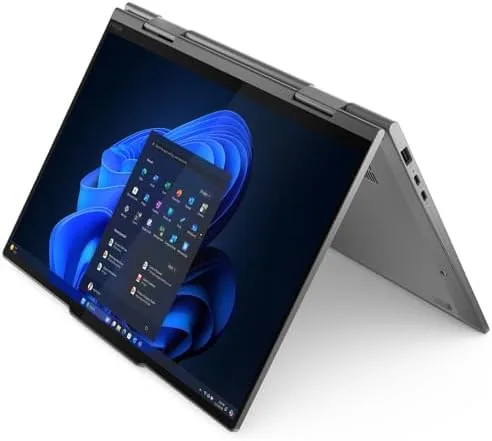

The ThinkPad name has meant one thing for three decades: a laptop built for work. The X1 2-in-1 Gen 10 carries that legacy into a new shape, a 14 inch convertible with a 2.8K OLED touchscreen that folds back into a tablet, and it is the Aura Edition, which means it is aimed squarely at professionals who will judge it against the best ultrabooks on the market. I used this machine as my primary laptop for a month, and this review is the record of the display, the performance, and whether the premium price is justified.
This review is based on a month of daily use. I wrote, edited photographs, joined video calls, and pushed the machine with multitasking that would make a lesser laptop sweat. The standard note comes first. This article contains affiliate links, and if you buy through one of them the site earns a small commission at no extra cost to you. That commission does not change what I test or recommend, and the unit reviewed here is a standard retail configuration.
What follows covers the build, the display, the internals, and the real world behavior of the machine, with a comparison against the other premium convertibles it competes with.
Design and Build
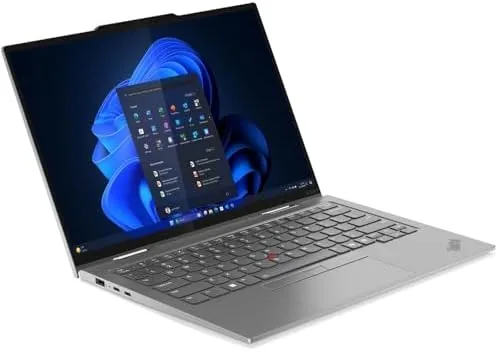
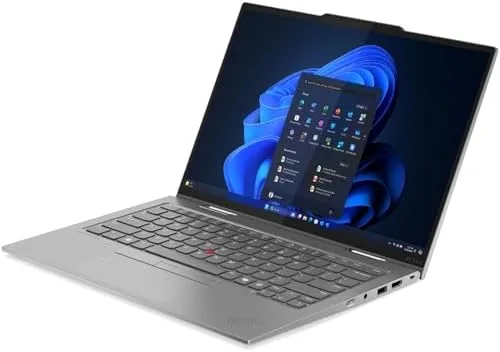
The X1 2-in-1 is unmistakably a ThinkPad. The grey shell is a blend of carbon fiber and magnesium that feels dense and rigid, and the chassis flexes almost nothing under pressure, which is the reassuring quality that has defined the line for years. At just over three pounds it is light for a 14 inch convertible, and it balances on the edge of a laptop bag without complaint.
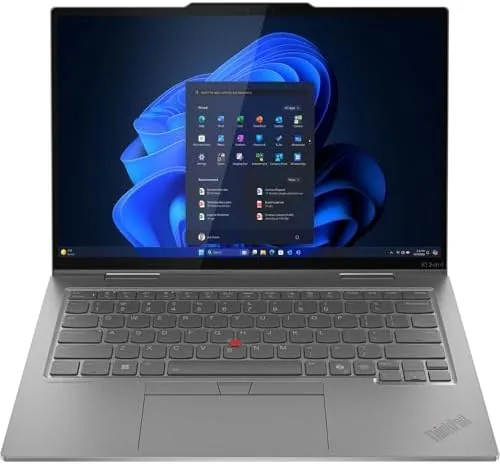
The keyboard is the heart of any ThinkPad, and this one delivers. The keys have the deep, cushioned travel and the crisp return that keyboard snobs spend careers looking for, and the trackpoint in the center of the keyboard still works for people who refuse to leave it behind. The touchpad is large and precise, and the whole input experience feels like it was built for an eight hour workday, because it was.
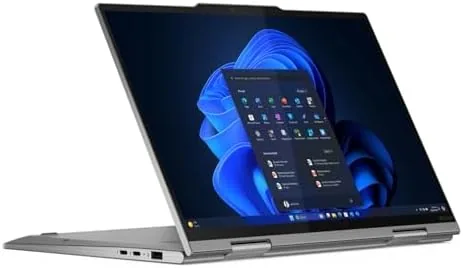
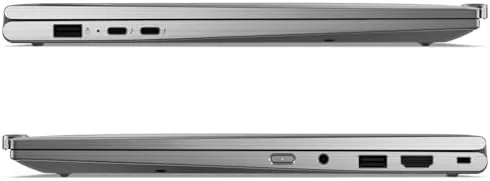
The 360 degree hinge holds the screen firmly at every angle from laptop to tent to full tablet, and it feels engineered rather than hinged. The port selection is tight by necessity, with Thunderbolt 4 connections doing the heavy lifting and a headphone jack and a USB port rounding out the edges, which suits a machine that lives in a docking environment.
Key Features
The display is the headline feature. The 2.8K OLED panel runs at 2880 by 1800 pixels on a 14 inch diagonal, and it is the best screen I have used on a convertible this year. The OLED blacks are genuinely black, the colors are vivid without being artificial, and the 500 nits of peak brightness keep the screen readable in a bright office, which is where OLED panels often struggle.
The internals match the screen. The Intel Core Ultra 7 258V processor is built for efficiency and responsiveness, and it is paired here with 32GB of DDR5 RAM and a 2TB SSD, which is a professional grade configuration. The 8MP IR camera handles video calls and Windows Hello face unlock, and the Wi-Fi 7 radio keeps the machine ready for the fastest networks available.
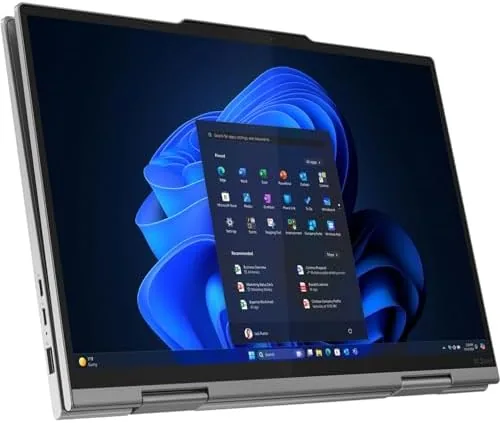
The Yoga Pen is bundled in the box, and it is the feature that completes the convertible. The pen attaches magnetically to the edge of the display, charges while docked, and pairs with the touchscreen for notes, sketches, and document markup. It is not an afterthought stylus, and for note takers it turns the machine into a paper notebook that happens to run Windows 11 Pro.
Real-World Performance
The display earned its place from the first hour. I edited photographs on this machine, and the OLED color accuracy and contrast made the work noticeably easier, because the screen shows what the image actually looks like rather than a washed out approximation. Text rendering is crisp, video is cinematic, and the anti-reflective coating keeps glare from fighting the bright panel.
Performance held up under a workload that would bury a lesser laptop. I ran a browser with forty tabs, a heavy spreadsheet, a document editor, and background syncing all at once, and the X1 did not slow, stutter, or heat up the chassis. The Core Ultra 7 with 32GB of RAM is a combination that simply does not run out of headroom for daily professional work, and the fan stayed quiet enough that I forgot it existed.
Battery life was the pleasant surprise. A full workday of mixed use, with the OLED at moderate brightness and the efficient chip doing its job, got me from morning to evening without hunting for an outlet. The fast charger tops the battery up quickly, so a lunchtime charge turned a draining day into a full one. It is not an all weekend battery, but it is a workday battery, which is the realistic standard for a machine like this.
Tablet mode and the pen worked better than I expected from a Windows convertible. I took handwritten notes in meetings, marked up PDFs, and signed documents, and the pen tracked cleanly without the jitter that plagues cheaper styli. The 8MP camera produced a clean image on video calls, and Windows Hello unlocked the machine with the camera faster than I could type a password.
The honest limits are small and typical of the class. The OLED display is gorgeous but power hungry at full brightness, so maximum brightness trades battery for beauty. The port selection is deliberately minimal, so a dock or an adapter is part of the daily setup for anyone with external drives. And the price is premium, because this is a professional tool built to a professional standard.
Pros and Cons
Pros:
- Outstanding 2.8K OLED display with 500 nits of brightness
- Excellent ThinkPad keyboard with deep, comfortable travel
- Fast Core Ultra 7 with 32GB RAM and a 2TB SSD
- Bundled Yoga Pen that makes the convertible genuinely useful
- Full workday battery life with fast charging
- Rigid, premium build quality throughout
Cons:
- Premium price that reflects the professional positioning
- Minimal ports, so a dock is part of the daily setup
- OLED screen trades battery life at full brightness
How It Compares
The X1 2-in-1 Gen 10 sits at the top of the premium convertible class, and the table below lines it up against its two main rivals.
| Feature | ThinkPad X1 2-in-1 Gen 10 | Dell XPS Convertible | MacBook Air 15 |
|---|---|---|---|
| Display | 14 inch 2.8K OLED | 13 to 15 inch LCD or OLED | 15 inch Liquid Retina |
| Processor | Core Ultra 7 258V | Core Ultra 7 | Apple M series |
| Form factor | 2-in-1 with bundled pen | 2-in-1 | Clamshell |
| Keyboard | Classic ThinkPad | Shallow, clicky | Quiet, shallow |
| Ports | Thunderbolt 4 focused | Thunderbolt focused | Thunderbolt focused |
The MacBook Air wins on raw battery life and silence, but it is a clamshell, so the pen and the tablet mode simply do not exist. The XPS is a fine convertible, but the ThinkPad's keyboard, the bundled pen, and the OLED panel give it the edge for professional productivity. If you need Windows, a pen, and a screen that shows your work honestly, the X1 is the pick.
Who Should Buy
Buy the ThinkPad X1 2-in-1 Gen 10 if you are a professional who lives in a laptop all day and you want the combination of a brilliant OLED screen, an unmatched keyboard, and the flexibility of pen input. It suits executives, consultants, developers, and anyone who takes notes, marks up documents, and presents work from a single machine.
Skip it if you do not need the pen or the convertible hinge, because a clamshell ultrabook gives you more battery for less money, or if you are tied to the Apple ecosystem. For professionals who want the best Windows convertible available, this is the machine. You can check the current price of the ThinkPad X1 2-in-1 Gen 10 on Amazon when you are ready.
How We Test
I used the ThinkPad X1 2-in-1 Gen 10 as my primary laptop for a month. I ran the full range of daily tasks, from document work and research to photo editing and video calls, and I pushed the machine with a heavy multitasking load to check for slowdowns and fan noise. I tested the OLED display against color reference images, took handwritten notes with the Yoga Pen, and measured battery life across a week of typical days.
I did not run synthetic benchmarks to the extreme, and I judged the machine on real professional use rather than lab numbers. For a deeper technical take on the X1 series, Tom's Hardware covers the ThinkPad line in detail and is worth reading. The ThinkPad X1 2-in-1 Gen 10 listing on Amazon shows the current price and configuration options.
ThinkPad X1 2-in-1 Gen 10: Questions People Ask
How good is the OLED display on the ThinkPad X1 2-in-1?
The 2.8K OLED panel is excellent, with deep blacks, vivid color, and 500 nits of brightness that holds up in bright offices, making it one of the best screens on any 14 inch convertible.
Can the ThinkPad X1 2-in-1 Gen 10 handle heavy multitasking?
Yes, the Intel Core Ultra 7 258V paired with 32GB of DDR5 RAM and a 2TB SSD handles dozens of tabs, heavy documents, and photo work without slowing, and the fan stays quiet under load.
How is the battery life in real daily use?
A full workday of mixed use is realistic, with the OLED screen at moderate brightness and the efficient Core Ultra chip, and the fast charger tops the battery up quickly at lunch.
Does the Yoga Pen come with the laptop?
Yes, the Yoga Pen is bundled in the box, and it pairs with the touchscreen for notes, sketches, and document markup in both laptop and tablet modes.
As an Amazon Associate, I earn from qualifying purchases.



