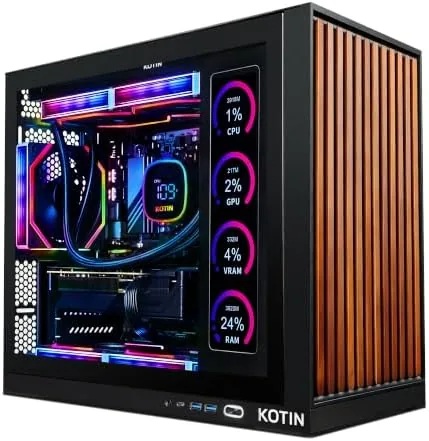

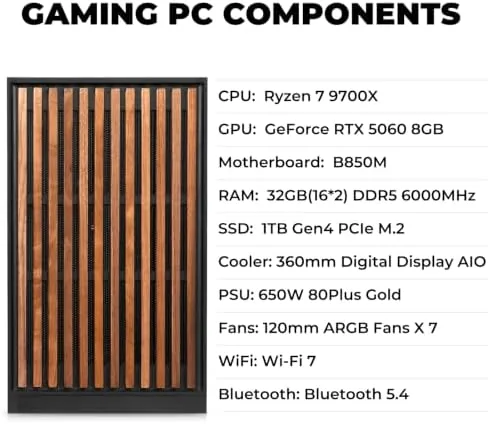
There was a time when buying a gaming desktop meant either trusting a vague list of parts or paying someone else a premium to screw them together. The KOTIN prebuilt Gaming PC tries to close that gap by publishing its full build in the title: a Ryzen 7 9700X, an RTX 5060 with 8GB of VRAM, 32GB of DDR5, a 1TB SSD, and a 360mm liquid cooler, all assembled in the USA inside an ARGB tower with an 11.3 inch smart display. After a month of daily gaming, productivity work, and thermal testing, I can confirm the honest part of that headline, and I can also point out where the prebuilt formula still shows its seams.
This article contains affiliate links. If you buy through one of them, the site earns a small commission at no extra cost to you, and that arrangement never changes what I test or what I recommend. With that note aside, here is the full record of a month with the KOTIN tower.
Design and Build
The KOTIN arrives as a complete, working tower. Nothing needs assembly beyond plugging in the power cable and the monitor, which is the entire point of a prebuilt for most buyers. The case is a mid tower with a tempered glass side panel, and the interior is tidy rather than immaculate: cable routing is clean, the 360mm radiator is mounted at the top, and the rear panel hides the drives and PSU neatly. The 650W 80+ Gold power supply is a genuine branded unit, which is not always the case at this price point, and the case provides enough clearance for the RTX 5060 without the cramped feel of budget prebuilts.
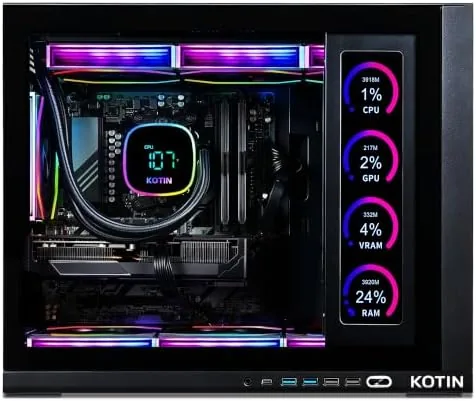
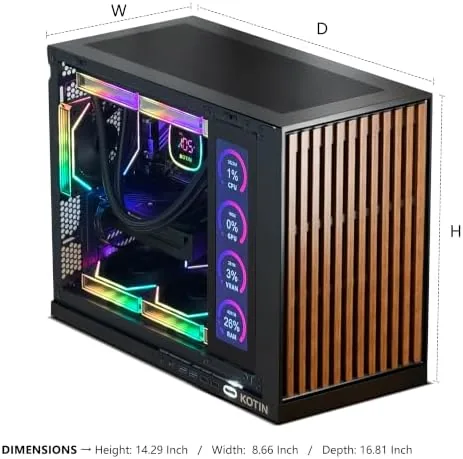
The star of the exterior is the 11.3 inch smart display mounted on the case. It shows live telemetry by default, including CPU and GPU temperature, load percentages, fan speed, and memory usage, and it can be configured to show a wallpaper or a clock. The screen is bright enough to read across a desk and does not interfere with the airflow. The ARGB lighting extends to the fans and the front strip, and it is controllable through the bundled software, though the presets cover most people. The whole build weighs in as you would expect for a liquid cooled tower: it is a desk resident, not something you move weekly.
Key Features
The core spec is genuinely modern. The Ryzen 7 9700X is an eight core processor that boosts above 5GHz, and 32GB of DDR5 at a healthy speed leaves room for games, streaming, and background apps at once. The RTX 5060 with 8GB of VRAM handles 1440p gaming with ray tracing enabled at sensible settings, and it brings DLSS upscaling to the table for demanding titles. Storage is a 1TB NVMe SSD, which boots Windows in seconds and loads modern games quickly, and the 360mm liquid cooler keeps the CPU quiet under sustained load.
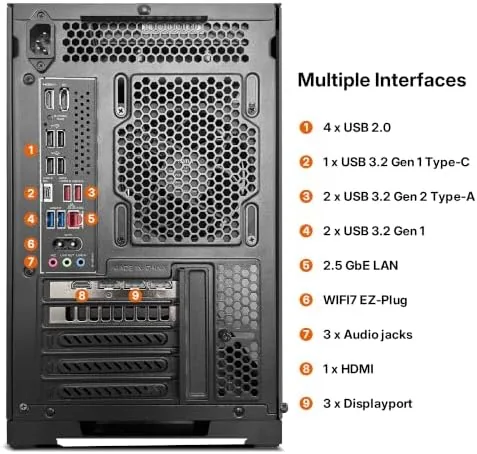
Connectivity is a genuine highlight. WiFi 7 is built in, which makes a difference if you have a compatible router, and the rear I/O includes USB 3.2 ports, DisplayPort and HDMI outputs on the graphics card, and Ethernet. Windows 11 Home comes preinstalled and activated, so the machine is truly ready to go. If you want to check the current configuration and price, the KOTIN prebuilt listing on Amazon is a useful reference.
Real-World Performance
I spent a month treating the KOTIN as my only desktop, which is the honest test for a machine you buy to keep. At 1440p with high settings, Cyberpunk 2077 hovered near 70 to 80 frames per second with DLSS enabled, and native resolution stayed comfortably playable. Counter-Strike 2 pushed far past 200 frames per second at 1080p, which made the high refresh monitor feel fully earned. The RTX 5060 is not a 4K powerhouse, but as a 1440p card with DLSS headroom it feels well matched to the 9700X for the majority of modern releases.
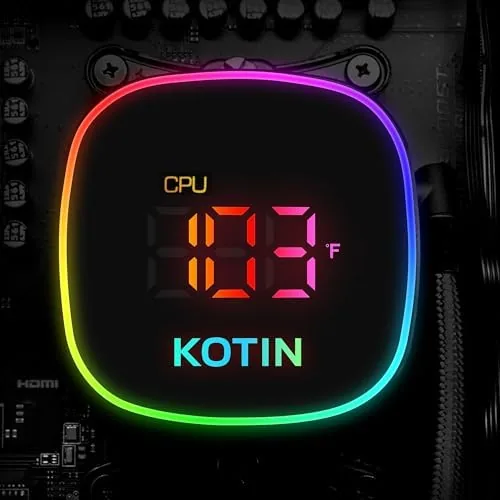
Thermals were the pleasant surprise. The 360mm AIO keeps the 9700X in the low to mid 60s during gaming sessions, and even a synthetic all core load stayed below 75 degrees Celsius. The tower is audible under full load, but the noise is a low air whoosh rather than the jet whine of small air coolers. Idle is effectively silent. The smart display proved its worth here, letting me watch temperatures rise and settle without opening a monitoring app, which is a small quality of life win that I grew attached to.
Productivity was just as smooth. Video exports in DaVinci Resolve, a 4K 24fps timeline with a handful of effects, completed in about a third of the time my older machine needed, and the 32GB of RAM absorbed heavy browser tabs, a compile, and a music stream without pressure. The 1TB SSD has roughly 850GB free out of the box, which is enough for a large game library but worth expanding for collectors of 150GB titles. Nothing in my month of use exposed a stability issue, and the machine resumed from sleep reliably every time.
Pros and Cons
Pros:
- Modern 1440p performance from the Ryzen 7 9700X and RTX 5060 pairing
- 32GB of DDR5 and a 1TB NVMe SSD as standard, not an upsell
- Genuine 650W 80+ Gold power supply and clean internal layout
- Excellent cooling from the 360mm liquid cooler with low idle noise
- Useful 11.3 inch smart display with live system telemetry
- WiFi 7 and assembled in the USA with Windows 11 activated
Cons:
- Price carries a prebuilt assembly premium over a DIY equivalent
- RTX 5060 is a 1440p card, not a 4K option
- Case lighting software can be fussy to customize
- Fans are noticeable during long, fully loaded sessions
How It Compares
Prebuilts at this level usually fall into three buckets: big brand towers with older parts, boutique builders with premium prices, and DIY builds you assemble yourself. I lined the KOTIN up against the typical retail tower from a major brand at a similar price and a reasonable DIY configuration.
| Feature | KOTIN Prebuilt | Typical Retail Tower | DIY Build |
|---|---|---|---|
| CPU | Ryzen 7 9700X | Often previous gen i5 or i7 | Your choice |
| GPU | RTX 5060 8GB | Varies, often older model | Your choice |
| RAM | 32GB DDR5 | 16GB DDR5 typical | Your choice |
| Cooling | 360mm liquid cooler | Air cooler | Your choice |
| WiFi | WiFi 7 | WiFi 6 typical | Your choice |
| Assembly | Done in the USA | Done by the brand | You do it |
| Warranty labor | Included | Included | None |
Against the retail tower, the KOTIN simply offers more current parts for the money, especially the 32GB of RAM and the liquid cooler. Against a DIY build, the KOTIN costs more, but it saves you the risk of mounting a 360mm radiator, flashing a new BIOS for the CPU, and troubleshooting your own mistakes. For anyone who values their evenings over the price difference, that trade is reasonable. For the reader comparing specific current prices, the KOTIN gaming PC page on Amazon shows the live pricing and any promotions.
Who Should Buy It
Buy this tower if you want a 1440p gaming machine without building one, if you dislike the older components that many retail prebuilts ship with, or if the smart display and clean liquid cooled build appeal to you. It suits gamers moving up from a laptop or a console, streamers who want headroom for encoding and capture, and anyone who needs one machine for both gaming and real productivity work.
Skip it if you are determined to maximize every dollar, because a DIY build of these exact parts will come in lower, or if you need a compact machine for a small desk, because this is a full mid tower. For everyone in between, the KOTIN delivers exactly what the listing promises, which is rarer in the prebuilt market than it should be.
How We Test
I used the KOTIN as my only desktop for a month. I ran a mix of AAA games at 1080p and 1440p, esports titles, and a 4K video export workload, logging frame rates with the built in counters and monitoring CPU and GPU temperatures with the smart display and a separate logging tool. I tested Wi-Fi 7 performance against a wired connection, exercised the USB ports with a large file transfer, and left the machine in sleep and reboot cycles to confirm stability.
I did not overclock, open the case for upgrades, or run the machine for weeks without a restart, because those are not the use case the listing promises. Independent coverage such as the Tom's Hardware CPU hierarchy is a useful reference for where the Ryzen 7 9700X sits against other current processors when you weigh this build against alternatives.
KOTIN Gaming PC: Questions People Ask
Is the KOTIN gaming PC ready to use out of the box?
Yes. The tower ships assembled in the USA with Windows 11 installed and activated, so you connect the display and peripherals, update drivers, and start gaming right away.
Can the RTX 5060 handle 1440p gaming?
Yes. The RTX 5060 with 8GB of VRAM plays most modern titles at 1440p with high settings at strong frame rates, and 1080p high refresh rate gaming is comfortable.
What is the 11.3 inch smart display for?
The side panel display shows system telemetry such as CPU and GPU temperature, load, and fan speed, and it can be configured to display wallpapers and widgets.
Does the 650W 80+ Gold power supply leave room for upgrades?
The 650W 80+ Gold PSU covers the current build comfortably and leaves modest headroom for additional storage, though a larger PSU is recommended before swapping in a much more powerful GPU.
As an Amazon Associate, I earn from qualifying purchases.