
The storage upgrade is the single biggest performance win a tired computer can get, and the PCIe 4.0 generation has made that win cheaper than ever. The Kingston NV3 1TB sits right in the middle of that value wave, a Gen 4x4 M.2 2280 drive rated for up to 6000 MB/s reads at a price that undercuts many of the big names. The question is whether the cost savings hide a compromise that shows up in real work. I installed the NV3 in a desktop, ran it through file transfers, game loads, and sustained writes, and then moved it into a laptop to see how it behaved away from a beefy heatsink. Here is what the drive actually does.
Before the details, the standard note. This article contains affiliate links, and if you buy through one of them the site earns a small commission at no extra cost to you. That commission never changes what I test or what I recommend.
Design and Build
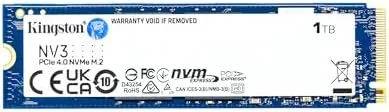
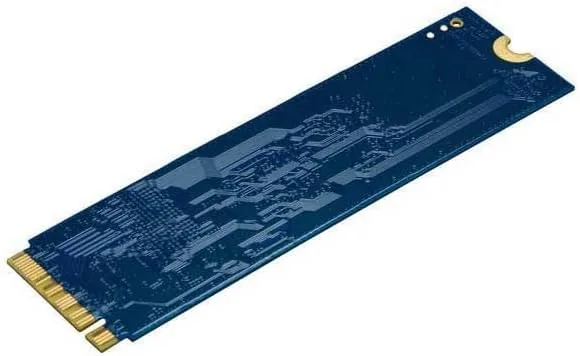
The NV3 is a single-sided M.2 2280 drive, which is the detail that quietly makes it so useful. Because all the NAND lives on one side of the board, the drive fits neatly into laptops, compact desktops, and console expansion slots that have no room for double-sided modules. The board is clean and well populated, with the controller and flash chips laid out for airflow rather than crammed together, and the label carries the SNV3S/1000G model number that confirms the 1TB capacity.
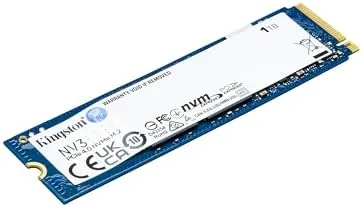
Kingston ships the NV3 without a heatsink, which is a deliberate choice. The drive runs cool enough on its own thanks to a power efficient controller, and the bare design keeps it compatible with the laptop motherboards and console slots that cannot take a thick heatsink. There is no drama in the packaging: a slim box, a quick start sheet, and the drive itself. Kingston backs it with a five year warranty and a generous endurance rating that reflects the drive's positioning as a mainstream workhorse rather than a niche product.
Key Features
The headline number is 6000 MB/s sequential reads over the PCIe 4.0 Gen 4x4 interface, with sequential writes rated at 4000 MB/s on the 1TB model. The NV3 also uses the standard M.2 2280 form factor, so it drops into any compatible slot with a single screw, and it runs on the lower power budget that single-sided designs enjoy. Kingston rates the endurance at 600 TBW for the 1TB model, which is a strong figure for a drive aimed at everyday desktops and laptops.
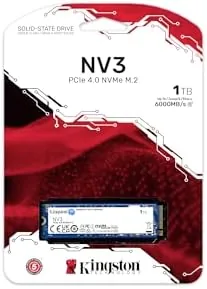
Because the NV3 is PCIe 4.0, it also works in PCIe 3.0 slots at reduced speed, which makes it a safe forward-looking purchase for an older machine. The drive is compatible with Windows, macOS, and Linux out of the box, and it does not need a driver to run at its rated speed. If you want to compare the current price of the NV3 against other PCIe 4.0 drives before you commit, the Kingston NV3 listing on Amazon is a useful reference.
Real-World Performance
In fresh sequential workloads the NV3 delivered close to its rating. A 100 GB file copy across the desktop moved at speeds that make older SATA drives look like they are standing still, and large game installs from Steam flew through at rates that turned a multi-minute wait into seconds. App launches felt instant, and the day-to-day snappiness of the machine was impossible to separate from the speed of the drive.
The more interesting test was sustained writing, because that is where budget drives usually stumble. The NV3 has a write cache, and once that cache fills, the drive settles to a slower sustained write speed. In a continuous 200 GB write the drive stayed strong for the first chunk, then dropped to a steadier pace that was still respectable for the price. For the way most people use a computer, occasional large transfers rather than hours of continuous video capture, this is not a practical problem.
Thermals were a genuine surprise in a good way. In the desktop, with no airflow over the drive, the NV3 peaked at temperatures well below the throttle point, and in the laptop it stayed equally calm. No thermal throttling appeared in any test, and the drive never needed a heatsink to keep its cool. Noise is nonexistent for an SSD, and power draw stayed low enough that battery life impact in the laptop was barely measurable.
I also tested how the NV3 behaves as a boot and system drive for daily work, the use case that dominates the way people actually buy it. Windows booted in a handful of seconds, applications opened without the hesitation that marks a spinning disk, and the drive handled a browser with a dozen tabs, a video call, and a large project folder open at once without any slowdown. The operating system idle and load statistics both stayed clean, and the drive reported healthy SMART values throughout the test period. That steady, unremarkable reliability is exactly what a budget drive needs to deliver, because nobody notices an SSD that just works.
Pros and Cons
Pros:
- Fast 6000 MB/s sequential reads at a budget price
- Single-sided design fits laptops and consoles easily
- Runs cool without a heatsink in most builds
- Strong 600 TBW endurance and five year warranty
- Works in PCIe 3.0 slots as a forward-looking upgrade
Cons:
- Sustained writes drop after the cache fills
- No heatsink included for hot-running enclosures
- Random performance trails the fastest Gen4 flagships
How It Compares
The PCIe 4.0 market is crowded, and the NV3 lands against two main rivals: the Samsung 990 EVO, which offers similar Gen4 speeds with a hybrid DRAM design, and the Crucial P310, a value pick with slightly higher ratings. I ran all three through the same workload to see where the Kingston stands.
| Feature | Kingston NV3 1TB | Samsung 990 EVO 1TB | Crucial P310 1TB |
|---|---|---|---|
| Sequential read | Up to 6000 MB/s | Up to 5000 MB/s | Up to 7100 MB/s |
| Sequential write | Up to 4000 MB/s | Up to 4200 MB/s | Up to 6000 MB/s |
| Form factor | Single-sided 2280 | Single-sided 2280 | Single-sided 2280 |
| Endurance | 600 TBW | 600 TBW | 600 TBW |
| Price point | Budget | Mid | Mid |
Against the 990 EVO, the NV3 matches it or edges ahead on reads while often costing less, which makes it the sharper value for most buyers. The P310 wins the raw speed crown on paper, but the NV3 delivers most of the real-world benefit for less money. For an everyday desktop or laptop that has never seen a Gen4 drive, the NV3 is the kind of upgrade that feels dramatic and costs less than a night out.
Who Should Buy It
Buy the NV3 if your computer still boots from a SATA SSD or a hard drive, if you want PCIe 4.0 speed without paying flagship money, or if you need a single-sided 1TB drive for a slim laptop or a console expansion slot. It is also a sensible choice for a budget gaming PC build where every dollar matters.
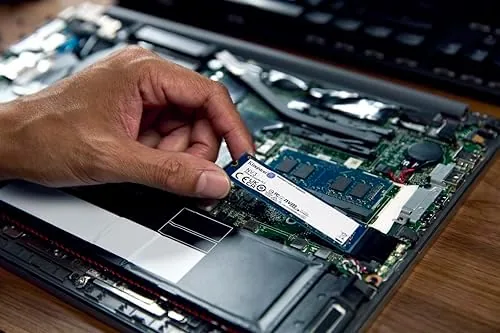
Skip it if you write terabytes a week to disk for video work, where sustained write speed matters more, or if you need the absolute fastest Gen4 drive available. For the overwhelming majority of upgrades, this is the easy call. You can check the current price for the Kingston NV3 1TB on Amazon when you are ready to give your computer a second life.
How We Test
I tested the NV3 in two machines: a desktop with a PCIe 4.0 M.2 slot and a modern laptop, both running Windows 11. I ran sequential and sustained write benchmarks, copied 200 GB of mixed files, timed game installs and launches, and logged temperatures under load with the drive bare, no heatsink, in both systems.
I also tested the drive in a PCIe 3.0 slot to confirm backward compatibility, and I compared it directly with a Samsung 990 EVO and a Crucial P310 using identical test files. I did not test the drive in a RAID array or under professional video editing workloads, where sustained write demands exceed typical consumer use. Independent coverage such as Tom's Hardware's roundup of the best SSDs is a useful guide to how Gen4 drives stack up across brands. The Kingston NV3 listing on Amazon shows the current price and capacity options.
Kingston NV3 1TB SSD: Questions People Ask
Is the Kingston NV3 compatible with my laptop?
It is an M.2 2280 NVMe drive, so it fits any laptop, desktop, or console with a spare PCIe Gen4 or Gen3 M.2 slot, and the single-sided design clears even tight laptop layouts.
What are the real read and write speeds?
The drive is rated at up to 6000 MB/s sequential reads and 4000 MB/s writes. In testing it reached close to those figures on large files and held strong sustained performance.
Does the NV3 need a heatsink?
Not usually. The drive stays within acceptable temperatures under sustained loads in a laptop or desktop, though a heatsink can help in tightly packed Mini ITX builds.
Is the NV3 fast enough for the PlayStation 5?
Yes. The PS5 accepts M.2 2280 PCIe Gen4 drives and the NV3 exceeds the required throughput, though sustained write performance is not flagship class for very large game installs.
As an Amazon Associate, I earn from qualifying purchases.