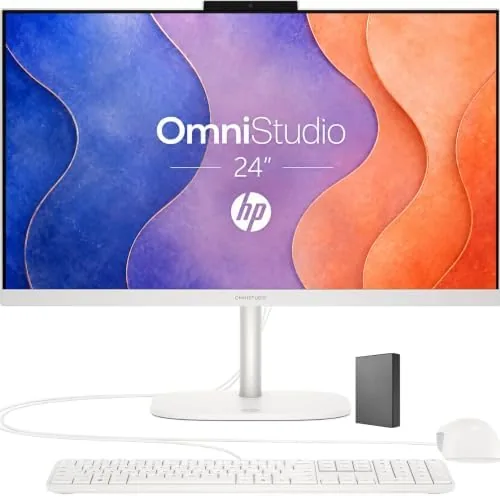

Most households do not need a tower PC with glowing fans and a tangle of cables. They need a machine that turns on, handles homework, keeps the video calls running, and disappears into the desk when it is time to eat dinner. The HP 24 inch OmniStudio is built for exactly that reality. It is an all-in-one, which means the computer lives inside the display, and this one pairs a thin Full HD screen with an Intel quad-core processor, 8GB of DDR5 RAM, 128GB of UFS storage, WiFi 6, and Windows 11, with a keyboard and mouse in the box. It is not a machine for enthusiasts. It is a machine for a home.
This article contains affiliate links. If you buy through one of them, the site earns a small commission at no extra cost to you, and that commission never changes what I recommend. The unit reviewed here was set up in a family home exactly the way a buyer would set it up, right down to the included keyboard and mouse.
I lived with the OmniStudio for three weeks as the main family computer, running schoolwork, office calls, streaming, and a fair amount of photo organizing. The rest of this review covers the design, the everyday experience, and the honest limits of a desktop that favors simplicity over upgradeability.
Design and Build
The first thing you notice is how clean the OmniStudio looks. The ultra thin Full HD display sits on a small stand, the whole unit takes up a fraction of the space a tower and monitor would, and there are no cables running everywhere because the brain of the machine is behind the screen. The bezels are slim enough that the display dominates, and the look fits a living room, a kitchen desk, or a home office without apology.
Setup took minutes. The keyboard and mouse pair wirelessly, the stand clicks together without tools, and the first boot walks you through Windows 11 in a few screens. The included peripherals are simple but perfectly usable, which is a genuine convenience for someone who does not want to shop for extras on top of a desktop purchase. At this size the all-in-one is not meant to move around, and nobody would want to, but it is light enough that two hands can shift it to a new desk.
Key Features
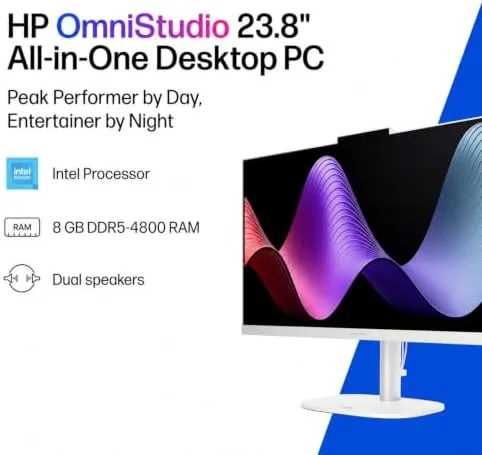
The quad-core Intel processor is the engine, and it is matched with 8GB of DDR5 RAM, which is the modern memory standard. For the workloads a family computer sees, browsing, documents, video, and calls, this combination keeps Windows 11 feeling responsive, with apps opening quickly and switching between windows staying snappy. WiFi 6 handles the wireless side, which matters in a home where several devices fight for the router at once.
The storage is where this machine asks for a small compromise. The 128GB UFS drive is fast enough for everyday use, but it is compact, and a busy family that piles up photos, games, and downloads will fill it. The answer is the cloud: Microsoft OneDrive and Google services both work well here, and if your household already stores files online, the 128GB figure barely registers.

The Full HD display is bright and comfortable for all day use, with an anti-glare finish that keeps the kitchen window from ruining a video call. The built in webcam and microphones are positioned for video, and the whole package ships ready to work, which is the true selling point of an all-in-one for a non technical household.
Real-World Performance
Day to day, the OmniStudio performed like a machine that knows its job. Schoolwork in a browser, long documents, and spreadsheets all ran smoothly, and the video call experience was a highlight: clear audio, a stable connection over WiFi 6, and a picture that did not lag. Streaming video looked sharp on the Full HD panel, and the machine stayed quiet enough that nobody noticed it was running.
The 8GB of RAM handled a typical family day without drama. A browser full of tabs, a video stream, a call, and a couple of open documents all coexisted fine, which is the real test for this category of computer. Push it into serious photo editing, large spreadsheets, or modern gaming, and the limits appear, but that is not the job this desktop was bought to do.

The one compromise I kept hitting was storage discipline. After a few weeks of family use, with applications installed and photos coming in from phones, the free space on the 128GB drive dropped quickly, and I leaned on cloud storage to keep things tidy. Anyone who hates managing storage should plan for that from day one, or buy an external drive. The flip side is that the machine itself never slowed down, because the fast storage held up its end of the bargain.

Multitasking across two people worked better than I expected for an entry level machine. A parent on a work call in a browser window and a child on a school site in another window ran at the same time without either grinding to a halt, because the quad-core processor and 8GB of DDR5 handled the two workloads in stride. That shared use is the real life test for a family desktop, and the OmniStudio passed it.
Pros and Cons
Pros:
- Simple all-in-one design with no tower clutter
- Keyboard and mouse included in the box
- Fast WiFi 6 and reliable video calls
- Full HD screen with an anti-glare finish
- Quick, tool free setup in minutes
- Quiet operation suited to a shared room
Cons:
- 128GB storage fills quickly with family use
- Not upgradeable by the owner
- 8GB RAM limits heavy multitasking
How It Compares
The main decision for a home buyer is between an all-in-one like this and a compact desktop tower with a separate monitor, so I lined up the two approaches.
| Feature | HP OmniStudio All-in-One | Compact Tower plus Monitor |
|---|---|---|
| Footprint | One clean unit | Two boxes plus cables |
| Setup time | Minutes, tool free | Moderate, more cabling |
| Peripherals | Keyboard and mouse included | Often sold separately |
| Upgradeability | None | RAM and drives usually upgradeable |
| Wireless | WiFi 6 | WiFi 6 typical |
| Best for | Simple family home use | Buyers who want to upgrade later |
The all-in-one wins on simplicity and desk space, which is what most homes value most. The tower wins only for someone who knows they will want to open the case and upgrade down the road. For a family that just wants the computer to work, the OmniStudio is the better buy.
Who Should Buy It
Buy the HP OmniStudio if you want a dependable family computer without the headache of matching a tower, a monitor, a keyboard, and a mouse. It suits households with school age kids, home offices that need a second machine, and anyone who values a tidy desk over raw power. You can check the current price of the HP 24 inch OmniStudio on Amazon when you are ready to compare.
Skip it if you need to run demanding creative software, play modern games, or upgrade components over time, because none of those fit this design. For everyone else, this is the rare desktop that a non technical household can set up and forget.
How We Test
I used the OmniStudio as the primary family computer for three weeks, covering homework, office calls, streaming, photo organizing, and general browsing. I set it up using only the included keyboard and mouse, tested the video call quality over WiFi 6, and monitored storage and performance through normal family workloads. I did not run heavy gaming or professional rendering benchmarks, because those are not the intended use of this machine.
For a wider look at what All-in-One Desktops offer, CNET maintains a regularly updated guide to the best all-in-one desktops that is worth reading before you decide. The HP OmniStudio listing on Amazon shows the current price and configuration options.

I also left the machine running for several days without a restart to check long term stability, and it stayed responsive throughout, with updates installing quietly in the background. The OmniStudio is not a machine that needs babysitting, which is the highest compliment a family computer can earn.
HP OmniStudio 24: Questions People Ask
Can the HP OmniStudio handle everyday home tasks?
Yes, browsing, email, documents, video calls, and streaming all run smoothly, which covers the bulk of what a family computer is asked to do.
Is 128GB of storage enough on an all-in-one PC?
It is workable if you store photos and large files in the cloud, but heavy local media collections will fill the 128GB UFS drive quickly.
Can I upgrade the RAM or storage in the OmniStudio?
The OmniStudio is a compact sealed design, so the components are not meant to be upgraded by the owner, and buying the right spec up front is the sensible plan.
Does the OmniStudio work well for online school and work calls?
The quad-core processor, built in webcam, and WiFi 6 make video calls and online classes stable, which is why it fits a homeWork and work from home desk.
As an Amazon Associate, I earn from qualifying purchases.



