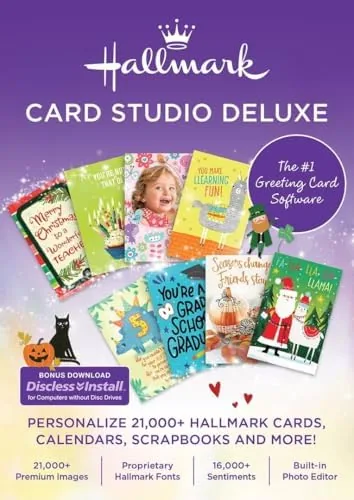

A personal greeting card is one of those small gestures that a store-bought option never quite matches. The right photo, the right words, and a design that looks intentional rather than generic can mean a lot to the person on the receiving end. Hallmark Card Studio Deluxe 2026 is software designed to put that power in your hands on a PC. It bundles thousands of Hallmark templates, editing tools, and printing options into a single downloadable package. I have spent two weeks building cards, invitations, and notes with it, and I have a clear picture of what it does well and where it falls short.
This article contains affiliate links. If you buy through one of them, the site earns a small commission at no extra cost to you, and that never changes what I test or what I recommend. With that disclosure out of the way, here is the honest record of two weeks with Card Studio Deluxe 2026.
Design and Build
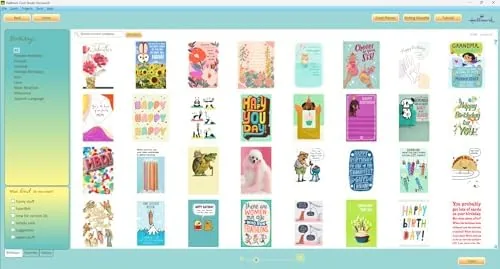
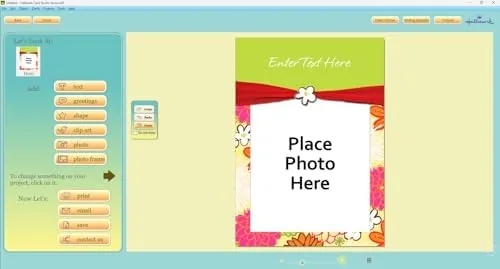
Card Studio Deluxe is a Windows application, and its interface has the friendly, button heavy feel of a consumer creative tool rather than a professional design suite. The home screen opens into a gallery of card categories: birthdays, holidays, weddings, anniversaries, sympathy, and more. Each category holds a deep library of templates built on the Hallmark design language, and you can start from a template or from a blank canvas.
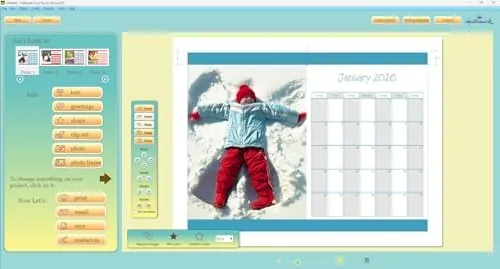
The main editing screen is straightforward. Your card appears in the center, with tool panels for text, images, and backgrounds on the sides. The toolbars are clearly labeled, and the learning curve for someone who has never designed a card is gentle. The software handles the standard card formats: folded cards, flat cards, postcards, and invitations, with guides built in so your print margins line up correctly.
Installation is a simple download-and-run process with an activation code, and the program opens to a setup wizard that walks you through picking a card size and starting a project. It is not a complicated piece of software to get running, which is the right call for its audience.
Key Features
The template library is the heart of the product. Card Studio Deluxe 2026 includes thousands of designs across every major occasion, and the Hallmark styling is immediately recognizable in the artwork, the layouts, and the typography. You can search by occasion, recipient, or style, and the library updates feel current for the 2026 season.
The personalization tools are where the software earns its keep. You can drop in your own photos, resize and rotate them, and apply simple effects. Text boxes accept your own message, and the software offers font choices, colors, and decorative elements that match the template you started with. For invitations, you can even create matching address labels and envelope designs in the same project.
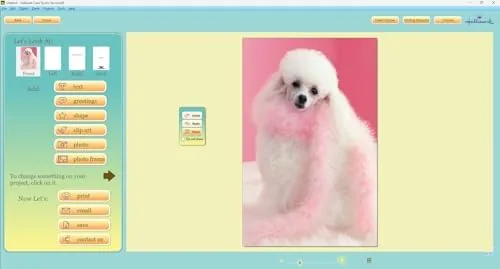
Printing is the payoff. The software lets you print on standard paper or card stock, with options for double-sided folded cards and clean cut lines. You can also save projects to come back to later, which matters when you are making a full set of holiday cards over several evenings. If you want to compare the current price against other card-making software, the Amazon listing for Hallmark Card Studio Deluxe 2026 is a useful reference.
Real-World Performance
I used Card Studio to build a birthday card, a holiday card, and a set of wedding invitations over two weeks. The template search worked well, and I found appropriate designs for each occasion in a couple of clicks. Dropping in my own photos was the easiest part; the software scaled and framed them cleanly, and the built-in effects let me add a simple border without touching any advanced settings.
Print quality was the strongest result. I printed the birthday card on matte card stock, and the colors came out rich and the text crisp. The cut guides aligned correctly, and a folded card folded cleanly along the printed crease line. For a home printer, the results look noticeably more polished than a hand-made card and more personal than a store-bought one.
The interface does have rough edges. Some template previews render slowly, and the occasional dialog is a little cluttered. Text layout can be finicky when a long message needs to fit inside a small design area, and I had to adjust font sizes manually a few times. These are annoyances rather than blockers, and they fade once you learn where the tools live.
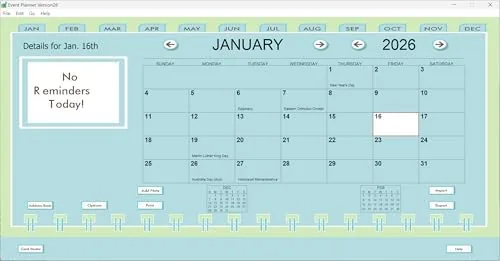
The invitation project showed off the deeper features. I created a matching invitation, response card, and envelope address layout in one session, and the consistent styling made the set look professionally produced. The ability to keep everything in one project is a genuine time saver for weddings and large events.
Pros and Cons
Pros:
- Thousands of Hallmark designs across every major occasion
- Easy photo personalization and simple editing tools
- Fold, print, and cut guides that line up cleanly
- Good print quality on standard paper and card stock
- Single project supports matching cards, invitations, and labels
Cons:
- Some template previews render slowly
- Text layout needs manual adjustment for long messages
- Download requires activation and a modern Windows PC
How It Compares
Home card-making software splits into template-heavy suites and free online tools. I compared Card Studio Deluxe 2026 against a free web-based card maker and a general purpose desktop publishing program.
| Feature | Card Studio Deluxe 2026 | Free Online Card Maker | Desktop Publishing Program |
|---|---|---|---|
| Hallmark design library | Yes | No | No |
| Offline use | Yes | No | Yes |
| Print quality tools | Good | Basic | Excellent |
| Learning curve | Gentle | Minimal | Steep |
| Photo personalization | Easy | Easy | Powerful |
| Price | One time | Free or ads | Subscription |
Against a free online card maker, Card Studio wins on the licensed Hallmark library, offline reliability, and print controls, and it costs a one-time price instead of a recurring subscription. Against a desktop publishing program, it loses on raw design power but wins decisively on ease of use and purpose-built templates. For someone who makes cards a few times a year and wants professional results without learning a design suite, this is the better fit.
Who Should Buy It
Buy Card Studio Deluxe 2026 if you make cards for birthdays, holidays, and weddings regularly, if you want the Hallmark design library without the per-card cost, or if you enjoy adding personal photos to your stationery. It is a strong choice for crafters, families who send lots of cards, and anyone planning an event who wants coordinated invitations.
Skip it if you only make one card a year and a free tool is enough, or if you need professional publishing features that a dedicated design program provides. For everyone else, this is an easy way to make personal cards at home. You can check the current price for Hallmark Card Studio Deluxe 2026 on Amazon when you are ready to start your next batch.
How We Test
I installed the software on a Windows PC and built three complete projects over two weeks: a birthday card, a holiday card, and a set of wedding invitations with matching envelopes. I tested template search, photo import, text editing, and print output on both standard paper and matte card stock, and I checked that folded cards and cut guides aligned correctly.
I did not test every template in the library or use the software on a Mac, and I did not compare it against every competing card tool on the market. For a broader look at greeting card software and print tools, the software coverage at PCMag is a useful authority to consult. The Card Studio Deluxe 2026 download page on Amazon lists the exact requirements and the current price.
Hallmark Card Studio Deluxe 2026: Questions People Ask
Is Hallmark Card Studio Deluxe 2026 a download or a physical disc?
The product is delivered as a PC download, so you receive an activation code and installer that you download and run on your computer rather than installing from a disc.
What kind of cards can I make with this software?
You can create birthday cards, holiday cards, invitations, thank you notes, announcements, and other stationery using the included Hallmark templates and your own photos and text.
What are the system requirements for this software?
The software runs on a modern Windows PC with a reasonably current processor, enough RAM for the installer, and available hard drive space for the template library.
Can I print the cards at home or send them digitally?
You can print finished cards at home on standard paper or card stock, and you can also save or share designs digitally depending on the format you export.
As an Amazon Associate, I earn from qualifying purchases.