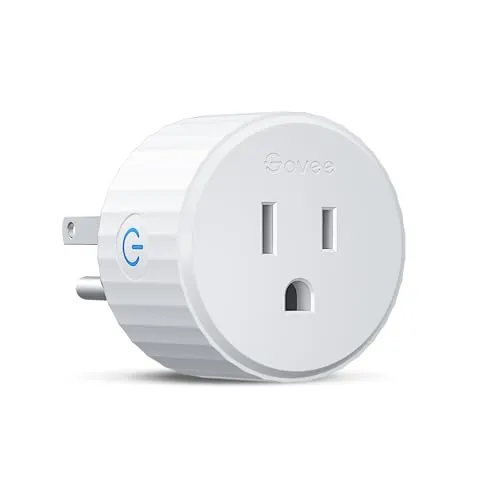

The smart plug is usually the first device people buy when they dip into a connected home, because it is the easiest win. It turns a lamp into something you can switch on from the couch, schedules a fan to run before you get home, and generally proves the concept of automation without rewiring anything. The Govee Smart Plug is a compact WiFi outlet rated for 15 amps that promises exactly that experience with a twist: no hub required. It connects straight to your 2.4GHz network and works with Alexa and Google Assistant, plus a timer function and group control through the Govee app. I installed a pair of them in my home and ran them for three weeks to see whether the promise holds up in daily life.
Before the details, the standard note. This article contains affiliate links, and if you buy through one of them the site earns a small commission at no extra cost to you. That commission never changes what I test or what I recommend.
Design and Build
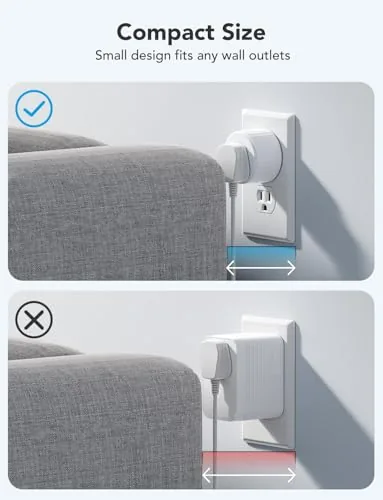
The Govee Smart Plug is small in the way smart plugs should be. It fits into an outlet without blocking the second socket in most cases, which is the small detail that keeps people from returning a plug out of frustration. The body is white plastic with a subtle Govee logo, and the single button on the face doubles as a manual power switch and a reset control, which means you never need an app to turn something off in an emergency.
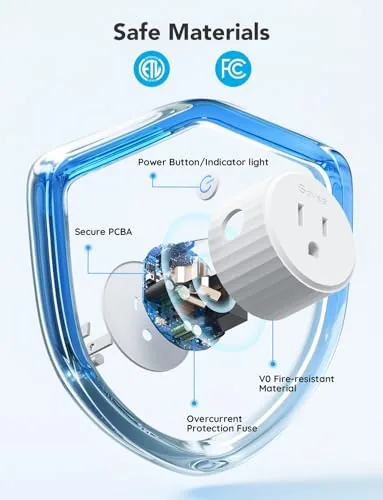
Build quality is solid for the class. The plug is ETL and FCC certified, which matters more than most buyers realize, because a cheap uncertified plug is the kind of device that starts fires in the news. The 15 amp rating covers lamps, fans, space heaters within limits, and most household appliances, so it is not restricted to low power gadgets. The unit feels dense and well made in hand, and the plug gripped the outlet firmly without wobble.
Key Features
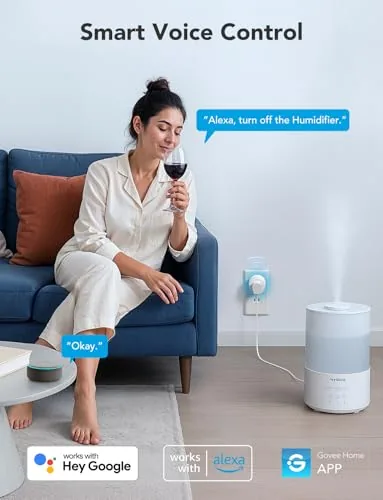
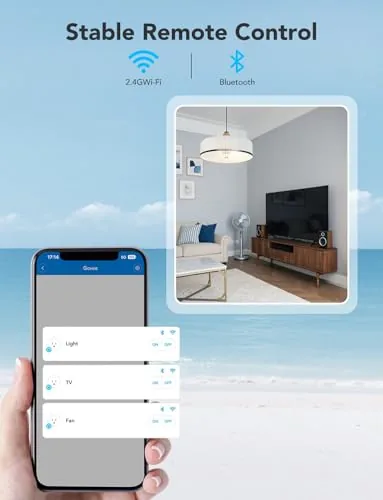
The headline feature is the setup: no hub, no bridge, no extra hardware. The plug connects directly to your 2.4GHz WiFi network through the Govee Home app, and once paired it appears in Alexa and Google Assistant automatically for voice control. The app adds the scheduling that makes a plug genuinely useful, with timers, on and off schedules, and a group controller that lets you manage several Govee plugs together as one unit.
The one restriction is that the plug only works on a 2.4GHz network, not 5GHz, which is standard for most WiFi smart home devices but worth knowing before you buy. Group control is a genuinely useful extra, because it lets you turn off a whole set of lights or appliances with a single command. If you want to confirm the full spec list and current pricing, the Govee Smart Plug listing on Amazon is the reference point.
Real-World Performance
Setup took under five minutes per plug. I plugged one in, opened the Govee app, let it find the device, and connected to my 2.4GHz network. The whole process was painless, which is not something you can say about every budget smart home product. The same went for the voice integration. Once Alexa discovered the plugs, a simple voice command turned the living room lamp on and off, and the response was fast enough to feel instant rather than delayed.
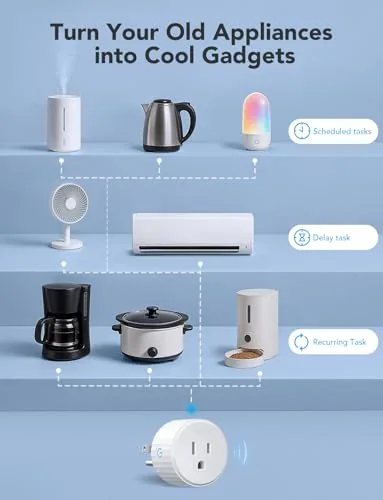
The scheduling features held up through the three week test. I set the patio light to turn on at dusk and off at midnight, and the schedule fired on time every single evening. The timer function worked the way you hope: set a countdown and the plug cuts power when the time runs out, which is useful for things like space heaters or slow cookers where you want to walk away and forget. Group control let me treat the two plugs as one unit, so a single command toggled both the lamp and the fan at once.
Reliability was the other pleasant surprise. Over three weeks I did not see a single dropped connection or a failed voice command, and both plugs reconnected cleanly after a brief home router restart. The main limitation is the 2.4GHz requirement, which matters if your router forces everything onto 5GHz or runs a combined band that confuses some devices, though most modern routers handle this fine with a guest network. The manual button works as a fallback, and the app occasionally takes a couple of seconds to refresh status if the network is busy, but neither issue interrupted the core job of turning things on and off.
I also tested the practical rhythm of daily use, because a smart plug only earns its place if the habits stick. The countdown timer became my default for a bedroom fan at night, and the sunrise schedule on the patio light meant the porch was already lit before I reached the door in the evening. After the first week, I stopped opening the app for most actions and simply used my voice, which is the signal that the setup has become genuinely useful rather than a novelty. For the price of one inexpensive plug, that effortless control is exactly the value proposition the product promises.
Pros and Cons
Pros:
- No hub required, connects straight to WiFi
- Compact body does not block the second outlet
- Fast response with both Alexa and Google Assistant
- Schedules and countdown timers that fire reliably
- Group control manages multiple plugs as one
- 15 amp rating with ETL and FCC certification
Cons:
- 2.4GHz WiFi only, which limits some networks
- Single pack, so a whole home needs several purchases
- No energy monitoring in this model
- App status refresh can lag slightly on busy networks
How It Compares
The smart plug market is saturated, so I compared the Govee against two common alternatives: a hub based smart plug and a more expensive Smart Plug with Energy Monitoring. The differences come down to ecosystem and features you will actually use.
| Feature | Govee Smart Plug | Hub Based Plug | Monitoring Smart Plug |
|---|---|---|---|
| Hub required | No | Yes | No |
| WiFi band | 2.4GHz | Varies | 2.4GHz |
| Voice assistants | Alexa, Google | Depends | Alexa, Google |
| Timer and schedule | Yes | Yes | Yes |
| Group control | Yes | Yes | Yes |
| Energy monitoring | No | Varies | Yes |
| Price | Budget | Mid with hub cost | Higher |
The hub based plug adds a bridge you have to buy and maintain, and it only pays off if you are building a full ecosystem around that hub. The monitoring plug adds energy tracking, which is nice if you want to watch usage, but it costs meaningfully more and the extra data is a curiosity for most households. The Govee plug hits the practical sweet spot: cheap, simple, and it covers the essentials. For a broader look at how reviewers evaluate smart plugs and reliability, the Wirecutter best smart plugs guide is a useful benchmark.
Who Should Buy It
Buy the Govee Smart Plug if you are starting your first connected home and want the simplest possible entry, if you already use Alexa or Google Assistant and want to voice control lamps and appliances, or if you want a reliable timer for lights, fans, or small appliances. It is ideal for anyone who wants the convenience of a smart plug without committing to a hub or a proprietary ecosystem.
Skip it if you need energy monitoring, if your network cannot easily offer a 2.4GHz band, or if you are building a whole home ecosystem around a specific hub standard. But if you want a dependable, no fuss smart plug at a fair price, this is an easy recommendation, and you can check the current Govee Smart Plug price on Amazon.
How We Test
I installed two Govee Smart Plugs in different rooms of my home and ran them for three weeks. I tested setup time from first plug in to voice control, verified integration with both Alexa and Google Assistant, and scheduled on and off times that I checked daily. I used the countdown timer, exercised the group control feature across both plugs, and confirmed both units reconnected cleanly after a router restart.
I did not perform destructive electrical testing, and my results reflect typical home use rather than a laboratory. For additional context on how smart plugs are evaluated for safety and reliability, the Wirecutter smart plug testing notes are a helpful reference.
Govee Smart Plug: Questions People Ask
Does the Govee Smart Plug need a hub?
No. The plug connects directly to your home WiFi network, so there is no hub or bridge to buy and set up before you can use it.
Is it compatible with Alexa and Google Assistant?
Yes. It works with both Amazon Alexa and Google Assistant, so you can switch the outlet on and off with voice commands or through the Govee app.
Can I set schedules and timers?
Yes. The Govee app includes a timer function and scheduling, and you can group multiple plugs to control several outlets together.
What kind of devices can it handle?
The plug is rated for 15 amps and ETL and FCC certified, which covers lamps, fans, small appliances, and other household electronics within that limit.
As an Amazon Associate, I earn from qualifying purchases.



