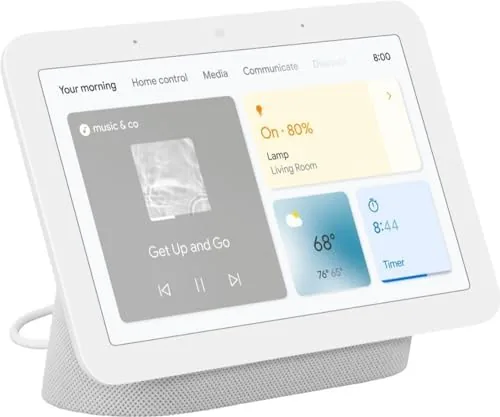

Most smart displays try to be the loudest screen in the house, with big speakers and aggressive video features. The Google Nest Hub takes the opposite approach. It is a small, quiet 7 inch screen with no camera at all, designed to be the calm center of a smart home rather than a second television. I lived with one in the kitchen and the bedroom for a month to test whether that gentleness is a feature or a limitation.
Before the details, the standard disclosure. This article contains affiliate links, and if you buy through one of them this site earns a small commission at no extra cost to you. That commission does not affect my testing or my recommendations, and I reviewed this display the way I would review one bought with my own money.
Design and Build
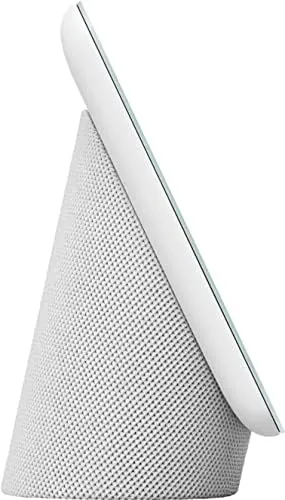
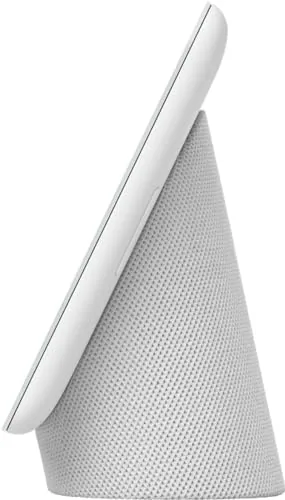
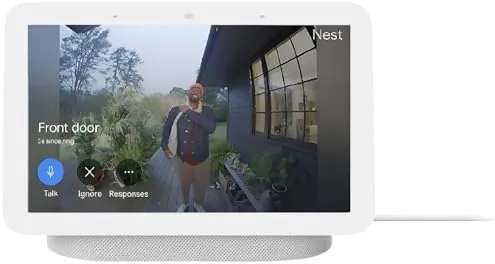
The Nest Hub is a small wedge of fabric and glass: a 7 inch display propped at a gentle angle on a base wrapped in the chalk fabric that matches the listing. It is compact enough to live on a kitchen counter, a nightstand, or a small desk without dominating the surface, and the fabric finish softens what could otherwise be a cold slab of electronics.
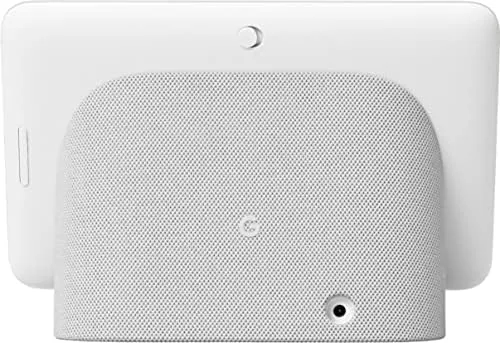
The build is exactly what you expect from Google hardware: tidy, solid, and understated. The screen has no visible bezel drama, the base holds the display at a comfortable viewing angle, and there is a physical mute switch on the back edge that disables the microphones entirely, which is a small but meaningful privacy gesture.
There is no camera on the front, and that absence is deliberate. Google positions the Nest Hub for the bedroom, and a camera there is the one thing that would make the placement uncomfortable, so the design trades video calls for the freedom to sit beside a bed without feeling watched.
Key Features
The Nest Hub runs Google Assistant with a screen, which means voice control plus visual feedback. Ask for the weather and the forecast appears, ask to start a timer and it shows the countdown, and every smart home command gets a visual confirmation on the display. That pairing of voice and screen is the core of what the device does.
It is a smart home controller above all else. The display controls compatible lights, thermostats, locks, and cameras through Google Home, and it supports the modern smart home standards Matter and Thread, which keeps it useful as the home grows. A glance at the screen shows the state of the house, and a tap adjusts it.
Beyond control, the screen shows photos from Google Photos when idle, adjusts its brightness to match the room with the ambient light sensor, and runs the optional sleep sensing feature that uses the Soli radar to track sleep without a camera. Media playback is present through supported streaming services, and the sound quality is fine for background listening. Setup takes minutes and needs nothing beyond the Google Home app. The Nest Hub paired with my network, synced my Google account, and pulled in the devices already linked to Google Home without me re-adding a single light or plug, which is the experience you want from a hub meant to sit in the middle of an existing smart home rather than start a new one.
Real-World Performance
I set the Nest Hub up in the kitchen first, where it became the family noticeboard. Timers became voice commands instead of kitchen gymnastics, the weather and calendar showed at a glance in the morning, and the photo frame mode turned a blank counter into a rotating gallery. In that role it earned its spot quickly.
Smart home control worked well with the lights and thermostat on my network. Commands resolved promptly, the screen showed the result, and the Matter support meant devices from different brands answered without a compatibility dance. The display also doubled as a quick dashboard for checking camera feeds from the driveway, which is a genuinely useful feature on a screen this size. The voice assistant handled the routine tasks a household throws at it: timers, alarms, conversions, shopping notes, and calendar checks all came back quickly, and the screen added a visual answer to each request. When the display was left idle, it cycled through family photo albums at a brightness that blended into the room rather than fighting it, and the whole effect was that of a quiet assistant that answers when asked and otherwise stays out of the way.
In the bedroom, the sleep sensing feature lived up to its promise. The Soli radar tracked sleep stages without any camera, presenting a morning summary of sleep duration and quality, and the light sensor dimmed the display to a comfortable night mode automatically. The screen was unobtrusive at night, and the whole experience was gentle in the way the marketing suggests. I left the display running for the full month without powering it down, which is how a bedside hub actually gets used, and it stayed stable the entire time. The screen turned itself off in the night mode, the morning summary arrived on schedule each day, and the device handled firmware updates quietly in the background without ever locking up or requiring a restart. That kind of hands off reliability is easy to overlook and hard to replace.
Pros and Cons
Pros:
- No camera, so it is comfortable in the bedroom
- Physical mute switch disables the microphones
- Controls the smart home with voice and screen
- Ambient light sensor adjusts automatically
- Matter and Thread support keeps it future proof
Cons:
- Small screen limits video and app usage
- Speakers are adequate but not impressive
- Sleep sensing requires enabling and reading the consent screen
How It Compares
Against the Amazon Echo Show 8, the Nest Hub is smaller, camera free, and better integrated with Google services, while the Echo Show has a larger screen and a camera for video calls. The comparison is really about which ecosystem you live in, because each display is happiest in its own home.
| Feature | Google Nest Hub 7 | Echo Show 8 |
|---|---|---|
| Screen size | 7 inches | 8 inches |
| Camera | None | 5 MP, video calls |
| Assistant | Google Assistant | Alexa |
| Smart home | Matter, Thread | Matter, Zigbee hub |
| Sleep sensing | Yes, Soli radar | No |
| Best placement | Bedroom, counter | Kitchen, living room |
If you live in Google Home, the Nest Hub is the natural choice, and the camera free design is a genuine advantage for the bedroom. If you rely on Alexa or want video calls from the kitchen, the Echo Show is the better fit. The deciding factor is less about the hardware and more about which assistant already runs your house.
Who Should Buy It
Buy the Google Nest Hub if you run your smart home through Google Home, if you want a display you can trust beside your bed, or if you value a screen that quietly shows photos and timers without demanding attention. It is the right display for people who want a home hub that feels calm.
Skip it if you want to make video calls from a smart display, if you need a larger screen for media, or if your home runs on Alexa. For everyone else, it is one of the most thoughtful smart displays on the market. You can check the current price of the Google Nest Hub on Amazon when you are ready.
How We Test
I used the Nest Hub for a month in two rooms, the kitchen and the bedroom, testing smart home control across lights, a thermostat, and a camera. I ran the sleep sensing feature nightly, checked the photo frame and ambient brightness, and compared the experience against an Echo Show.
I verified the Matter and Thread integration with a mix of devices and confirmed that the physical mute switch disables the microphones. For deeper coverage of smart displays and home hubs, the reviews at Tom's Guide are a dependable authority.
The Google Nest Hub on Amazon shows the current price and color options.
Google Nest Hub: Questions People Ask
Does the Nest Hub have a camera?
No, there is no camera on the device at all, which is exactly why it is comfortable in a bedroom, and the back edge has a physical switch that disables the microphones.
Can the Nest Hub control smart home devices?
Yes, it controls compatible lights, thermostats, locks, and cameras through Google Home, including devices that support the Matter or Thread standards.
Does the display show photos when not in use?
Yes, it turns into a digital photo frame using your Google Photos albums, and the ambient light sensor adjusts the brightness to match the room throughout the day.
Does sleep sensing require a subscription?
Sleep sensing is a free feature on the second generation Nest Hub and does not need a subscription, though you must enable it and place the device near the bed.
As an Amazon Associate, I earn from qualifying purchases.



