
There is something refreshing about a streaming device that refuses to be complicated. In a market full of dongles with on screen menus, bundled remotes, and app stores, the Google Chromecast 3rd generation still does one thing and does it well: it turns any television with an HDMI port into a target for your phone. After living with the little black puck for several weeks on a secondary 1080p set, I am convinced the device deserves a place in the conversation even as newer 4K sticks grab the headlines. This review covers how it handles, where it shines, and the honest limits you should know before you buy.
Before the details, the standard note. Some links in this article are affiliate links, and if you buy through them the site earns a small commission at no extra cost to you. That commission never changes what I test or what I recommend.
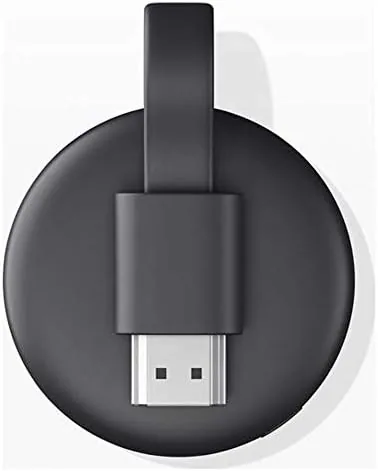
The 3rd generation Chromecast is the refined version of the original casting dongle, updated with a faster processor, improved Wi-Fi, and a rounder, glossier design that dangles from the back of your TV like a small puck. It is not a 4K device, and Google makes no secret of that, which is exactly why it remains a budget friendly option for older televisions that do not need 4K resolution in the first place.
Design and Build
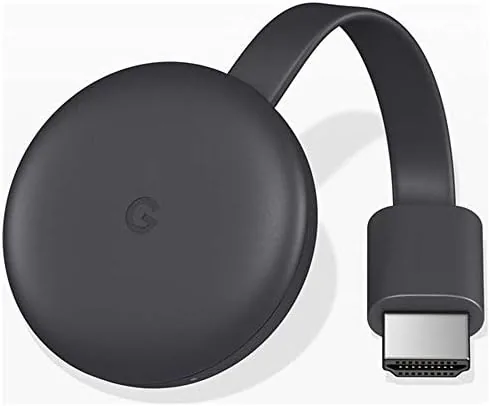
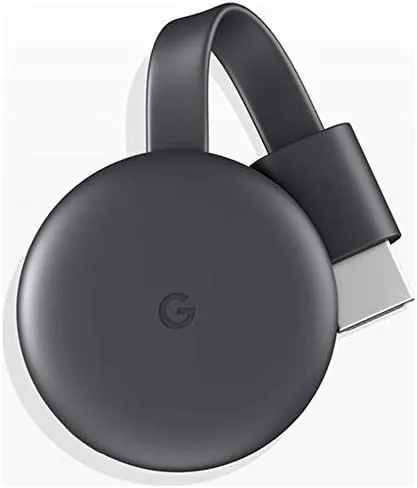
The Chromecast 3rd generation is about the size of a thick hockey puck, roughly an inch and a half across, with a glossy black finish and a flexible HDMI cable that lets it hang from ports that sit flush against a wall. The build is simple and solid, no moving parts, no buttons, and no remote in the box, because the whole idea is that your phone is the remote.
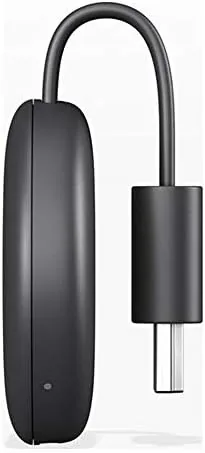
The power arrangement deserves attention. The Chromecast plugs into the HDMI port for signal and draws power through a USB cable that connects to the included adapter. That adapter is essential, because most televisions do not deliver enough power over HDMI alone, and the USB cable itself is short enough that you will want the wall outlet reasonably close to the TV. The glossy top picks up fingerprints quickly, but the device lives behind the television, so that barely matters.
Key Features
The core feature is casting, and it is elegantly simple. From any supported app on your phone, tablet, or laptop, you tap the Cast icon and the Chromecast takes over the stream directly from the internet. Your phone becomes a remote and frees itself from the job of relaying the video, which means the playback does not stutter when you lock your phone or leave the room.
The second big feature is Google Assistant integration. If you have a Google smart speaker, you can say the name of a show and it casts to the Chromecast automatically, and you can control playback with your voice. The device supports a huge library of casting apps, from the big streaming services to music, podcasts, and photo casting, so the compatibility list is broader than most dedicated remotes.
The third feature is the refreshed hardware. The 3rd generation added dual band Wi-Fi, which makes a real difference on congested networks, and the faster processor launches streams noticeably quicker than the older generations. There is no on screen menu, no app store, and nothing to update by hand, which is either the greatest convenience or the reason you will skip it, depending on how you like to watch.
Real-World Performance
In daily use, the Chromecast 3rd generation is about as low maintenance as streaming gets. The device appeared in the Google Home app within a minute of setup, I plugged it into a 1080p television, and casting from Netflix, YouTube, and a music app all worked on the first try. The stream started within a couple of seconds of tapping Cast, and there was no buffering over a solid home network.
Picture quality on a 1080p television is excellent. Streaming Sticks can struggle with gradients and dark scenes, but the 3rd generation handled both well, and the image looked clean and stable across a range of sources. I ran it on a television with a modest Wi-Fi signal, and the dual band radio kept the stream steady where an older single band device used to stutter.
Control is where the simplicity cuts both ways. Casting from a phone is second nature for most people, and the Assistant integration works well with a Google speaker in the same room. But there is no dedicated remote, so if your phone dies or you have a guest who wants to browse, the experience depends on someone else's device. For a family room where phones are always present, it is a non issue, and for a guest bedroom or a kitchen TV, it is exactly right.
Pros and Cons
Pros:
- Simple, reliable casting with no on screen menus
- Excellent 1080p picture quality on older televisions
- Dual band Wi-Fi keeps streams stable on busy networks
- Google Assistant voice control with a smart speaker
- Huge library of compatible casting apps
- Budget friendly price for a capable streamer
Cons:
- No 4K support, which rules it out for newer sets
- No remote in the box, phone casting only
- Needs a wall adapter, not just the HDMI plug
- No on screen interface for browsing
How It Compares
To give the Chromecast 3rd generation context, I compared it against the two devices it most often loses sales to: the Roku Express and the Amazon Fire TV Stick, both at a similar price point. The table below shows how they differ.
| Feature | Chromecast 3rd Gen | Roku Express | Fire TV Stick |
|---|---|---|---|
| Resolution | 1080p | 1080p | 1080p |
| Remote included | No, phone only | Yes | Yes |
| On screen menu | No | Yes | Yes |
| Voice assistant | Google Assistant | Alexa, limited | Alexa |
| Setup | Very simple | Simple | Simple |
| Best for | Phone casters | Remote fans | Alexa households |
Against the Roku Express and Fire TV Stick, the Chromecast wins on pure casting simplicity and Assistant integration, but it loses the remote and the on screen browse experience. If you live in a household where everyone has a phone and you want the cheapest way to stream, the Chromecast is a great buy. If you want a remote, an interface, and a self contained experience, one of the remote based sticks is the better fit. You can check the current price for the Chromecast 3rd generation on Amazon to judge the value.
Who Should Buy It
Buy the Chromecast 3rd generation if you have a 1080p television, a phone in your hand, and no desire to learn a new remote. It is the right choice for a kitchen TV, a guest room, a rental property, or anyone whose streaming habit is already built on casting from apps. It is also an easy recommendation for Google households, where Assistant and the Google Home app make the experience feel native.
Skip it if you own a 4K television, if you want a remote based device for a less tech savvy family member, or if you want to browse content on a grid instead of casting app by app. For everyone with a modest television and a phone, the Chromecast 3rd generation remains a genuinely pleasant, fuss free way to watch. You can compare the price for the Chromecast 3rd generation on Amazon when you are ready.
How We Test
I used the Chromecast 3rd generation on a 1080p television for three weeks, casting from Netflix, YouTube, a music app, and a sports app, and I tested it on both a strong home network and a weaker signal in another room. I timed setup, checked launch speed, and watched for buffering and stuttering across different sources.
I also paired the Chromecast with a Google smart speaker to test voice casting and playback control. For independent perspective on how casting devices compare, PCMag's review of the Chromecast 3rd generation is a useful reference. The Chromecast listing on Amazon shows the current price and shipping details.
Questions People Ask
Does the Chromecast 3rd generation support 4K?
No, the 3rd generation Chromecast streams up to 1080p at 60 frames per second, and you need the Ultra or a Google TV stick for 4K resolution, so it is best matched to a 1080p television.
Do I need a phone to use the Chromecast?
Yes, the Chromecast has no remote and is controlled from a phone, tablet, or laptop using supported apps and the Google Home app, which is the core of the casting experience.
Can I use the Chromecast with an iPhone?
Yes, most major streaming apps support casting from iOS devices, though the experience is smoothest inside the Google ecosystem with an Android phone and a Google speaker.
What TVs work with the Chromecast 3rd generation?
Any television with an HDMI port works, as long as you can power the device through the included USB cable and a wall adapter, which most modern televisions and setups can provide.
As an Amazon Associate, I earn from qualifying purchases.