
The desktop tower has been shrinking for years, but the mini PC finally took the idea to its logical conclusion: a full computer small enough to fit in the palm of your hand, mounted behind a monitor, drawing a fraction of the power of a tower. The GMKtec G3S is one of the most popular examples of the breed, built around the Intel N95 processor with 8GB of RAM and a 256GB M.2 SSD. I ran one as my primary office machine for a month, and then I set it up as a home server running Proxmox to see if the marketing holds up. This review is the honest record of both experiments.
Before the details, the standard note. This article contains affiliate links, and if you buy through one of them the site earns a small commission at no extra cost to you. That commission does not change what I test or what I recommend, and the G3S reviewed here was configured the way an owner would configure it.
The G3S is aimed at office work, media streaming, and light server duties, with dual 4K display output, WiFi 5, Gigabit Ethernet, and a VESA mount included. This review tests whether a machine this small can genuinely replace a tower.
Design and Build
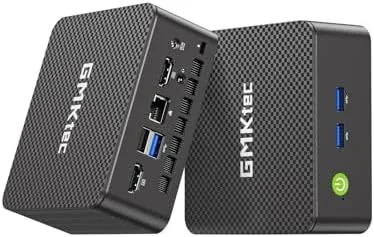
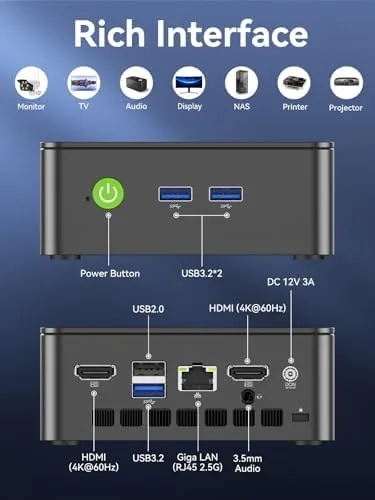
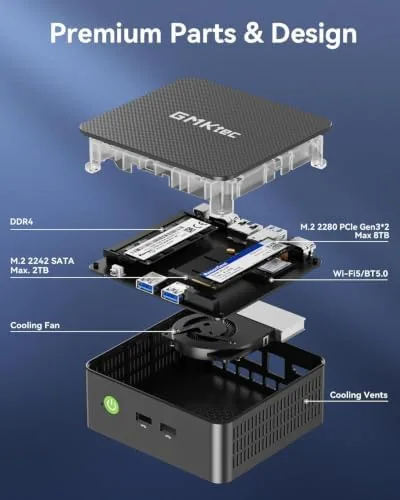
The G3S is genuinely small, a compact plastic and metal box that fits in the palm and disappears behind a monitor with the included VESA bracket. The build feels solid for the price, with a clean finish and a quiet exhaust fan on top that stays nearly inaudible under normal loads. The ports are arranged sensibly, with two USB ports on the front for daily devices and the rest around the back out of the way.
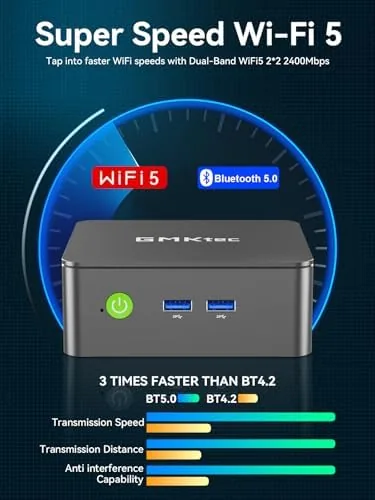
The layout covers everything a home office needs. The two HDMI ports drive the dual 4K displays, the USB 3.2 ports move files quickly, and the Gigabit Ethernet jack provides a stable wired connection for anyone who does not want to depend on wireless. WiFi 5 and Bluetooth 5.0 round out the wireless side. The unit runs cool enough to keep a hand on top after a full day of work, and there is no rattling or flex in the chassis.
Key Features
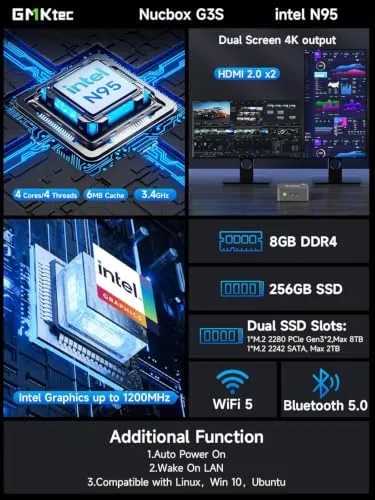
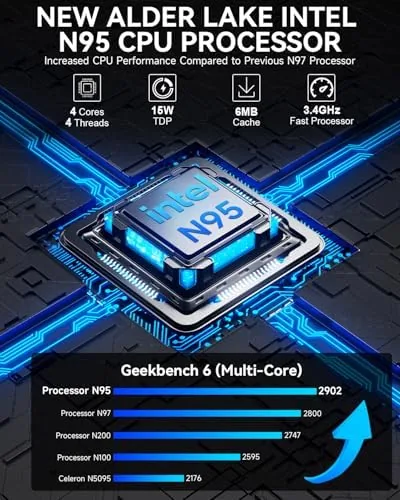
The headline feature is the Intel N95 processor with a turbo speed of 3.4GHz. It is a quad core chip built for efficiency rather than raw muscle, and it is exactly the right kind of processor for office work, streaming, and light productivity because it delivers responsive performance without the power draw or fan noise of a desktop CPU.
The dual 4K display output is the feature that makes the G3S a real work machine. Two displays run at once through the HDMI ports, which changes the office experience completely when a spreadsheet lives on one screen and a browser on the other. The 8GB of DDR4 memory keeps the system fluid under everyday multitasking, and the 256GB M.2 SSD gives the system fast boots and snappy app launches.
The VESA mount is the quiet hero of the package. You screw the bracket to the back of a compatible monitor or to the underside of a desk, clip the G3S in, and the entire computer vanishes. It is the feature that turns a tiny PC into an invisible one, and it is included in the box rather than sold separately.
Real-World Performance
I replaced my desktop tower with the G3S for a full month of daily office work, which is the only fair way to review a machine like this. The work was typical: a browser with a dozen tabs, a spreadsheet, a word processor, video calls, and the occasional image edit. The G3S handled all of it without a stutter, and the dual 4K displays made the machine feel larger than its size suggests. Text was crisp on both screens, and window management across two displays was smooth.
The video calls were the pleasant surprise. With the fan rarely spinning up and the N95 carrying the load easily, calls stayed smooth even with a screen share running alongside a browser. The machine never got hot, never slowed down during a long meeting, and never forced me to close anything to keep the pace.
Boot times were a constant reminder of how far small PCs have come. The 256GB M.2 SSD brought the machine from power on to a usable desktop in seconds, and apps opened instantly enough that I stopped noticing the wait. The 8GB of memory held the line through the day, and the system stayed responsive even with the browser chewing through its share of RAM.
Then I moved the G3S into the home server role. I installed Proxmox on it and ran a few lightweight virtual machines and containers, which is exactly the kind of job the G3S is marketed toward. It handled the small VMs without complaint, the Gigabit Ethernet gave solid transfer speeds, and the low power draw meant leaving it on around the clock was a non issue. For a home lab, an HTPC, or a small always on box, the G3S is genuinely well suited.
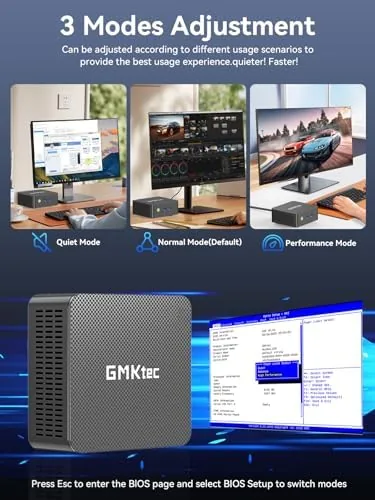
One detail earned respect over the month. The G3S idled almost silently, the kind of quiet that lets you forget the computer exists, and the fan only made itself known under a sustained load. After a month of daily use there were no crashes, no driver fights, and no thermal issues.
Pros and Cons
Pros:
- Very small footprint with VESA mount included
- Dual 4K display output for multitasking
- Quiet and cool through an entire work day
- Good port selection including USB 3.2 and Gigabit Ethernet
- Runs Proxmox and lightweight VMs for a home server
- Costs a fraction of a desktop tower
Cons:
- N95 processor is not built for gaming or heavy rendering
- 256GB storage fills up quickly
- WiFi 5 instead of the newer WiFi 6 standard
- 8GB of RAM limits heavier virtualization workloads
How It Compares
The G3S sits between a budget mini PC and a mainstream desktop tower, and the comparison against a traditional tower is the one most buyers will make. The table below lines up the two.
| Feature | GMKtec G3S Mini PC | Mid Range Desktop Tower |
|---|---|---|
| Size | Fits in a palm, mounts behind a monitor | Full tower under or beside the desk |
| Processor | Intel N95, efficient quad core | Stronger desktop CPU |
| Displays | Dual 4K HDMI | Varies, often single display |
| Power use | Very low, quiet | Higher, louder |
| Best for | Office, media, home server | Gaming, heavy rendering |
| Price | Budget friendly | Significantly higher |
If the work is office tasks, media, and light server duty, the G3S does it all while using a fraction of the desk and the power, and it wins on price by a wide margin. If the workload is gaming or heavy rendering, the tower is still the right tool, and the mini PC is not pretending otherwise. For a broader look at whether a mini PC can replace a desktop, Tom's Guide has a practical comparison of mini PCs and desktop towers that is worth a read.
Who Should Buy It
Buy the GMKtec G3S if you need a second office machine, a computer for a student, a media box for the living room, or a quiet home server for Proxmox and lightweight VMs. It is also a natural fit for anyone downsizing their desk and tired of a tower taking up the floor. The dual 4K output and the included VESA mount make it a particularly good fit for a tidy dual monitor workspace.
Skip it if your work demands a dedicated graphics card or a powerful processor, because the N95 has clear limits. For the everyday office and media load, this is a small PC that does a big job. You can check the current price of the GMKtec G3S Mini PC on Amazon when you are ready.
How We Test
I ran the G3S as my primary office machine for a month, driving two 4K monitors through the HDMI ports, running video calls with screen sharing, and keeping the browser and office apps busy through full work days. I checked the fan noise, the temperatures, and the stability under a sustained multitasking load. I then repurposed the same unit as a home server, installing Proxmox and running lightweight virtual machines and containers to test the use case the marketing calls out.
I did not test the G3S for gaming or heavy rendering, because the N95 is not aimed at those jobs. My office is a bright room with a window, so my brightness and thermal findings reflect a typical well lit space. The GMKtec G3S listing on Amazon shows the current price and the full spec sheet.
GMKtec G3S Mini PC: Questions People Ask
Can the GMKtec G3S run two 4K displays?
Yes, the G3S drives two 4K displays at once through its video outputs, which makes it a strong fit for multitasking home and office setups.
Is the Intel N95 processor fast enough for daily use?
The N95 with a 3.4GHz turbo handles browsing, documents, video calls, and media without trouble, though it is not built for gaming or heavy rendering.
Can the G3S be mounted behind a monitor?
Yes, the included VESA mount lets you attach the G3S to the back of a compatible monitor or desk, keeping the desktop completely out of sight.
Is the G3S suitable as a home server or HTPC?
Yes, with Gigabit Ethernet, low power draw, and support for operating systems like Proxmox, the G3S works well as a home server, media box, or light virtualization host.
As an Amazon Associate, I earn from qualifying purchases.