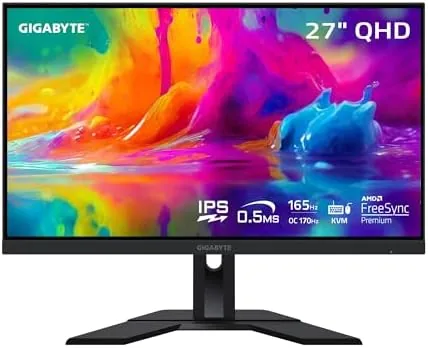

Finding a monitor that games hard on the weekend and works properly on Monday is harder than it sounds. Many fast panels chase refresh rates at the expense of color, and many color accurate panels crawl through a shooter. The GIGABYTE M27Q tries to have it both ways, pairing a 27 Inch 1440p Super Speed IPS panel at 165Hz with a color gamut aimed at creative work and a built in KVM that lets two computers share one keyboard and mouse.
Before the details, the standard note. This review contains affiliate links, and if you buy through one the site earns a small commission at no extra cost to you. That commission never changes what I recommend.
I used the M27Q as my primary display for three weeks, switching between a gaming desktop and a work laptop through the KVM, running fast shooters, open world titles, and a full day of photo editing. This is what it is actually like to live with.
Design and Build
The M27Q looks understated in the best way. The bezel is thin on three sides, the chassis is dark plastic with a subtle texture, and there are none of the aggressive gamer flourishes that date other displays. It will sit happily in a home office or a bedroom without shouting about its refresh rate.
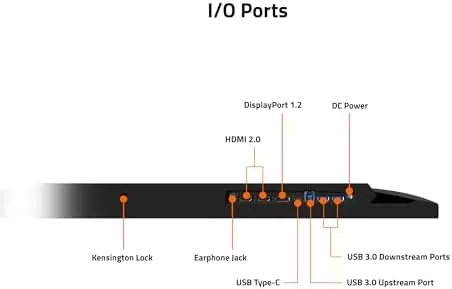
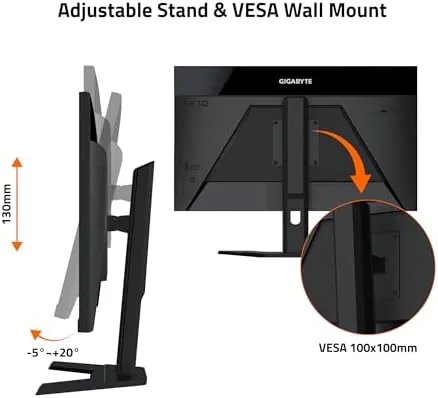
The stand is the weakest part of the package. It offers tilt only, with no height, swivel, or pivot adjustment, which is disappointing on a monitor at this price. The good news is that the panel is VESA compatible, so a cheap monitor arm fixes the problem in minutes, and I recommend one if you care about posture. The ports face down and slightly back: one DisplayPort 1.2, two HDMI 2.0, two USB 3.0 downstream ports, and one USB Type B upstream for the KVM, joined by a modest pair of 2 watt speakers that are fine for alerts and poor for anything else.
Key Features
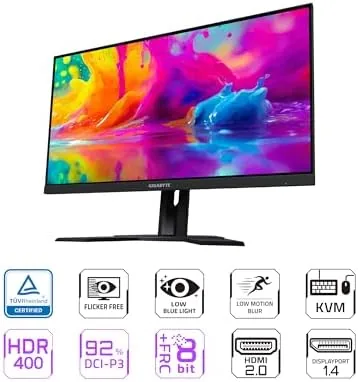
The core spec is a 27 inch Super Speed IPS panel at 2560 by 1440, running at 165Hz with a 0.5ms MPRT rating and AMD FreeSync Premium. Super Speed IPS is GIGABYTE's name for a fast liquid crystal implementation that keeps IPS color and viewing angles while cutting response times down to near TN territory, and the panel delivers on both promises.
The color story is strong. GIGABYTE rates the panel for about 92 percent of the DCI-P3 gamut, which in practice means rich, accurate color out of the box for games and photo work alike. The monitor is HDR ready rather than HDR certified, so do not expect true high dynamic range, but the panel handles SDR content beautifully.
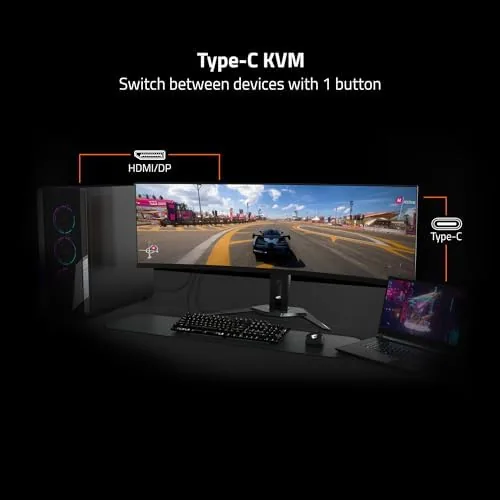
The KVM is the feature that makes the M27Q special. Connect a keyboard and mouse to the monitor, plug the USB Type B cable into one computer and the video cable into another, and a button on the OSD switches both video and peripherals between machines instantly. GIGABYTE calls it KVM 2.0, and it works with the same button through the OSD Sidekick software, which also offers crosshair overlays, a dashboard, and picture in picture modes.
Real-World Performance
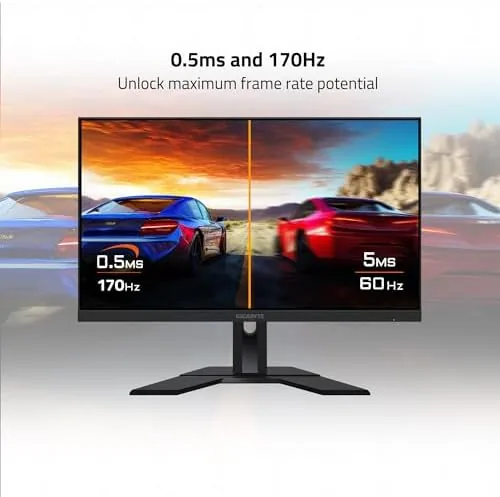
Gaming is where the M27Q earns its money. At 165Hz over DisplayPort, motion stays fluid and the response feels immediate, with none of the smearing that used to plague IPS panels. In a competitive shooter, targets remain readable during fast flicks, and FreeSync Premium kept the picture tear free in both AMD and NVIDIA systems during my testing, since the panel also works as a G-SYNC Compatible display.
Colors in games are a genuine step up from the washed out budget panels many people are replacing. The 92 percent DCI-P3 coverage shows in rich sky gradients, saturated foliage, and accurate skin tones, and the monitor keeps that quality for a full day of photo editing. Text is crisp at 1440p, and the wide viewing angles mean two people can watch a film without the image falling apart.
The overclock adds a small bonus: the panel runs at 170Hz with the overclock enabled over DisplayPort, and it held the higher refresh without artifacts throughout my session. HDR is the one letdown. The HDR ready label means the panel accepts HDR signals but lacks the brightness and local dimming for real impact, so I left it off for most content. The built in speakers are also forgettable, and a headset or external pair is worth budgeting for. The OSD deserves its own line of praise. It is driven by a small joystick, the menus are logical, and the presets cover the range from a punchy gaming look to a calmer office mode. The OSD Sidekick software mirrors those controls on the desktop, which makes fine tuning color or enabling a crosshair overlay far easier than digging through buttons on the back of a panel.
Pros and Cons
Pros:
- Fast SS IPS panel with excellent color at 1440p
- 165Hz with a stable 170Hz overclock and FreeSync Premium
- Genuinely useful KVM for two computer setups
- Works as G-SYNC Compatible on NVIDIA cards too
- Strong value as a gaming and work monitor in one
Cons:
- Basic tilt only stand on a monitor at this price
- HDR ready, not a true HDR experience
- Weak built in speakers
How It Compares
The M27Q shares its aisle with cheaper 1440p panels and much pricier 4K screens. The table below shows where it lands.
| Feature | GIGABYTE M27Q | Budget 1440p 144Hz | Premium 4K 144Hz |
|---|---|---|---|
| Resolution | 2560x1440 | 2560x1440 | 3840x2160 |
| Refresh rate | 165Hz, OC 170Hz | 144 to 165Hz | 144Hz |
| Panel type | Super Speed IPS | IPS or VA | IPS |
| Color gamut | 92% DCI-P3 | Often 72% | High |
| KVM | Built in | Usually absent | Depends on model |
| Price | Mid | Lower | Much higher |
Budget 1440p monitors undercut the M27Q on price but usually pair a slower panel with weaker color and no KVM. A 4K screen offers more pixels and sharper text, but it demands a far more powerful graphics card to game at speed and costs considerably more. The M27Q threads the middle better than most, and lists like Tom's Hardware gaming monitor coverage regularly place fast 1440p IPS panels ahead of 4K for value.
Who Should Buy It
Buy the M27Q if you game and work on the same desk, especially if you use two computers, because the KVM alone can remove a mouse and keyboard from your desk. It is also the right pick for the gamer who cares about color and wants a single monitor for shooters and photo editing.
Skip it if you need a 4K panel for serious design work, if you want height adjustment out of the box without an arm, or if your budget stops at the very bottom of the 1440p market. For most people it is one of the best balanced monitors available, and you can check the current GIGABYTE M27Q price on Amazon.
How We Test
I tested the M27Q over three weeks as my primary monitor, with a gaming desktop on DisplayPort and a work laptop on HDMI sharing one keyboard and mouse through the KVM. I switched between the two inputs dozens of times a day to confirm the KVM stayed reliable, and I ran competitive shooters, open world titles, and a full photo editing session to cover both halves of its personality.
I verified the 165Hz refresh over DisplayPort, confirmed the 170Hz overclock stayed stable through long sessions, and checked the panel on both AMD FreeSync and NVIDIA G-SYNC Compatible setups. I did not use a laboratory colorimeter, so the color comments are based on out of the box appearance and the manufacturer's rated gamut rather than measured delta values.
Beyond the headline tests, I checked the everyday details: the menu joystick, the OSD Sidekick software, the built in speakers with both a game and a podcast, and the behavior of the panel during a full evening of use. The screen ran cool, the tilt stand stayed stable on a desk without adjustment, and the monitor woke from sleep cleanly every time the laptop reconnected through the KVM.
Questions People Ask
Is the GIGABYTE M27Q good for PS5 or Xbox gaming?
Yes. Both consoles support 1440p output, and the HDMI 2.0 ports allow 1440p at up to 120Hz on the consoles that offer it.
What is the KVM feature on the M27Q and how does it work?
The KVM lets one keyboard and mouse control two computers, and the monitor switches both the video input and the USB control between them with a single button.
Does the M27Q reach 165Hz over HDMI?
The full 165Hz is available over DisplayPort. The HDMI 2.0 ports cap lower at 1440p, and the 170Hz overclock also runs over DisplayPort only.
Is the GIGABYTE M27Q good for photo editing as well as gaming?
Yes. The Super Speed IPS panel covers about 92 percent of DCI-P3 with accurate color out of the box, which makes it a solid dual purpose display.
If the balance of speed, color, and that KVM appeals to you, the GIGABYTE M27Q on Amazon is a dependable place to start.
As an Amazon Associate, I earn from qualifying purchases.