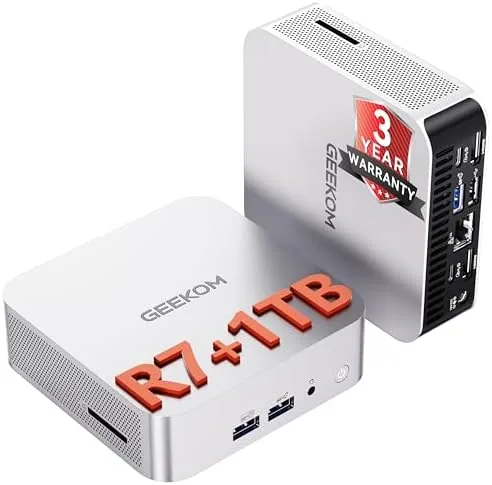

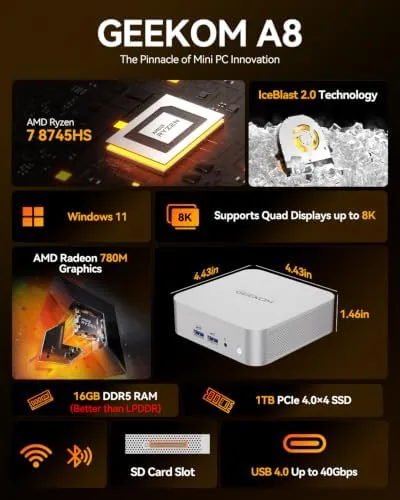
There was a time when a desktop PC meant a tower under the desk, a tangle of cables behind it, and a power bill to match. The GEEKOM A8 Mini PC makes that look like a museum exhibit. This is a full desktop machine the size of a small book, powered by an AMD Ryzen 7 8745HS with eight cores, 16GB of DDR5 RAM, and a 1TB SSD, with USB4, support for up to 128GB of memory, four 4K display outputs, WiFi 6E, and a 2.5G LAN port. I ran one as my daily work machine for three weeks, pushing it through office tasks, media, and light creation, and this review covers what it does well and where a mini PC still asks you to compromise.
Before the details, the disclosure note. This article contains affiliate links, and if you buy through one of them the site earns a small commission at no extra cost to you. That commission never changes what I test or what I recommend.
Design and Build
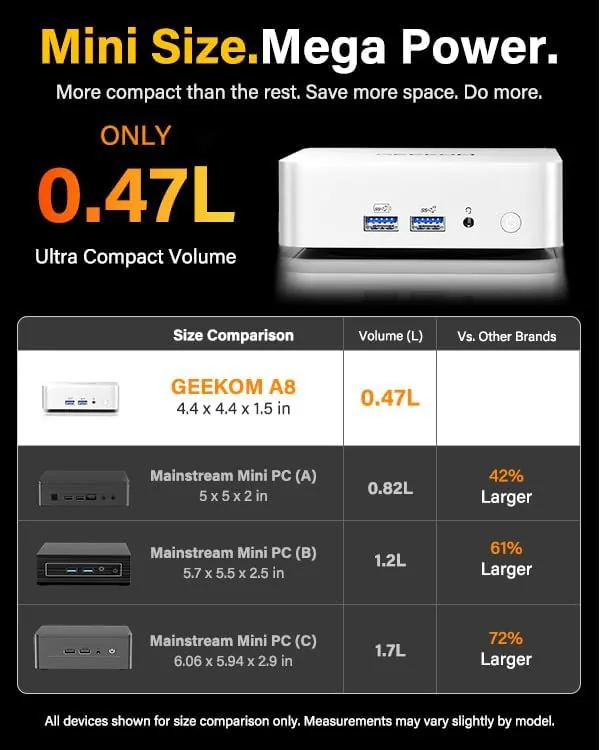
The A8 is unremarkable at a glance, which is exactly what a business ready mini PC should be. The chassis is a compact aluminum and plastic box that fits in the palm of a hand, finished in a dark gray that disappears into an office setup. The top panel carries a subtle texture, and a soft power button sits on the front beside a pair of USB ports and a headphone jack. There is no aggressive styling and no gamer glow, just a clean box that looks the part of a tool rather than a toy.
Build quality is reassuring. The chassis feels dense and solid, the vents are machined cleanly, and every port sits tight with no wobble. The bottom panel carries a generous rubber foot that keeps the box planted on a desk, and the included VESA bracket lets you bolt the whole machine to the back of a monitor and reclaim the desk entirely. A unit this small can flex and creak if the tooling is cheap, and this one stays rigid. It is the kind of quiet, unexciting quality that earns trust over a long ownership.
Key Features
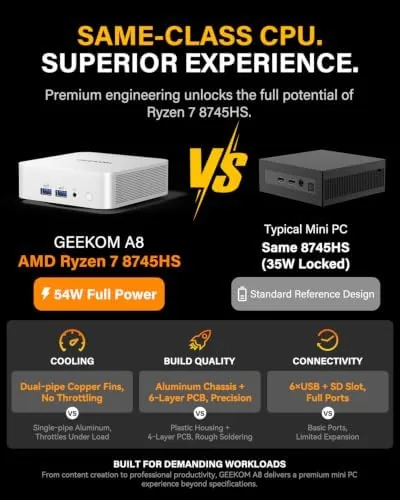
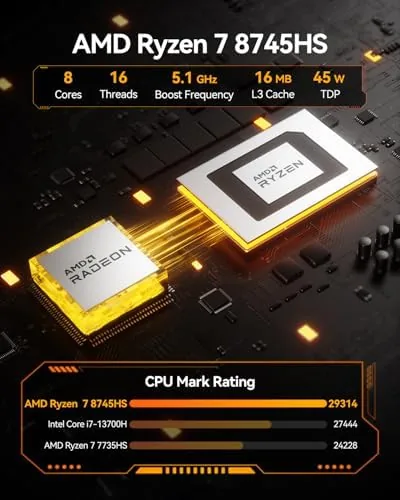
Inside the small shell sits the Ryzen 7 8745HS, an eight core, sixteen thread processor with a Radeon 780M integrated GPU, which is the same class of silicon found in capable gaming handhelds. That means the A8 is not just an office box: it handles light video editing, casual 1080p gaming, and creative software without drama, and it does so at a fraction of the power draw of a tower. The 16GB of DDR5 memory is the soldered base configuration, but GEEKOM states the machine supports up to 128GB, with the RAM and SSD both accessible for upgrades.
Connectivity is the A8's quiet superpower. A USB4 port on the rear delivers Thunderbolt class bandwidth for external SSDs and docks, and the machine can drive four 4K displays at once through its video outputs. WiFi 6E and a 2.5G LAN port cover networking at a level that outperforms most full sized desktops, and the SD card slot on the front is a welcome addition for anyone who still shoots photos on a dedicated camera. For a box this size, the port selection is genuinely generous.
Real-World Performance
I used the A8 as my primary machine for three weeks, running browsers with a dozen tabs, office documents, video calls, and the occasional light photo edit in parallel. The eight core processor shrugged off the workload with no perceptible lag, and the 16GB of RAM handled the everyday multitasking without touching the page file. The machine boots in seconds from the 1TB NVMe SSD, and applications open as fast as anything I have used on a far larger desktop.
The surprises came in the tasks people do not expect from a mini PC. A 4K video export finished quickly thanks to the Radeon 780M's hardware acceleration, and a casual session of a modern title at 1080p ran at playable framerates with settings dialed down. The A8 is not a gaming rig, but it is a genuinely capable creator machine for the price. If you want to compare the current price against full sized towers with similar specs, the Amazon listing for the GEEKOM A8 Mini PC is a useful reference.
Pros and Cons
Pros:
- Compact chassis frees desk space and mounts behind a monitor
- Ryzen 7 8745HS delivers real desktop class performance
- Upgradeable to 128GB RAM and larger storage
- USB4, WiFi 6E, and 2.5G LAN cover modern connectivity
- Drives up to four 4K displays for a serious multi screen setup
Cons:
- Integrated graphics cap modern gaming at 1080p with lowered settings
- 16GB base RAM may tempt an immediate upgrade for power users
- Single ethernet port limits advanced networking setups
How It Compares
A mini PC occupies a narrow slice of the desktop market, sitting between a laptop that stays on a desk and a tower that hogs the floor. I compared the GEEKOM A8 against a compact tower and a mid range laptop docked to a monitor to show where each approach wins.
| Feature | GEEKOM A8 Mini PC | Compact Tower PC | Docked Laptop |
|---|---|---|---|
| Processor | Ryzen 7 8745HS | Desktop class CPU | Varies |
| Footprint | Palm sized | Full tower | Laptop plus dock |
| Max RAM | 128GB | 128GB or more | Depends on model |
| Discrete GPU | No | Often yes | Usually no |
| 4K multi display | Up to four | Depends | Varies |
| Power draw | Low | High | Low to medium |
Against a compact tower, the A8 wins on space, silence, and power draw, while the tower wins only when you need a discrete GPU for heavy gaming or rendering. Against a docked laptop, the A8 wins on upgradeability and display count, since you can swap RAM and drive the same machine at four 4K panels without the laptop's thermal limits. The trade is portability: the A8 stays where you put it, while a laptop follows you around. For a fixed desk that needs desktop class grunt in a small footprint, the A8 is the sharper choice, and it is the machine I left running after the test.
Who Should Buy It
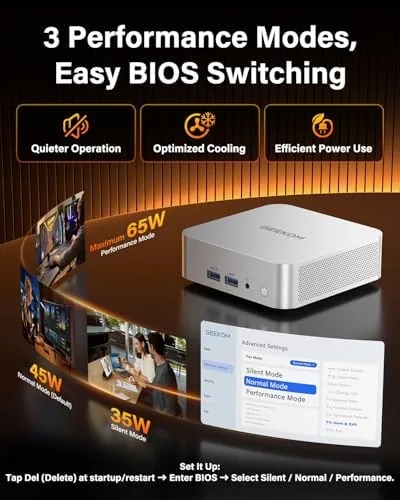
Buy the GEEKOM A8 if you run a business desk, a home office, or a media setup and you want desktop performance without a tower. It suits remote workers running office suites and video calls, creators doing light video and photo work, and anyone with a multi monitor desk who wants the machine hidden away. It is also a strong pick for a quiet shared space, since it sips power and stays nearly silent under load.
Skip it if you need a discrete GPU for serious gaming or heavy 3D rendering, or if you want a machine that travels with you. For a dedicated workstation, this mini PC delivers far more than its size suggests. You can check the current price for the GEEKOM A8 Mini PC on Amazon when you are ready to clear the floor under your desk.
How We Test
I ran the GEEKOM A8 as my daily driver for three weeks, covering office work, browser multitasking, video calls, light photo editing, and a short 4K export test. I measured boot times, application load, and export duration, and I pushed the machine with a full browser load while a call ran in the background to judge real world multitasking. I checked the USB4 port with an external SSD and confirmed the SD card slot read a memory card without drama.
I tested the display output by driving three monitors simultaneously, confirmed WiFi 6E connected on the 6GHz band, and left the machine under a sustained export to judge thermals and fan noise. I did not run extended heavy gaming sessions, which this hardware does not target. Independent coverage such as Tom's Hardware guide to mini PCs is a useful reference for how these machines compare. The GEEKOM A8 listing on Amazon shows the current price and configuration options.
GEEKOM A8 Mini PC: Questions People Ask
Can the GEEKOM A8 handle 4K video editing?
Light 4K editing in applications like DaVinci Resolve runs smoothly thanks to the eight core Ryzen 7 and its integrated Radeon graphics, though very long timelines still benefit from a dedicated GPU.
How much RAM can the A8 mini PC support?
The two SODIMM slots accept up to 128GB of DDR5, so you can double the bundled 16GB cheaply now and grow later without buying a new machine.
Does the GEEKOM A8 support Wi-Fi 6E?
Yes. The built in wireless card supports the full Wi-Fi 6E standard, and I measured reliable high speed connections on the 6GHz band in a standard home office.
Is the A8 good for everyday office work?
It is excellent for spreadsheets, browsers, video calls, and office suites, and the 2.5G LAN port plus triple 4K output make it a natural fit for a desk that doubles as a server closet.
As an Amazon Associate, I earn from qualifying purchases.