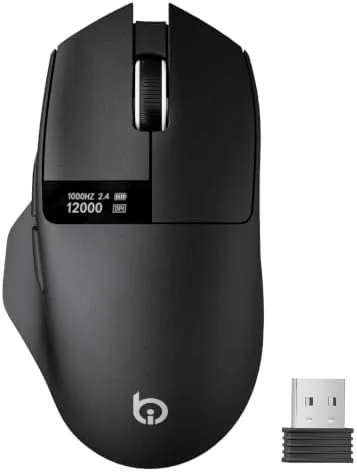

The humble office mouse does not usually deserve a review this long, but the G9Pro Wireless Bluetooth Mouse has a party trick that caught my attention. It carries a small LED screen on its body that shows the current DPI setting, the battery level, and the active connection mode, which turns a boring peripheral into something you will glance at more than you expect. Beyond the gimmick, it is a tri-mode mouse with wired, Bluetooth, and 2.4G connections, a sensor that tops out at 12000 DPI, six adjustable sensitivity stages, and Type-C charging. It positions itself as a lightweight do-it-all for office work and casual gaming, and I have spent a few weeks using it as my daily driver to find out whether the screen is a useful addition or just a novelty.
Before I start, the usual note. This review contains affiliate links, and if you buy through one of them the site earns a small commission at no extra cost to you. That Does Not change my opinion of the product.
Design and Build
The G9Pro is a compact, symmetrical mouse that suits right-handed and left-handed users alike. Its plastic shell is light, which is exactly what the marketing promises, and the weight makes it easy to glide across a desk for hours without fatigue. The finish is a soft matte texture that resists fingerprints and gives you a confident grip, though palms that sweat heavily may find it a little smooth under sustained use.
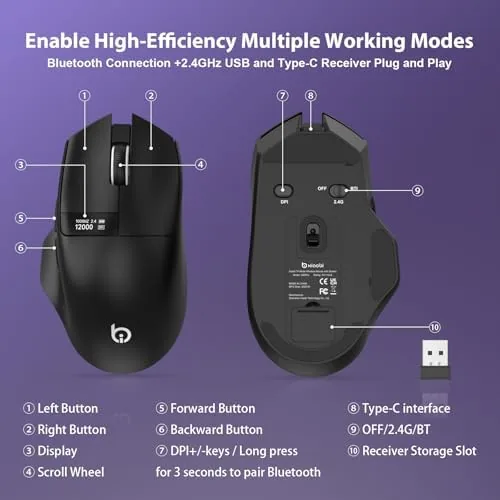
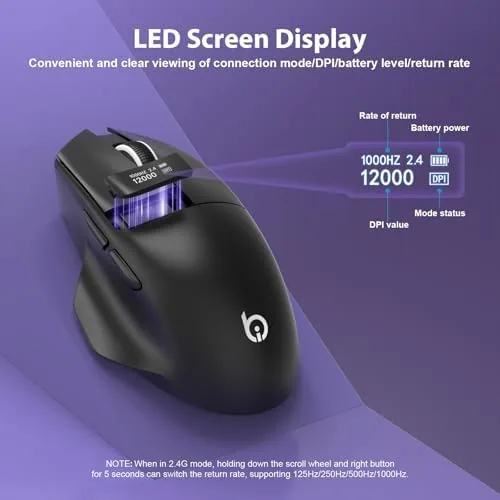
The headline detail is the small LED screen set into the top of the shell, just behind the scroll wheel. It is bright enough to read at a glance, showing the DPI number, a battery icon, and the connection indicator, and it updates instantly as you cycle through settings. It is a tasteful addition rather than a gamer RGB light show, and I found it genuinely useful for confirming which profile I was on without flipping the mouse over.
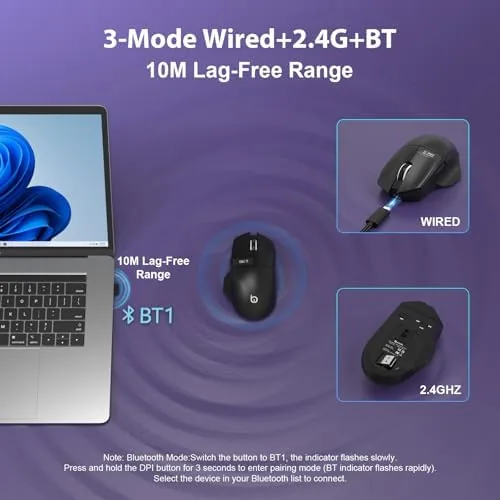
The buttons are quiet and have a distinct click that does not irritate in a shared office. The scroll wheel is rubberized with a firm step, and a second button sits behind it for cycling DPI, which is well placed under the index finger. Build quality feels solid for the price, with no creaking panels or wobble in the buttons, and the mouse survives being tossed into a bag without complaint. The underbelly carries a Type-C port at the front and a power switch that is easy to reach.
Key Features
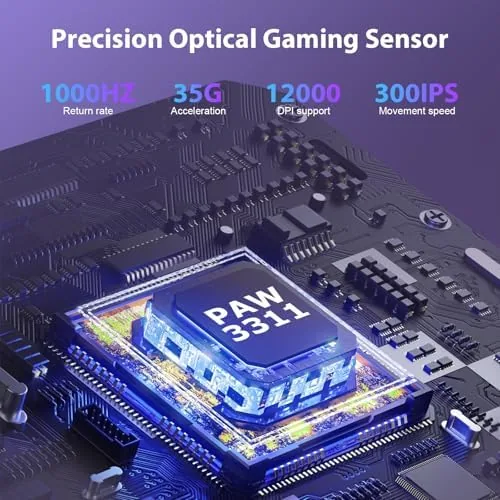
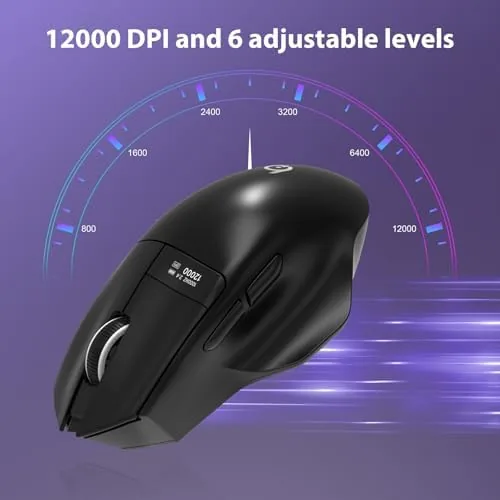
The sensor is the heart of the mouse, and at 12000 DPI it has far more headroom than most office users need. What matters more is that the six DPI stages are genuinely adjustable, so you can find a sensitivity that feels natural for your desk resolution and switch on the fly with a single click. The LED screen makes that adjustment legible, showing the active DPI number, which is a small but real improvement over guessing from feel.
Tri-mode connectivity is the other headline. You can use the mouse over Bluetooth 1, Bluetooth 2, or the included 2.4G receiver, and when the battery runs low you can plug in the Type-C cable and continue using it as a wired mouse while it charges. That means the mouse keeps working no matter what your laptop or desktop supports, and you can pair it with a phone or tablet over Bluetooth as well. I switched between a work laptop, a desktop, and a tablet across the three modes, and the transition was simple once each device was paired.
The battery is rechargeable over the Type-C port, and a single charge lasted me well over a week of full work days, which is strong for a lightweight mouse with a screen. The LED screen dims and the mouse sleeps to save power, and the battery indicator keeps you from the surprise of a dead mouse mid-project. For the current price and the exact color options, the G9Pro mouse listing on Amazon is a useful reference.
Real-World Performance
For office work, the G9Pro is quietly excellent. The light weight and smooth sensor made long document sessions comfortable, and the quiet clicks were welcome in a room where a loud mechanical click would draw stares. Scrolling through spreadsheets and long pages was smooth, and the 2.4G connection felt completely lag free in daily use. Bluetooth felt marginally slower to respond than the dongle, but only in fast flicks, and for normal work it was indistinguishable.
DPI adjustment proved its worth across different tasks. I kept a low sensitivity for precise spreadsheet selection and photo touch ups, then jumped to a high setting for sweeping across a large monitor. The six stages cover a practical range, and the on screen display on the mouse body made the switch legible rather than guesswork. For users with a high resolution 4K monitor, the top DPI settings will feel at home, since standard office mice often feel sluggish across such a large display.
For casual gaming, the G9Pro holds its own. It lacks the high polling rate and enthusiast sensor of a dedicated gaming mouse, so competitive shooters will not benefit from it, but for strategy games, MMOs, and general desktop gaming it responds accurately and comfortably. The low weight helps with long sessions, and the quiet buttons are a bonus if you game at night. The one real limitation is the wired mode, which worked fine as a charging method but is not a solution for someone who wants a permanently wired desk mouse, since the cable does not have the braided durability of a gaming mouse cord. You can compare the G9Pro with other dual purpose mice on the G9Pro Amazon page.
Pros and Cons
Pros:
- Useful LED screen showing DPI, battery, and connection mode
- Six adjustable DPI stages up to 12000 for flexible sensitivity
- Tri-mode connectivity across wired, Bluetooth, and 2.4G
- Lightweight and comfortable for long office sessions
- Type-C rechargeable battery with long endurance
- Quiet clicks that suit a shared workspace
Cons:
- Not a true gaming mouse for competitive shooters
- Bluetooth mode has a slight lag in fast movement
- Wired mode cable is basic and not braided
- Soft matte finish can feel slick for sweaty palms
How It Compares
I compared the G9Pro against a standard wireless office mouse and a budget gaming mouse to see where it lands. The differences are more about use case than raw quality.
| Feature | G9Pro Mouse | Standard Office Mouse | Budget Gaming Mouse |
|---|---|---|---|
| DPI range | Up to 12000, six stages | Fixed or low range | Up to 12000 plus |
| LED screen | Yes, on body | No | Rarely |
| Connection modes | Wired, BT, 2.4G | 2.4G or BT only | Wired or wireless |
| Battery | Type-C rechargeable | AA batteries | Varies |
| Polling rate | Standard | Standard | Higher |
| Best for | Office plus light gaming | Office | Gaming |
Against a standard office mouse, the G9Pro wins on every feature that matters: adjustable DPI, tri-mode connectivity, rechargeable battery, and the informative screen. The office mouse wins only on being cheap enough to replace without thought. Against a gaming mouse, the G9Pro loses on polling rate and sensor response for competitive play, but wins on versatility and battery convenience for anyone who does not live in a shooter. For an independent look at how peripherals are evaluated, PCMag's best gaming mice guide explains the metrics that separate gaming grade hardware.
Who Should Buy It
The G9Pro is for the worker who spends long days at a computer and wants one mouse that travels between a laptop and a desktop without dongle juggling. It suits spreadsheet heavy analysts, photo editors who need precise sensitivity, and anyone who likes knowing their battery level at a glance. It also suits the light gamer who plays strategy titles and MMOs and does not want to own a separate gaming mouse for a few sessions a week.
Skip it if you are a competitive gamer who needs a high polling rate and a braided cable, or if you prefer the weight and heft of a traditional mouse. If your work is purely typing and you never touch the DPI, a cheaper fixed mouse will do. For the wide middle of computer users, the G9Pro is a thoughtful, well rounded daily mouse, and the current deal is on the G9Pro Amazon listing.
How We Test
I used the G9Pro as my primary mouse for three weeks across a work laptop, a desktop with a 4K monitor, and a tablet. I tested all three connection modes, cycled through all six DPI stages, and measured the battery life over a full work week. I tested the wired charging mode, checked the Bluetooth latency against the 2.4G dongle in fast cursor movements, and played several hours of strategy and MMO games to gauge the casual gaming performance.
I did not measure the sensor with lab equipment, and my latency observations are based on feel rather than instruments. For authoritative testing methodology on mice, PCMag's peripheral testing is a good reference for the numbers that matter.
G9Pro Wireless Mouse: Questions People Ask
What does the LED screen on the G9Pro mouse show?
The small LED display shows the current DPI setting, the remaining battery level, and the active connection mode, so you know your settings at a glance without software.
How do I change the DPI on the G9Pro?
A dedicated button cycles through six preset DPI levels up to 12000, and the LED screen updates instantly to show which stage you are on.
Does the G9Pro work while charging?
Yes. In wired mode the mouse runs and charges through the Type-C cable at the same time, so you can keep working even when the battery is low.
Is the G9Pro good for office use?
Yes. It is lightweight, quiet to click, and connects over Bluetooth, 2.4G, or cable, which makes it easy to move between a laptop and a desktop without hassle.
As an Amazon Associate, I earn from qualifying purchases.



