
The budget iPad has always had a gap in its story. Apple sells a smart connector keyboard folio for it, but the official option skips the trackpad, which means anyone who wants a true laptop-style setup has to look elsewhere. This folio keyboard case for the iPad A16 and the 10th generation closes that gap, adding a multi-touch trackpad, seven-color backlit keys, a detachable keyboard, and a pencil holder around the same body both models share. I ran it for two weeks as my main writing setup to see whether a third-party keyboard case can make the budget iPad feel like A Real Laptop.
Before the details, the standard note. This article contains affiliate links, and if you buy through one of them the site earns a small commission at no extra cost to you. That commission does not change what I test or what I recommend, and the case reviewed here was used exactly the way an owner would use it.
The case is a folio with a magnetic back shell and a detachable keyboard, and the rest of this review covers the typing feel, the trackpad, the backlight, and how the whole setup behaves on a lap and a desk.
Design and Build
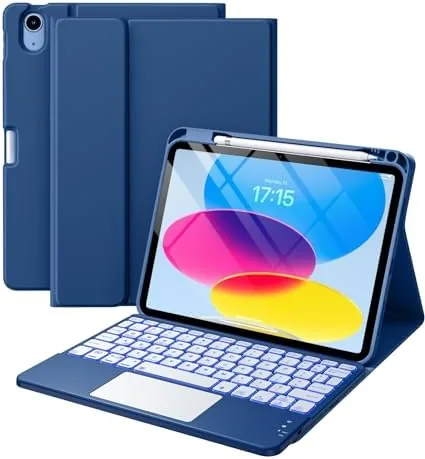
The folio is built around a hard back shell that snaps around the iPad and a detachable keyboard that connects over a magnetic rail. The navy blue finish looks sharp and professional, and the shell adds a protective lip around the screen and the camera. The keyboard detaches cleanly and reattaches with a firm magnetic click, and when the keyboard is off, the back shell still protects the iPad while a rear flap covers the screen.
The pencil holder is a practical addition. A pocket along the top edge holds the Apple Pencil when it is attached, and it stays secure in a bag without forcing the case to bulge. The magnetic connection means the pencil keeps charging while it rides in the slot, which is the detail that makes the holder more than a place to lose a stylus.
Key Features
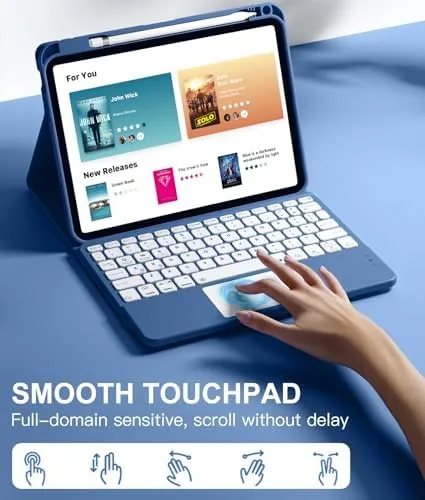
The feature that matters most is The Multi-Touch trackpad. Apple left trackpads off its own budget keyboard folio, and this case makes up for it with a clickable trackpad that supports the standard iPadOS gestures: tap to click, two-finger scroll, two-finger right click, and the cursor control that makes iPadOS feel like a desktop. The trackpad is small by laptop standards, but it sits in the right place and works well enough to leave the screen untouched for long stretches.
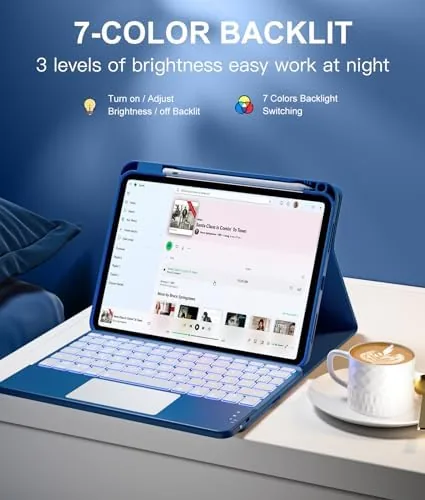
The seven-color backlight is the flashy feature, and it works as advertised. The keys light up in a selection of colors that cycle through the available options, with brightness levels that handle a dark room and a dim evening. The backlight runs on the keyboard internal battery, so it does not drain the iPad, and the keyboard itself charges through USB-C.
The typing experience rounds out the setup. The keys have decent travel for a folio keyboard and a stable deck that does not flex when you type hard. The layout keeps the number row, and the case includes a slot for the Apple Pencil, so the whole package covers the three things a budget iPad setup usually lacks: typing, a cursor, and a home for the stylus.
Real-World Performance
Over two weeks the case became my default writing station. Long typing sessions on a desk were comfortable, with enough key travel to avoid the shallow tap of a pure folio keyboard, and the deck stayed firm even at speed. On a lap the folio needs a flat surface to be truly stable, which is expected for a case-based keyboard, but on a desk it behaved like a small laptop and the trackpad meant I rarely reached for the screen.
The trackpad earned its place in daily use. Scrolling through long documents and web pages with two fingers felt natural, the cursor moved with predictable speed, and the tap and click actions registered reliably. The gestures work without setup because they map to standard iPadOS shortcuts, and the trackpad stayed responsive through a week of mixed use without needing a reconnect.
The backlight was a genuine evening aid. Writing in a dim room, the glowing keys made touch typing effortless, and the color options meant the case could match a mood or simply default to a clean white. Battery life on the keyboard held up for days of use between charges, and the USB-C port charged it back to full quickly.
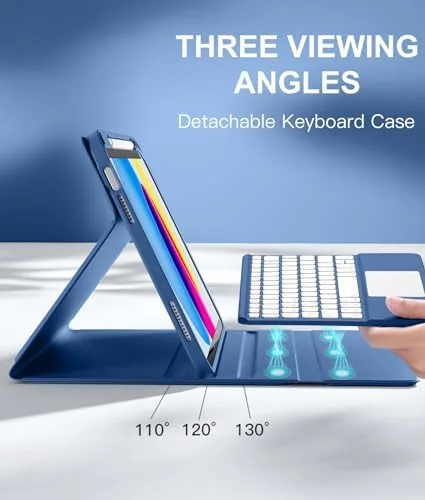
The honest trade-offs are weight and the trackpad size. The folio adds real heft, so the iPad is no longer a thin tablet when the keyboard is attached, and the small trackpad takes a little adjustment if you are used to a full laptop. The Bluetooth connection occasionally needed a moment to wake when the keyboard had been idle, a small quirk that resolved in a second, and the case is not a keyboard for heavy fast typists who need a full-size deck. One area that deserves a closer look is how the case holds up when the keyboard is detached and you use the iPad as a pure tablet. The back shell stays on, which means the added protection and the pencil slot remain, and the bare keyboard lies flat in the folio or on the desk. I read articles and drew in a notes app with the keyboard off, and the case never got in the way, which makes it a two-mode accessory rather than a one-trick laptop shell. That flexibility is worth more than it might seem, because it means you are not carrying a dedicated typing deck that becomes dead weight the moment you switch to reading.
Pros and Cons
Pros:
- Working multi-touch trackpad with standard iPadOS gestures
- Seven-color backlight with adjustable brightness
- Detachable keyboard with a stable, firm typing deck
- Dedicated slot that holds and charges the Apple Pencil
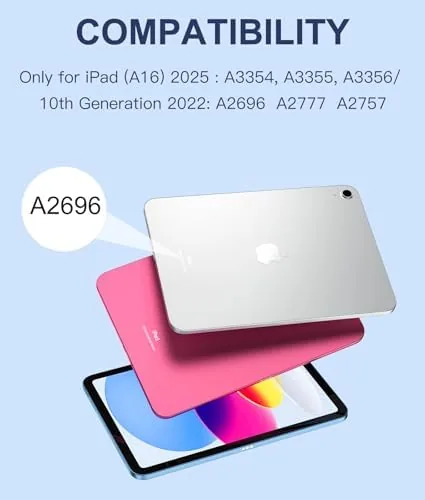
- Fits both the iPad A16 and the 10th generation
- USB-C charging that does not drain the iPad battery
Cons:
- Adds noticeable weight to the thin iPad body
- Trackpad is small compared to a laptop
- Bluetooth needs a moment to wake after idle
- Lap typing works best with a flat surface
How It Compares
The direct comparison is Apple own Smart Keyboard Folio for the same iPad, and the difference comes down to the trackpad and the price. The table below lines up the two.
| Feature | This Keyboard Case | Apple Smart Keyboard Folio |
|---|---|---|
| Trackpad | Multi-touch | None |
| Backlight | Seven colors | None |
| Keyboard | Detachable | Attached |
| Pencil holder | Yes | No |
| Connection | Bluetooth | Smart connector |
| Typing feel | Firm, tactile | Shallow scissor keys |

Apple folio wins on the convenience of the smart connector, which needs no charging and no pairing, and on its slimmer profile. This case wins on capability, adding the trackpad, backlight, and pencil holder that Apple leaves out, and it often costs less. If a cursor and a backlit keyboard matter to you, this case is the more complete product despite the Bluetooth setup.
Who Should Buy It
Buy this keyboard case if you want the budget iPad to double as a laptop for writing, email, and light productivity, and you have felt the absence of a trackpad on the official folio. It suits students who write essays, commuters who type on a train tray, and anyone who wants a backlit keyboard and a pencil slot without buying separate accessories.
Skip it if you use the iPad mainly as a tablet and rarely type, because the added weight is not worth carrying, or if you want the zero-maintenance smart connector connection of the Apple folio. For a real writing setup on a budget iPad, this case delivers the trackpad that Apple leaves out. You can check the current price of the iPad keyboard case on Amazon if it fits your workflow.
How We Test
I used this keyboard case with a 10th generation iPad for two weeks, writing daily in notes, email, and a document editor, and I tested the trackpad gestures, the backlight across all colors and brightness levels, the detachable keyboard mechanism, and the pencil holder with an Apple Pencil attached.
I did not run the keyboard battery to empty, and the wake behavior I noted is from normal daily use rather than controlled timing. For a look at what iPadOS expects from keyboard and trackpad accessories, CNET has reviewed the iPad 10th generation and its accessory ecosystem in detail. The iPad keyboard case listing on Amazon shows the current price and compatibility details.
iPad A16 and 10th Generation Keyboard Case: Questions People Ask
Will this case fit both the iPad A16 and the 10th generation?
Yes, the two models share the same chassis and dimensions, so the folio snaps on and the keyboard lines up for both.
Does the trackpad work with iPadOS gestures?
The multi-touch trackpad supports tap to click, two finger scroll, and the standard iPadOS cursor gestures with no extra setup.
How does the keyboard connect?
The keyboard pairs over Bluetooth and charges through USB-C, while the magnetic back case stays on the iPad when the keyboard is detached.
Where does the Apple Pencil sit?
There is a dedicated slot along the top edge of the case that holds and charges the Apple Pencil when it is magnetically attached.
As an Amazon Associate, I earn from qualifying purchases.