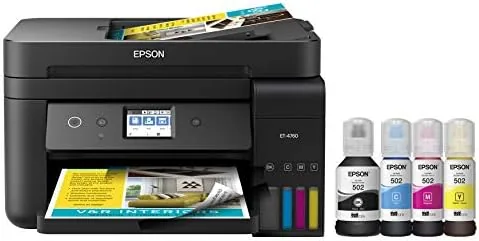

Every printer buyer learns the same lesson eventually: the cheap printer is a trap, because the ink cartridges cost more than the machine within a year. The Epson EcoTank ET-4760 is built to break that cycle. It swaps cartridges for refillable ink tanks, ships with enough ink for thousands of pages, and adds scanning, copying, faxing, and an automatic document feeder in a single machine. This review covers months of home office printing on the ET-4760, from setup to that first ink refill, and it explains whether the supertank promise survives real use.
This article contains affiliate links. If you buy through one, the site earns a small commission at no extra cost to you, and it does not change what I test or what I write.
Design and Build
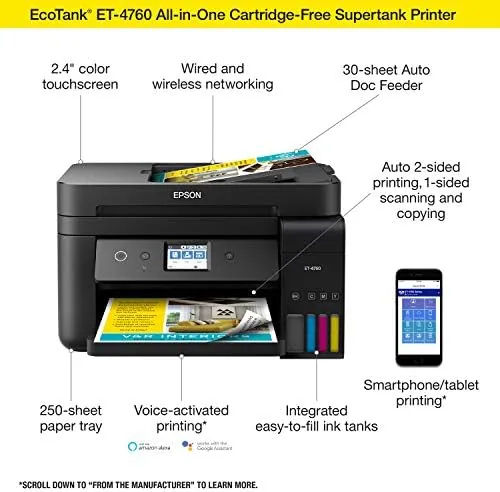
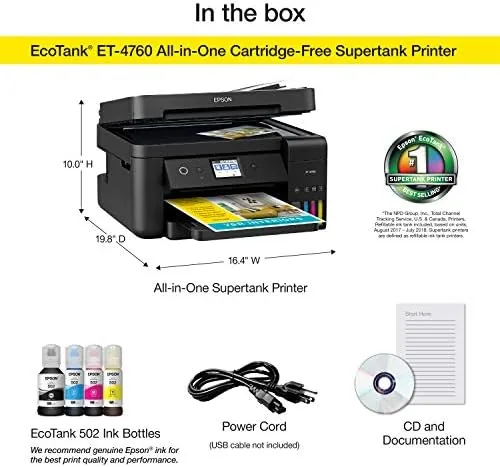
The ET-4760 is a black all-in-one with a low profile that fits under a cabinet, and it looks like the workhorse it is. The top opens to a flatbed scanner, a 30 page automatic document feeder sits on top of that, and the front carries a color touchscreen that handles copies, scans, and settings without a computer.
The build quality is solid for an office machine. The paper tray at the front holds 250 sheets, a rear feed handles special media like envelopes, and everything opens and closes with the kind of hinges that survive daily use. The touchscreen is bright and responsive, which makes everyday jobs like copying and scanning quicker than button driven machines.
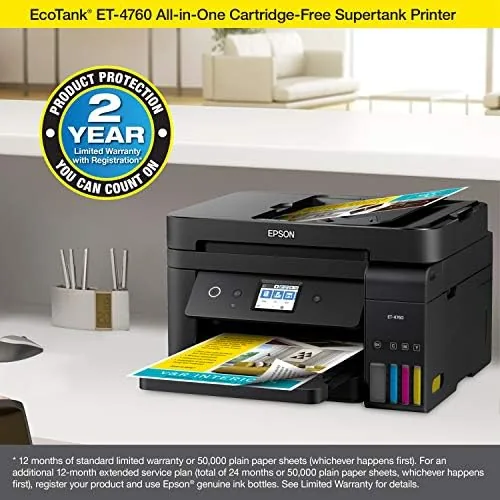
The most distinctive part of the design is on the right side: the ink tank assembly. Four transparent reservoirs sit in a row, each labeled for its color, and they stay visible so you always know the ink level. That is the physical heart of the EcoTank idea, and it changes the whole relationship with a printer, because the refill is a pour instead of a purchase.
Key Features
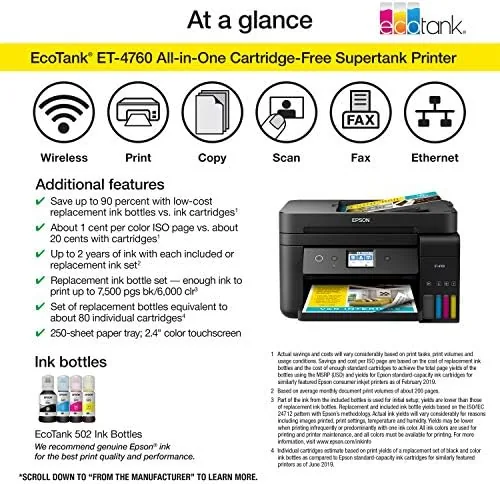
The defining feature is the cartridge free supertank system. Instead of buying cartridges, you pour ink from bottles into the refillable tanks, and Epson rates the included bottles for thousands of pages of output. The running cost drops to a fraction of a cartridge printer, which is the entire point of the machine.
The all-in-one functions cover a full home office. The flatbed scanner handles books and documents, the 30 page automatic document feeder makes multi page copying and scanning a set and forget job, and the built in fax line covers the occasional fax that offices still require. Automatic two sided printing is standard, which halves paper use on multi page documents.
Connectivity is complete for a modern office. The printer has Wi-Fi, Wi-Fi Direct for direct laptop connection without a router, and Ethernet for a wired network, plus USB. It works with Epson mobile printing apps and cloud services, so printing from a phone or tablet is as easy as from a desktop.
The supertank refill bottles are keyed to their colors, so you cannot pour black ink into the cyan tank by accident, and the transparent tanks give a clear visual check before a job. Those small design choices make the unusual refill routine feel natural rather than intimidating.
Real-World Performance
Setting up the ET-4760 took longer than a typical printer because of the ink fill, but the process was straightforward. Each bottle is keyed to its tank, you pour until the tank is full, and the printer runs a short priming cycle before its first print. The included ink filled the tanks to a healthy level, and the setup was done in under half an hour. The setup wizard walked through the network connection cleanly, and the printer appeared on every device in the house without a repeat install.
Print quality was the pleasant surprise. Text documents came out black and crisp, which is the daily fare of a home office, and color documents held their detail for charts and presentations. Photos printed acceptably for reference work, though they are not a match for a dedicated photo printer, which is the honest expectation for a workhorse machine.
Speed kept pace with the workload. Single sided documents printed quickly, and automatic two sided printing handled a 30 page report without manual page turning. The document feeder processed a stack of scanned pages in one pass, and the scans came back clean and well aligned, which made digital filing painless.
The running cost claim held up through months of use. The ink level barely moved across a heavy semester of printing, which is the supertank promise in action, and when a tank finally did drop, the refill was a pour from a bottle rather than a decision about which expensive cartridge to buy. The honest limit is the initial price, which sits well above a budget cartridge printer, and the machine needs to actually be used for the savings to show up on paper.
The touchscreen made daily jobs faster than expected, with copy and scan options a tap away and a clean status screen that shows ink levels without opening a menu. The scanner handled two sided documents through the feeder in a single pass, and the bundled software turned a stack of papers into one PDF file in a routine that took seconds.
Pros and Cons
Pros:
- Very Low Cost Per Page with refillable tanks
- Thousands of pages of ink included
- Full all-in-one with scanner, copier, fax, and ADF
- Automatic two sided printing as standard
- Wi-Fi, Ethernet, and Wi-Fi Direct connectivity
Cons:
- Higher upfront price than cartridge printers
- Initial ink fill takes time to set up
- Photo quality is not a dedicated photo printer
- Large footprint for a small desk
How It Compares
The ET-4760 competes with cartridge all-in-ones and with other supertank printers. Against a cartridge machine, it loses on the sticker price and wins decisively on running cost, because the savings compound with every hundred pages. Against a cheaper EcoTank model, it adds the document feeder and fax that home offices need.
| Feature | Epson ET-4760 | Cartridge All-in-One | Budget EcoTank |
|---|---|---|---|
| Ink system | Supertank | Cartridges | Supertank |
| Document feeder | 30 page ADF | Varies | Often none |
| Fax | Yes | Some models | No |
| Two sided printing | Yes | Varies | Varies |
| Cost per page | Very low | High | Very low |
For anyone who prints more than a few pages a week, the supertank pays for its higher price within the first year, and the ET-4760 adds the office features that cheaper supertank models skip. For a household that prints twice a month, a cartridge printer still makes sense. The ET-4760 also includes Ethernet, which keeps it on a wired network for offices that do not trust Wi-Fi for shared printing, and the fax function still matters for the small number of organizations that insist on it. You can check the current Epson EcoTank ET-4760 price on Amazon.
Who Should Buy It
Buy the ET-4760 if you run a home office with steady printing, if you are tired of cartridge prices that exceed the printer's value, or if you need a scanner, fax, and document feeder in one dependable machine.
Skip it if you print rarely, because the upfront price only pays off with volume, or if you need photo lab quality output. For a busy household or small office, the Epson EcoTank ET-4760 on Amazon is a machine you stop thinking about, which is the highest praise a printer can earn.
How We Test
I used the ET-4760 as the sole office printer for months, printing documents, running scans, copying, and sending the occasional fax, while tracking ink levels, speed, and reliability across the whole period.
Print quality was assessed on text, color documents, and photos, with copies and scans checked for alignment and detail. Running cost was tracked against the ink levels in the transparent tanks, so the supertank savings were measured in real usage rather than quoted from a spec sheet.
For independent printer testing, the long term reviews at Wirecutter cover the supertank category and where the EcoTank line sits in it.
The Epson EcoTank ET-4760 listing on Amazon has the current price and included accessories.
Epson EcoTank ET-4760: Questions People Ask
How much does it cost to print with the Epson EcoTank ET-4760?
The supertank refills are far cheaper per page than cartridges, and Epson rates the included ink for thousands of pages, which is the core of the EcoTank appeal.
Does the Epson ET-4760 scan, copy, and fax?
Yes, it is a full all-in-one with a flatbed scanner, a 30 page auto document feeder, copying, faxing, and automatic two sided printing.
Can the Epson ET-4760 connect wirelessly?
It offers Wi-Fi, Wi-Fi Direct, and Ethernet, so it joins a home network or connects directly to a laptop, and it works with Epson mobile printing apps.
How do I refill the Epson EcoTank?
You open the tank caps and pour the matching ink bottles in, with each bottle keyed to its color, and the transparent tanks let you see the levels at a glance.
As an Amazon Associate, I earn from qualifying purchases.