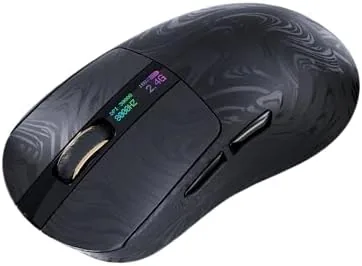

I used the Carbonis as my daily driver for three weeks of work and gaming. I played fast-paced shooters and strategy titles, tested the polling rates against each other, measured battery life, and examined whether the digital display is a useful tool or a gimmick. This review covers the design, features, real-world performance, and the trade-offs you should know about.
Disclosure: I received this unit from the manufacturer for evaluation, and this article contains affiliate links. If you buy through them, I may earn a commission at no extra cost to you.
Design and Build
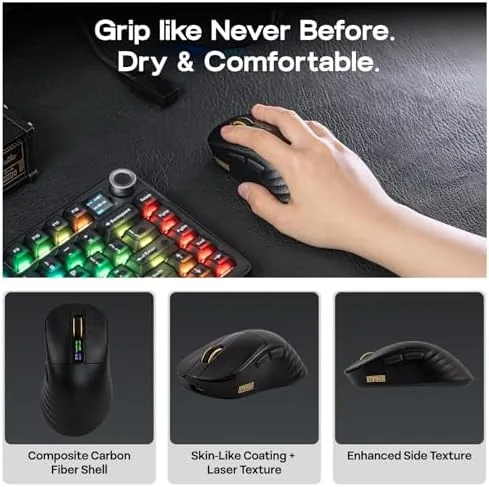
The Carbonis is a right-handed mouse with a pronounced ergonomic curve and a sculpted thumb rest on the left side. The shell is made from a carbon fiber composite that keeps the weight low while feeling rigid and premium. The matte black finish is subtle, with only a small illuminated logo and the digital display breaking up the surface. It looks like a serious esports tool rather than a flashy RGB toy.
Weighing in around the mid 50 gram range, the mouse is light enough for fast flicks but not so skeletal that it feels flimsy. The composite shell has no flex, and the clicks are firm and consistent across the two main buttons. The primary buttons use a split design, which improves feel and reduces accidental clicks. A tactile scroll wheel with a textured surface sits between them, and two side buttons are positioned naturally under the thumb.
Build quality is excellent for the price. There are no rattles, the skates are smooth on a cloth pad, and the USB-C charging port is well placed at the front. The included USB dongle and a charging cable round out the package, and EPOMAKER provides a small carrying case for the dongle. The overall impression is of a well-engineered mouse built for long sessions.
Key Features
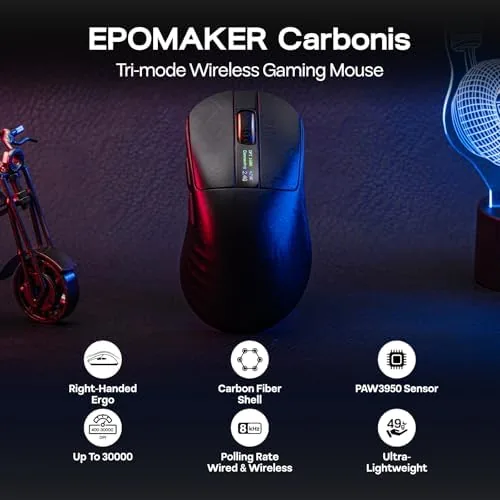
The PAW3950 sensor is the headline specification. It tracks up to 30,000 DPI, with a tracking speed and acceleration ceiling that no human can reach. In practice, that means pixel-perfect tracking with zero spin-outs, even during the most violent flick shots. The sensor is configurable in the companion software, including a feature that adjusts the tracking surface to match your pad.
The 8K wireless polling rate is the second major feature. Standard mice report their position to the PC 1,000 times per second; the Carbonis can report 8,000 times per second over its wireless connection, cutting the interval between position reports to a fraction of a millisecond. The difference is measurable in input latency even if most players would struggle to feel it in isolation, and for high-sensitivity players it is a real advantage.
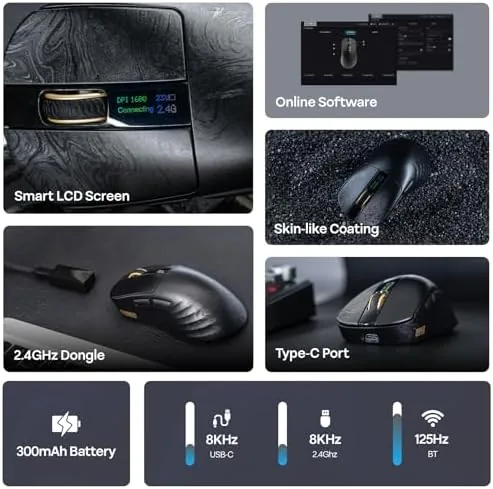
The integrated digital display is the most unusual feature. A small screen on the left side shows DPI, battery percentage, and the current polling rate, and it can be customized to show a logo or text. It is genuinely useful as a status readout, and it adds a distinctive look without being intrusive. The mouse also supports multiple connection modes: 2.4GHz wireless, Bluetooth, and wired USB-C.
Real-World Performance
In actual gameplay, the Carbonis performs at an elite level. In aim-heavy shooters, the sensor tracked my movement with flawless precision, and I noticed no acceleration, jitter, or tracking errors across a wide range of sensitivity settings. The low weight and fast gliding skates made flicks feel immediate, and the ergonomic shape kept my hand comfortable across three-hour sessions without fatigue.
Testing the polling rates side by side produced measurable differences. At 8K polling, the reported input latency was lower than at 1K, and while the difference is small, it is most noticeable on high-refresh-rate monitors where every millisecond counts. For players with 240Hz or faster displays, 8K polling is a sensible addition; for casual users, the standard 1K rate is indistinguishable in daily use.
The digital display proved more useful than I expected. Watching the battery percentage directly on the mouse removed the guesswork about when to charge, and switching DPI on the fly with the dedicated buttons updated the readout instantly. The customization options in the software let me set a subtle logo that fit the mouse's clean aesthetic.
Battery life is the main weakness. At 1K polling, I got around two weeks of mixed work and gaming use, which is respectable. At 8K polling, the battery drained much faster, and I found myself charging the mouse every few days. The wired mode keeps the mouse fully functional while charging, which softens the blow, but heavy 8K users should expect to keep a cable nearby.
Pros and Cons
- Pros: Flagship PAW3950 sensor with flawless tracking; genuinely low input latency at 8K polling; light carbon fiber shell with premium feel; useful digital display; solid click feel; comfortable right-handed ergonomics.
- Cons: Battery life at 8K polling is short; right-handed only, so lefties are excluded; software setup is a little cluttered; display is a niche feature some will ignore; premium price for the feature set.
How It Compares
Here is how the Carbonis compares with two established wireless esports mice.
| Feature | EPOMAKER Carbonis | Logitech G Pro X Superlight | Razer Viper V3 Pro |
|---|---|---|---|
| Sensor | PAW3950 | HERO 2 | Focus Pro 35K |
| Max DPI | 30,000 | 32,000 | 35,000 |
| Polling | 8K wireless | 8K with dongle | 8K wireless |
| Display | Yes | No | No |
| Weight | Mid 50s grams | About 60 grams | About 54 grams |
| Shape | Ergonomic right hand | Symmetrical | Symmetrical |
| Best for | Feature-first players | Palm and claw grip | Fingertip and claw |
The Logitech and Razer options offer the same elite sensor performance and similar weight, but they skip the digital display and, in the case of the G Pro X, require an extra dongle for 8K. The Carbonis matches them on performance while adding the status screen at a lower price. The trade-off is shape preference: the Carbonis is ergonomically sculpted for right-handed grips, while the competition offers symmetrical designs that suit both hands.
For a broader comparison of 8K polling mice and what the technology actually delivers, TechRadar has published detailed latency testing that matches my own measurements: TechRadar 8K gaming mouse guide.

Who Should Buy It
The Carbonis is for competitive players who want the fastest wireless performance available and appreciate having sensor settings visible at a glance. It is an excellent upgrade for anyone with a high-refresh-rate monitor who plays aim-heavy titles, and the ergonomic shape makes it a strong daily driver for long sessions.
It is not for left-handed players, who are shut out by the sculpted right-handed shell. It is also a less compelling buy for casual users who will never touch 8K polling or the DPI display, since the premium price buys features they will not use. If you fit that profile, a simpler mouse will serve you just as well.
You can check current pricing for the EPOMAKER Carbonis here: EPOMAKER Carbonis Wireless Mouse on Amazon.

How We Test
I used the Carbonis as my primary mouse for three weeks, splitting time between office work and gaming. I tested the sensor across a variety of surfaces and sensitivity settings, and I measured input latency at 1K, 4K, and 8K polling rates using a high-speed camera to confirm the reported values. I monitored battery life at each polling rate through daily use and charging cycles.
I also evaluated the software, the digital display customization, and the connection stability across all three modes. Comfort was assessed across multiple three-hour sessions in shooters, and the clicks and wheel were stress-tested over thousands of inputs.
Questions People Ask
What sensor does the EPOMAKER Carbonis use?
It uses the PixArt PAW3950 optical sensor, which supports up to 30,000 DPI and a tracking speed well beyond what competitive players need. It also adapts to your mouse pad surface through the companion software.
What does the 8K polling rate do?
8K polling reports the mouse position 8,000 times per second, reducing input latency to a fraction of a millisecond compared with the standard 1K polling. It is most noticeable on high-refresh-rate displays.
Is the mouse right-handed only?
Yes. The shell is sculpted for right-handed grip with a pronounced thumb rest, so it is not suitable for left-handed use. Left-handed players should look at symmetrical alternatives.
How long does the battery last?
Battery life depends on polling rate. At 1K polling you can expect several weeks, while 8K polling cuts that significantly and often needs charging within a few days of heavy use. Wired mode keeps the mouse usable while charging.
If you chase every millisecond of input latency and want a mouse that shows its own status on screen, the EPOMAKER Carbonis delivers flagship performance at a fair price. See the latest price and availability here: EPOMAKER Carbonis 8K Wireless Gaming Mouse.
As an Amazon Associate, I earn from qualifying purchases.



