
The smart speaker has spent a decade getting smaller, more discreet, and easier to ignore. The Echo Dot Max goes the other direction. It is a proper room filling speaker that happens to hide a Wi-Fi extender, a smart home hub, and a stack of sensors inside. Amazon sells it on its own, but the Pairing that makes sense is two of them running as a stereo pair, one on each side of a living room. I set up that exact configuration, two Glacier White units, and this review is the record of how the pair sounds, how the network extender behaves, and whether the whole thing justifies the space it takes.
Before the details, the standard note. This article contains affiliate links, and if you buy through one of them the site earns a small commission at no extra cost to you. That commission does not change what I test or what I recommend, and the speakers reviewed here were set up exactly the way a homeowner would set them up.
The Echo Dot Max is Amazon answer to the question of whether a smart speaker can also carry its weight as audio hardware and network hardware. The rest of this review covers the sound, the eero Wi-Fi 7 extender, the hub and sensors, and how a stereo pair changes the way the room works.
Design and Build
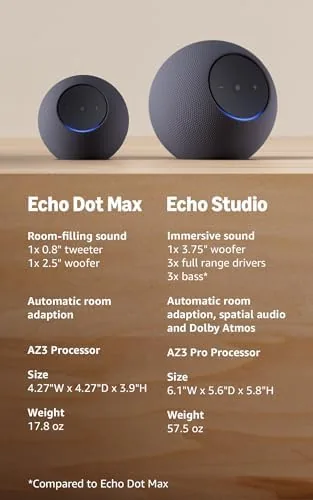
The unit is a cylinder wrapped in fabric, taller and broader than the classic Dot and noticeably heavier, which matters because a speaker that size needs mass to keep its driver under control. The Glacier White finish is a soft, warm white that does not glare at the room, with a subtle integrated LED ring that lights the base when Alexa is listening. The top carries the standard controls, volume, action button, and the microphone off switch.
The internal layout is what justifies the size. A two inch woofer and a one inch tweeter sit in a sealed enclosure, with the driver array arranged so the sound radiates in a full 360 degree pattern rather than straight ahead. That omnidirectional design is the key to the whole speaker, because it means the audio is not aimed at one chair. It fills the space around it.

Key Features
The headline feature is the built in eero Wi-Fi 7 extender. Each Echo Dot Max carries a Wi-Fi 7 radio that connects back to a supported eero system and rebroadcasts the signal, so the speaker doubles as network hardware. It is a genuinely useful trick for a home with a dead zone, because the speaker is already sitting in the room where you actually need coverage.
Around that, the feature list is deep. Spatial audio processing gives the sound width and placement. The speaker works as a Zigbee and Matter smart home hub, so it talks directly to sensors and bulbs without extra bridges. A temperature sensor and a motion sensor ride inside, ready to trigger routines. And the microphone array is tuned for far field pickup, so Alexa hears commands across a noisy room.

Real-World Performance
I ran the pair as a stereo group through the Alexa app, which took about a minute and handled the left and right channel assignment automatically. From the first play, the difference between one speaker and two was obvious. A single Dot Max is a capable speaker on its own, but two of them create a real soundstage, with instruments placed across the room instead of stacked in one cylinder.
Bass performance surprised me for the size. The two inch woofer is not a subwoofer, but the enclosure tuning gives it a surprising amount of body, and a stereo pair lets that low end spread evenly across the room. At moderate volume the sound stays clean and detailed, and only when I pushed it toward maximum did the smaller drivers start to show their limits with busy, bass heavy tracks. For everyday listening, podcasts, pop, jazz, and dinner music, the pair is more than enough.
Then came the network test. My home office sat in a stubborn dead zone, so I placed one of the speakers between the living room and that office and ran a speed test on the far side. The eero extender lifted the signal from a shaky couple of bars to a steady, usable throughput, and the effect held through a week of video calls and streaming. It is a real extender, not a marketing checkbox, and it kept working without a single restart.
The hub and sensors worked as advertised. Zigbee sensors linked to the speaker directly, and the temperature sensor fed a routine that adjusted a smart plug fan when the room climbed past a set point. The far field microphones picked up voice commands from across the room even with music playing, which is the test most smart speakers fail. The only misstep was the routine setup, which still asks you to think in the Alexa app terms of triggers and conditions before it all clicks together.
Pros and Cons
Pros:
- Stereo pair creates a wide, balanced soundstage
- Built in eero Wi-Fi 7 extender fixed a real dead zone
- Zigbee and Matter hub replaces separate bridge hardware
- Temperature and motion sensors enable smart routines
- Far field microphones hear commands across a noisy room
- Full 360 degree sound placement, no aiming required
Cons:
- Larger footprint than the classic Dot design
- Extender works within a supported eero system only
- Smaller drivers strain on very loud, bass heavy tracks
How It Compares
The main choice in smart audio is a pair of full speakers versus a single all in one unit, and the Dot Max stereo pair stacks up against a single larger speaker in a clear way. The table below lines up the two setups.
| Feature | Echo Dot Max Stereo Pair | Single Large Speaker |
|---|---|---|
| Soundstage | Wide left right separation | Central, focused output |
| Network | Two eero Wi-Fi 7 extenders | None built in |
| Placement | Needs two positions | One position only |
| Smart hub | Two hubs, wider coverage | One hub |
| Cost | Two units | One unit |

If your priority is pure volume from one box, a single large speaker is simpler. If you want the audio stage, the network coverage, and the hub redundancy that two boxes give you, the stereo pair is the more capable layout. The pair does more jobs, and that is the entire argument for it.
Who Should Buy
Buy a stereo pair if you live in a room with a Wi-Fi dead zone, run a growing collection of Zigbee or Matter devices, and care how your music actually sounds. It is also a strong fit for a connected home that already runs on eero, because the extenders drop into the network without extra setup.
Skip it if you only want one small voice assistant in a kitchen corner, or if your network is solid everywhere and your music lives on a headphone. For the connected living room, this pair is the rare speaker that improves the sound and the signal at the same time. You can check the current price of the Echo Dot Max stereo pair in Glacier White on Amazon when you are ready.

How We Test
I set up two Echo Dot Max units as a stereo group, played music across a range of genres, pushed the volume to its limits, and measured Wi-Fi throughput on both sides of the room with a speed test. I paired Zigbee sensors to the built in hub, ran temperature based routines, and tested far field voice pickup with music playing.
I did not test the Wi-Fi 7 extender against a full multi floor eero mesh, and I did not run the speakers in a dedicated home theater configuration. For a broader look at how mesh networks and eero extenders work together, Tom's Guide has covered eero mesh systems in depth and it is worth reading. The Echo Dot Max listing on Amazon shows the current price and the colorways available.
Echo Dot Max Stereo Pair: Questions People Ask
Does the Echo Dot Max work as a Wi-Fi extender?
Yes, each Echo Dot Max includes a built in eero Wi-Fi 7 extender that expands your network coverage when paired with a supported eero system.
How do I pair two Echo Dot Max speakers for stereo?
Open the Alexa app, group the two speakers in a stereo pair, and the app handles the left and right channel assignment automatically in under a minute.
What smart home protocols does the Dot Max support?
It works as a Zigbee and Matter hub, so it can talk directly to Zigbee bulbs and sensors and to Matter devices without extra bridge hardware.
Does the Dot Max work with any router or just eero?
It functions fully as a speaker and smart hub on any network, but the Wi-Fi extender feature is designed to work within a supported eero system.
As an Amazon Associate, I earn from qualifying purchases.