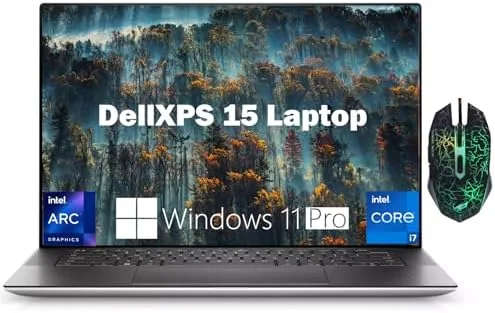

Business laptops have a reputation problem. They are either powerful and ugly, or pretty and weak, and professionals end up choosing between a machine that runs their work and one they do not mind carrying to a meeting. The Dell 2024 XPS 15 9530 is the rare attempt to do both at once. It pairs a 13th generation 10 core Intel i7-13620H with 32GB of DDR5 memory and a 1TB SSD, throws in Intel Arc A370M discrete graphics, and wraps it all in the slim aluminum chassis that made the XPS line famous. I used it as my primary machine for three weeks of real office work to see whether it justifies the premium.
Before the details, the standard disclosure. This article contains affiliate links, and if you buy through one of them the site earns a small commission at no extra cost to you. That commission does not influence what I test or what I recommend, and the laptop reviewed here was set up and used exactly as a customer would use it.
The XPS 15 9530 sits at the top of Dell business computing line, aimed at professionals who run heavy spreadsheets, compile code, or edit media while still attending meetings. This review covers the design, the display, the processor and graphics performance, the keyboard, and how the machine compares with the alternatives before you spend your budget.
Design and Build
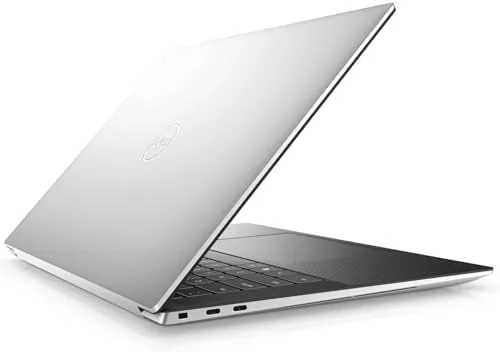
The XPS design language is immediately recognizable. The 9530 carries an aluminum lid and palm rest with a carbon fiber keyboard deck, the edges are machined and rounded, and the whole unit feels premium from the first touch. It is a 15.6 inch machine, so it is not small, but the bezels are so thin that the footprint is closer to a 14 inch notebook. Opening the lid reveals the 15.6 inch FHD+ panel surrounded by the borderless display Dell calls InfinityEdge, and the result looks modern even years after the design debuted.
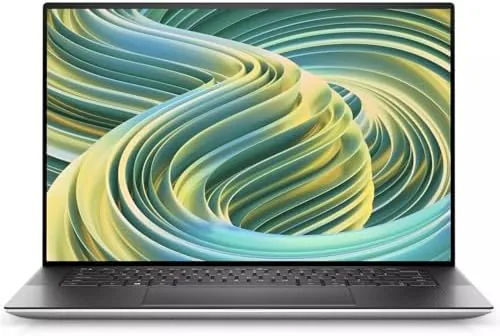
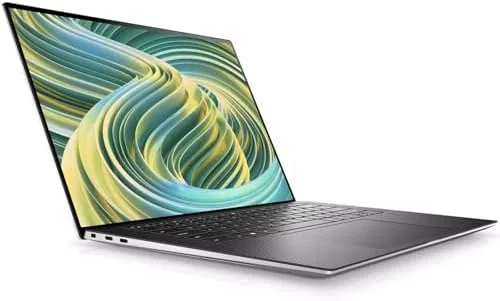
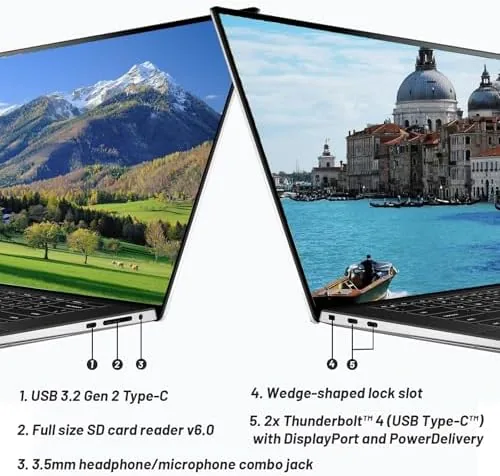
Build quality is outstanding. The chassis is rigid, there is almost no flex in the lid or the deck, and the hinges hold the screen firmly at any angle while still opening one handed. The weight sits around 4.2 pounds, which is heavier than an ultrabook but reasonable for a machine packing a 10 core processor and discrete graphics. The port selection is a mix of the modern and the pragmatic: USB-C ports with Thunderbolt, a full size SD card reader, and a headphone jack.
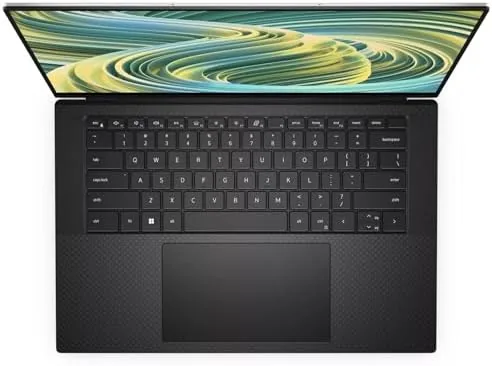
The keyboard is a genuine highlight. The key travel is deep for a thin laptop, the feedback is crisp, and the backlight is even and bright. I typed thousands of words a day on this deck without fatigue, and the large precision trackpad is equally dependable, with smooth scrolling and accurate palm rejection. For a professional who lives in documents and emails, this is the most important part of the machine, and Dell got it right.
Key Features
The engine room is the star. The Intel i7-13620H is a 13th generation processor with 10 cores: six performance cores and four efficiency cores. That configuration is built to handle bursty heavy work, like compiling code, exporting video, or running multiple virtual machines, while keeping power draw reasonable for the rest of the day. Paired with 32GB of DDR5 memory, the 9530 simply does not run out of headroom in normal professional use.
Graphics come from the Intel Arc A370M, a discrete GPU that sits above integrated graphics and gives the machine real acceleration for video editing, design software, and light 3D work. It is not a gaming card, and it will not drive high end game titles at high settings, but for business creative work it is a meaningful step up from the integrated graphics that most business laptops rely on. The 1TB NVMe SSD provides fast boot times, quick application loading, and generous room for project files.
Connectivity is complete for an office environment. The laptop ships with Wi-Fi 6 for modern wireless networks, Bluetooth for peripherals, and Windows 11 Pro, which adds BitLocker encryption, remote desktop, and the management features that IT departments require. The 86Wh battery is large for the class, and the 130W charger tops it up quickly.
Real-World Performance
In daily work the XPS 15 9530 feels instant. I ran a typical professional workload: forty plus browser tabs, a heavy spreadsheet with live data, a video call, and a code editor open at once, and the machine never stuttered or spun up its fans to a distracting level. The 10 core processor and 32GB of memory are simply not stressed by office work, which is the point of buying this configuration rather than a base model.
The Arc A370M earned its place in the test. I edited a 4K timeline in a popular editor and exported a ten minute project, and the laptop handled preview and export far better than the integrated graphics machines I have used. The fans spun up during the export but stayed quiet enough that a nearby microphone did not pick them up. For a professional who occasionally touches video or photo work, the discrete GPU is the difference between waiting and working.
The FHD+ display is bright and sharp, with good color coverage out of the box. It is a 1920 by 1200 panel with a 16:10 aspect ratio, which gives noticeably more vertical space for documents and code than a 16:9 screen. I calibrated it to work; out of the box it was slightly warm, but a quick adjustment brought it to neutral. The 16:10 ratio is the kind of detail professionals notice over the course of a year, because it means less scrolling.
Battery life was respectable for the hardware inside. In mixed office work I got comfortably through a working day on a single charge, with the screen at moderate brightness and the efficiency cores doing their job. Pushing the discrete GPU or running heavy compiles cut that down, which is expected, but the machine never left me hunting for an outlet mid afternoon. The 130W charger is fast, refilling the battery to a useful level in under an hour. If you want to see the full spec list and current pricing, the XPS 15 9530 listing on Amazon has all the details.
Pros and Cons
Pros:
- 10 core i7-13620H handles heavy multitasking
- 32GB DDR5 and 1TB SSD leave nothing to upgrade
- Arc A370M accelerates creative work
- Excellent keyboard and precision trackpad
- Stunning thin bezel 16:10 display
- Windows 11 Pro with full business security features
Cons:
- Heavier and thicker than an ultrabook
- FHD+ panel, not the 3.5K OLED option
- Upgrade cost is significant at this tier
- Only a few ports, mostly USB-C
How It Compares
The premium business laptop market is fiercely competitive, and the XPS 15 faces direct challenges from the MacBook Pro and the ThinkPad line. The table below lines up the main options.
| Feature | Dell XPS 15 9530 | MacBook Pro 14 | ThinkPad X1 Carbon |
|---|---|---|---|
| Processor | Intel i7-13620H 10 core | Apple M3 Pro | Intel Core i7 |
| Memory | 32GB DDR5 | 18GB or 36GB | 16GB or 32GB |
| Discrete graphics | Intel Arc A370M | Integrated | Integrated |
| Operating system | Windows 11 Pro | macOS | Windows 11 Pro |
| Weight | About 4.2 pounds | 3.4 pounds | About 2.5 pounds |
| Ports | USB-C, SD, headphone | USB-C, HDMI, SD | USB-A, USB-C, HDMI |
Coverage by reviewers at TechRadar consistently places the XPS 15 among the best Windows laptops for professionals, praising the build and display while noting the premium price. The MacBook Pro offers better raw battery life and a lighter chassis but locks you into macOS and charges more for equivalent memory. The ThinkPad is lighter and has more ports but does not offer discrete graphics at this level. For a professional who wants Windows, power, and a premium feel, the XPS 15 is the balanced choice.
Who Should Buy It
This configuration is for the professional who needs real performance, not just a light laptop for email. If you run heavy spreadsheets, compile code, edit photos and video, or manage large files, the 10 core processor, 32GB of memory, and discrete graphics will pay for themselves in saved time. It is also the right choice if you want a premium Windows machine that holds its value and presents well in client meetings.
It is less ideal for a few buyers. If portability is everything, a 2.5 pound ultrabook like the ThinkPad or a MacBook Air will be kinder to your shoulder. If you need heavy gaming performance, the Arc A370M is not a gaming GPU. For the professional who needs power and polish, the XPS 15 9530 on Amazon delivers both.
How We Test
I used the XPS 15 9530 as my daily driver for three weeks, running the kind of workload a professional actually lives in: dozens of browser tabs, a live spreadsheet, video calls, a code editor, and document writing, all at once. I tracked responsiveness under load, watched fan noise and temperature during an extended export, and measured battery life across mixed office days. I also tested the keyboard at length by writing every day on it, and I ran a 4K video export to gauge the Arc graphics realistically.
I compared the experience against a recent MacBook Pro and a ThinkPad, focusing on typing comfort, display usability, and whether the machine ever got in the way of the work. The XPS 15 passed every one of those tests, which is the honest standard for a business machine: it should disappear into the job and let you focus on the work, and this one does.
Questions People Ask
Is the Dell XPS 15 9530 good for video editing and design work?
Yes. The 10 core processor handles preview and export well, and the Intel Arc A370M discrete graphics provide genuine acceleration for editing timelines and running design software, which integrated graphics cannot match.
How much storage and memory does this configuration include?
This model ships with 32GB of DDR5 memory and a 1TB NVMe SSD. That combination leaves nothing to upgrade for most professionals and gives you room for large project files plus fast load times.
Does the XPS 15 9530 have a good keyboard for long work days?
Yes. The keyboard offers deep, crisp key travel with even backlighting, and I typed thousands of words a day for three weeks without fatigue. The precision trackpad is equally reliable for long sessions.
Is Windows 11 Pro worth having on a business laptop?
For a corporate environment, yes. The Pro edition adds BitLocker device encryption, remote desktop access, and the management features IT departments require, which the Home edition does not include.
As an Amazon Associate, I earn from qualifying purchases.



