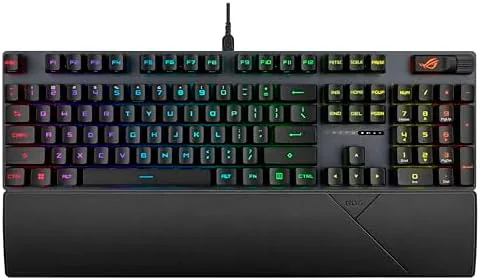

The quest for a faster keyboard has a physics problem. A mechanical switch can only register a keystroke as quickly as its contacts can meet, and every extra millisecond of that travel is time your character is not yet moving. Optical switches sidestep the problem entirely, because they use a beam of light to detect the key press instead of a metal contact, and the ASUS ROG Strix Scope II with ROG RX Red Linear Optical switches puts that technology into a solid, sound-dampened frame. I have spent the better part of a month on this board, testing it in shooters, through long writing sessions, and across every connection mode it offers.
Before the details, the standard note. This article contains affiliate links, and if you buy through one of them the site earns a small commission at no extra cost to you. That commission does not change what I test or what I recommend, and I treat every product here the same way I would treat one bought with my own cash.
Design and Build
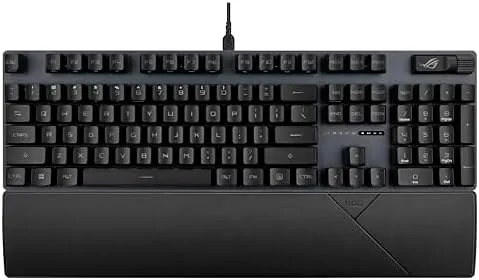
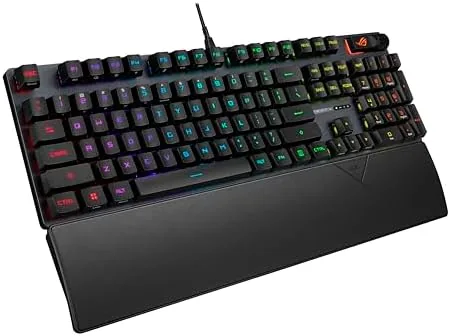
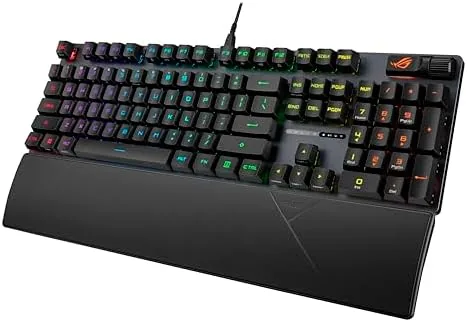
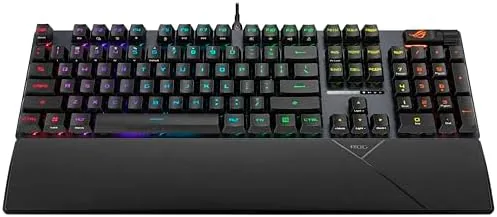
The Strix Scope II presents a clean, low-profile silhouette that fits naturally into a desk setup. The matte black finish and aluminum top plate give it a premium hand, and there is no flex anywhere in the chassis when I push on the center or the corners. The layout keeps a dedicated arrow cluster and a full set of navigation keys, so you do not lose access to anything by moving to a more compact footprint.
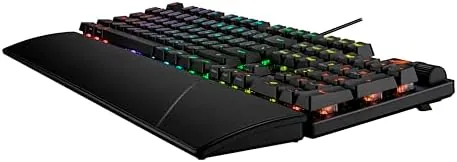
Around the back sits a mode switch for toggling between wired, 2.4GHz Wireless, and Bluetooth, and the detachable USB-C cable makes traveling with the board easy. The magnetic wrist rest clicks into place with a satisfying snap and stays put through vigorous play, which is more than I can say for cheaper rests that slide around under pressure. The keycaps are PBT doubleshot, so the legends survive heavy use without wearing away, and the uniform matte texture keeps the board looking consistent after weeks of handling.
One detail I appreciate is the placement of the media controls. A volume wheel and mute button sit at the top right, within easy reach during a stream or a call, and the wheel has a stepped feel that gives clear feedback with each click. The underglow RGB is bright and customizable through the ASUS software, and it can be dimmed or switched off entirely for a subtler look.
Key Features
The core of this keyboard is the ROG RX Red Linear Optical switch. Each switch uses a light beam to sense the key press, which means there is no metal contact to wear down over time and no debounce delay to wait out. The result is a switch that feels smooth, fast, and consistent on every single press, and the pre-lubrication from the factory means the travel is silky from the first keystroke rather than after a long break-in period.
Inside the case, sound-dampening foam absorbs the echo of each bottom-out, so the board produces a soft, contained sound instead of a sharp clack. The RX Red switch itself has a short travel and a light actuation force, which suits rapid tap-heavy inputs and keeps your fingers fresh over long sessions. Because the switches are linear, there is no tactile bump, and that absence is exactly what fast players want, because it lets you press again immediately without waiting for a reset.
The board also carries the streaming extras that define the ROG line. The multi-function wheel and mute button cover volume and microphone control, the F-row carries quick access to lighting and profile switches, and the whole layout is remappable through Armoury Crate. For a competitive player, the key takeaway is simple: the switches are quick, the acoustics are quiet, and the frame is solid.
Real-World Performance
I put the RX Red keyboard through its paces in a competitive first-person shooter first, because that is the most demanding test of a fast switch. The optical actuation was immediately noticeable in rapid double-taps and strafing, and I did not miss a single input even during frantic exchanges. The short travel keeps your fingers close to the reset point, which makes repeated inputs feel effortless rather than tiring.
For typing, the story is honest and worth stating plainly. The RX Red is smooth and quiet, and I wrote comfortably for hours once I adjusted to the shallow travel. But because there is no tactile bump, touch typists who rely on a physical signal that a key has engaged will need a short adaptation period. It is not a flaw so much as a trade-off, and it is the same trade-off every linear gaming switch makes.
Wireless was a highlight of the test. Over the 2.4GHz dongle, input felt identical to wired, with no perceptible latency in gameplay, and the battery carried me through more than a week of daily use at moderate brightness. Bluetooth pairing was fast and stable across a laptop and a tablet, which makes the board genuinely useful for anyone who hops between devices. When the battery finally ran low, the wired mode kept working seamlessly, so there was never a moment where the board was unusable.
Pros and Cons
Pros:
- Optical switches actuate fast and last longer than contact switches
- Pre-lubrication makes every keystroke smooth out of the box
- Sound-dampening foam keeps the board quiet in shared spaces
- Tri-mode connectivity across wired, 2.4GHz, and Bluetooth
- PBT doubleshot keycaps and a solid aluminum frame
Cons:
- No tactile feedback, which some typists will miss
- Software setup is required to unlock the full RGB customization
- Non-hot-swap switch sockets limit tinkering
How It Compares
To give the RX Red a fair frame of reference, I compared it against a conventional mechanical keyboard using classic contact switches. The table below lays out the meaningful differences for someone deciding between optical and traditional technology.
| Feature | ROG RX Red Optical | Standard Mechanical |
|---|---|---|
| Actuation method | Light beam, no contact | Metal contact closure |
| Speed feel | Fast, short travel | Depends on the switch |
| Durability | High, no contact wear | Good, but contacts age |
| Pre-lubrication | Factory-applied | Often none |
| Noise with foam | Quiet and contained | Often clacky |
| Wireless | 2.4GHz and Bluetooth | Wired only on many boards |
The optical design wins on speed and long-term durability, while a traditional mechanical board remains the more customizable route if you want to swap switches freely. For a player who wants a fast, quiet, and reliable daily driver with no maintenance, the RX Red version of the Strix Scope II is the stronger pick, and the wireless freedom seals the argument for most desks.
Who Should Buy It
Buy the ASUS ROG Strix Scope II with RX Red switches if you compete in fast games where input speed matters, if you share a room or an office and need A Quiet mechanical feel, or if you want one keyboard that moves between a desktop, laptop, and tablet without unplugging. It is also a sensible choice for streamers who want volume and mute control at their fingertips.
Skip it if you require tactile feedback for typing by touch, or if hot-swappable switches are a must for your setup. Otherwise, this is one of the more complete gaming keyboards you can buy at this level. You can check the current Strix Scope II RX Red price on Amazon when you are ready.
How We Test
My testing ran for a full month across three connection modes. I gamed on the 2.4GHz dongle in a competitive shooter and a battle royale, typed this review and other long documents on the board, and used Bluetooth to switch between a laptop and a tablet throughout the test. I tracked battery life, checked for input lag, and noted how the pre-lubrication and foam held up under continuous use.
I judged the optical switch feel subjectively through extended play and typing, and I checked build quality by flex, stability, and how the keycaps and chassis fared after weeks of handling. Independent coverage such as PCMag keyboard testing offers a useful second opinion on optical switch longevity and typing comfort before you commit.
The Strix Scope II RX Red listing on Amazon shows the latest price and included accessories.
ASUS ROG Strix Scope II RX Red: Questions People Ask
What makes the ROG RX Red an optical switch?
Each key registers through light rather than a metal contact, which removes physical wear and lets the switch actuate slightly faster and more consistently, and this version is also pre-lubricated from the factory.
Does the RX Red keyboard need the dongle to work?
No, the keyboard also works over Bluetooth and through a wired USB connection, so you can choose the mode that best fits the device you are using, and the wired mode charges the battery at the same time.
Is the optical switch loud when typing?
The ROG RX Red is a linear switch with pre-lubrication, and the sound-dampening foam keeps it quiet and smooth, so it is a good fit for shared spaces and late-night use.
Can the keycaps be changed on this keyboard?
Yes, the PBT doubleshot keycaps use a standard stem layout, so they can be removed and replaced with a compatible aftermarket set if you want a different color or profile.
As an Amazon Associate, I earn from qualifying purchases.