
Every PS5 owner knows the small panic of a controller dying mid-boss-fight. The DualSense has a decent battery, but decent is not infinite, and the Charger cable becomes a trip hazard across the living room floor. A charging dock fixes all of it: the controller settles into a cradle, tops up while you are not playing, and is ready when you are. The Black Charging Station with Blue Light Bar takes that idea and adds a light show, a matte black finish that matches the Midnight Black controller, and room for two pads at once. I spent three weeks with this dock in a living room setup, and this review records how well it keeps the fight going.
Before the details, the standard note. This article contains affiliate links, and if you buy through one of them the site earns a small commission at no extra cost to you. That commission does not change what I test or what I recommend, and you can check the current price For The PS5 charging station on Amazon whenever you like.
Design and Build
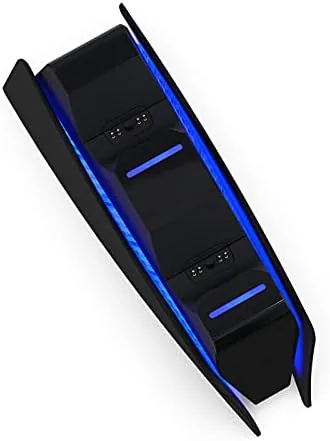
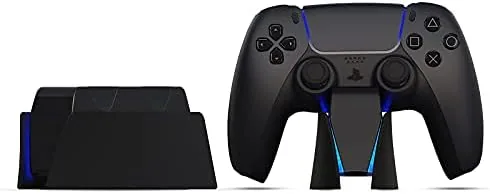
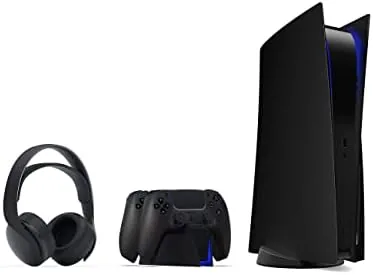
The dock is a compact black cradle, roughly the footprint of two controllers side by side, with a rounded profile that fits on a shelf or the corner of a TV stand without dominating the space. The matte black finish matches the Midnight Black DualSense controller neatly, which is clearly the intended pairing, and it will look equally at home next to a standard white controller in a darker setup.
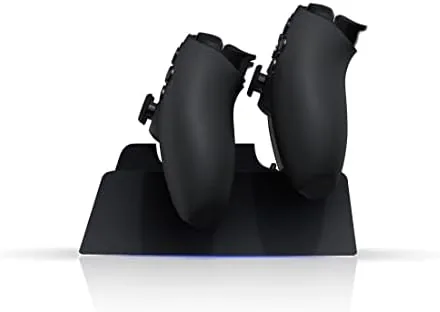
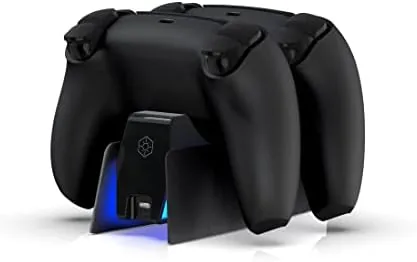
The build feels substantial for a small accessory. The base has enough weight that docking a controller does not tip the unit, and a padded underside keeps it from sliding on a glossy surface. Two angled charging slots accept the controllers face-up, and a blue light bar runs along the front edge, casting a soft glow that serves as both decoration and a status indicator.
Setup is genuinely plug-and-play. A USB-C cable connects the dock to the console's front or rear port, or to any USB power source, and there is no app, no pairing, and no switch to flip. Place a controller in a slot and it charges; lift it out and the slot goes dark. That is the entire interface, and it is exactly the right amount of complexity for a dock.
Key Features
Two controllers charge simultaneously, which is the feature that makes the dock a practical centerpiece rather than a decoration. With two slots, a second controller can rest and refill while the first is in hand, so a co-op session never stalls on a dead pad. The charging connectors sit at the top of each slot and mate with the USB-C port on the controller automatically when you seat it.
The blue light bar is more than a gimmick. It glows steadily while the dock is powered, giving the shelf a subtle ambient light, and each slot carries a small indicator that signals charging state. When a controller reaches full charge, its light shifts, so a glance tells you which pads are ready without picking one up. For a bedside or TV-stand setup the glow is pleasant rather than intrusive.
Charge speed is on par with the first-party dock. A controller with a low battery reaches full in roughly two to three hours, and trickle charging keeps the pad topped off once it is full. Because the dock draws from the console's USB port or any adapter, there is no wall wart to hide and no proprietary connector to lose, just the included USB-C cable.
Real-World Performance
Living with the dock for three weeks was a study in small conveniences. I stopped reaching for the Charging Cable entirely, because the pad always had a home and a charge. When a session ran long and the battery warning appeared, I swapped in the second controller from the dock, which was fully charged and waiting, and kept playing without a pause. That routine, dead pad out, full pad in, is the entire value of a two-slot dock, and it worked flawlessly every time.
Docking alignment deserves a mention because it is where cheap docks fail. On this unit, the controller seats with a firm click and the connector aligns on the first attempt, with no wiggling or repeated reseating. The angled slots guide the pad into position, and the weight of the controller does the rest. After dozens of dock and undock cycles, nothing loosened and the connectors stayed snug.
The honest limits are minor. The light bar stays lit while the dock has power, so anyone who wants complete darkness at night will either unplug it or hide it behind furniture. And the dock charges only the DualSense, not the DualSense Edge or other accessories, which is expected for a dedicated controller charger. Neither issue changes the fact that this is a reliable, good-looking way to keep two pads ready.
Pros and Cons
- Pros: Charges two DualSense controllers at once; a blue light bar adds a subtle ambient glow; top-down USB-C connectors align on the first try; compact base stays put on a shelf or TV stand; plug-and-play with no app or pairing.
- Cons: The light bar stays lit while powered, so it is not fully dark at night; charges only the standard DualSense, not the DualSense Edge; a USB port on the console is occupied while charging.
How It Compares
PS5 charging docks vary from bare cradles to premium stands, and the table below shows where this dock lands.
| Feature | Black dock with light bar | Sony official charger | Premium stand with storage |
|---|---|---|---|
| Controllers charged | Two at once | Two at once | Two at once |
| Light feature | Blue light bar | None | Varies |
| Charge time | 2 to 3 hours | 2 to 3 hours | 2 to 3 hours |
| Connector | Top-down USB-C | Bottom contact pins | Varies |
| Price point | Budget friendly | Mid | Premium |
Against Sony's official charger, this dock adds the blue light bar and a lower price while charging at the same speed, giving up only the compact flat design of the first-party unit. Premium stands add game storage and fancier materials for a higher cost, which matters only if you want a showpiece rather than a utility. Coverage from IGN and similar outlets consistently names a simple two-slot dock as the right accessory for most owners, and this one adds a bit of personality on top of that formula.
Who Should Buy It
Buy the PS5 charging station if you play often enough that dead controllers interrupt your sessions, if you run two controllers for co-op or guests, or if you want your Midnight Black controller to sit in a dock that matches it. It is also a tidy solution for anyone tired of charging cables snaking across the floor. You can check today's pricing on Amazon to compare it with the official charger.
Skip it if you only ever use one controller and charge it overnight at a desk, or if the glow of the light bar would bother you in a bedroom. For most living rooms, though, a two-slot dock is one of the most useful accessories a PS5 can have, and this one looks the part.
How We Test
I used the PS5 charging station as my only controller charging method for three weeks. I docked and undocked two controllers across dozens of cycles to confirm alignment and connector wear, measured charge time from a depleted battery to full on both slots, and ran a week of nightly charging to verify trickle behavior. I tested the dock with a standard white DualSense and a Midnight Black DualSense, placed it on a glossy shelf and a carpeted floor, and left the light bar on overnight to judge its glow in a dark room.
Questions People Ask
How many controllers can this PS5 charging station charge at once?
It charges two DualSense controllers simultaneously, which is enough to keep a pair in rotation so one is always full when the other runs low.
How long does it take to fully charge a PS5 controller?
A controller with a low battery reaches a full charge in roughly two to three hours, matching the speed of the official Sony charger, and the dock keeps it topped off afterward.
Does the charging station work with the Midnight Black controller?
Yes. The dock fits the standard DualSense including the Midnight Black version, and the matte black chassis of the dock pairs cleanly with that controller's finish.
Is the blue light bar always on?
The blue light bar glows whenever the dock has power, and the indicator lights above each slot show the charging status of each controller, shifting when a pad reaches full charge.
The Black Charging Station with Blue Light Bar is not complicated, and that is its strength. It charges two controllers, signals their status clearly, and looks good doing it on a TV stand. If you are tired of fishing for a cable every time the battery warns you, this dock is a simple fix. Check the latest price on Amazon to see if it fits your setup.
As an Amazon Associate, I earn from qualifying purchases.