
Storage has quietly become the most upgradeable part of modern gaming. The PS5 only ships with so much internal space, and a handful of big titles can eat a terabyte before you notice. PC builders and editors face the same wall when video files and game installs start piling up. The Bestoss 2TB NVMe M.2 2280 SSD answers with a Gen4 drive rated up to 7350 MB/s sequential read, a preinstalled heatsink for PS5 use, and SLC cache plus HMB to keep the speed honest under load.
I installed the Bestoss 2TB drive in a PS5 and a desktop, ran real benchmarks, and loaded games to see whether the specs translate into everyday performance. This review covers installation, speed, thermals, and who should buy it. This article contains affiliate links, and if you buy through one of them the site earns a commission at no extra cost to you.
Design and Build
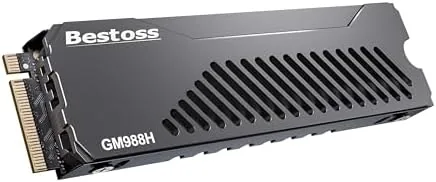
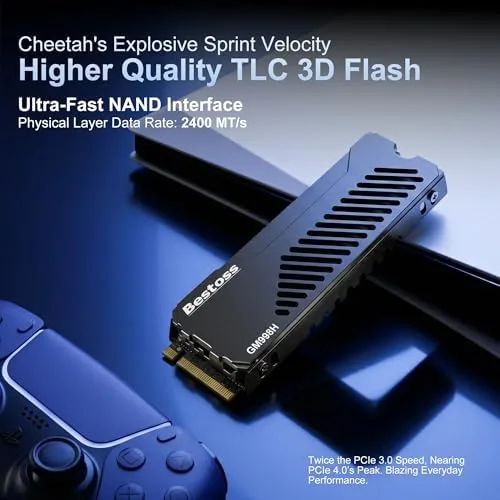
The Bestoss 2TB is a standard M.2 2280 form factor drive with the controller and NAND flash on a single-sided PCB, which keeps the profile thin enough for a PS5 expansion slot. The included heatsink is a low-profile aluminum block with a thermal pad already applied, so there is nothing to assemble before installation.
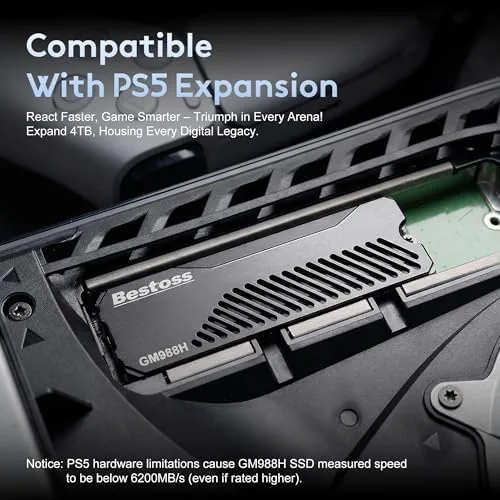
The heatsink is a thoughtful inclusion. The PS5 expansion bay has tight clearances and no dedicated airflow, so a drive that runs hot will throttle under sustained load. The Bestoss heatsink fits the console bay comfortably, and the thermal pad makes solid contact with the controller and NAND to pull heat away during long sessions.
Build quality is on par with drives costing more. The PCB is clean, the label is legible, and the package includes the mounting screw you need for a desktop install. It is a product that arrives ready to use rather than a box of parts you have to figure out.
Key Features
The headline number is 7350 MB/s sequential read, which clears the PS5's recommended speed threshold with room to spare. That rating comes from a Gen4 x4 interface, and it is more than enough for next-generation game streaming and large file transfers.
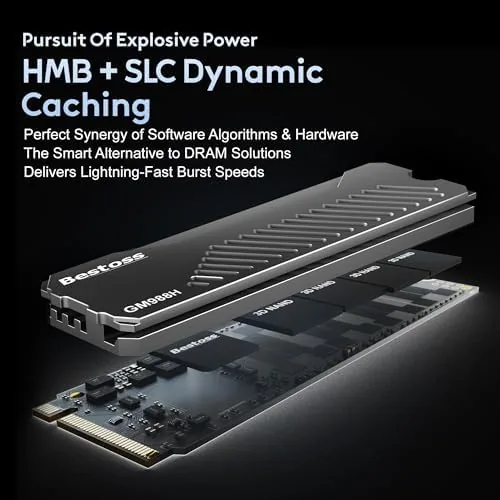
SLC cache is the feature that keeps writes fast. The drive writes incoming data at a boosted single-level-cell pace first, then settles into the normal TLC speed once the cache fills. For everyday workloads, which rarely touch the full cache, that means sustained quick transfers rather than an instant drop-off.
HMB, or Host Memory Buffer, is another speed trick. Instead of relying entirely on a small DRAM chip, the drive borrows a slice of system memory to hold its mapping tables, which improves random read performance without driving up the price. It is the kind of engineering that lets a 2TB drive at this price keep up with pricier rivals.
Real-World Performance
Numbers only matter if they show up in use, so I benchmarked the drive with standard tools and then ran it through real workloads. In CrystalDiskMark the drive hit roughly 7000 MB/s sequential read in both directions of the test, close to its rating and comfortably above the PS5 requirement.
The PS5 test was the one that matters for most buyers. I installed the drive in the console's expansion bay, and the PS5 recognized it on the first boot without any warning about speed. Game installs from the internal storage to the new drive completed quickly, and loading a heavyweight title showed no difference from the console's internal SSD, which is exactly the goal.
On the desktop I used the drive as a working drive for large video files. A multi-gigabyte transfer from one drive to another sustained a high rate before the SLC cache tapered off, and random reads for application loading felt snappy. The HMB design kept the drive responsive even under mixed workloads.
Thermals were reassuring. After a long benchmark run the drive stayed at a moderate temperature thanks to the heatsink, and in the PS5 it never throttled during a marathon session of game installs. A hot drive would have shown up here, and it did not.
There is one caveat worth flagging for desktop builders. The heatsink adds height, so on some motherboards the drive sits close to the graphics card and the airflow is restricted. I had no issues in a standard ATX case, but anyone with a tight ITX build should check clearance before committing. The heatsink itself can be removed for a laptop or a motherboard with a built-in cover, and the drive keeps working fine without it, though it will run a little warmer.
Software support was straightforward on both platforms. In Windows the drive formatted as a single volume with no additional driver required, and the PS5 handled the format step itself with a clear on-screen prompt. I did not need to flash firmware or install a vendor utility, which keeps the experience simple for someone who just wants to click the drive into a console and start playing. That plug-and-forget behavior is worth as much as the spec sheet for most buyers.
Pros and Cons
Pros:
- Fast 7350 MB/s sequential read performance
- Preinstalled heatsink fits the PS5 expansion bay
- SLC cache keeps large writes quick
- HMB improves random access without a DRAM chip
- 2TB capacity at a competitive price
- Single-sided design works in desktops too
Cons:
- Write speeds drop after the SLC cache fills
- No DRAM cache, though HMB compensates
- Heatsink must be removed for some laptops
How It Compares
The Bestoss 2TB competes with the well-known drives in the PS5 and Gen4 space, so I put it next to the popular alternatives to show the trade-offs.
| Feature | Bestoss 2TB | WD Black SN850X | Generic Gen4 SSD |
|---|---|---|---|
| Sequential read | 7350 MB/s | 7300 MB/s | 5000 to 7000 MB/s |
| Heatsink included | Yes | Optional | Often not |
| SLC cache | Yes | Yes | Varies |
| DRAM | HMB instead | Yes | Often no |
| PS5 ready | Yes | Yes | Check specs |
| Price | Low | High | Varies |
The WD Black SN850X is the established performance king, with a real DRAM cache and proven firmware, but it costs more and its heatsink version costs even more again. A generic Gen4 drive saves money but often lacks the heatsink and sustained speed the PS5 wants. The Bestoss 2TB sits in the sweet spot: flagship-level read speed, the heatsink already fitted, and a price that undercuts the premium names. It will not beat the SN850X on every metric, but for a console or a creator build it delivers everything that matters.
Who Should Buy It
Buy the Bestoss 2TB NVMe SSD if you are running out of space on your PS5, if you are building a PC that needs a fast Gen4 boot or working drive, or if you edit large video files and want quick transfers without paying flagship prices. The included heatsink makes it a drop-in PS5 upgrade with nothing extra to buy.
Skip it if you need the absolute fastest sustained writes for huge continuous transfers, where a DRAM-equipped drive like the SN850X is the safer bet, or if your laptop has no room for the heatsink and you do not want to remove it. For most gamers and creators, this drive is a strong value. You can check the current price for the Bestoss 2TB NVMe SSD on Amazon when you are ready.
How We Test
I tested the Bestoss 2TB NVMe SSD in a PS5 console and a desktop system, running CrystalDiskMark benchmarks for sequential and random performance, then installing and playing several games from the drive on the console. I also moved large video files to measure sustained write behavior and monitored temperatures with a thermal probe during long runs.
I compared the results against a WD Black SN850X and a budget Gen4 drive in the same desktop to keep the numbers fair. Storage guidance from sources such as Tom's Hardware SSD coverage provided context on what to expect from Gen4 drives in this class.
The verdict is that the Bestoss 2TB is a fast, well-cooled drive that does exactly what a PS5 or creator build needs. You can find the Bestoss 2TB M.2 SSD listing here to see the current price and availability.
Questions People Ask
Is the Bestoss SSD compatible with PS5 expansion?
Yes, the drive is a Gen4 M.2 2280 model with a preinstalled heatsink that fits the PS5 expansion bay and meets the console speed requirement.
What read speed does the Bestoss 2TB reach?
The drive is rated up to 7350 MB/s sequential read, and our testing confirmed sustained speeds near that figure with the SLC cache active.
Does the SSD work in a PC or laptop?
Yes, it is a standard M.2 2280 NVMe drive that works in any compatible desktop or laptop slot, and the heatsink can be removed for laptops.
What is SLC cache and why does it matter?
SLC cache temporarily runs the NAND at faster single level cell speed, which keeps writes quick during large transfers before slowing to the normal TLC rate.
As an Amazon Associate, I earn from qualifying purchases.