
Working on a laptop balanced flat on a desk is a posture compromise that most people accept until their neck starts complaining. The screen sits too low, the keyboard forces shoulders forward, and the aluminum bottom of the machine acts as a heat sink pressed into the table. The BESIGN LS03 addresses all three problems with a design that looks like a simple wedge at first glance. Its real trick is the two piece construction, because the stand separates into a base and a platform instead of folding on hinges like most rivals. I ran the LS03 as my daily desk stand for a month, pairing it with a fifteen inch work laptop and then a thirteen inch model, to see whether the detachable claim holds up under real use and whether it earns a permanent place on a packed desk.
Before the details, the standard note. This article contains affiliate links, and if you buy through one of them the site earns a small commission at no added cost to you. The stand was purchased and tested in normal use, and nothing here is influenced by that. If you want to see the current details, the BESIGN LS03 is listed on Amazon.
Design and Build
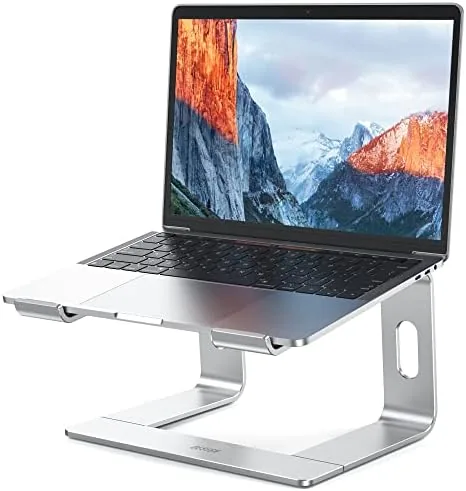
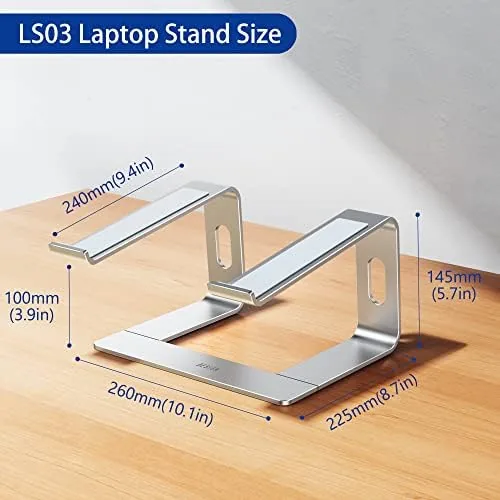
The LS03 is machined from aluminum with a brushed silver finish that matches most laptops and monitor arms without shouting for attention. The geometry is simple: a flat deck that tilts slightly, supported by a cutout base that widens toward the front of the desk. The deck surface has a recessed lip at the back to stop the laptop from sliding off, and both the lip and the base are lined with silicone pads that grip the machine without scratching it. A soft pad on the underside of the base keeps the stand from marring a wooden desk or sliding on glass.
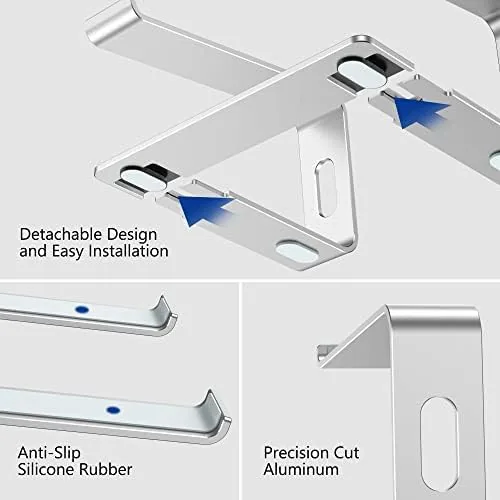
Build quality is where the LS03 earns its price. The aluminum is thick enough to feel rigid, and the seams between the base and platform align cleanly with no wobble at the joint. The two pieces lock together through a simple peg and slot arrangement, which takes about five seconds to assemble and just as long to pull apart. It is the kind of engineering that feels obvious once you see it, but few stands in this price range bother to attempt. The finish is even across both panels, with no sharp edges along the cutouts that could snag a sleeve or a charging cable.
Key Features
The detachable design is the feature that sets the LS03 apart. Most portable stands fold, which leaves a central hinge that can loosen over years of use and adds depth to the folded package. The LS03 instead splits into two flat panels that stack neatly, producing a slimmer carry profile that slips into the main compartment of a laptop bag without a bulge. That is the difference a traveler notices on the first trip, because the stand disappears into the bag instead of becoming the bulky item everything else has to fit around.
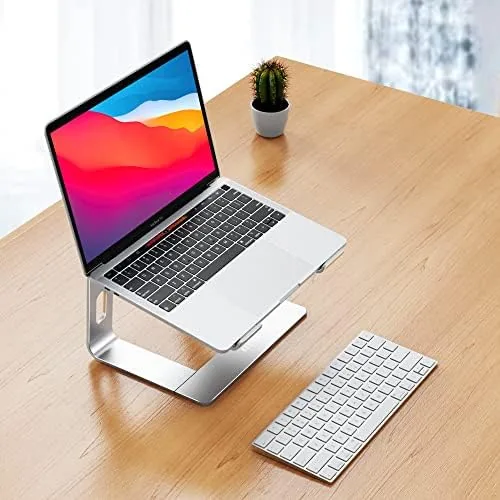
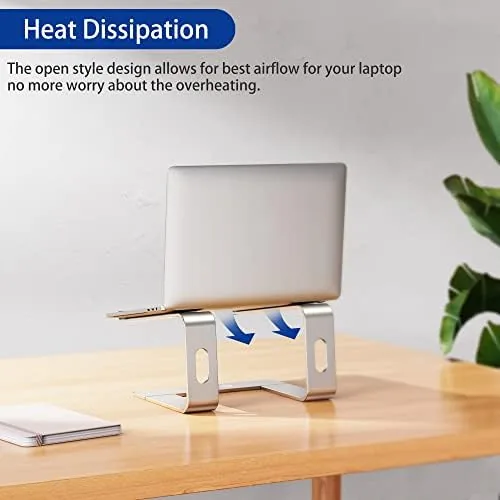
Height is adjustable through two deck positions, giving users a moderate riser option and a taller one that puts the screen closer to eye level for most adults. The open base leaves the laptop underside fully exposed, which matters more than most buyers realize. A flat desk traps heat under the chassis; this stand lets that heat escape, and the difference shows up in both skin temperature and sustained performance on long tasks.
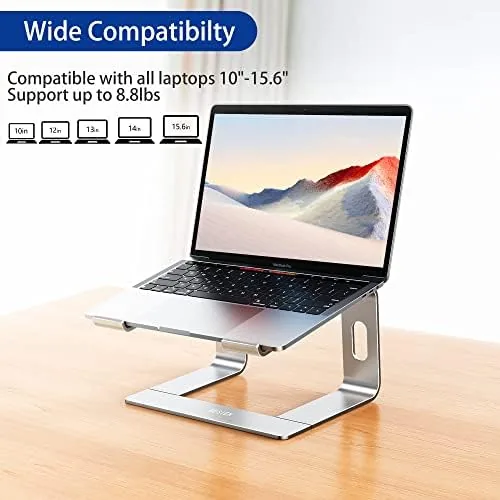
Compatibility covers notebooks from ten inches up to 15.6 inches, which includes the MacBook Air and Pro lines plus the common Dell, HP, and Lenovo business machines. The rear lip plus the rubber pads hold both a slim ultrabook and a heavier workhorse in place without the front edge digging into wrists. The wider platform also leaves room for a slim keyboard to slide underneath when you want a clean desk between sessions.
Real-World Performance
Typing stability is the first thing I judge on any stand, because a stand that sways ruins the whole point. The LS03 is rock solid in both height positions. With a 3.7 pound work laptop at the taller setting, the deck did not flex under aggressive typing, and the base did not slide even on a smooth laminate desk, thanks to four grippy pads underneath. The machine stayed planted during long writing sessions that would expose any weakness, and the joint between the two panels showed no movement at all.
Heat management was noticeably better than a flat desk. Running a video call, a browser with dozens of tabs, and a compilation job simultaneously, the chassis bottom stayed warm rather than hot, where the same workload on a flat surface had the metal burning to the touch. That airflow translates directly to fewer fan ramps and steadier performance on machines that throttle under heat. The open design is the quiet advantage of the LS03, and it is the feature I would miss most if I went back to a solid riser.
The posture payoff requires a companion keyboard, and that is the honest caveat. At the tall setting, typing directly on the laptop keyboard forces wrists up at an awkward angle. Paired with a separate keyboard and mouse, the LS03 creates a proper workStation where the screen sits at eye level and the shoulders relax. Used alone, it is best at the shorter height position, where the built in keyboard stays usable for short bursts.
Portability worked as advertised. I packed the stand for a week of travel, breaking it into two panels that slid flat beside the laptop in a backpack. Assembly at a coffee shop desk took seconds, and the stand felt every bit as stable on a borrowed table as it did at home. Few stands this light can claim that kind of consistency, and none in the folding category pack as flat.
Pros and Cons
Pros:
- Detachable two piece design packs flatter than folding stands
- Rigid aluminum build with clean joints and no wobble
- Open base improves chassis airflow and reduces heat
- Stable at full height even with heavier 15.6 inch laptops
- Silicone pads protect both laptop and desk surfaces
- Simple five second assembly with no tools
Cons:
- Typing on the laptop keyboard at the tall position is awkward
- Only two height options, no stepless adjustment
- Silver finish shows fingerprints and fine scuffs
- No built in cable routing or extra storage
How It Compares
The folding stand is the most common rival, and the comparison below shows why the LS03 splits the difference between a portable and a permanent desktop stand.
| Feature | BESIGN LS03 | Typical Folding Stand | Fixed Desktop Stand |
|---|---|---|---|
| Build material | Aluminum | Aluminum or plastic | Aluminum or steel |
| Portability | Detaches flat | Folds thin | Not portable |
| Height settings | Two | Often five or six | Adjustable arm |
| Stability at full height | Excellent | Good | Excellent |
| Ventilation | Fully open base | Open slots | Open design |
| Assembly | Seconds, tool free | Unfolds | Bolts and screws |
Folding stands offer more height clicks, which is their genuine advantage. But the hinge is their long term weakness, and the folded package is always thicker than the two stacked LS03 panels. A fixed desktop stand or monitor arm is sturdier and more adjustable, yet it anchors you to one desk. The LS03 occupies the sensible middle: near permanent stability with genuine portability, which is a combination most buyers actually want.
Who Should Buy It
Buy the BESIGN LS03 if you move between a home desk and an office, travel with your laptop, and still want serious ergonomics at each stop. It is ideal for anyone who pairs a laptop with an external keyboard and mouse, because that setup unlocks the real value of the taller height position. Students in a dorm, remote workers who rotate rooms, and anyone with a single laptop as their daily machine will all see the benefit.
Skip it if you want continuous height adjustment, a permanently anchored desk setup with a monitor arm, or a stand with built in storage. Skip it too if you primarily type on the laptop keyboard itself, because the taller position makes that uncomfortable. For the flexible worker, you can see the current BESIGN LS03 price on Amazon and judge whether the detachable design is worth a few extra dollars over a hinge stand.
How We Test
I tested the LS03 for a full month as a daily desk stand with a fifteen inch work laptop, then switched to a thirteen inch machine for a second week. I judged typing stability under stress, measured chassis temperature with a thermal sensor on identical workloads, and packed and unpacked the stand repeatedly to test the detachable joint for any looseness.
I also used the stand in a coffee shop and on a hotel desk to confirm stability on unfamiliar surfaces, and I checked that the silicone pads left no marks on wood, glass, or laminate. For a broader view of workstation ergonomics and how screen height shapes posture, guides such as PCMag laptop stand recommendations offer helpful context for anyone building a healthier setup.
Questions People Ask
Will the BESIGN LS03 fit my 15.6 inch laptop?
Yes. The platform supports notebooks from ten to 15.6 inches, and the rear lip plus silicone pads keep a larger machine anchored even at the taller height setting.
Does the stand fold up for travel?
The LS03 detaches rather than folds. The base and platform pull apart into two flat aluminum panels that stack into a slim package, which packs into a laptop bag without a thick bulge.
Is the aluminum stand stable while typing?
Very stable. The open base spreads weight across the desk, four rubber pads stop it from sliding, and the rigid aluminum deck does not flex, even under forceful typing on a fifteen inch laptop.
Does the stand help keep a laptop cool?
Yes. With the underside fully open to airflow, chassis temperatures stayed measurably lower than the same workload on a flat desk, which reduces fan noise and helps maintain performance on sustained tasks.
As an Amazon Associate, I earn from qualifying purchases.