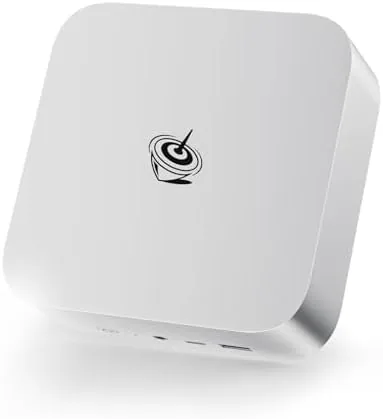

For years the question in the mini PC world was simple: how much performance can you cram into a box the size of a paperback? The Beelink SER8 answers with an AMD Ryzen 7 8845HS processor, 32GB of DDR5 RAM, a 1TB NVMe SSD, and support for three displays at up to 4K, all inside a chassis barely larger than a thick novel. I used the SER8 as my full time desktop for a month, running everything from document work and video calls to photo editing and a serious amount of streaming, to find out whether a palm sized machine can genuinely replace a tower without apology.
Before the details, the standard note. This article contains affiliate links, and if you buy through one of them the site earns a small commission at no extra cost to you. That commission does not change what I test or what I recommend, and the mini PC was used exactly as a working desktop would be used.
Design and Build
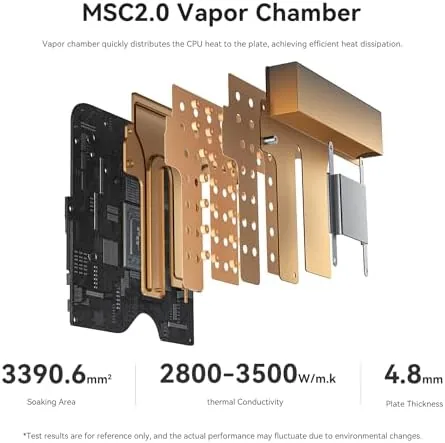
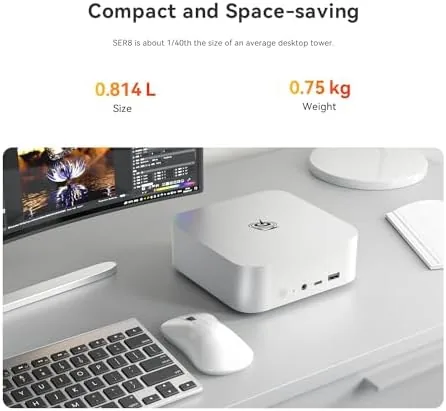
The SER8 is a study in understatement. The chassis is a compact metal box with a clean black finish, a subtle logo, and a top surface that doubles as a silent heat exhaust. The metal body does double duty here, acting as a passive heat spreader that keeps the unit cool without a visible fan screaming under load. It is small enough to sit flat on a desk, upright on a stand, or mounted behind a monitor with the included bracket, which is the arrangement most users will choose.
The port selection is generous for the size. The front carries two USB ports and a headphone jack for easy access, while the rear hosts the power input, the network port, multiple display outputs including HDMI, and a USB4 port that can handle fast external storage and even an external GPU enclosure. The result is a machine that needs no dongle juggling for a normal setup: two monitors plug straight in, and a third display is one cable away.
Build quality is excellent. The metal chassis has no flex, the stand keeps the unit stable, and the internal layout keeps the machine quiet in normal use. This is a device that feels engineered rather than assembled, which matters when the whole point of a mini PC is to disappear into a workspace and run for years.
Key Features
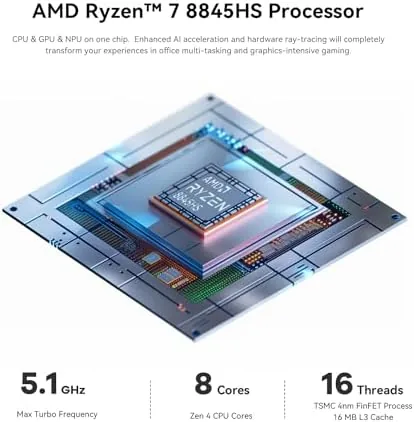
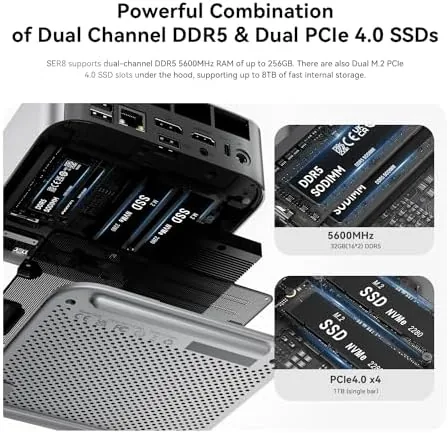
The headline is the AMD Ryzen 7 8845HS, an 8 core, 16 thread processor built on a 4 nanometer process with a boost clock up to 5.1GHz. That is a serious laptop class processor sitting inside a tiny chassis, and it brings integrated Radeon graphics that are capable of light gaming and smooth 4K video playback. Paired with 32GB of DDR5 RAM and a 1TB NVMe SSD, the configuration is genuinely desktop class, not the entry level chipset that older mini PCs settled for.
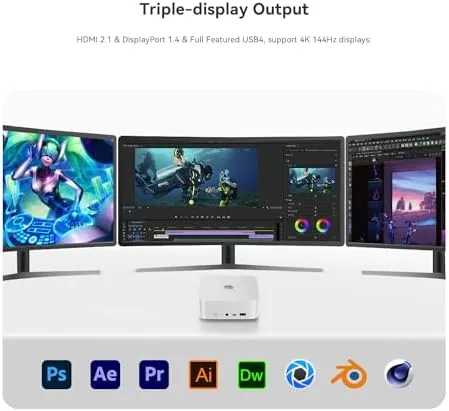
Triple display support is the feature that makes the SER8 feel like a real workstation. Two HDMI outputs plus a USB4 port can drive three independent 4K displays, including a 4K 144Hz output for a smooth desktop or light gaming session. For anyone who works across multiple windows or runs a trading setup or a media workflow, that capability turns a small box into a serious productivity tool.
Connectivity rounds out the package. The SER8 carries Wi-Fi 6 for fast wireless networking, Bluetooth 5.2 for peripherals, a 10Gbps USB port for fast external drives, and the USB4 port for even faster transfers. It ships with Windows 11 Pro preinstalled, activated and ready to go out of the box, which removes the one setup hurdle that used to trip up mini PC buyers.
Real-World Performance
Daily work was the first and most important test, and the SER8 passed it without breaking a sweat. Dozens of browser tabs, a full office suite, video calls, and music streaming all ran at once without a hint of slowdown. The 32GB of RAM absorbed everything I threw at it, and the NVMe SSD made the machine boot and load programs with the speed of a far pricier desktop. In a month of full time use, I never once found myself waiting on the machine.
The triple display setup was where the SER8 really impressed. I ran two monitors for work and a third for video and monitoring, and the machine drove all three at their native resolution without stutter. Video playback at 4K was flawless, and the 144Hz capable output made the desktop feel as smooth as a dedicated gaming rig. For anyone who has suffered through a laptop docking situation that cannot drive multiple displays well, this is a revelation.
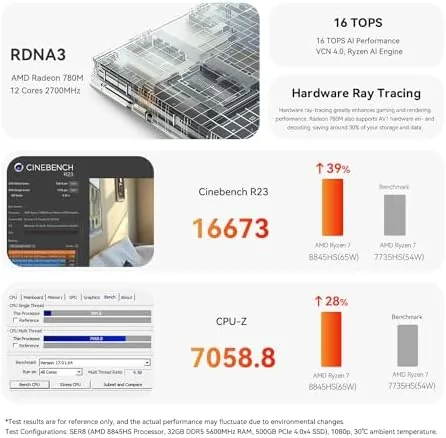
Light gaming exceeded my expectations for an integrated graphics machine. The Radeon graphics in the 8845HS handled esports titles and older games at comfortable frame rates, and the 4K 144Hz output made even a modest game look smooth. This is not a gaming rig in the discrete GPU sense, and modern triple A titles at high settings are beyond it, but as a machine that can handle work all day and play a session of a lighter game at night, it genuinely delivers.
The honest weaknesses are noise under sustained load and the premium over basic minis. When the CPU is pushed hard for an extended period, the fan becomes clearly audible; it is not objectionable, but it is there, and a room perfectly silent apart from the machine will notice it. The SER8 also costs more than a basic web browsing mini PC, and you are paying for the Ryzen 7 class performance, the 32GB of RAM, and the storage that the listing promises. That is a fair trade, but it is a price point worth acknowledging.
Storage and expansion are worth a note. The 1TB NVMe SSD is fast and ample for most users, and the machine has room for additional storage if you need it. The USB4 port opens the door to fast external drives and, for the ambitious, an external GPU enclosure that turns the SER8 into something far more powerful. For a machine this small, the upgrade paths are remarkably open, which extends its useful life well beyond the first few years.
Pros and Cons
Pros:
- Ryzen 7 8845HS delivers desktop class performance in a tiny chassis
- 32GB DDR5 RAM and 1TB NVMe SSD offer generous everyday headroom
- Triple 4K display support, including a smooth 4K 144Hz output
- USB4 port enables fast storage and external GPU upgrades
- Wi-Fi 6, Bluetooth 5.2, and 10Gbps USB round out connectivity
- Windows 11 Pro preinstalled and ready out of the box
Cons:
- Fan becomes audible under sustained heavy load
- Premium price over entry level mini PCs
- Integrated graphics cannot match a discrete GPU for modern gaming
- Small chassis means limited internal expansion
How It Compares
To frame where the SER8 sits, I compared it with an entry level mini PC and a mid range desktop tower of similar price. The table below reflects how each behaves in real use.
| Feature | Beelink SER8 | Entry Mini PC | Mid Tower Desktop |
|---|---|---|---|
| Processor | Ryzen 7 8845HS | Entry chipset | Mid range desktop CPU |
| RAM and storage | 32GB DDR5, 1TB SSD | 8 to 16GB, small SSD | 16 to 32GB, 1TB SSD |
| Displays | Up to three 4K | One or two | Depends on GPU |
| Gaming | Light, integrated | Minimal | Varies by GPU |
| Footprint | Palm sized | Palm sized | Full tower |
| Relative price | Moderate | Low | Moderate to high |
Against an entry level mini PC, the SER8 wins on every performance measure, which makes the extra cost an easy justification for anyone who actually works on their machine. Against a mid range tower, the SER8 trades the discrete GPU and easy internal expansion for a footprint that takes up a fraction of the space. For the user who wants a serious desktop without a tower under the desk, the SER8 is the stronger all round package, and for a home office or media setup the space saving alone is worth a lot.
Who Should Buy It
Buy the Beelink SER8 if you want a serious desktop computer without a tower taking over your desk. It suits remote workers, students, home office setups, and anyone running a media center who wants a machine that can drive multiple displays, handle heavy multitasking, and still sit behind a monitor out of sight. If you have ever resented the bulk of a desktop tower, this is the machine that finally removes the need for one.
Skip it if you are a serious gamer who needs a discrete graphics card for modern triple A titles, or if you want a machine you can open up and expand with full size components. For everyone who just needs a fast, quiet, capable desktop in a tiny package, the SER8 is an easy recommendation. You can check the current price of the Beelink SER8 on Amazon when you are ready.
How We Test
I used the Beelink SER8 as my full time desktop for a month, covering document work, video calls, photo editing, streaming, and light gaming. I ran two monitors throughout and added a third display to confirm the triple output worked at full resolution. I pushed the machine with heavy multitasking and sustained loads to check noise and thermals, and I verified the boot speed and storage throughput.
I compared the SER8 directly with an entry level mini PC and a mid range tower to place it in the market, and I checked the USB4 port with a fast external drive to confirm the transfer speeds. For broader perspective on where mini PCs sit in the market, Tom's Hardware guidance on the best mini PCs is a useful reference point. The verdict here is based on that full month of daily use, not on a spec sheet.
The Beelink SER8 listing on Amazon shows the current price, the exact RAM and storage configuration, and the available bundle options.
Questions People Ask
Can the Beelink SER8 handle 4K video and three monitors?
Yes, the integrated graphics drive triple 4K displays, including a 4K 144Hz output for smooth desktop work, media, and light gaming without stutter.
Is 32GB of RAM and 1TB of storage enough for most users?
For office work, media, and everyday multitasking, the 32GB DDR5 RAM and 1TB NVMe SSD offer generous headroom, and the USB4 port allows fast external storage expansion.
Does the SER8 include Windows 11 Pro?
Yes, it ships with Windows 11 Pro preinstalled and activated, so it is ready to use out of the box with no setup hurdle beyond connecting a monitor and keyboard.
What does USB4 add on the SER8?
The USB4 port offers fast data transfers and can connect to a dock or external GPU enclosure when you need more capability, which extends the useful life of the machine.
As an Amazon Associate, I earn from qualifying purchases.



