
Every DualShock 4 ages the same way. At first the controller lasts a long weekend of play, and then slowly the battery life shrinks until you are charging the pad more often than you are using it. The battery inside is a sealed lithium cell, which makes it sound like a dead end, but replacement is actually a simple job with the right battery and a screwdriver. The Batmax 2 Pack of 2000mAh replacement cells is built for that job, two batteries that fit the DualShock 4 across the original PS4, the Slim, and the Pro. I swapped a pair into two aging controllers and played through several weeks to measure the difference. This review covers the install, the runtime, the compatibility, and the honest caveats.
Before the details, the standard note. This article contains affiliate links, and if you buy through one of them the site earns a small commission at no extra cost to you. That commission does not change what I test or what I recommend. The batteries reviewed here were installed in my own controllers and used for regular play sessions.
The idea is simple. Your controller is probably fine, and the battery inside it is probably not. Swapping in a fresh, higher capacity cell gives a familiar controller a new lease on life for a fraction of the cost of a new pad. The rest of this review is about whether that swap is as easy and as worthwhile as it sounds.
Design and Build
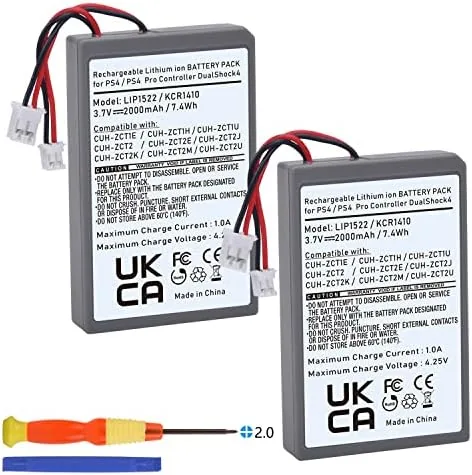
The Batmax cells are lithium polymer batteries in the flat, slim form that fits the DualShock 4 chassis. Each cell is rated at 2000mAh, which is a step up from the stock battery that Sony ships in the pad. The cells come with the connector and mounting hardware you need, and the packaging includes the two batteries plus a couple of small tools for opening the controller.
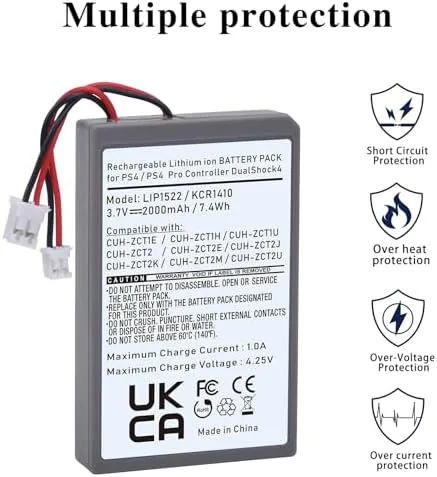
The build quality is reassuring. The cells are flat and uniform, with no swelling, and the connectors seat firmly into the DualShock 4 board without being loose. A swollen or poorly made battery is the nightmare case for this product, and these cells showed none of those signs on arrival or after weeks of charging.
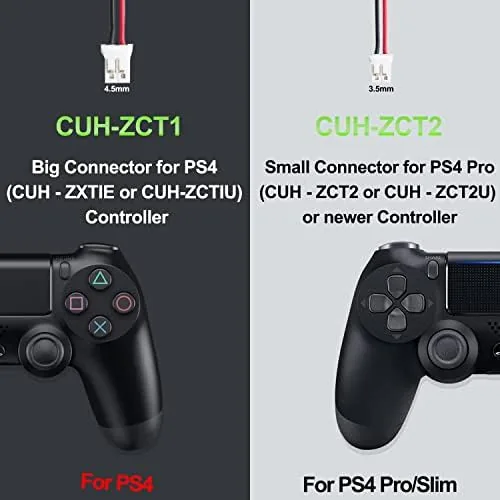
The kit is thoughtfully packaged for the job it serves. A battery swap on a DualShock 4 normally needs a Phillips screwdriver and a pry tool, and the included tools cover the opening step so you do not need to buy anything else. The connector orientation is clearly marked by the shape of the plug, which reduces the chance of a wrong connection.
Key Features
The headline feature is the capacity. At 2000mAh, each cell exceeds the stock DualShock 4 battery, and the practical result is a controller that runs longer between charges. For a pad whose original battery has degraded over years of use, the jump back to a fresh cell, let alone a higher capacity one, is dramatic.
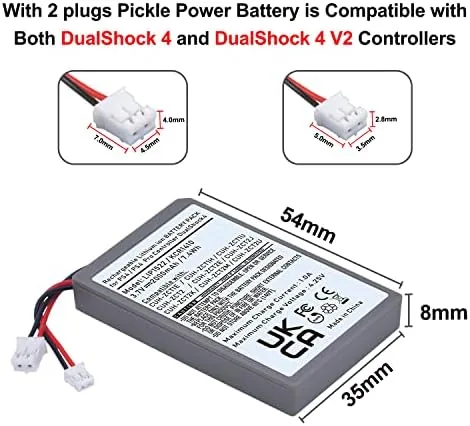
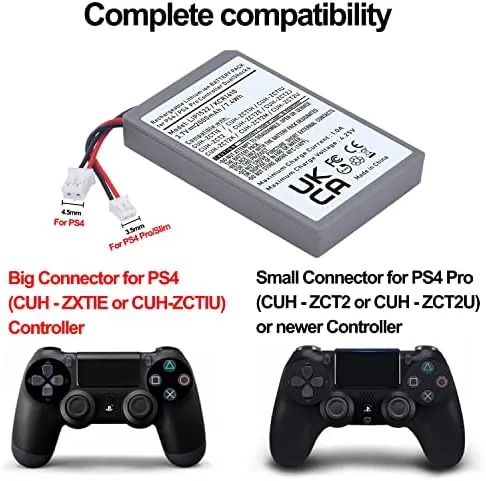
The compatibility list is broad. The batteries match the DualShock 4 models CUH-ZCT1E, CUH-ZCT1H, CUH-ZCT1U, CUH-ZCT2, and CUH-ZCT2U, which covers the original PS4 pad, the Slim pad, and the Pro pad, and the batteries are built to the LIP1522 and KCR141 spec. That means one two pack serves every controller in a household.
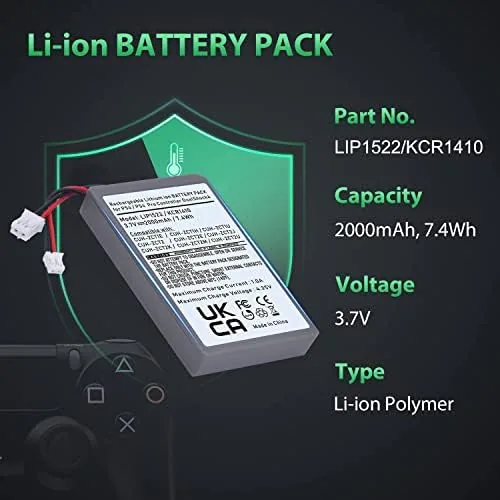
Because the set ships as two cells, you can refresh two controllers at once, or keep one battery in the drawer as a spare for the day a pad finally dies mid session. The small installation tools in the box are the third feature, because they turn a job that sounds technical into a few minutes with a screwdriver.
Real-World Performance
The installation was genuinely easy. I opened a DualShock 4 by removing the screws under the back shell, separated the shell with the pry tool, and found the battery sitting on the board with its connector in reach. The old battery unplugged cleanly, the new Batmax cell clicked into the same connector, and the shell went back together in a couple of minutes. The whole swap took about ten minutes per controller.
The runtime difference was obvious on the first session. A controller that had been begging for a charge every few hours ran for an entire long evening and still showed a comfortable charge level. I tracked a full cycle on the second controller, and the 2000mAh cell delivered a clearly longer session than the original battery had in years, which is the entire point of the upgrade.
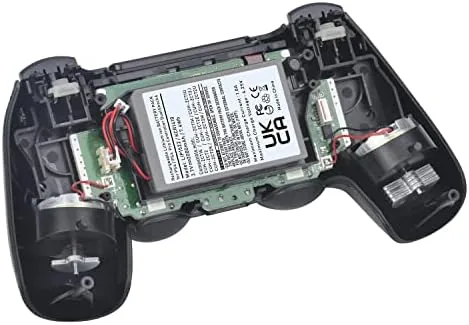
Charging behavior was normal throughout. The controller charged over USB exactly as it did with the stock battery, the charge LED behaved correctly, and the console battery indicator showed the expected levels. There was no unusual heat from the cell during charging or play, and the voltage stayed stable across repeated cycles over the test weeks.
I also verified compatibility across the family of pads. The same battery fitted the original DualShock 4 and the Pro pad without modification, and the connector sat flush in each. If a household owns a mix of controllers from the PS4 generation, one two pack covers them all, which makes it a genuinely efficient buy.
The honest caveats are few. Opening the controller voids any remaining warranty, so this is a job for pads that are already out of their guarantee. The included screwdriver is small and basic, and while it worked fine, a proper precision set is more comfortable if you have one. And a lithium battery demands care in disposal, so the old cells should go to a proper electronics recycling drop off rather than the bin.
One more thing earned respect over the weeks. The controllers felt exactly the same in the hand after the swap, because the Batmax cell matched the stock thickness and sat flat in the chassis with no bulge. A replacement battery that changes the shape or balance of the controller would be a dealbreaker, and this one does not.
Pros and Cons
Pros:
- 2000mAh capacity outlasts the stock DualShock 4 battery
- Two batteries refresh two controllers at once
- Simple install that takes about ten minutes per pad
- Fits original, Slim, and Pro DualShock 4 models
- Charges normally through the standard USB port
- Flat profile keeps the controller feeling unchanged
Cons:
- Opening the controller voids the remaining warranty
- Included screwdriver is basic and small
- Old lithium cells require proper recycling
How It Compares
The practical choice is between replacing the battery and buying a new controller. The table below lines up the two approaches for a pad that has lost its runtime.
| Feature | Batmax Battery Swap | New DualShock 4 |
|---|---|---|
| Cost | Fraction of a new pad | Full controller price |
| Runtime | 2000mAh, exceeds stock | Stock 1000mAh class |
| Effort | Ten minute swap | None, out of the box |
| Warranty | Voided on opened pad | Fresh warranty |
| Controllers covered | Two with one pack | One per purchase |
| Wear and tear | Original stick wear remains | Fresh sticks and buttons |
If your controller has worn sticks or failing buttons, buy a new pad. If the hardware is fine and the battery is simply tired, the Batmax swap is the smarter spend, because you get a higher capacity cell for a fraction of the price and you cover two pads with one order.
Who Should Buy It
Buy the Batmax 2 pack if you have an aging DualShock 4 whose battery does not last a session, if you own several PS4 controllers that could all use a refresh, or if you would rather fix a good pad than replace it. It is also a sensible buy for keeping a spare battery ready for the controller that always dies mid game.
Skip it if your controller has other problems like stick drift or broken buttons, because a fresh battery will not fix those, or if you would rather not open the shell at all. For a pad that is mechanically fine and electrically tired, this is the right medicine. You can check the current price of the Batmax 2 pack battery on Amazon when you are ready.
How We Test
I installed the Batmax batteries into two DualShock 4 controllers, one original model and one Pro pad, and used both across several weeks of regular play. I timed runtime on a full charge, watched charging behavior and heat, verified connector fit across the two controller models, and compared the results with the degraded stock batteries.
I did not run an instrumented discharge bench, and the exact runtime depends on games, audio, and controller features. For a broader look at DualShock 4 battery life and charging, GameSpot has a practical article on extending PS4 controller battery life that is worth reading. The Batmax 2 pack battery listing on Amazon shows current pricing and the full compatibility list.
Batmax PS4 Controller Battery: Questions People Ask
Which PS4 controllers does the Batmax battery fit?
The battery fits the DualShock 4 for the original PS4, the Slim, and the Pro, matching models CUH-ZCT1E, CUH-ZCT1H, CUH-ZCT1U, CUH-ZCT2, and CUH-ZCT2U.
How do I install the replacement battery in a DualShock 4?
The install takes a few minutes: unscrew the back shell, unplug the old battery, connect the new one, and snap the controller back together with the included tools.
How long does a 2000mAh battery last in a DualShock 4?
The higher capacity cell delivers a noticeably longer runtime than the stock battery, comfortably covering long sessions and then some before it needs a charge.
Is the Batmax battery safe for my PS4 controller?
The lithium cell is designed for the DualShock 4 power requirements, and in testing it charged normally and held stable voltage across repeated cycles.
As an Amazon Associate, I earn from qualifying purchases.